Compare
Descript vs Slice
Our bias: we make Shorts by Slice. Everything about Descript here is from its own pricing page and help centre. We did not test it hands-on, and where it is the better pick we say so.
The short answer
Choose Descript if you want to edit the whole episode: it is a full editor where you cut the video by editing its transcript, clean up the sound and remove filler words, and making clips is one of its many tools. Choose Slice if clips are the job: Slice is $14.99 a month against $24 for Descript Hobbyist (10 media hours a month), includes 6 hours of video and 100 clips a month, finds the moments in a long episode for you, and exports a batch of clips in one zip.
Choose Descript if
- You want to edit the whole episode, not just cut clips from it: remove filler words, fix the sound, reorder the conversation.
- You want remote recording, dubbing, AI voices or green screen in the same app.
- You hand the edit off to Premiere, Final Cut Pro or Pro Tools.
- You want one tool for the long version and the clips.
Choose Slice if
- You mostly want clips. Slice finds them in a 3-hour episode and exports a batch at once, with one email and one zip.
- You want to pay less: $14.99 a month against $24, or $149 a year against $192.
- You want each clip to start with a hook title and come with post text, ready to paste.
- You want clips cut the way an editor would cut them. Slice is built by video editors: every clip starts and ends where the thought does, and on a two-person video the picture switches 0.17s before the next voice, close to the timing we measured in professional podcasts.
Descript vs Slice, side by side
| Shorts by Slice | Descript | |
|---|---|---|
| Price | $14.99/month or $149/year | $24 / $35 / $65 a month, or $16 / $24 / $50 billed yearly, per person |
| Free to try | Your first video (we search the first hour) and first 2 clips are free, no card; then $14.99 a month | Yes: 60 media minutes a month, 720p |
| What the entry plan gets | Everything: 6 hours of video and 100 clips a month, no watermark | Hobbyist: 10 media hours and 400 AI credits a month, 1080p |
| Longest video | 3 hours and 4.5GB (MP4, MOV or WebM) | Not stated in its help centre; files up to 10GB on Hobbyist, 50GB on Business |
| Monthly limit | Up to 6 hours of video and 100 clips a month | 10, 30 or 40 media hours; every upload counts |
| Watermark | Never | Paid plans are watermark-free; the free plan exports at 720p |
| Link import | Upload only for now: MP4, MOV or WebM, up to 4.5GB | No YouTube or Twitch links: upload, Zoom, Google Drive and others |
| Posting | No: you download and post | Publishes to YouTube, but not as Shorts; no social scheduler |
| Editing | A clip editor: trim, split, join moments, captions, framing | A full editor, edited through the transcript, with sound clean-up and AI tools |
| Reviews | No third-party ratings to report yet | Trustpilot 2.7 (288), G2 4.6 (924), Capterra 4.6 (183), Product Hunt 4.4 (41) |
Descript’s figures from its pricing page and help centre, read ; ratings from review sites, 30 September 2026. Prices in US dollars.
Where Slice falls short
- Slice does not record your show. Record in Riverside, Zoom, a camera or a phone, then upload the file.
- Slice does not post or schedule. You download the clips, each with post text ready to paste, and post them yourself.
- You cannot paste a YouTube link right now: link import is paused, so you upload the file (MP4, MOV or WebM, up to 4.5GB; audio as MP3, M4A, WAV, OGG or FLAC).
- There are no team seats yet: each person has their own account.
- Slice has no third-party ratings to report yet.
Where Descript does more
- Descript is a whole editor and Slice is not. If you want to edit the full episode, clean up the sound, or cut by editing a transcript, Descript does far more.
- Descript records, too. Slice only works on a recording you already have.
- Descript has more than 1,400 reviews across the four sites (G2 4.6 from 924); Slice has none to report yet.
Descript, in short
Pricing, in plain words
- Free: 60 media minutes a month, 100 AI credits once, 720p exports and files up to 1GB. Clip-making is marked "Limited".
- Hobbyist: $24 a month, or $16 a month billed yearly. 10 media hours and 400 AI credits a month, 1080p, files up to 10GB.
- Creator: $35 a month, or $24 a month billed yearly. 30 media hours and 800 AI credits, 4K, files up to 20GB, up to 3 people.
- Business: $65 a month, or $50 a month billed yearly. 40 media hours and 1,500 AI credits, 4K, files up to 50GB, up to 5 people.
- Prices are per person. Every upload counts against media hours, transcribed or not, and AI credits do not roll over.
Worth knowing before you pick Descript
- Every upload uses media hours: 10 a month on Hobbyist, so three 3-hour episodes use most of it.
- No link import from YouTube or Twitch, and no social scheduler. Its help centre says publishing to YouTube Shorts is not supported.
- AI features draw on a monthly credit allowance that does not roll over.
- In 20 Trustpilot 1-2 star reviews from July to September 2026, the most common complaints were cancelling and unwanted charges, and AI edits that missed.
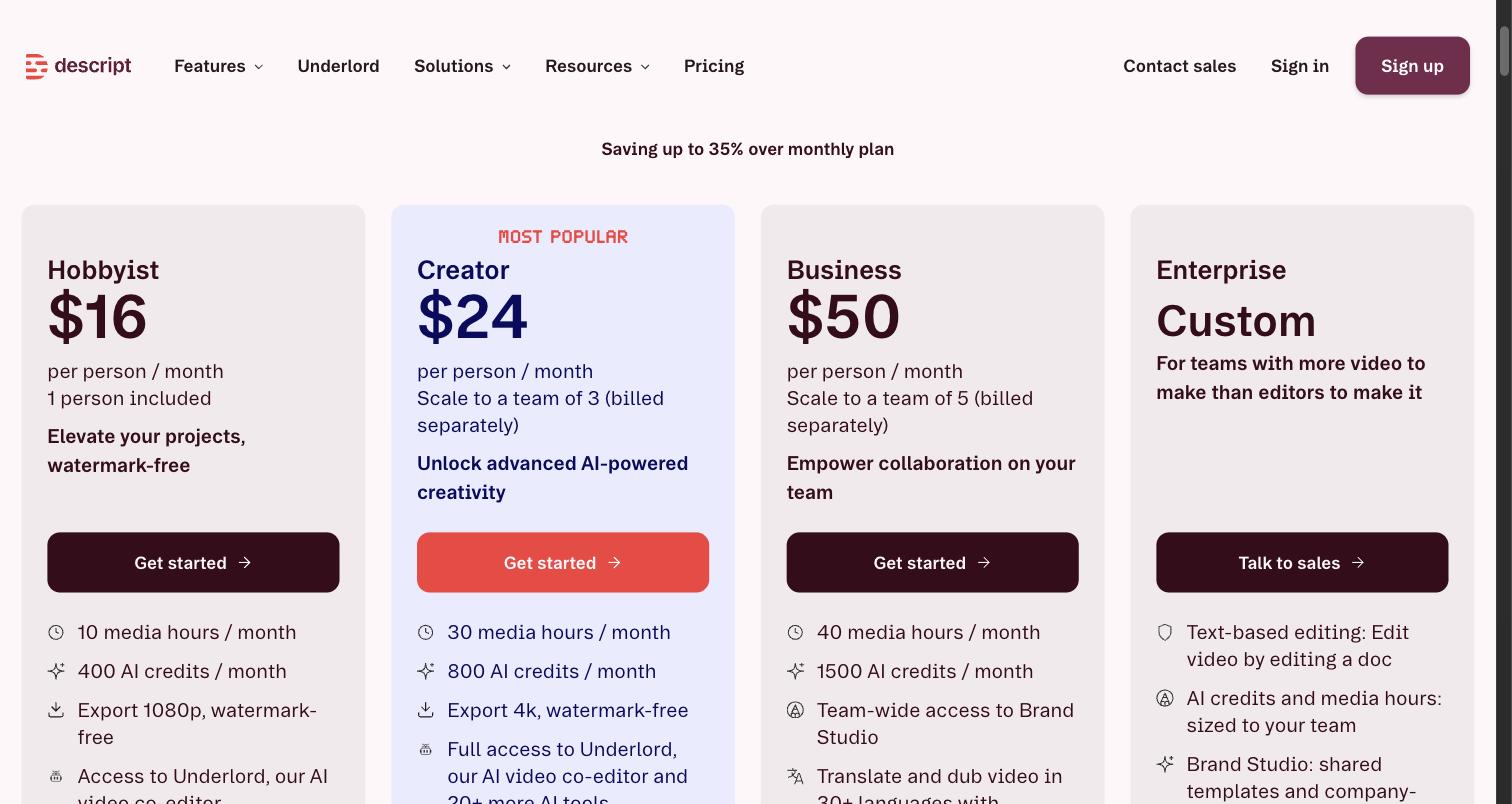
The screenshot is from the day shown under it; the prices above were read again on 4 November 2026.
What Descript’s reviewers say
| Site | Rating | Reviews |
|---|---|---|
| Trustpilot | 2.7 / 5 | 288 |
| G2 | 4.6 / 5 | 924 |
| Capterra | 4.6 / 5 | 183 |
| Product Hunt | 4.4 / 5 | 41 |
Praise: Text-based editing; Easy for beginners; Saves time; Transcription and filler-word removal.
Recurring complaints: Hard to cancel, or unwanted charges (9 of 20); AI edits wrong or unusable (7 of 20); Credits used up fast (4 of 20); Slow or poor support (4 of 20); Bugs and crashes (2 of 20).
Source: Trustpilot 1-2 star reviews, 20 reviews from July to September 2026. A sample, not every review. Read them on Trustpilot. Read .
“The AI bot wastes the credits on edits that aren’t what I asked for.”A reviewer on Trustpilot, September 2026
Try Slice on your own episode
Shorts by Slice turns a long podcast or stream into captioned vertical clips. $14.99 a month. Your first video (we search the first hour) and first 2 clips are free, no card. After that, buy clips one at a time or take the plan, which you can cancel any time.
Try it free →See how Shorts by Slice works first, if you like. If Descript fits you better, use it.
Questions
Which is better, Descript or Slice?
Choose Descript if you want to edit the whole episode: it is a full editor where you cut the video by editing its transcript, clean up the sound and remove filler words, and making clips is one of its many tools. Choose Slice if clips are the job: Slice is $14.99 a month against $24 for Descript Hobbyist (10 media hours a month), includes 6 hours of video and 100 clips a month, finds the moments in a long episode for you, and exports a batch of clips in one zip.
Is Slice cheaper than Descript?
Yes. Slice is $14.99 a month or $149 a year. Descript Hobbyist is $24 a month, or $16 a month billed yearly ($192 a year), per person, for 10 media hours a month. Prices checked 30 September 2026.
Can Descript make short clips from a podcast?
Yes. Its Create clips tool makes 1 to 20 clips at a time, each 10 seconds to 5 minutes, in 9:16, 1:1 or a custom shape, and each one opens as its own project to edit.
Can I paste a YouTube link into Descript?
Not according to its help centre, which lists upload, Zoom, Google Drive and partner tools as the ways in. Slice takes an uploaded file.
What do people complain about with Descript?
In 20 Trustpilot 1-2 star reviews from July to September 2026, nine mention cancelling or unwanted charges, seven AI edits that were wrong or unusable, four credits used up fast and four support. Its Trustpilot score is 2.7 from 288 reviews; on G2 it is 4.6 from 924.
How was this compared?
Descript's prices and limits were read from its own pricing page and help centre on 4 November 2026, not signed in. Its ratings and complaints were read from review sites on 30 September 2026. We did not test Descript hands-on. We make Slice.
Get The Cut
More comparisons
- The Descript alternative, in more detail
- Riverside vs Slice
- Podcastle vs Slice
- Headliner vs Slice
- Castmagic vs Slice
- Pulpit AI vs Slice
- Best AI clipping tools for podcasts and streams (2026)
All comparisons, in one list.