Guide
How to make podcast clips with ChatGPT (2026)
· by the Slice team, who make the plugin
The short answer
ChatGPT can’t cut video by itself, but with the Slice plugin added you can do the whole job in one chat: attach the episode, type “@Slice turn this video into short clips”, and Slice lists the best moments with their lengths and opening lines. Reply with the numbers you want (“1 and 3 please”) and a few minutes later you get download links for vertical clips with captions and a hook title. It needs a Slice plan, $14.99 a month after a 3-day free trial.
New to the plugin? Set up Slice in ChatGPT or Claude first. It takes a couple of minutes.
What do you need before you start?
- A ChatGPT plan that can add apps. We tested on ChatGPT Plus.
- A Slice account with a plan or a free trial (3 days, then $14.99 a month or $149 a year).
- The episode as a video file: MP4, MOV or WebM, up to three hours and 2GB.
Audio-only episode? Slice makes video clips, so it needs video. If you just want the words, the same plugin transcribes audio for free.
How do you make podcast clips with ChatGPT, step by step?
- Add Slice to ChatGPT
In ChatGPT, open Plugins, choose Add, then Create MCP App. Paste https://mcp.tryslicemedia.com/mcp as the address and sign in with your Slice account when asked. You only do this once.
The setup guide has each screen.
- Attach the episode
Start a new chat and attach the video file of your episode with the paperclip or plus button. Slice takes MP4, MOV or WebM files up to 3 hours long and 2GB.
- Ask Slice for clips
Type @Slice and pick it from the list, then ask for clips in plain words. Slice copies the video, transcribes it and looks for the moments that work on their own.
Type@Slice turn this video into short clips - Read the moments it found
You get a numbered list: a title for each moment, how long the clip will be and the line it opens on. Nothing has been cut yet, so this costs you nothing to read.
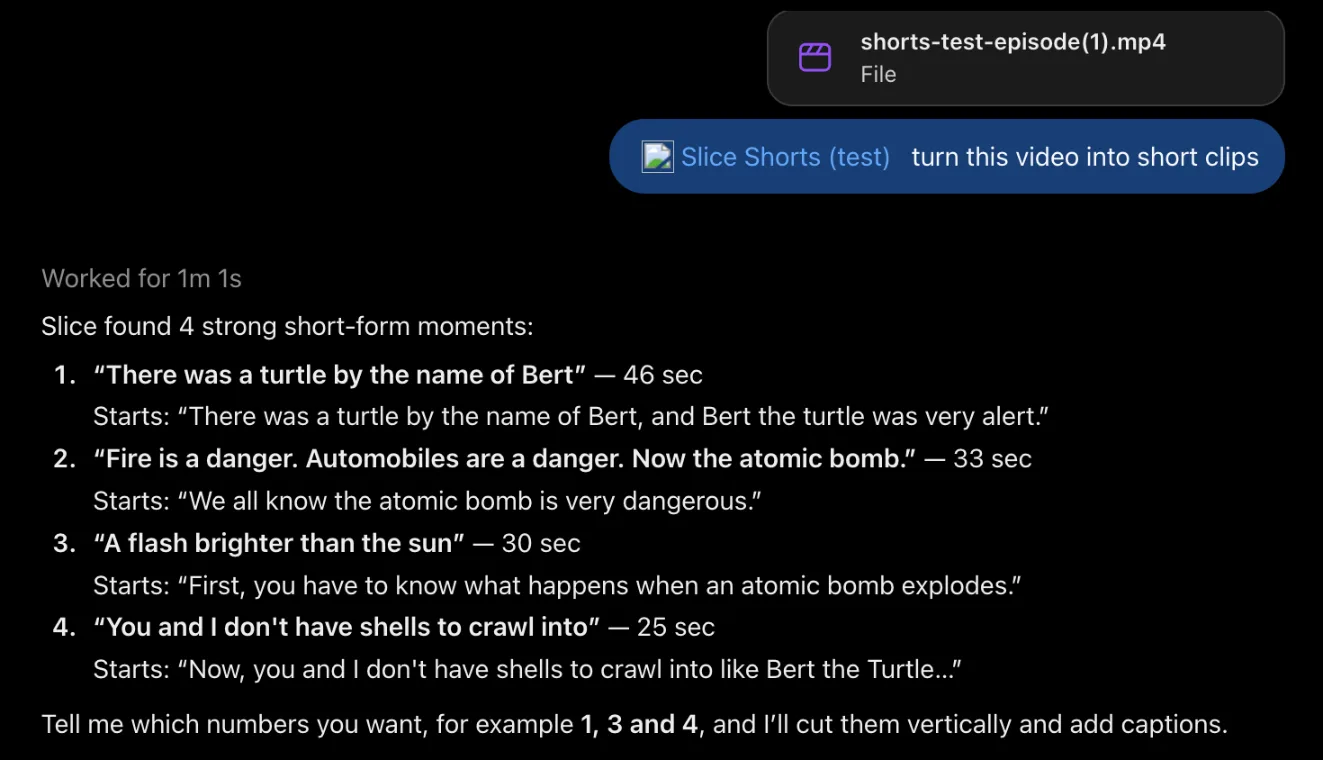
In ChatGPT on 1 October 2026: one attached video, one sentence, and four moments back with their lengths and opening lines. This was our test build of the app, so it is named "Slice Shorts (test)". Tap to enlarge. - Pick the ones you want by number
Reply with the numbers. Slice cuts each one, reframes it to vertical, adds a hook title at the start and burns in word-by-word captions.
Type1 and 3 please - Download the clips
When they are ready, ChatGPT replies with a download link for each clip. Each one is a vertical 1080×1920 MP4, ready to post.
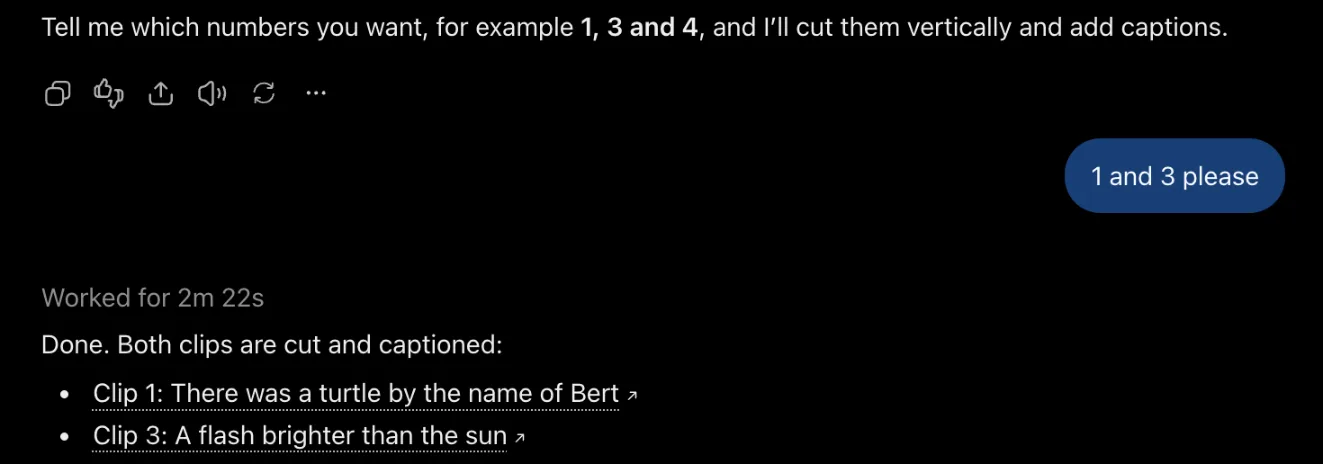
Picking clips by number. About two and a half minutes later both were cut, captioned and linked for download. Tap to enlarge.
How long does each step take?
These are the times from our own run on 1 October 2026, with a short test video, two clips picked. A long episode spends longer on the first wait, because the whole recording is transcribed and read first.
| Step | Our test | What changes it |
|---|---|---|
| Adding the plugin | A couple of minutes, once | Nothing: you do it once |
| Finding the moments | About 1 minute | The length of the episode |
| Cutting and captioning | About 2½ minutes for two clips | How many clips you pick, and how long they are |
If ChatGPT says Slice is still working, you don’t need to start again. Ask it to check:
What else can you type?
Slice reads plain sentences. These all work in the same chat, after the list of moments has appeared.
| You type | What happens |
|---|---|
2, 4 and 5 please | Cuts those three. Up to 10 at a time. |
Make 1 in the Marker style | Uses one of the 29 caption styles for that clip. |
Show me the caption styles | Lists every style with a one-line description and a preview picture. |
Make the captions on clip 3 bigger | Saves the change and renders the clip again. |
Move the captions up | Moves them higher on screen, out of the way of an app’s buttons. |
Turn the hook title off | Removes the title card at the start. |
Styling, hook titles and post text for each app get their own guide: turn a podcast into TikToks, Reels and Shorts inside ChatGPT.
What if something goes wrong?
| What you see | What to do |
|---|---|
| Slice isn’t in the @ list | The plugin isn’t added on this account. Add it under Plugins, then start a new chat. |
| “This needs a Slice plan” | Clipping needs a plan or a trial. Start the 3-day trial on the Slice website, then ask again. |
| The file won’t attach | ChatGPT has its own limits on attachments. Ask Slice for an upload link instead (“give me an upload link”), open it and drop the video there. The link works for two hours. |
| You pasted a YouTube link | The plugin works from files, not web pages. Attach the video file, or use the Slice website, which imports YouTube links. |
| It’s been a while | Ask “Is it ready yet?”. Slice reports where it is rather than guessing. |
| A download link stopped working | Links last 7 days. Ask for a fresh link to that clip. |
Questions
Can ChatGPT make podcast clips on its own?
Not finished ones. ChatGPT can read a transcript and suggest good moments, but cutting the video, turning it vertical and burning in captions needs a plugin. The Slice plugin does that part and hands the files back in the chat.
How long does it take?
In our test on 1 October 2026, Slice listed the moments in a short test video about a minute after the request, and cut and captioned two clips about two and a half minutes after we picked them. A long episode takes longer to transcribe and search before the list appears.
Is it free?
Making clips needs a Slice plan: $14.99 a month or $149 a year, with a 3-day free trial. Transcription through the same plugin is free with no sign-in.
Which ChatGPT plan do I need?
We tested on ChatGPT Plus. You need a plan that lets you add apps with Create MCP App; ChatGPT's own help pages list which plans that is.
Can I give it a YouTube link instead of a file?
Not in ChatGPT. The plugin works from the file itself. If your episode is on YouTube, the Slice website can import a YouTube link; in the chat, attach the video file.
What do the finished clips look like?
Vertical 1080×1920 MP4 files with the captions burned in, appearing word by word as they are spoken, and a hook title on screen at the start. There is no watermark.
More guides
- Set up Slice in ChatGPT and Claude: adding the plugin, with pictures
- Turn a podcast into TikToks, Reels and Shorts inside ChatGPT: After the clips are made: captions, hook titles and post text for each app, all in the same chat.
- Can Claude edit video? How to make clips with Claude: What Claude can and cannot do with video, and how to get clips out of it with a connector.
- How to transcribe audio in ChatGPT and Claude (free plugin): Free transcripts with speaker turns and subtitle files, in either app, with no sign-in.
- AI clipping inside ChatGPT or Claude vs AI clipping apps: An honest comparison of the two ways to work, including where a standalone app is the better choice.
- All guides