Last updated 30 September 2026
Best AI clipping tools for podcasts and streams (2026)
For podcasters and clippers turning long episodes and streams into Shorts, Reels and TikToks. Eight tools, five in depth: what each costs, how long a video it takes, whether it stamps your clips, how much it lets you make a month, and what its users say.
Our bias, plainly: we make Shorts by Slice, one of the tools below. Compared from published pricing, limits, features and user reviews, checked 30 September 2026. We did not test the others hands-on. Where another tool is better, this page says so, and it is better in several places.
The short version
| Tool | Best for | Entry price | Free plan | Watermark | Max length | Monthly limit | Standout | Weakest point |
|---|---|---|---|---|---|---|---|---|
| Shorts by Slice | Many clips from long episodes, flat price | $14.99/month or $149/year | 3-day free trial, no card | None, on any plan or the trial | 3 hours, 2GB | No cap on videos or exports | Joins moments from different parts of an episode into one clip; batch export with one download | No posting or scheduling, no link import, fewer caption scripts |
| OpusClip | Clip, b-roll and auto-post in one tool | $15/month Starter (monthly only) | Yes: 60 minutes a month, watermarked | On the free plan only | Up to 10 hours | 150 min (Starter), 300 min (Pro) | Virality score, prompt-based clipping, auto-post and scheduler | Recent 1-2 star reviews cite support and billing after cancelling |
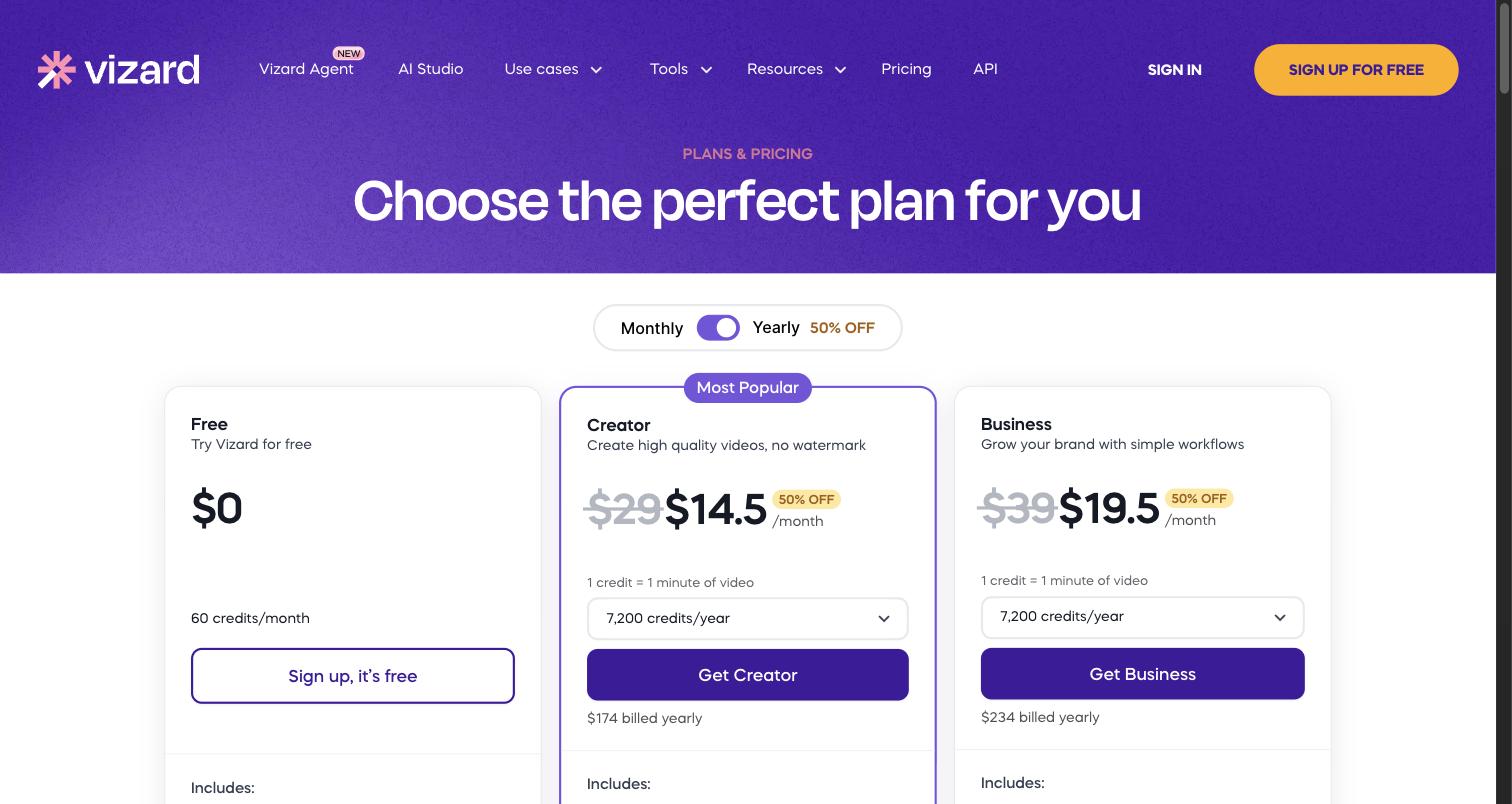
| Vizard | Best reviewed, with scheduling | $29/month, or $14.50/month billed yearly | Yes: 60 credits a month, 720p, watermarked | On the free plan only | Not stated; uploads to 30GB on paid (1GB free) | 600 credits (paid plans) | Strongest review scores of the group; scheduling to 6 or 20 accounts | Credits lost when you cancel; limited caption customisation |
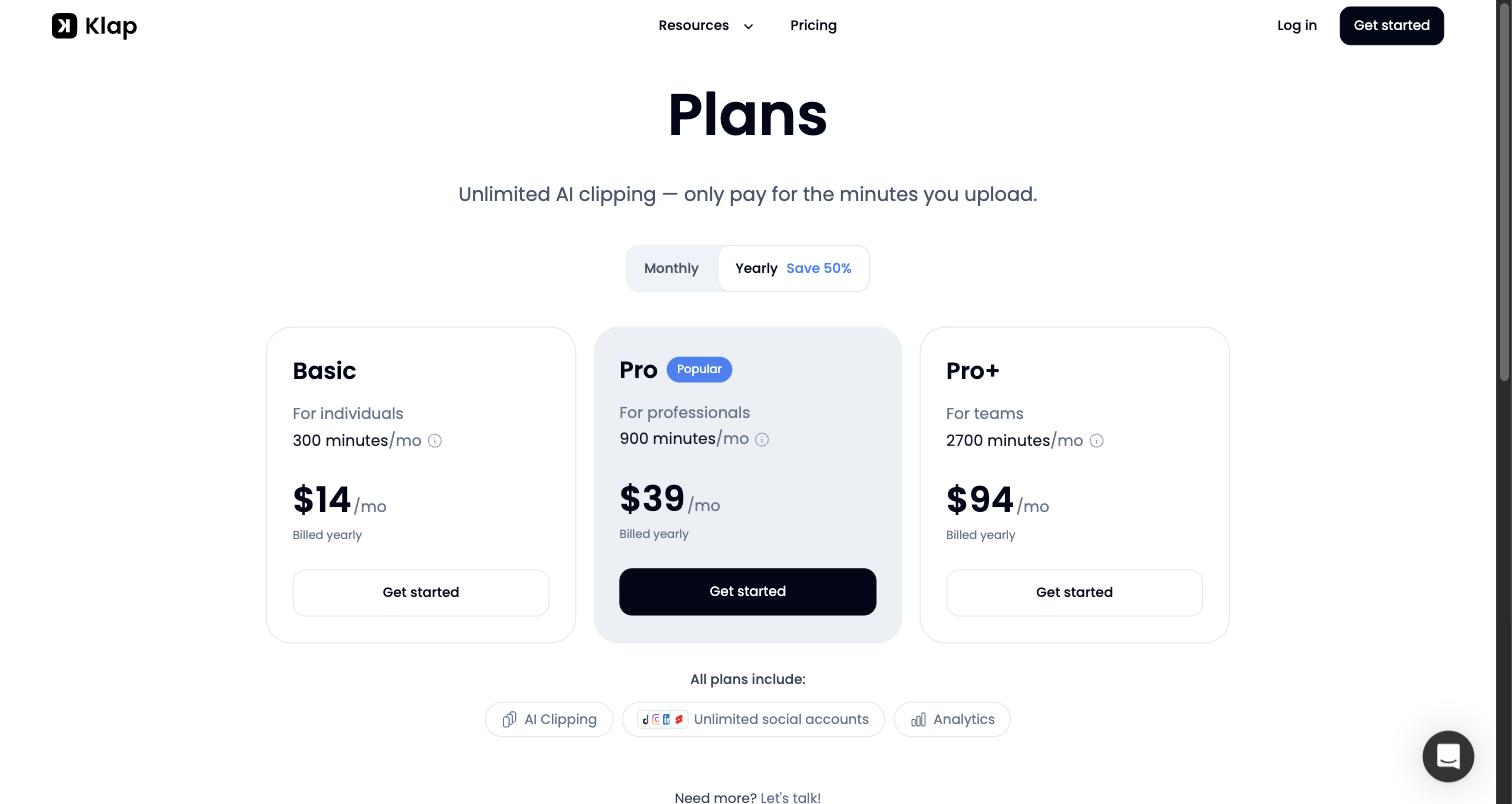
| Klap | YouTube links, many languages, auto-post | $29/month, or $14/month billed yearly | Yes: 1 video, no card | None stated on free | Up to 4 hours | 100, 300 or 1,000 clips | YouTube link import, 52 caption languages, auto-post with analytics | Billing and cancelling complaints; few reviews outside Trustpilot |
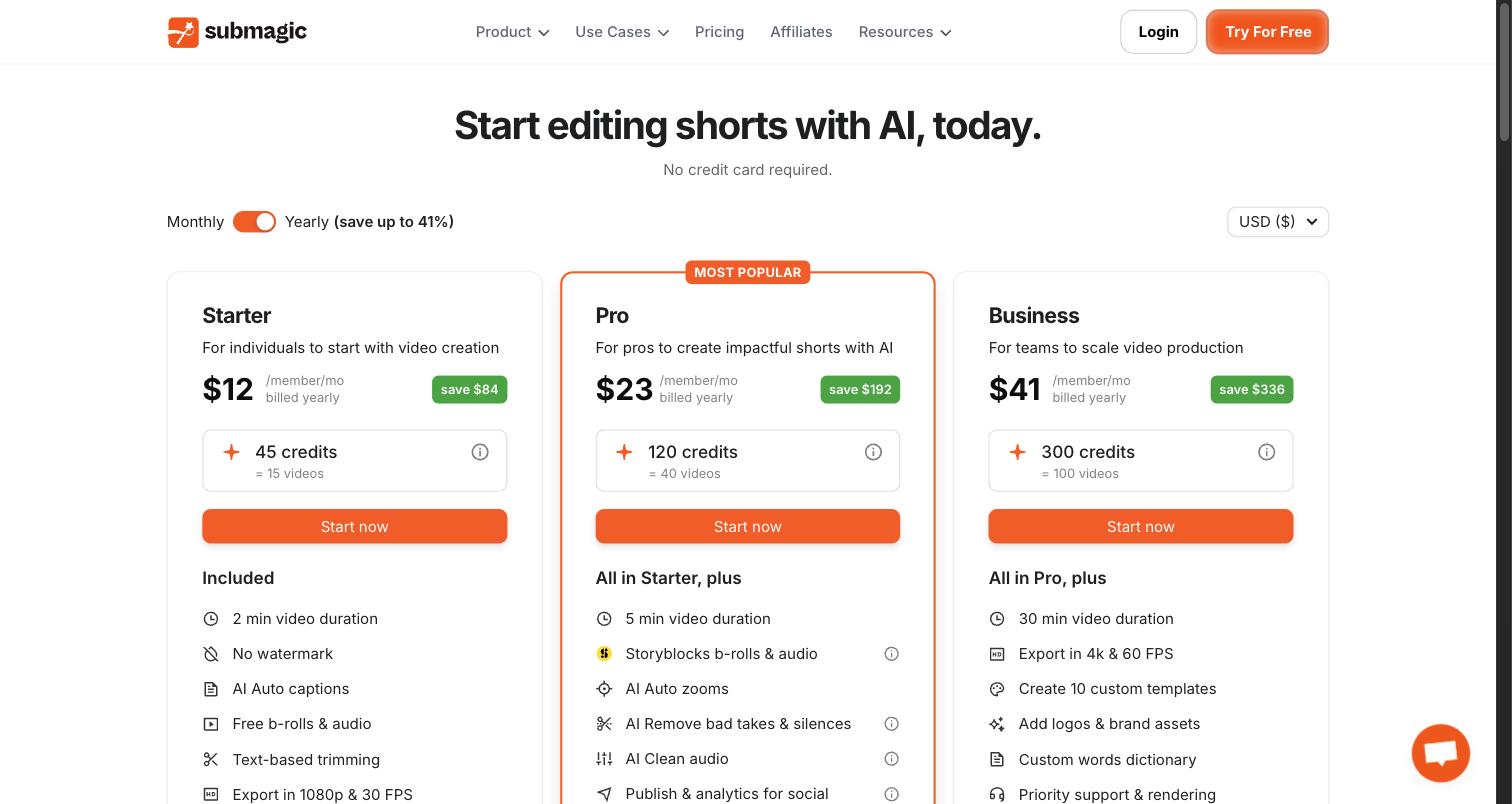
| Submagic | Caption styling on short videos | $19/month, or $12/month billed yearly | No free plan (free try, no card) | None, on any plan | 2 min (Starter) to 30 min (Business); long videos need the Magic Clips add-on | 15, 40 or 100 videos | Caption styling, b-roll, auto-zoom, 123 languages | Long-video clipping is a $19/month add-on; renewal complaints |
Prices in US dollars, read from each vendor’s pricing page on 30 September 2026. Scroll the table sideways on a phone.
Where Slice loses
Since we make it, the weak spots first. Slice does not post or schedule (OpusClip, Vizard and Klap do). It has no b-roll (OpusClip and Submagic do). You upload a file; Klap takes a YouTube link. It has no virality score (OpusClip does). Its caption fonts cover Latin scripts and Hebrew, while Klap captions in 52 languages and Submagic in 123. And it has no third-party reviews yet, where Vizard has thousands.
Shorts by Sliceours
Best for podcasters and clippers who cut long episodes and streams into lots of clips and export them in one go.
What it does well
- Takes long files: MP4, MOV or WebM, up to three hours and 2GB.
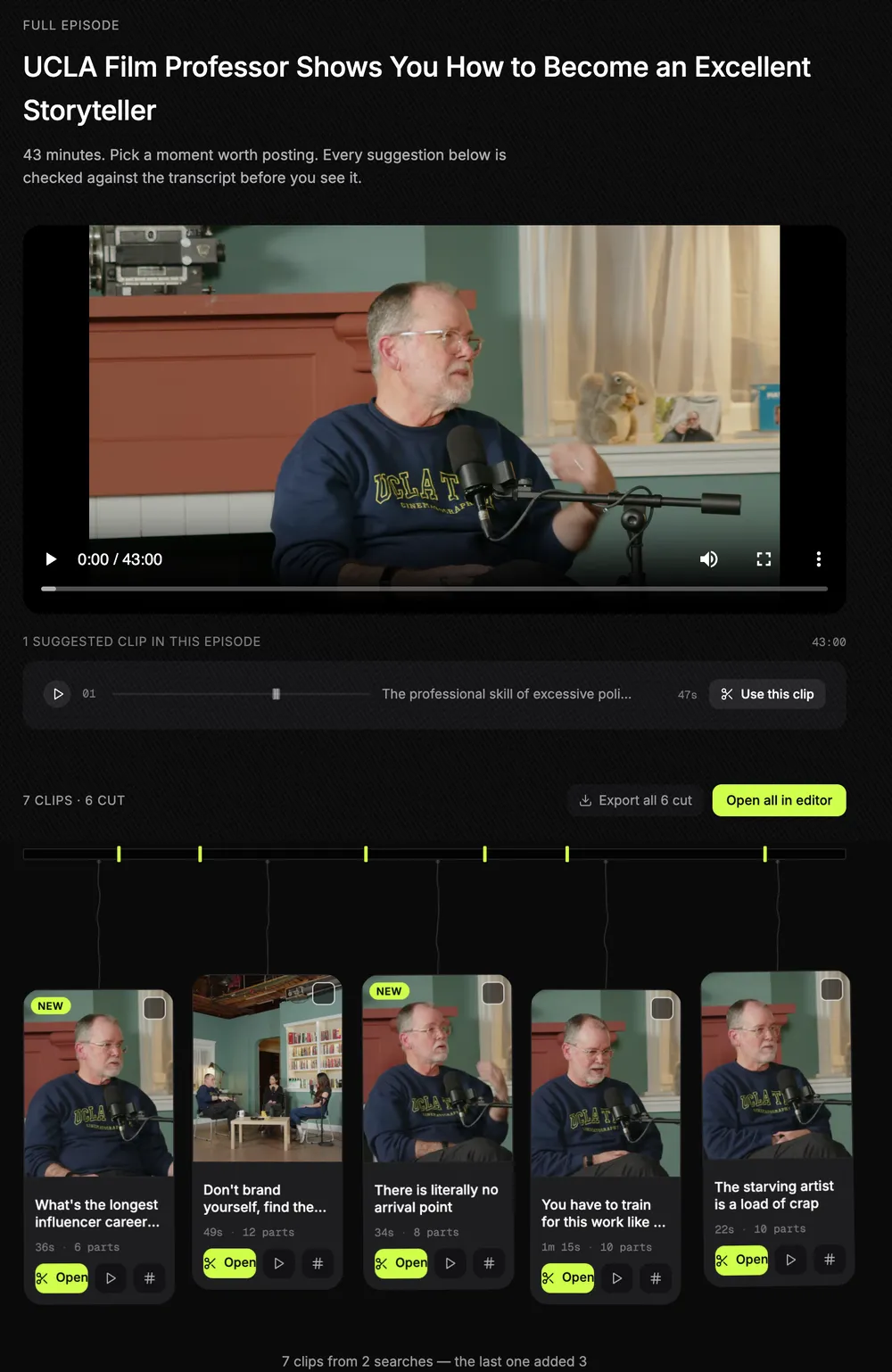
- Finds the clips in a long episode, and can join moments from different parts of it into one clip. It never rewrites what the speaker said.
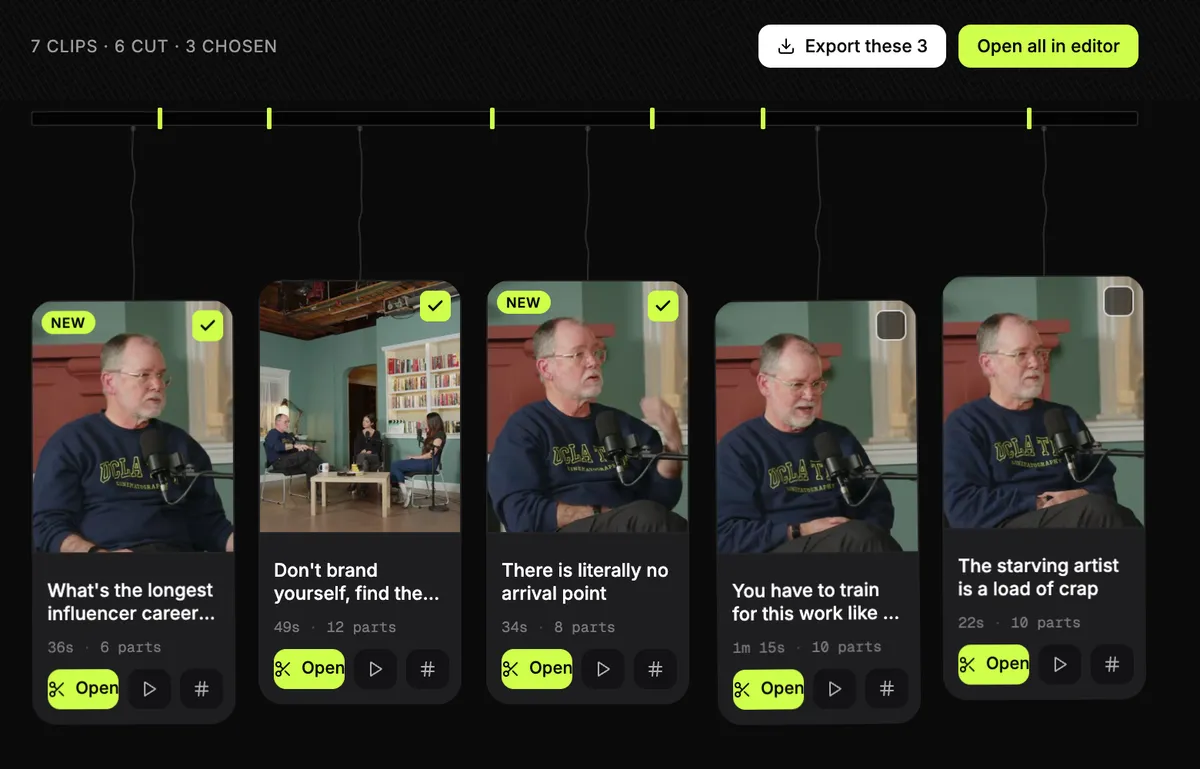
- Tick the clips you want and export them together. One email arrives when they are done, with a single "download all" zip.
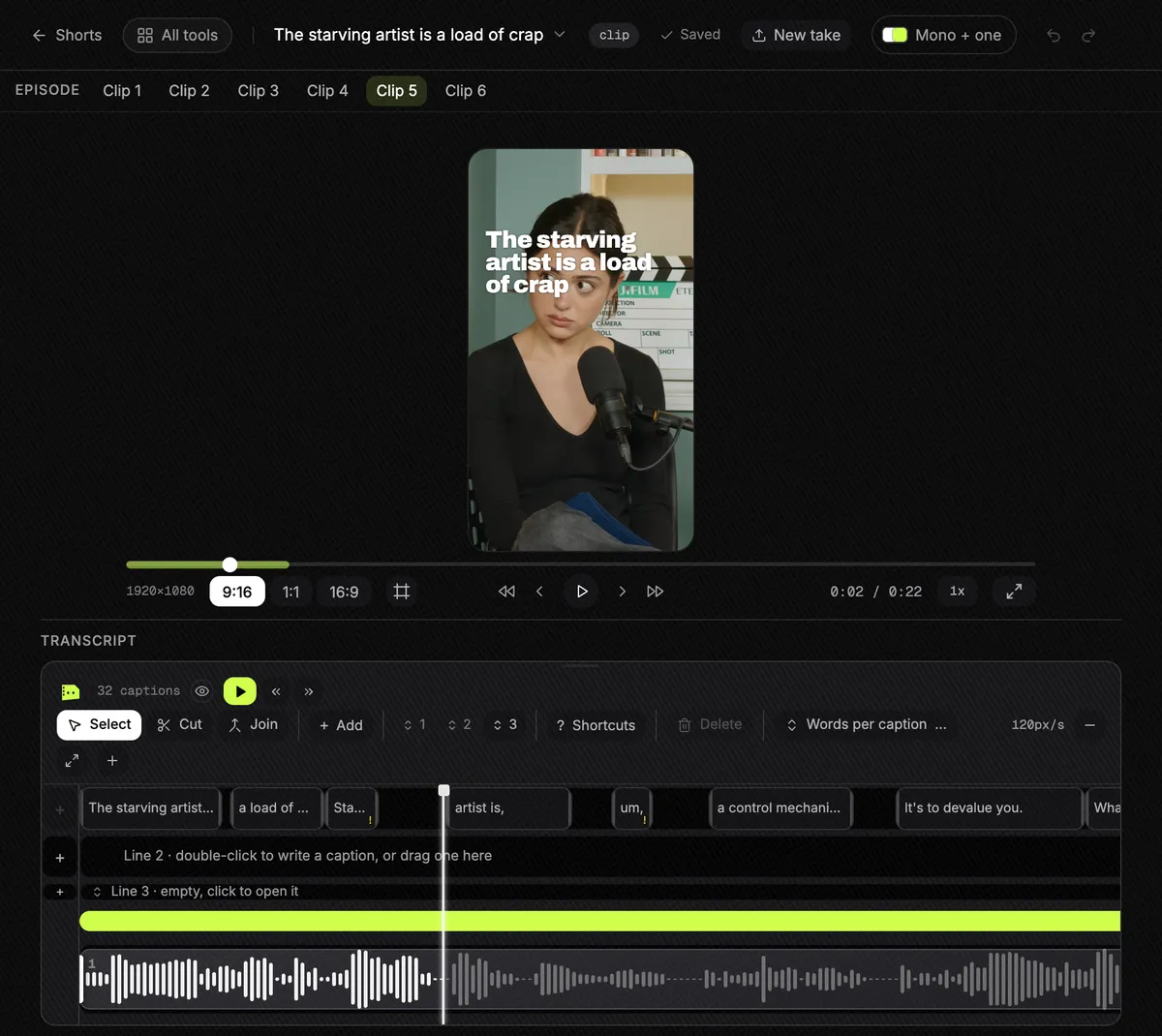
- Each clip starts with a hook title on it, and comes with post-ready text and hashtags in the clip's own language.
- A stream layout (facecam on top, gameplay below), 98 caption fonts, stacked caption layouts and .srt export.
- Vertical exports are at least 1080x1920, and up to 4K when the recording is 4K. Square and wide too.
- Nothing stamped on the video, on any plan or during the trial.
Where it falls short
- It does not post or schedule for you, and has no analytics.
- No b-roll.
- You upload a file. There is no YouTube link import.
- Caption fonts cover Latin scripts and Hebrew only: not Arabic, Chinese, Japanese, Korean, Hindi or Thai.
- No virality score.
Pricing, in plain words
- One plan: $14.99 a month, or $149 a year.
- A 3-day free trial with everything switched on, and no card needed to start it.
- No per-export charge and no cap on how many videos you put through it.
- The same subscription also covers Captions, Reframe, Podshare and Moodboard.
Reviews
No third-party ratings to report yet. That is a real gap next to the others here, so weigh it.
OpusClip
Best for creators who want clipping, b-roll and scheduled posting in one tool, and whose monthly footage fits a minutes-based credit budget.
What it does well
- Takes very long videos: up to 10 hours, per its help centre.
- A virality score on each clip, and ClipAnything, which clips from a prompt.
- AI reframe, b-roll, and a scheduler that posts for you.
- Exports to Premiere and DaVinci Resolve (XML), an API, and a Claude connector (September 2026).
- Reviewers praise how easy it is, the time it saves, its choice of moments, captions with emoji and keyword highlights, and active-speaker reframing.
Where it falls short
- Priced by minutes of source video. A 3-hour episode is 180 credits, more than the 150 on Starter.
- The free plan watermarks and gives you 3 days to export.
- In 16 Trustpilot 1-2 star reviews from June to September 2026, the most common complaints were support that did not answer or was AI-only, and being charged after cancelling.
Pricing, in plain words
- Free: 60 credits a month (one credit is one minute of source video), watermarked, 1080p, and you have 3 days to export.
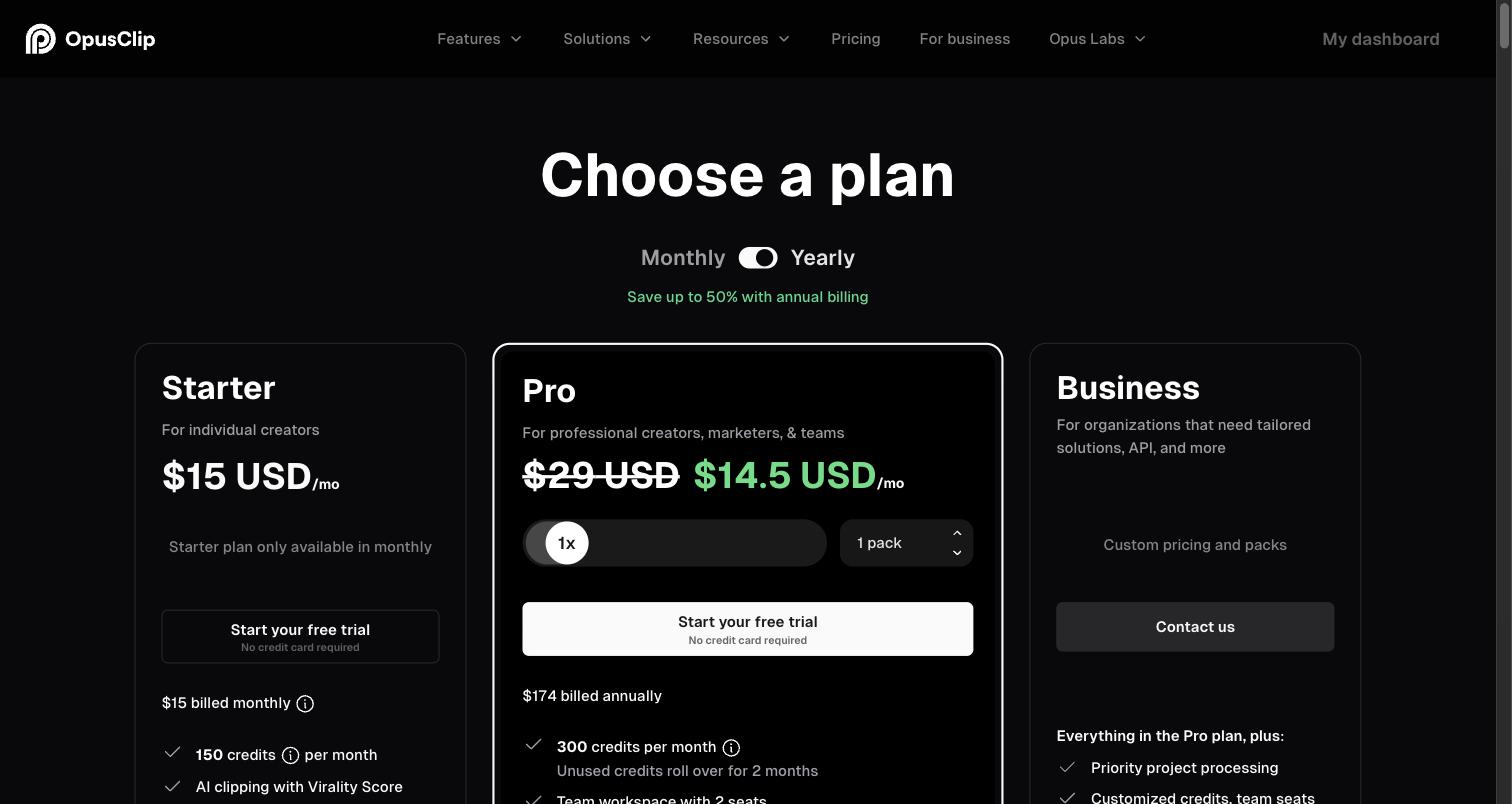
- Starter: $15 a month, monthly billing only. 150 credits a month, no watermark, a 30-day export window, and auto-posting to YouTube Shorts, TikTok and Reels.
- Pro: $29 a month, or $14.50 a month billed yearly ($174 a year). 300 credits a month per pack, rolling over for 2 months; up to 4K, a scheduler for 6 accounts, 2 seats per pack, 30GB uploads, public MP4 link import and limited API access.
- Business: custom pricing.
- Credits on monthly plans expire after 60 days.
Source: OpusClip’s pricing page, read 30 September 2026.
Review ratings
| Site | Rating | Reviews |
|---|---|---|
| Trustpilot | 4.0 / 5 | 499 |
| G2 | 4.6 / 5 | 121 |
| Capterra | 3.6 / 5 | 5 |
| Product Hunt | 4.5 / 5 | 78 |
What reviewers keep saying
Praise: Easy to use; Saves time; Picks good moments; Captions with emoji and keyword highlights; Active-speaker reframe.
Complaints: Support unresponsive or AI-only (7 of 16); Charged after cancelling, or refund refused (6 of 16); Bugs or failed uploads (5 of 16); Weak clip choice (2 of 16).
Source: Trustpilot 1-2 star reviews, 16 reviews from June to September 2026. A sample, not every review. Read them yourself on Trustpilot.
“a funnel to upsell you at every click”A reviewer on Product Hunt
Weighing OpusClip against Slice? Slice as a OpusClip alternative, side by side.
Vizard
Best for creators who want the best-reviewed clipper with scheduling built in, at a low yearly price.
What it does well
- The strongest review scores here, on every site, and by far the most reviews.
- Schedules posts to 6 social accounts on Creator, 20 on Business.
- 4K and 30GB uploads on the paid plans.
- Reviewers praise how well it finds good moments, how simple it is, accurate captions and many languages.
Where it falls short
- Reviewers say unused credits are forfeited when you cancel.
- Limited customisation, such as where subtitles sit and how zoom behaves.
- Slow on long videos, per reviews, and clips or captions sometimes need fixing by hand.
- The free plan exports at 720p, up to 10 minutes, with a watermark.
Pricing, in plain words
- Free: 60 credits a month, 1GB uploads, 720p exports up to 10 minutes long, watermarked, and files kept for 3 days.
- Creator: $29 a month, or $14.50 a month billed yearly ($174 a year). 600 credits a month, 30GB uploads, 4K, no watermark, 6 social accounts with scheduling, 100GB storage.
- Business: $39 a month, or $19.50 a month billed yearly ($234 a year). 600 credits a month, a brand kit, 20 social accounts, and extra team seats at $5 a month each.
Source: Vizard’s pricing page, read 30 September 2026.
Review ratings
| Site | Rating | Reviews |
|---|---|---|
| Trustpilot | 4.7 / 5 | 2,521 |
| G2 | 4.7 / 5 | 420 |
| Capterra | 4.9 / 5 | 481 |
| Product Hunt | 4.6 / 5 | 18 |
What reviewers keep saying
Praise: Finds good moments; Simple; Accurate captions; Many languages.
Complaints: Credits forfeited on cancelling; Limited customisation (subtitle position, zoom); Slow on long videos; Clips or captions sometimes need manual fixes.
Source: Recurring themes on page one of each review site and its 1-2 star filter. A sample, not every review. Read them yourself on Trustpilot.
Weighing Vizard against Slice? Slice as a Vizard alternative, side by side.
Klap
Best for clippers who want to paste a YouTube link, caption in many languages and auto-post, and are happy to pay per clip.
What it does well
- Paste a YouTube link instead of downloading the file.
- Source files up to 4 hours each.
- Captions in 52 languages.
- Posts to TikTok, YouTube, Instagram and LinkedIn for you, with analytics, and has an API.
- Reviewers say it saves time, is simple, and handles many languages.
Where it falls short
- Priced by clips: 100 a month on the entry plan.
- In 11 Trustpilot 1-2 star reviews, the most common complaints were being charged after cancelling and not being able to find how to cancel.
- Very few reviews outside Trustpilot (2 on G2, 1 on Capterra), so its ratings there tell you little.
Pricing, in plain words
- Free: one video, no card needed. Its tool page says there is no watermark on the free plan.
- Basic: 100 clips a month for $29 a month, or $14 a month billed yearly.
- Pro: 300 clips a month for $79 a month, or $39 a month billed yearly.
- Pro+: 1,000 clips a month for $189 a month, or $94 a month billed yearly.
Source: Klap’s pricing page, read 30 September 2026.
Review ratings
| Site | Rating | Reviews |
|---|---|---|
| Trustpilot | 3.6 / 5 | 47 |
| G2 | 4.8 / 5 | 2 |
| Capterra | 5.0 / 5 | 1 |
| Product Hunt | 3.2 / 5 | 6 |
What reviewers keep saying
Praise: Saves time; Simple; Many languages.
Complaints: Billing, or charged after cancelling (6 of 11); Support unresponsive (5 of 11); Hard to find how to cancel (5 of 11); The "free trial" felt misleading (3 of 11).
Source: Trustpilot 1-2 star reviews, 11 reviews. A sample, not every review. Read them yourself on Trustpilot.
“when you try to cancel your subscription there is no where to do it”A reviewer on Trustpilot, June 2026
Weighing Klap against Slice? Slice as a Klap alternative, side by side.
Submagic
Best for styling captions, b-roll and zooms on videos that are already short, in almost any language.
What it does well
- Strong caption styling, auto-zoom, b-roll and silence removal.
- Captions in 123 languages.
- No watermark on any tier.
- Magic Clips accepts YouTube links.
- Reviewers praise fast caption styling, accurate captions, and often its support.
Where it falls short
- Built for short videos: each plan caps how long a video can be, from 2 minutes to 30.
- Cutting a long episode into clips needs the Magic Clips add-on, $19 a month for 10 uploads, on top of a plan.
- In 25 Trustpilot 1-2 star reviews, the most common complaint was surprise renewals and refunds.
Pricing, in plain words
- Starter: $19 a month, or $12 a month billed yearly. 15 videos a month, each up to 2 minutes, 1080p at 30fps.
- Pro: $39 a month, or $23 a month billed yearly. 40 videos, up to 5 minutes each, b-roll, 3 users.
- Business: $69 a month, or $41 a month billed yearly. 100 videos, up to 30 minutes each, 4K at 60fps.
- Magic Clips, which turns a long video into clips, is a paid add-on: $19 a month for 10 uploads. It takes YouTube links and makes "20+" clips.
- No watermark on any tier. No free plan, but you can try it without a card.
Source: Submagic’s pricing page, read 30 September 2026.
Review ratings
| Site | Rating | Reviews |
|---|---|---|
| Trustpilot | 4.5 / 5 | 842 |
| G2 | 4.6 / 5 | 85 |
| Capterra | 5.0 / 5 | 1 |
| Product Hunt | 4.4 / 5 | 30 |
What reviewers keep saying
Praise: Fast caption styling; Accurate captions; Support often praised.
Complaints: Surprise renewals or refunds (12 of 25); Support (8 of 25); Failed exports (6 of 25); Pricing confusion (4 of 25).
Source: Trustpilot 1-2 star reviews, 25 reviews. A sample, not every review. Read them yourself on Trustpilot.
“changing the features… every few months”A reviewer on Product Hunt
Weighing Submagic against Slice? Slice as a Submagic alternative, side by side.
Also worth a look
Choppity
Best for trying a clipper on a real hour of video before paying.
$20 a month, or $14 a month billed yearly. The free tier analyses 1 hour of video.
Trustpilot 3.3 from 16 reviews.
Ssemble
Best for the lowest yearly price, if 20-minute segments are enough.
$15 a month, or $6 a month billed yearly. Segments are capped at 20 minutes.
Trustpilot 3.7 from 42 reviews.
Descript
Best for people who want a full editor rather than a clipper.
A full video editor rather than a clipping tool. $24 a month, or $16 a month billed yearly.
Trustpilot 2.7 from 288 reviews.
How we compared
Compared from published pricing, limits, features and user reviews, checked 30 September 2026. For each tool we read its own pricing page (as a browser shows it and in the page source) and its help centre, and its pages on Trustpilot, Capterra and Product Hunt; G2 was checked in a browser. The ratings and review counts are what those pages showed that day.
The praise and complaints come from the first page of each site’s reviews and its 1-2 star filter. The counts, such as “7 of 16”, are from that sample, not from every review a tool has. Quotes are short and credited to the site they are from.
We did not test the other tools hands-on. Slice is described from the product itself: its limits and prices are read from the same code the app runs on, and the screenshots are of the real app. Pricing changes often, so check a vendor’s page before you pay. We re-check this page every month.
Questions
What is the best AI clipping tool for long podcasts?
It depends on what you need next. For many clips from long episodes at a flat price, Shorts by Slice (ours) takes 3 hours with no monthly cap. OpusClip takes the longest videos, up to 10 hours, and posts for you, but meters minutes. Vizard has the best reviews and built-in scheduling. Checked 30 September 2026.
Which AI clipping tools have no watermark?
Slice never watermarks, trial included. Submagic has no watermark on any tier. Klap's tool page says its free plan has none. OpusClip and Vizard watermark on their free plans only. Checked 30 September 2026.
Which AI clipper has the best reviews?
Vizard, by a distance: 4.7 on Trustpilot from 2,521 reviews, 4.7 on G2 from 420 and 4.9 on Capterra from 481. Submagic (4.5 from 842 on Trustpilot) and OpusClip (4.0 from 499) follow. We have no third-party ratings to report for Slice yet.
Which tools post to TikTok, YouTube and Instagram for you?
OpusClip (auto-post on Starter, a scheduler on Pro), Vizard (scheduling on its paid plans) and Klap (auto-post with analytics). Slice does not post or schedule: you download the clips with post-ready text.
Can I paste a YouTube link instead of uploading?
Klap takes YouTube links, and so does Submagic's Magic Clips add-on. OpusClip Pro lists public MP4 link import. Slice takes an uploaded file only.
Is there a free AI clipping tool?
OpusClip (60 minutes a month) and Vizard (60 credits a month) have free plans with a watermark. Klap's free plan covers one video. Choppity's free tier analyses one hour. Slice has a 3-day free trial with no card, and Submagic lets you try without a card.
How did you compare these tools?
Compared from published pricing, limits, features and user reviews, checked 30 September 2026. We read each vendor's pricing page and help centre, and the Trustpilot, G2, Capterra and Product Hunt pages linked here. Complaint counts come from a sample of 1-2 star reviews, not every review. We did not test the other tools hands-on. We make Slice.
Side by side
- Slice vs OpusClip: the OpusClip alternative for long podcasts and streams
- Slice vs Klap: the Klap alternative for long podcasts and streams
- Slice vs Vizard: the Vizard alternative for long podcasts and streams
- Slice vs Submagic: the Submagic alternative for long podcasts and streams
- AI clip tools compared: prices and caps in one table
Shorts by Slice is $14.99 a month with a 3-day trial and never puts anything on your video. If another tool here fits you better, use it.