Guide
Can ChatGPT make clips from my video?
· by the Slice team, who make the plugin
The short answer
Not on its own. ChatGPT can read a transcript, suggest the moments worth posting and write the captions, but it can’t cut your video into clips, turn them vertical or burn in captions. With the Slice plugin added it can: attach the video, type “@Slice turn this video into short clips”, and pick the moments by number. We ran an 82-minute podcast episode through it on 2 October 2026: four moments came back three and a half minutes after the upload, and two finished vertical clips 4 minutes after we picked them.
New to the plugin? Set up Slice in ChatGPT or Claude first. It takes a couple of minutes.
What can ChatGPT do with a video on its own?
The split is simple: ChatGPT works with words, and a clip is a new video file. Everything it can do in any chat is on the left. Everything that produces a file needs something that edits video.
| Job | ChatGPT on its own | ChatGPT with Slice |
|---|---|---|
| Suggest which moments to post | From a transcript you paste in | From the video: Slice transcribes it first |
| Exact start and end times | Only as exact as the times in your transcript | Taken from its own transcript, word by word |
| Cut the clips out of the video | No: needs a plugin | Yes |
| Make them vertical, add captions and a title | No: needs a plugin | Yes, burned into the file |
| Write the post text | Yes | Yes, in the same chat, knowing the clips |
| Post or schedule them | No | No: you upload them yourself |
What people run into
Even getting a video into ChatGPT is not a given. On OpenAI’s own forum in September, one user described MP4s that attached but could not be opened:
“When I attach an MP4, the attachment appears normally in the conversation.”
“However, when ChatGPT attempts to access that exact path to inspect the video, the file is not present.”
Others are still asking for video uploads at all, and OpenAI’s support team has said it can’t give a date:
“I’d love to see support for uploading very short video clips in ChatGPT, perhaps with a limit of around 10–15 seconds.”
“I can’t share a timeline right now, but I’ll pass this feedback along internally.”
That is why the plugin doesn’t depend on ChatGPT reading the video. Slice copies the file to its own servers and does the cutting there, and when a file is too big to attach, it gives you an upload link instead.
A real run: an 82-minute podcast, start to finish
The episode is LinuxGameCast Weekly 430, a three-host video podcast streamed on 15 November 2020, 1:21:55 long, 1280×720, 531MB. LinuxGameCast LLP publishes it under CC BY-SA 4.0, which is why we can show it here. We ran it through the same plugin steps ChatGPT uses on 2 October 2026. Every time and number below is read back from that run.
1. Upload
At 531MB, the file went through the upload link rather than as a chat attachment. It took about two minutes.
2. The list of moments
Three and a half minutes after the upload finished, Slice listed four moments. Almost all of that was the transcript: the search for moments itself took 39 seconds.
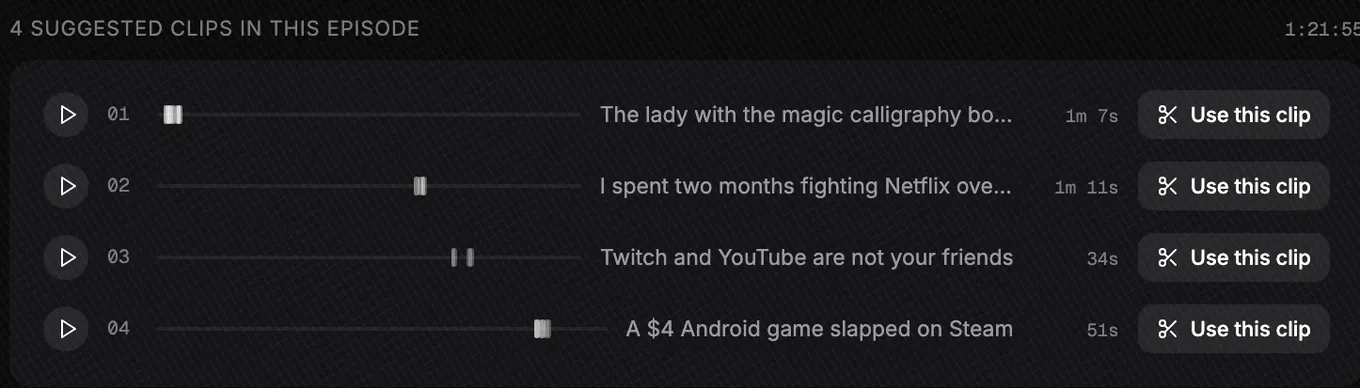
| # | Title Slice gave it | Length | Taken from | Opens on |
|---|---|---|---|---|
| 1 | The lady with the magic calligraphy books | 1:07 | 1:20 to 4:05, 17 passages | “So gyms have been closed. I'm a powerlifter. I have to get creative with my training.” |
| 2 | I spent two months fighting Netflix over a copyright claim | 1:11 | 49:37 to 51:12, 6 passages | “Um, you gotta realize how many false claims I currently get on our YouTube channel, man, each month.” |
| 3 | Twitch and YouTube are not your friends | 0:34 | 56:47 to 1:00:13, 4 passages | Strong language, so we skipped this one |
| 4 | A $4 Android game slapped on Steam | 0:51 | 1:08:35 to 1:10:46, 9 passages | “The uh developer's solution was to fix this was to disable my firewall and antivirus.” |
No moment is one unbroken stretch. Clip 1 runs 1:07 but is joined from 17 passages between 1:20 and 4:05: the story, with the cross-talk and asides between its lines left out. Slice also says why it picked each one. For clip 2: “Specific, verifiable first-person war story with a punchline — the claimed song came from YouTube's own audio library — ending on 'be happy to see you in court.'”
3. Picking two
We picked 1 and 2. Clip 3 was a strong pick by Slice’s reasoning, but it opens on strong language, which is a choice you make for your own audience, not one a tool should make for you.
4. What came back
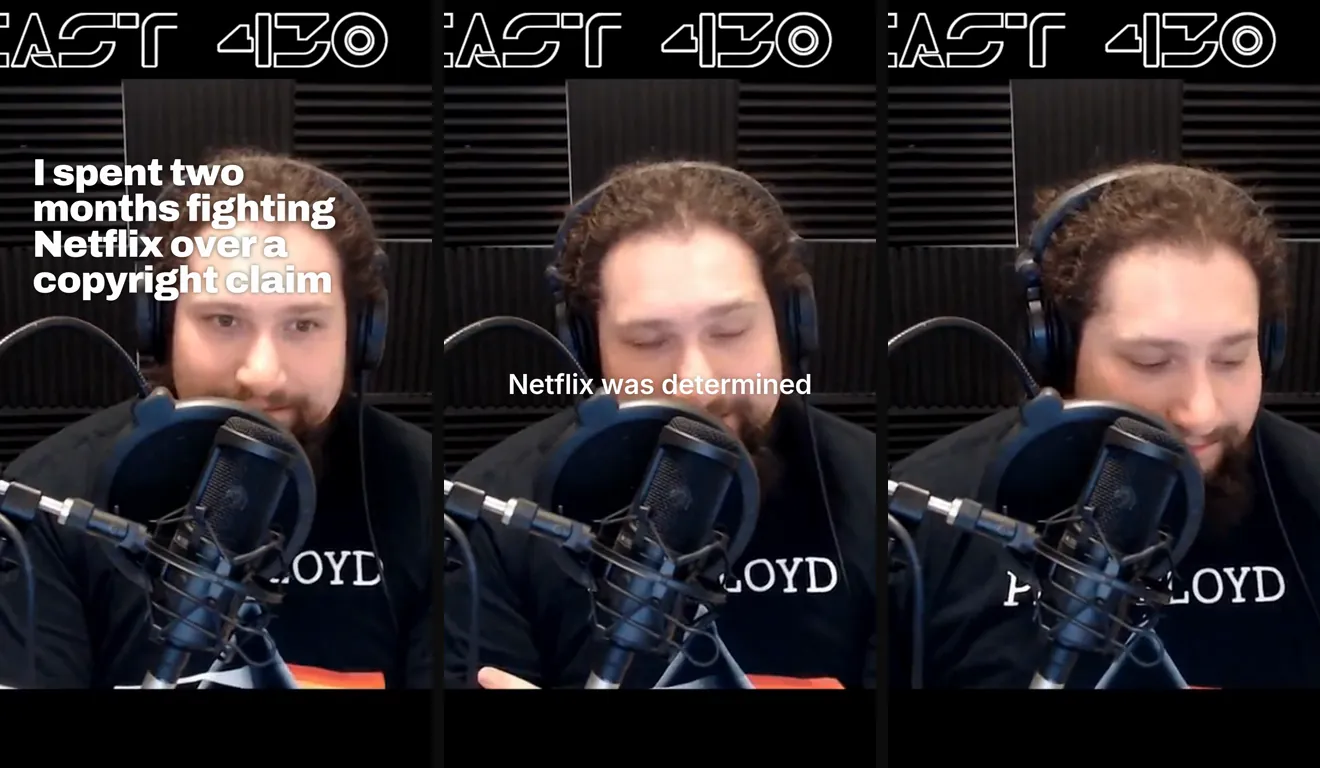
Both clips were finished 4 minutes after we asked: 1080×1920 MP4s at 30 frames a second: 1:08 and 1:11 long, 70MB and 56MB. Each opens on its title card, then the captions run word by word as the host speaks.
5. What we would fix before posting
We read both clips’ captions in full and checked frames through each. Both were usable, and neither was perfect:
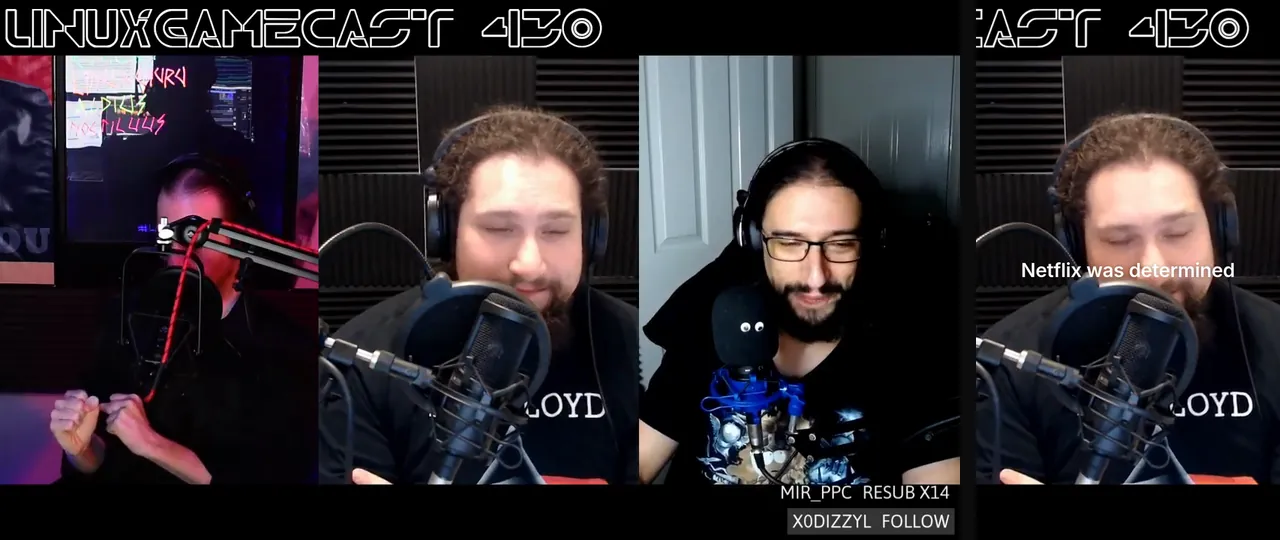
- The framing. The episode is three webcams side by side under the show’s logo. Slice kept the middle camera, which cut the logo to “AST 430” and left an empty band under the picture. In clip 1, a line of chat from the stream’s overlay shows along the bottom.
- A lost word. In clip 1, one join between passages dropped a word: the captions read “There’s not a of heavy things”.
- A stray word. In clip 2, a join left a lone “have.” between two sentences.
- The language. The show swears, and so do the clips. Know your source before you post.
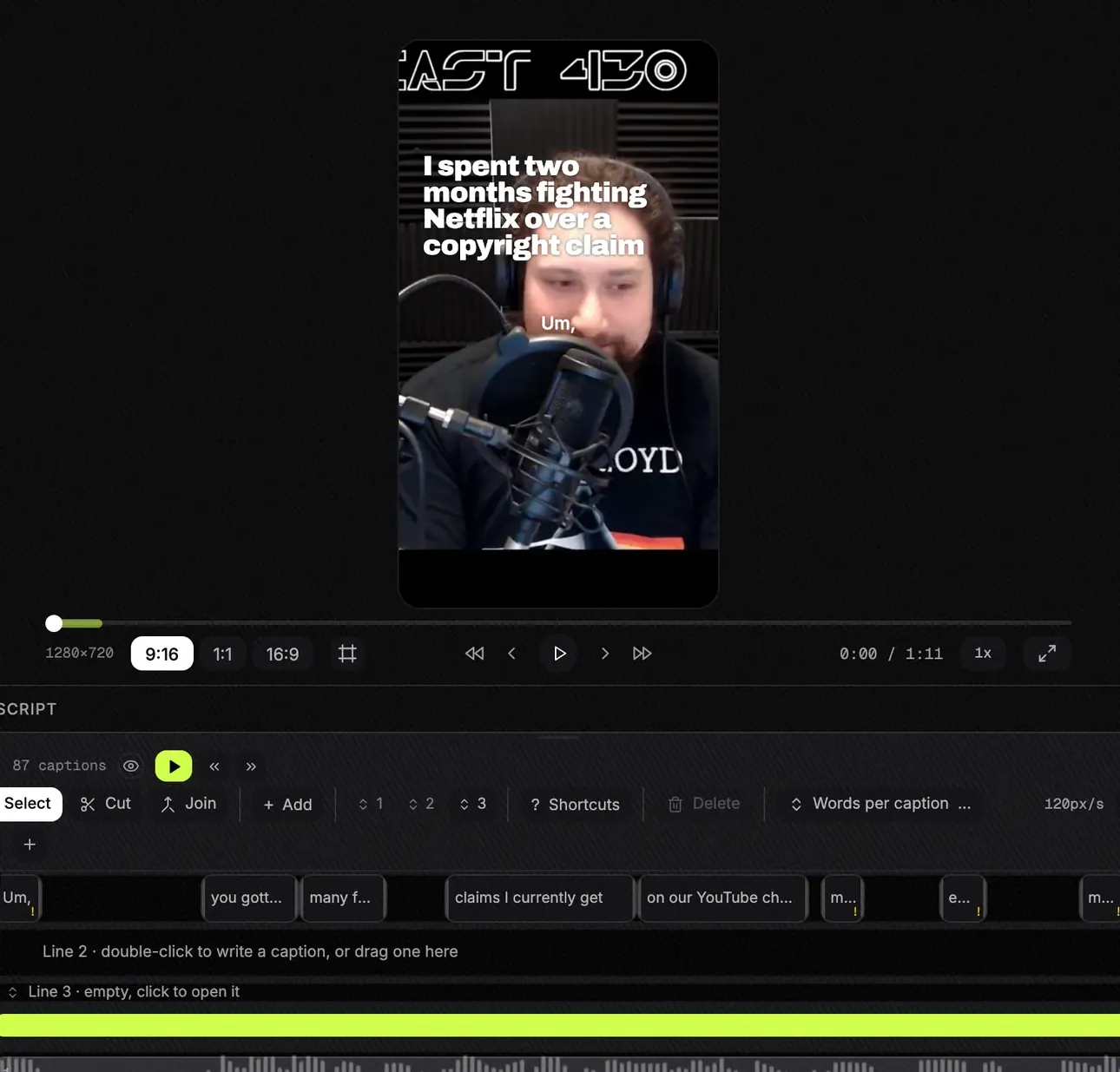
Each of these is a change in the Slice editor, where the episode and both clips are waiting afterwards: the captions are editable blocks on a timeline, and the Frame tab is where the framing is set. We left everything as it came back, so the frames on this page are exactly what the plugin produced.
How do you do it with your own video?
- Add Slice to ChatGPT, once
In ChatGPT, open Plugins, choose Add, then Create MCP App. Paste https://mcp.tryslicemedia.com/mcp as the address and sign in with your Slice account when asked.
Each screen is in the setup guide.
- Attach the video and ask for clips
Start a new chat, attach the video file and type the sentence below. Slice takes MP4, MOV or WebM files up to 3 hours long. If the file is too big to attach, ask for an upload link instead.
Type@Slice turn this video into short clipsOr, for a big file@Slice give me an upload link - Read the list of moments
Slice transcribes the video and replies with a numbered list: a title, a length and the opening line for each moment. Nothing is cut yet.
- Reply with the numbers you want
Slice cuts those moments, makes them vertical, adds a hook title and burns in captions. Up to 10 at a time.
Type1 and 2 please - Download the files
ChatGPT replies with a download link for each clip. The links work for 7 days; ask again for a fresh one after that.
Why people want this in ChatGPT
The requests on OpenAI’s forum are for the same thing: hand over the video and get edited clips back, without moving between apps.
“The main idea is that instead of users spending a lot of time editing videos themselves, the AI robot should edit the video automatically.”
“Instead of switching between ChatGPT, Canva, CapCut, text-to-speech tools, image generators and other apps, users could create everything in one place.”
A plugin is how that works today. It is honest to say what it isn’t: it doesn’t make new footage, it doesn’t post for you, and you still watch what it made.
What it won’t do
- Take a YouTube, Spotify or other page link in ChatGPT. Attach the file or use an upload link, or use the Slice website, which imports YouTube links.
- Clip an audio-only episode. Slice makes video clips, so it needs video. For the words alone, the same plugin transcribes audio for free.
- Post or schedule. You download the files and upload them in each app.
- Run without a plan. Clips need a Slice plan or the 3-day trial; ChatGPT says so if you ask without one.
Slice is not the only plugin that edits video in ChatGPT: ChatCut, for one, says on its site that it works inside ChatGPT too. If you are weighing a chat plugin against a separate clipping app, the honest version is in AI clipping inside ChatGPT or Claude vs AI clipping apps.
What next?
- How to find the best moments in a long video with ChatGPT, including the free way with a transcript and a prompt.
- How to repurpose a podcast for TikTok and Reels with ChatGPT: captions, titles and post text for each app.
Example episode: LinuxGameCast Weekly 430 by LinuxGameCast LLP, on the Internet Archive, licensed CC BY-SA 4.0. The clips are cut, reframed and captioned from it.
Get the Slice Weekly
One free email every Friday: tools for creators and the best advice we found from people who make things.
Questions
Can ChatGPT edit video by itself?
It can help you plan an edit: read a transcript, suggest moments, write titles and captions. Cutting your file into clips, turning it vertical and burning in captions needs a plugin that edits video, and the clips come back from that plugin as files you download.
What about Sora?
Sora makes new video from a description. It does not cut clips out of a recording you already have, which is the job here.
How long does it take?
On the 82-minute episode on this page: the list of moments came back three and a half minutes after the upload finished, and the two clips we picked were finished 4 minutes after we asked. A short video is quicker; most of the wait is the transcript.
Can I give ChatGPT a YouTube link instead of the file?
Not with the Slice plugin. It works from the video file itself. The Slice website imports YouTube links; in the chat, attach the file or ask for an upload link.
My video is too big to attach. What now?
ChatGPT has its own attachment limits, listed on its help pages. Ask Slice for an upload link instead ("give me an upload link"), open it and drop the video there. The link works for 2 hours and takes files up to 3 hours and 2GB. That is how we sent the 531MB episode on this page.
Will the clips be perfect?
No, and the run on this page shows where they weren't: the vertical crop cut the show's logo, and two joins between passages each lost or left a word. Watch each clip before you post it; small fixes are a few clicks in the Slice editor.
Is it free?
Clips need a Slice plan: $14.99 a month or $149 a year, after a 3-day free trial. Transcription through the same plugin is free with no sign-in.
More guides
- Set up Slice in ChatGPT and Claude: adding the plugin, with pictures
- How to make podcast clips with ChatGPT (2026): Step by step, from attaching the episode to downloading captioned vertical clips, with the exact prompts.
- How to repurpose a podcast for TikTok and Reels with ChatGPT: One episode into TikToks, Reels and Shorts in one chat: the clips, the captions, the hook titles and the post text.
- How to find the best moments in a long video with ChatGPT: Two ways to have ChatGPT pick the moments worth posting from a long recording, and what each gives you.
- Can Claude edit video? How to make clips with Claude: What Claude can and cannot do with video, and how to get clips out of it with a connector.
- Can ChatGPT transcribe audio? Yes, with a free plugin: Free transcripts with speaker turns and subtitle files, in either app, with no sign-in.
- AI clipping inside ChatGPT or Claude vs AI clipping apps: An honest comparison of the two ways to work, including where a standalone app is the better choice.
- All guides