Or (MP3, M4A, WAV or MP4). Up to 90 minutes and 600MB. Spotify links can’t be read, so type the show’s name instead.
What is the podcast clip finder?
Slice’s podcast clip finder is a free web tool that finds the best moments to clip in a podcast episode. Paste an Apple Podcasts link, an RSS feed or the show’s name, pick an episode, and it transcribes the whole episode and picks its 3 best moments of 30 to 90 seconds, each with its start time, length, opening line in the speaker’s own words, and one sentence on why it works. You can play each moment from the episode itself and see the top one as a finished audio clip with the show’s cover art, captions and a waveform. It is free with an email address and no account: 3 episodes a month per person, each up to 90 minutes. It does not take YouTube links. It is made for podcasters, including audio-only shows, and for churches that publish sermons as a podcast.
How it differs from OpusClip, Riverside’s Magic Clips and Descript: those are editors you bring the recording into, and they cut clips inside their own app (OpusClip’s free plan: 60 minutes a month, watermarked; Riverside’s: 2 hours of recording, 720p, watermarked; Descript’s: 60 media minutes a month, 720p). The clip finder works one step earlier and from your public feed: nothing to upload or install, no account to see the moments, and it shows the three moments to judge before you make anything. To turn them into captioned clips you then use Shorts by Slice, where the first 3 clip exports are free and the plan is $14.99 a month.
- Price
- Free: 3 episodes a month per person (shared with Slice’s free transcription tool). Making the clips in Shorts by Slice: the first 3 exports free, then $14.99 a month or $149 a year.
- Input
- An Apple Podcasts link, an RSS feed, the show’s name (found in Apple’s podcast directory), or an uploaded MP3, M4A, WAV or MP4. Not YouTube links. Spotify links can’t be read because Spotify doesn’t share feeds; type the show’s name instead.
- Length
- Episodes up to 90 minutes.
- Output
- 3 moments of 30 to 90 seconds, each with a title, start time, length, opening line and why it works; playable from the episode; the top one previewed as a finished audio clip. The full transcript by email.
- Account
- None needed to see the moments; an email address is. A free Slice account to make the clips (Google sign-in works).
- Kept
- Your moments for 30 days behind a private link, then deleted unless you made them into clips.
A real run: three moments from Up First from NPR
We ran the finder on “Hurricane Isaias Floods the Panhandle, A Russian Oil Deal, ICE Shooting in New York” from Up First from NPR (18 minutes, public RSS feed) on . These are the three moments it picked, unedited, in the order it ranked them. The quotes are the speakers’ own words, shortened.
Hurricane winds knocked trees against building
“By nightfall, the pine trees outside my hotel window were just swaying with the wind gusts and they started whacking…”
Why it works: Vivid firsthand account of hurricane conditions that conveys the storm's intensity through specific sensory details.
Trump and Putin spoke for an hour and a half
“A Kremlin advisor, Yuriyushkov, later described to journalists the atmosphere of this call, saying Trump had wished Putin a happy…”
Why it works: Reveals the personal dynamic between Trump and Putin during a significant geopolitical deal, showing an unusual level of rapport.
Zelensky says deal replenishes Russia's war chest
“he clearly doesn't like it. He said that the White House's decision prolongs the war by replenishing Russia's war chest.”
Why it works: Direct statement of Ukraine's opposition to the US-Russia diesel deal and its potential consequences for the ongoing conflict.
Excerpts from Up First from NPR, quoted to show how the tool works; listen to the full episode. Not an endorsement by the show. Finding these moments cost us $0.05 in transcription and AI.
How it works
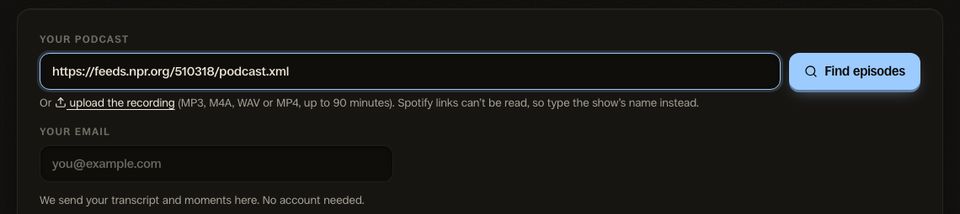
1. Paste your show
Your Apple Podcasts link, your RSS feed, or just the show’s name. The latest episodes appear, newest already picked.
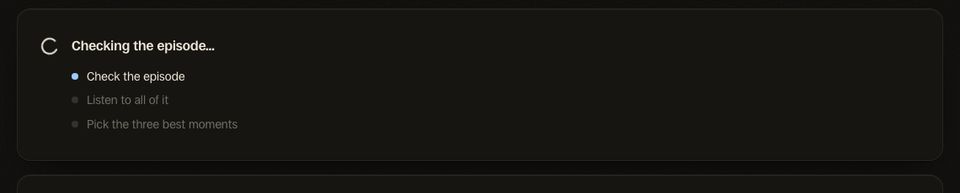
2. Let it listen
It transcribes the whole episode and reads it for moments that stand on their own. A 15-minute episode took under a minute in our test.
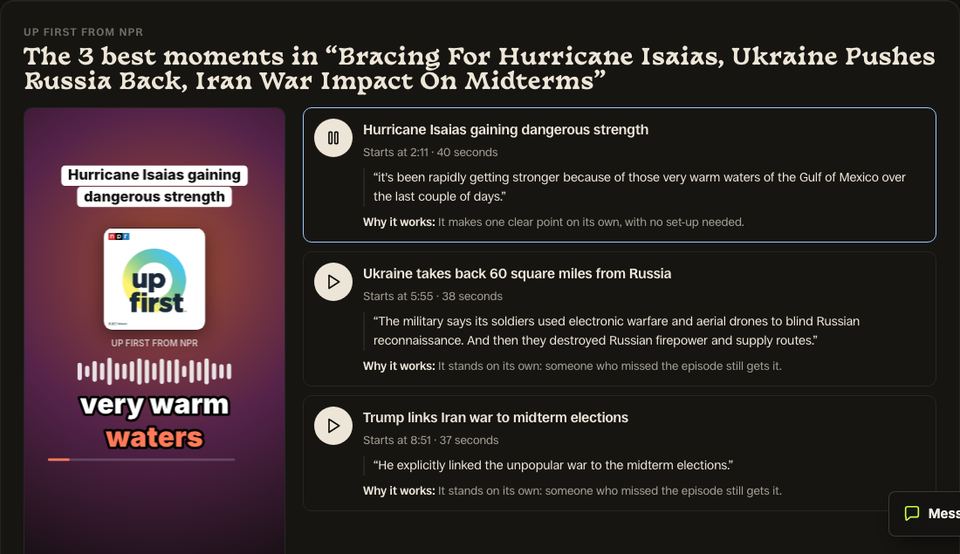
3. Hear your 3 moments
Each with its time, opening line and why it works. Play them from the episode, see the top one as a finished clip, then make all three.
Who it’s for
- Audio-only podcasts: No video needed: the clip is your cover art, captions and a waveform.
- Interview shows: The guest’s best story, found in a 45-minute conversation.
- Churches and sermons: Three passages from Sunday that make sense on their own.
- Business podcasts: The number or the argument that makes someone stop scrolling.
- Storytelling and true crime: The scene that hooks, without giving the ending away.
- Educational shows: One idea explained clearly, start to finish.
Video podcasts work too: upload the file, or take the whole episode to Shorts by Slice, which frames the speakers and finds clips in long videos.
Questions
Is the podcast clip finder free?
How does it find the best moments in a podcast?
Can I paste a Spotify link?
Does it work with YouTube links?
Does it work for audio-only podcasts?
Can I use it for sermons?
How long can the episode be?
What do I get?
What happens when I press Make these 3 clips?
How is it different from OpusClip or Riverside Magic Clips?
Clip finder by format
Related
More Free Tools
Shorts by Slice
From the team behind these free tools
One video. A week of posts.
Upload an episode and get back the moments worth posting, cut and captioned.
- Reads the whole episode, then picks the excerpts worth posting
- Captions burned in and framed vertical, ready to post
- Your first video and first 3 clips are free, no card