Checked 30 September 2026
Podcast to YouTube Shorts: the tools compared (2026)
For podcasters who want the best minutes of each episode on YouTube Shorts. Seven tools, compared on the things that decide it: how the episode gets in, how long an episode each one takes, and whether it posts to Shorts for you or hands you a file.
Our bias, plainly: we make Shorts by Slice, one of the seven. Compared from published pricing, limits, features and user reviews, checked 30 September 2026. We did not test the others hands-on.
Shorts by Slice turns a long podcast or stream into captioned vertical clips. $14.99 a month. Up to 3 videos free with no card; downloading starts a 3-day trial.
Try it free →What YouTube asks of a Short
- Length: Up to 3 minutes, for videos uploaded after 15 October 2024.
- Shape: A square or vertical aspect ratio; 16:9 is treated as a long-form video.
- Music and claims: A Short over one minute with an active Content ID claim of any type is blocked worldwide. If your episode has a licensed intro or music bed, keep those clips under a minute.
From YouTube’s help centre, read 2 October 2026: Upload YouTube Shorts and Understand three-minute YouTube Shorts.
The tools, side by side
| Tool | How the episode gets in | Longest episode | Posts to Shorts? | Price |
|---|---|---|---|---|
| Shorts by Slice | YouTube video links, one video per link; or upload a file | 3 hours, 2GB | No: you download the MP4 and upload it, with post text ready | $14.99/month or $149/year |
| OpusClip | YouTube links on every plan, or upload | Up to 10 hours | Yes: auto-posts to YouTube Shorts on Starter; scheduler on Pro | $15/month Starter; free plan watermarked |
| Klap | YouTube links, or upload | Up to 4 hours | Yes: posts to YouTube, TikTok, Instagram and LinkedIn | $29/month, or $14/month billed yearly |
| Vizard | YouTube and other links, or upload | 10 hours on paid plans (60 min free) | Scheduling to 6 or 20 social accounts on paid plans | $29/month, or $14.50/month billed yearly |
| Riverside | Records it, or upload (no YouTube links) | Uploads up to 4 hours and 25GB | Scheduling to YouTube and others on Grow ($39/month), not Pro | $29/month Pro, or $24/month billed yearly |
| Descript | Upload, Zoom, Google Drive (no YouTube links) | Not stated; files up to 10GB on Hobbyist | No: its help centre says publishing to YouTube Shorts is not supported | $24/month, or $16/month billed yearly |
| Submagic | Magic Clips add-on takes YouTube links | Plans cap videos at 2 to 30 minutes; Magic Clips limit not stated | Not covered in our check | $19/month plus Magic Clips, $19/month |
Prices in US dollars, read from each vendor’s pricing page on 30 September 2026. Scroll the table sideways on a phone.
Which one, for what
- You want Shorts posted for you: OpusClip (auto-post on Starter) or Klap. Both take a YouTube link.
- You record in Riverside: its Magic Clips come from the recording with nothing to move; posting to YouTube needs its Grow plan.
- You want to edit the whole episode too: Descript, though it cannot publish to Shorts, so you upload the clip yourself.
- You want the best-reviewed tool: Vizard, with scheduling on its paid plans.
- You cut long episodes every week and want many clips from each: Slice, at a flat price, with a batch export.
How Slice does it
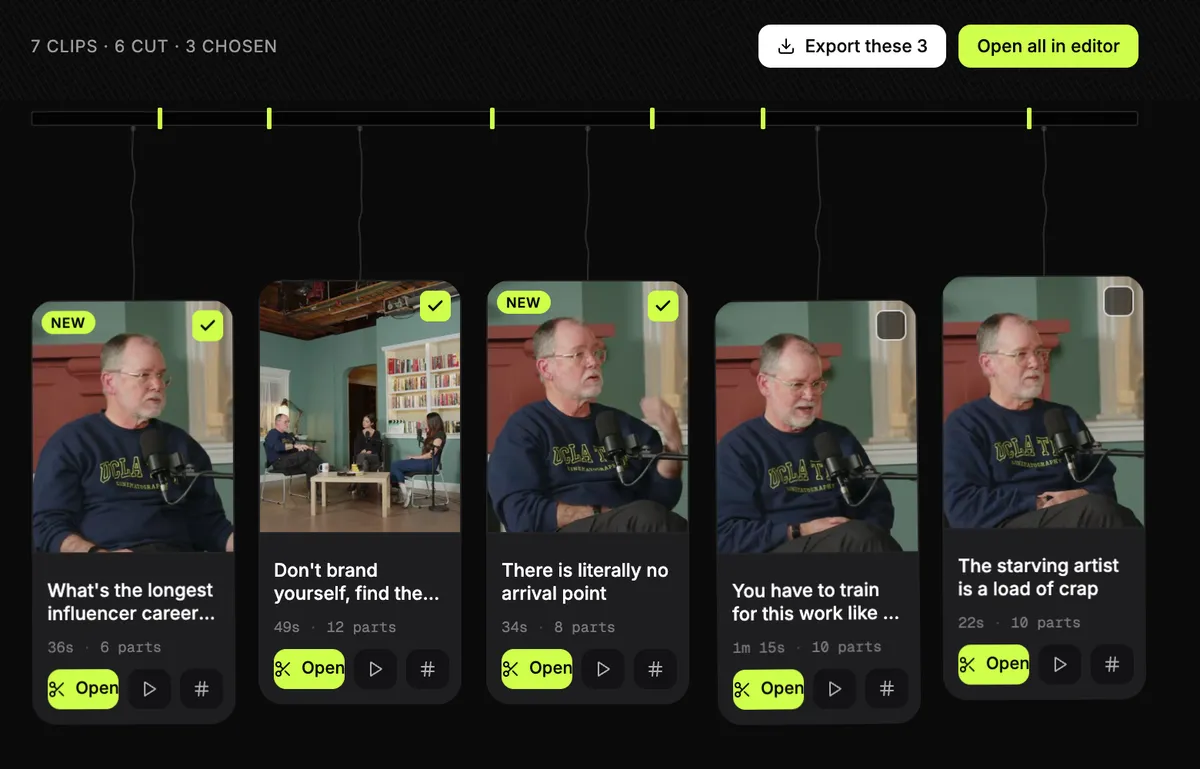
Paste the episode’s YouTube link or upload the file, pick the clips, export them together, and upload them to Shorts yourself.
- Takes mP4, MOV or WebM, up to three hours and 2GB. Or paste a YouTube video link, one video per link.
- The clips it finds run 15 to 90 seconds, inside YouTube's 3-minute limit, and you can trim any of them.
- Vertical, 1080x1920 as standard, and up to 4K when the recording is 4K, with the captions burned in.
- Each clip starts with a hook title on it and comes with post text and hashtags in the episode's language.
- Tick a dozen clips and export them at once: one email, one zip.
- $14.99 a month or $149 a year, no cap on videos, nothing stamped on the video. Up to 3 videos free with no card; downloading starts a 3-day trial.
Where it falls short
- It does not post to YouTube or schedule anything. You upload each Short yourself.
- Caption fonts cover Latin scripts and Hebrew only.
- Episodes over 3 hours need splitting first; OpusClip and Vizard take up to 10.
- No third-party reviews to report yet.
Before you post, check what YouTube’s buttons will cover with the free Shorts safe-zone checker.
Get the Slice Weekly
One free email every Friday: tools for creators and the best advice we found from people who make things.
Questions
What is the best tool to turn a podcast into YouTube Shorts?
It depends on whether you want it posted for you. OpusClip auto-posts to YouTube Shorts on its $15 Starter plan and takes episodes up to 10 hours, but meters minutes. Klap posts to YouTube and takes YouTube links. Shorts by Slice (ours) takes a 3-hour episode at a flat $14.99 a month and exports many clips at once, but you upload them yourself. Checked 30 September 2026.
How long can a YouTube Short be?
Up to 3 minutes, for videos uploaded after 15 October 2024, in a square or vertical shape, per YouTube's help centre (read 2 October 2026). A Short over one minute with an active Content ID claim is blocked worldwide, so a clip that includes licensed music is safer under a minute.
Can I make Shorts from a podcast that is already on YouTube?
Yes, with a tool that takes a YouTube link: Slice (one video per link), OpusClip, Klap, Vizard, and Submagic's Magic Clips add-on. Riverside and Descript take uploads, not YouTube links.
Which tools post straight to YouTube Shorts?
OpusClip auto-posts to YouTube Shorts on Starter. Klap posts to YouTube. Riverside schedules to YouTube on its Grow plan. Vizard schedules to social accounts on its paid plans. Descript publishes to YouTube but its help centre says Shorts are not supported. Slice does not post: you download the file, with post text ready to paste.
How did you compare these tools?
Compared from published pricing, limits, features and user reviews, checked 30 September 2026. YouTube's rules were read from its help centre on 2 October 2026. We did not test the other tools hands-on. We make Slice.
Side by side
- Best AI clipping tools for podcasts and streams (2026)
- Free OpusClip alternatives: what each free plan really gives
- Best AI clipping tools for Twitch and Kick streamers (2026)
- AI clip tools compared: prices and caps in one table
- The OpusClip alternative
- The Klap alternative
- The Vizard alternative
- The Submagic alternative
- The Descript alternative
- The Riverside alternative
- The Choppity alternative