Facts checked
The short answer
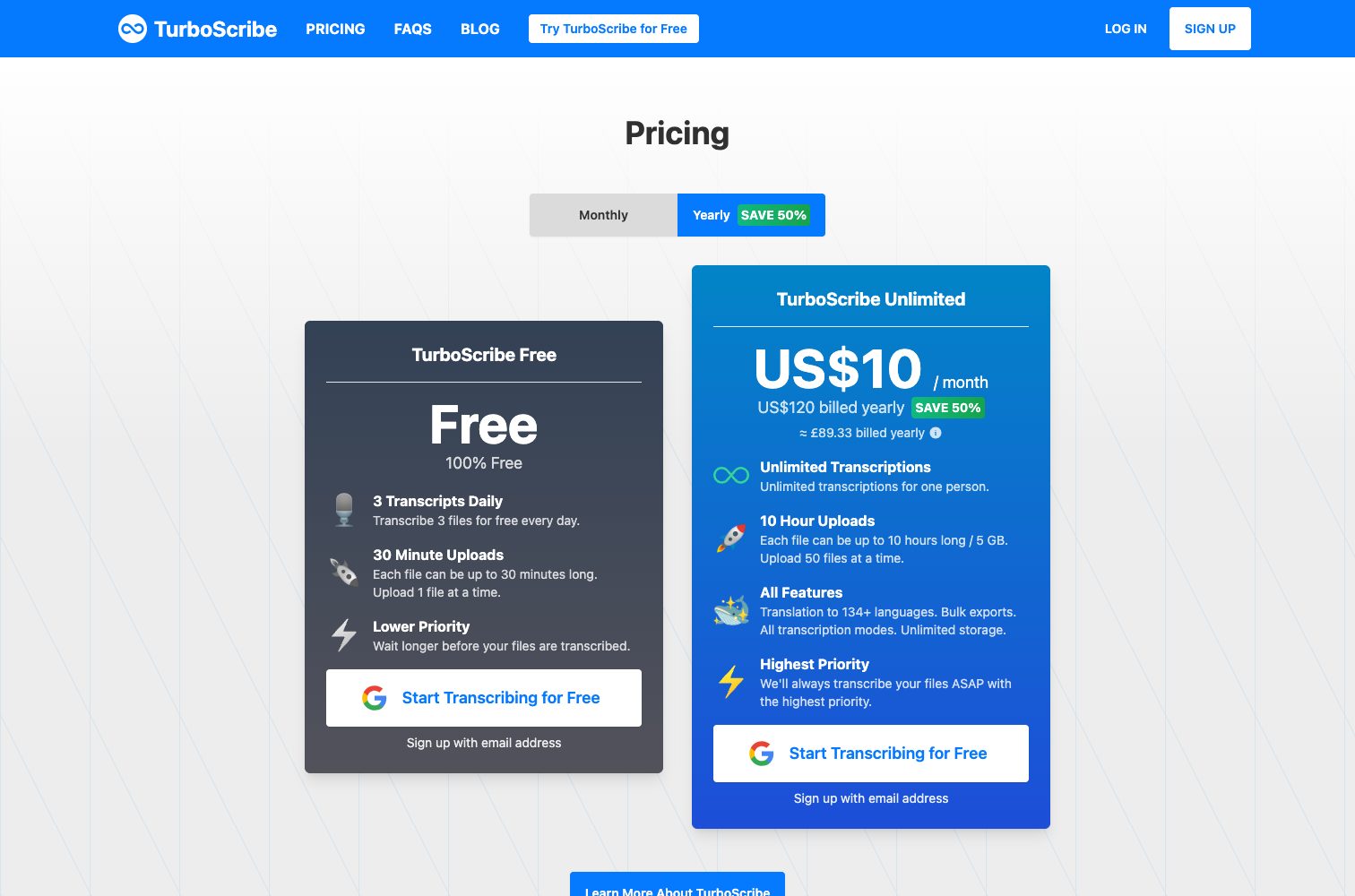
If you transcribe a lot, pick TurboScribe. Its Unlimited plan is $20 a month, or $10 a month billed yearly, with no cap on hours and files up to 10 hours, and its free tier gives you 3 files a day up to 30 minutes each, far more free volume than Slice. Slice is the better pick for one long recording now and then: the free tier takes a file up to 1 hour (TurboScribe's free files stop at 30 minutes), and paid hours come in packs from $1.99 that never expire, so there is no subscription to remember. Up to 20 hours a month, Slice's $7.99 monthly plan costs less; well past that, TurboScribe costs less, and the same however much you transcribe.
TurboScribe's Unlimited plan is a subscription: $20 a month, or $10 a month billed yearly. On Slice, a one-hour recording is the 1-hour pack at $1.99, paid once.
Choose TurboScribe if
- You transcribe many hours a month. Unlimited has no cap on hours, and well past 20 hours a month it is better value than anything Slice sells.
- You want a bigger free tier: 3 files a day, each up to 30 minutes.
- Your files are very long or very large: up to 10 hours and 5 GB a file, 50 files at a time.
- You need translation (it lists 134+ languages for transcripts and subtitles) or transcription in many languages (it claims 98+).
- You want an editor, PDF and CSV exports, bulk export of whole folders, and a choice of speed or accuracy modes.
Choose Slice if
- You transcribe now and then. Hour packs (1 hour for $1.99, 5 hours for $4.99, 15 hours for $9.99 or 40 hours for $24.99) are paid once and never expire, so a quiet month costs nothing.
- Your free recording is longer than 30 minutes. Slice's free tier takes up to 1 hour a file.
- You use up to 20 hours a month: Slice's monthly plan is $7.99, under TurboScribe's $10 a month billed yearly and $20 billed monthly.
- You want an API. Slice has an HTTP API at $2 an hour after the free allowance; TurboScribe says it does not offer one.
- You make clips from your episodes as well: the same account runs Shorts by Slice.
TurboScribe vs Slice, side by side
| Slice | TurboScribe | |
|---|---|---|
| What it is | A transcriber for recordings you upload | A transcriber for recordings you upload, sold as an unlimited plan |
| Free | 2 recordings a month, each up to 1 hour | 3 files a day, each up to 30 minutes, one at a time, lower priority |
| Longest file, free | 1 hour | 30 minutes |
| Longest file, paid | 3 hours | 10 hours |
| Paid price | $7.99 a month for 20 hours (about 40¢ an hour), files up to 3 hours, no count of files | Unlimited: $20 a month, or $10 a month billed yearly ($120). No cap on hours for one person |
| Pay once | 1 hour for $1.99, 5 hours for $4.99, 15 hours for $9.99 or 40 hours for $24.99. Paid once, the hours never expire, no subscription | No. Subscription only |
| File size | 600 MB a file | 5 GB a file; 50 files at a time on Unlimited |
| Speaker labels | Yes, free: each voice labelled Speaker A, Speaker B | Yes, a "Speaker Recognition" option when you upload |
| Exports | Free: the text on screen, plus .txt, .srt and .vtt (also emailed to you). Paid: adds Word (.docx), Copy for Notion and notes with a timestamp on every paragraph | PDF, DOCX, SRT, VTT, CSV and TXT; bulk export on Unlimited |
| Languages | Detects the language and transcribes in it. Tuned for English; we do not promise accuracy in other languages | Claims 98+ for transcription; translation to 134+ |
| Meetings | No. Upload a recording; nothing joins your calls | No meeting bot on the pages we read; you upload files |
| API | HTTP API: the same free allowance, then $2 an hour (10 hours for $20 or 50 hours for $90) | None. TurboScribe says it does not offer an API |
| Accuracy | No accuracy figure. We would rather you try one file | Claims "99.8% Accuracy" and says it varies by language, English the best |
TurboScribe’s figures from its pricing page and help pages, read . Prices in US dollars. Slice’s from the code that runs it.
Where Slice falls short
- It does not join meetings or record anything. You upload a file you already have.
- No transcript editor. You get the text and subtitle files and fix them in your own editor.
- No translation, and it is tuned for English. Other languages are transcribed in the language spoken, without a promise on accuracy.
- The free tier is small: two recordings a month. It is built for one long recording, not for daily use.
- No team workspace, shared folders or mobile app.
- Links are not supported on the website: you upload the file itself.
Where TurboScribe does more
- Volume: unlimited transcription for one person, and its FAQ says its systems are built for at least 720 hours a month.
- Long and large files: up to 10 hours and 5 GB each, 50 at a time.
- Translation of transcripts and subtitles, and "Transcribe to English" from other languages.
- Exports Slice does not make: PDF and CSV, and bulk export of a folder at a time.
- Three modes (fastest to most accurate), an audio restoration option for poor recordings, and subtitle line settings.
- Its upload list names YouTube as a source. Slice takes files only.
TurboScribe’s prices, in plain words
- Free: 3 transcripts a day, each file up to 30 minutes, one upload at a time, lower priority.
- Unlimited, monthly: $20 a month.
- Unlimited, yearly: $10 a month, billed $120 a year ("save 50%").
- Unlimited includes files up to 10 hours and 5 GB, 50 uploads at a time, translation, bulk exports, all transcription modes and unlimited storage. One login per person.
Worth knowing before you pick TurboScribe
- It is unlimited for one person: its FAQ says the only rule is not sharing your login.
- The pricing page lists translation, bulk exports, all transcription modes and unlimited storage under Unlimited, but does not spell out which of these the free tier lacks.
- There is no API: everything goes through its website.
- "99.8% Accuracy" is TurboScribe's own claim. We did not test it, or Slice against it.
“There are no caps on overall usage and customers regularly transcribe hundreds of hours per month.”TurboScribe FAQ
“TurboScribe does not offer an API or automated access to our service.”TurboScribe Help and Support
Try Slice on your own recording
2 recordings a month free, each up to 1 hour, with speaker labels and .srt and .vtt subtitles. Your first one needs only an email address. If TurboScribe fits you better, use it.
More than that: 1 hour for $1.99, 5 hours for $4.99, 15 hours for $9.99 or 40 hours for $24.99. Paid once, the hours never expire, no subscription. Or $7.99 a month for 20 hours (about 40¢ an hour), files up to 3 hours, no count of files. Calling it from code? The transcription API.
Questions
Which is better, TurboScribe or Slice?
Is TurboScribe really unlimited?
Is TurboScribe free?
When is Slice cheaper than TurboScribe?
Which takes longer files for free?
Does TurboScribe have an API?
How was this compared?
Sources
Each read in a browser, not signed in, on :
Found something out of date? Tell us and we will fix it and re-date the page.
More comparisons
This tool is looked after by Clack.Listens hard, types fast, never asks you to repeat yourself.
More Free Tools
Shorts by Slice
From the team behind these free tools
One video. A week of posts.
Upload an episode and get back the moments worth posting, cut and captioned.
- Reads the whole episode, then picks the excerpts worth posting
- Captions burned in and framed vertical, ready to post
- Your first video (we search the first hour) and first 2 clips are free, no card