Guide for podcasters
How to turn an audio podcast into video clips
Plenty of podcasts are just voices. That is a problem on TikTok, Reels and Shorts, where people scroll with their eyes first. Here are the five ways audio-only shows deal with it, what podcasters say actually works, and one real episode run through every template we make.
The short answer
Give people something to read, not just something to hear. Pick a moment that makes sense on its own and starts strong, put the words on screen in big captions, and add your cover art or the hosts’ faces. You can make that by hand in Canva, as an audiogram in Headliner, or by uploading the episode’s audio to Slice, which finds the moments and draws each one with one of 16 templates.
Why a waveform is not enough any more
For years the answer to “how do I make my audio podcast into a video” was the audiogram: cover art, a bouncing waveform, maybe some captions. It still works as a way of getting the episode onto video platforms. As a clip people stop scrolling for, podcasters are blunt about it.
“You are not getting views with just a waveform.”
“those classic static audiograms with the bouncing waveform are basically invisible on reels now.”
But the most useful answer in those threads was not about the picture at all. It was about which 45 seconds you chose.
“The waveform format usually isn't the problem by itself, the clip selection is.”
The same commenter’s rule is the one to keep: open the clip on the most alarming sentence, not the lead-up to it.
Even Headliner, whose whole business started with the waveform, says the same thing. Its head of marketing, answering in the same thread as the first quote above:
“I would argue the quality of the clip and initial 1-2 seconds of audio are going to be the most critical part of making an engaging clip.”
What do you do for video when you clip an audio-only podcast?
That question, nearly word for word, gets asked in r/podcasting every few weeks. Here are the five answers that come back, with what they cost you in time and what the people using them say.
| Option | What it looks like | Time per clip | The catch |
|---|---|---|---|
| Static cover art | Your artwork, still, with the audio | Minutes | Fine for a full episode on YouTube; gives a clip nothing to look at. |
| Waveform audiogram | Cover art, a moving wave, often captions | Minutes, with a tool | Recognisable as “a podcast”, which is also why it gets scrolled past. |
| Stock footage or b-roll | Footage that matches the topic, under your voice | As long as the search takes | One podcaster: stock footage is the absolute death of personality, feels like a corporate training video from 2009 |
| Made by hand (Canva, CapCut) | Animated text, photos, your own design | Hours | Looks the most like your show, and costs the most evenings. |
| Templates drawn from the words | Big captions, quotes, chat bubbles, faces that light up | Minutes, once the show is set up | Still only as good as the moment you pick. |
The people doing the hand-made version are honest about the trade:
“We make simple animated shorts in Canva for our audio-only show, and they've performed very well compared to basic audio clips. Downside is each one takes a few hours to create.”
“You can easily sink hours into it and still end up with something pretty underwhelming, which is honestly frustrating.”
Simple can still work, if you keep at it:
“Mine is audio only but I create waveform videos and text card shorts to promote it. It does take time but growth is steady.”
One more idea from those threads is worth stealing whatever you use: a picture of the guest with a line from the episode.
“I've been using a photo of my guest(s) and sometimes adding a caption of one of the quotes from my episode.”
What makes an audio-only clip worth watching
Put the threads together and the rules are short.
- A moment that stands on its own. Someone who has never heard your show has to follow it from the first line. A story with a turn in it beats a clever aside.
- Start on the line, not the run-up. Cut the “so, um, the thing is” and begin where the sentence bites.
- Words big enough to read with the sound off. As the producer of an audio-only show three years in put it:
If you must do it, you should probably include captions and an interesting image at minimum.
- Something that moves with the voice. Words appearing as they are said, a face that lights up when that person talks, a level that rises when someone laughs.
- Your show, recognisably. The same colour, the same cover and the same look every week, so a second clip is recognised as the show from the first.
And measure the right thing. One reply in r/podcasting is worth reading before you start, because it saves a lot of disappointment:
“If you add video, you're basically creating a new channel where you're entertaining people with your clips.”
Picking the moment is the hard part, and it is the part our guide to finding the best moments in a long recording covers.
One real episode, sixteen ways
To show what “drawn from the words” means, we used a real podcast that its makers publish under an open licence: LinuxGameCast Weekly 430, an 82-minute episode by LinuxGameCast LLP (CC BY-SA 4.0). When we ran it through Slice on 2 October 2026, one of the moments it found was a host’s story titled “I spent two months fighting Netflix over a copyright claim”: 1:11 long, built from 6 passages of the conversation.
Below is that one clip in every template. Each frame is drawn by the same code that draws the preview on the episode page and the exported MP4, from the clip’s real words and the real level of its sound. We added no cover art and no photos, so you can see what happens before you set your show up: the templates that want a picture use the show’s initials.
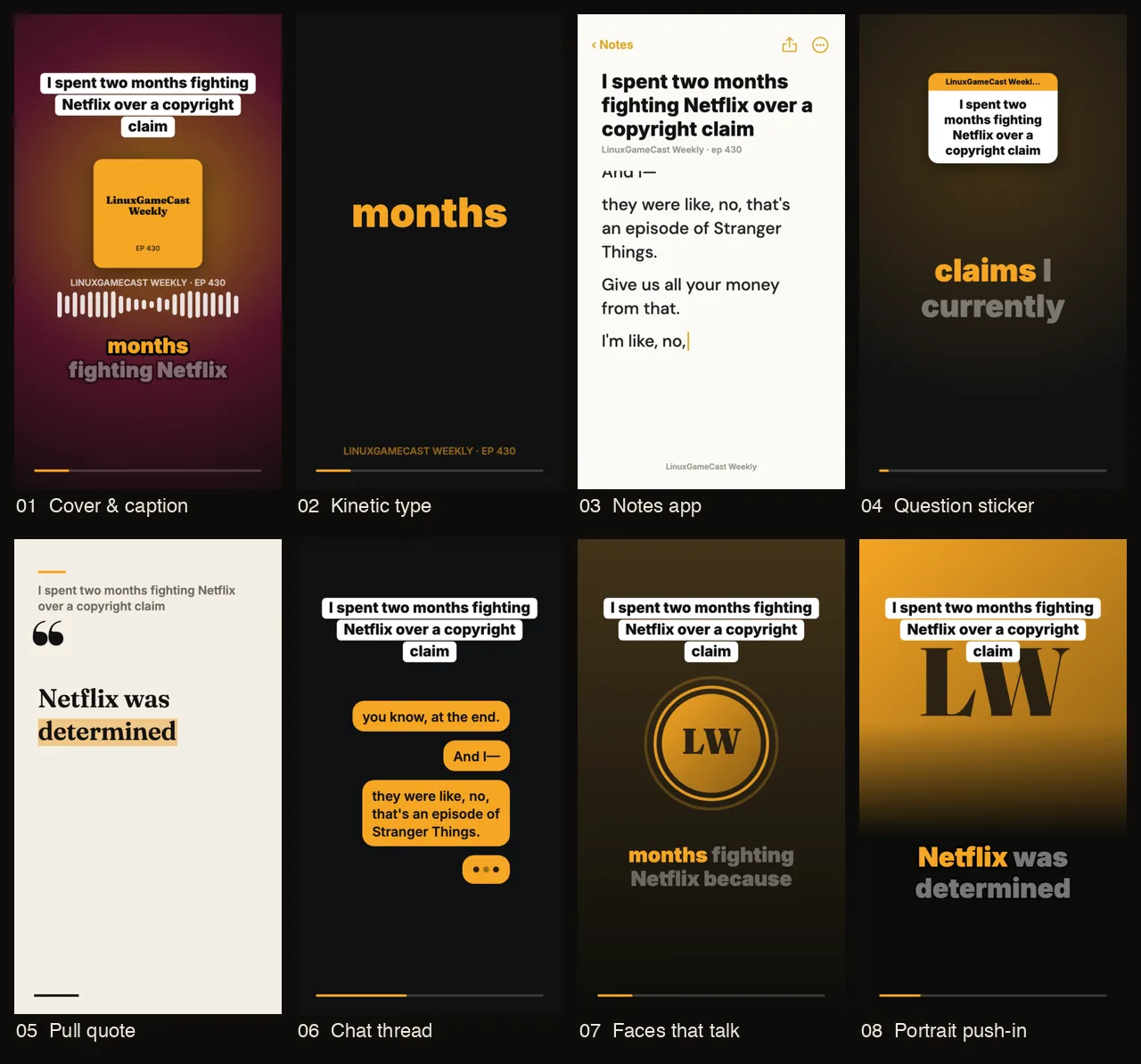
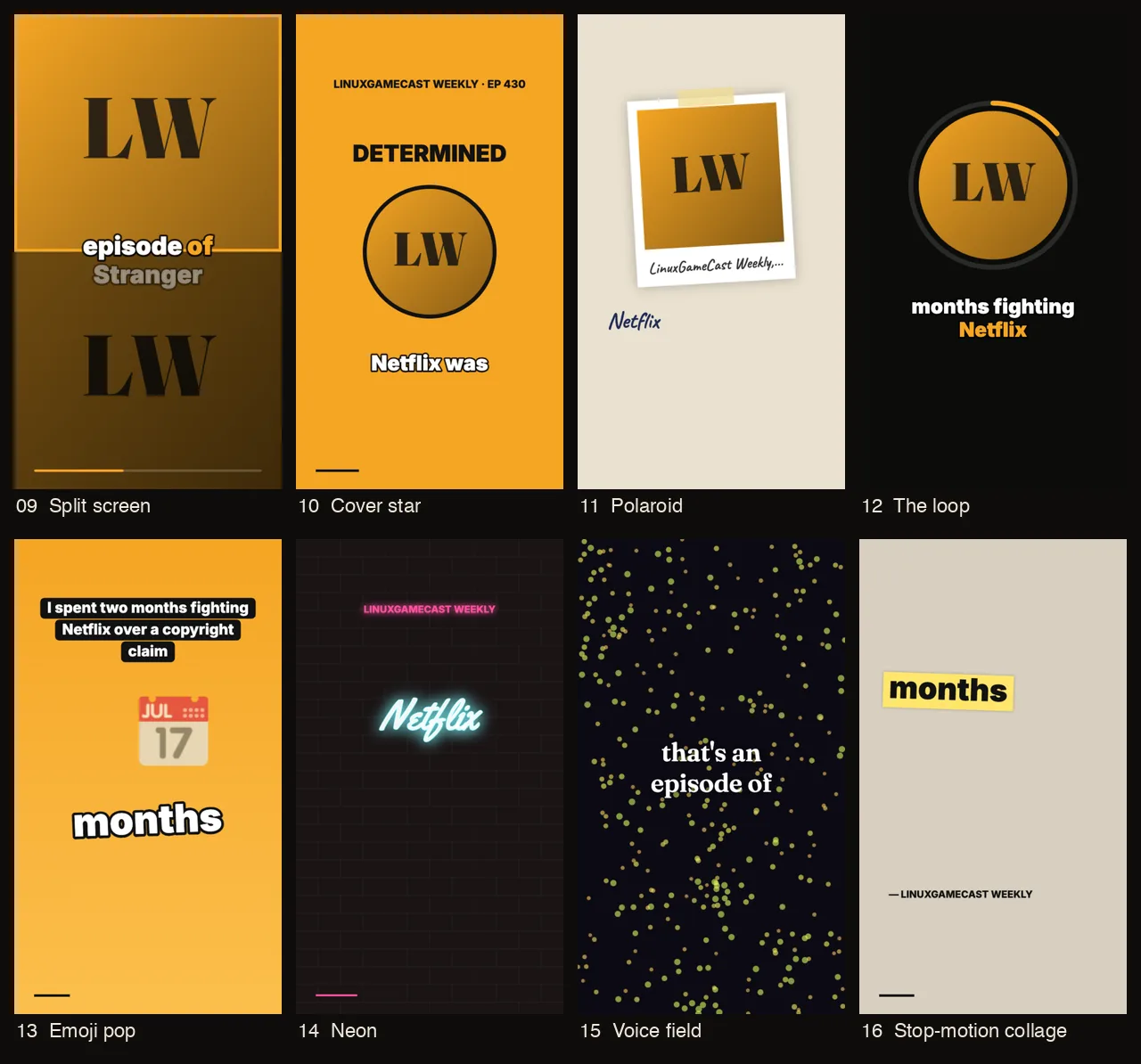
Some notes from looking at them side by side. Chat thread and Notes app carry the most words, so they suit a story told over a minute. Kinetic type, Emoji pop and Neon show one or two words at a time, so they suit a fast punchline. Pull quote builds one sentence and ends on a card you can post on its own. The face templates (7 to 12) are the closest thing to a video podcast, but only once you add real photos.
How to turn an audio podcast into video clips with Slice
- 1Audio file
- 2Transcript, voices told apart
- 3Moments that stand alone
- 4Template, drawn from the words and the sound
- 5Vertical MP4
- Upload the episode’s audio file
Sign in at tryslicemedia.com/shorts and drop the file on the page. An audio-only episode uploads as MP3, M4A, WAV, OGG or FLAC; its clips are drawn with templates from the words, your cover art and the sound of the voices. You need no video and no camera.
- Let Slice read the episode
Once the upload has finished, Slice transcribes the episode, tells the voices apart and lists the moments that stand on their own, each with a title, its length and the line it opens on. You can close the tab while it reads.
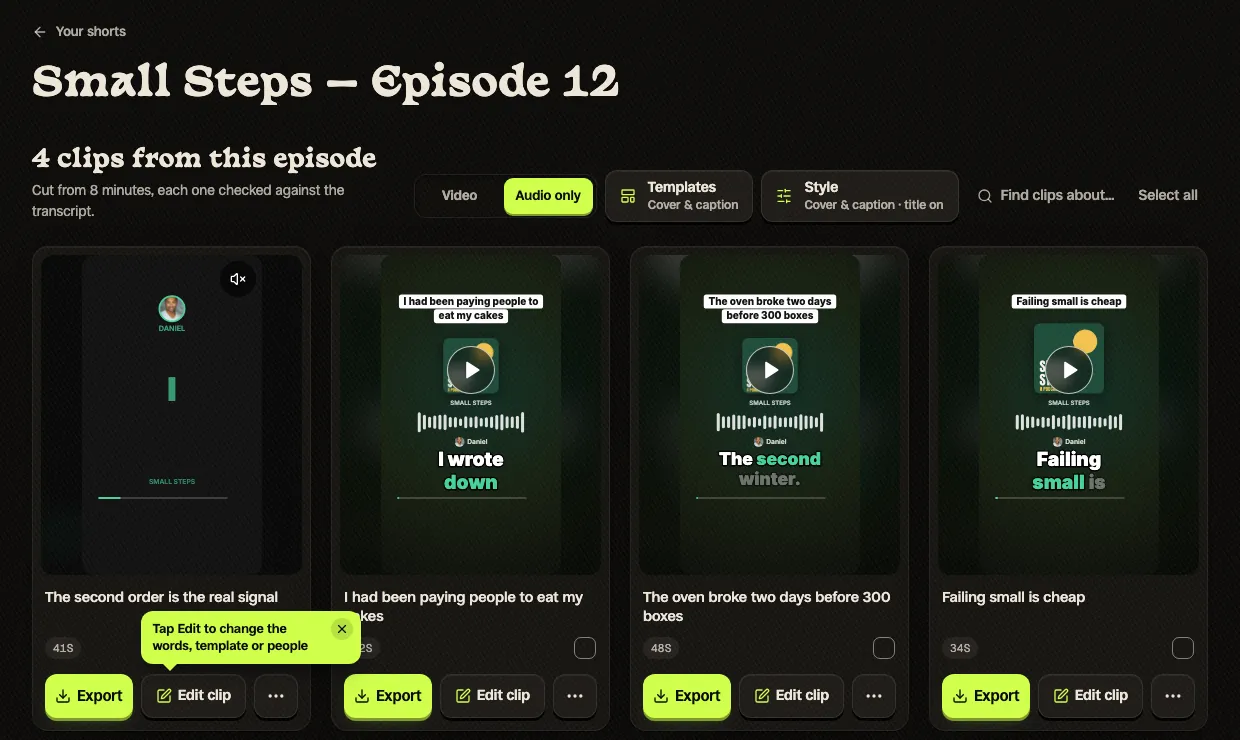
The episode page with Audio only switched on: four clips from an 8-minute episode, each drawn with the Cover & caption template. Templates and Style sit beside the switch. Tap to enlarge. - Fill in your show once
Add the cover art, the show name and a colour (or take it from the cover), and the hosts, with photos if you want the templates that show faces; in the editor this is the Show & people panel. Slice keeps these for the next episode; guests are per episode.
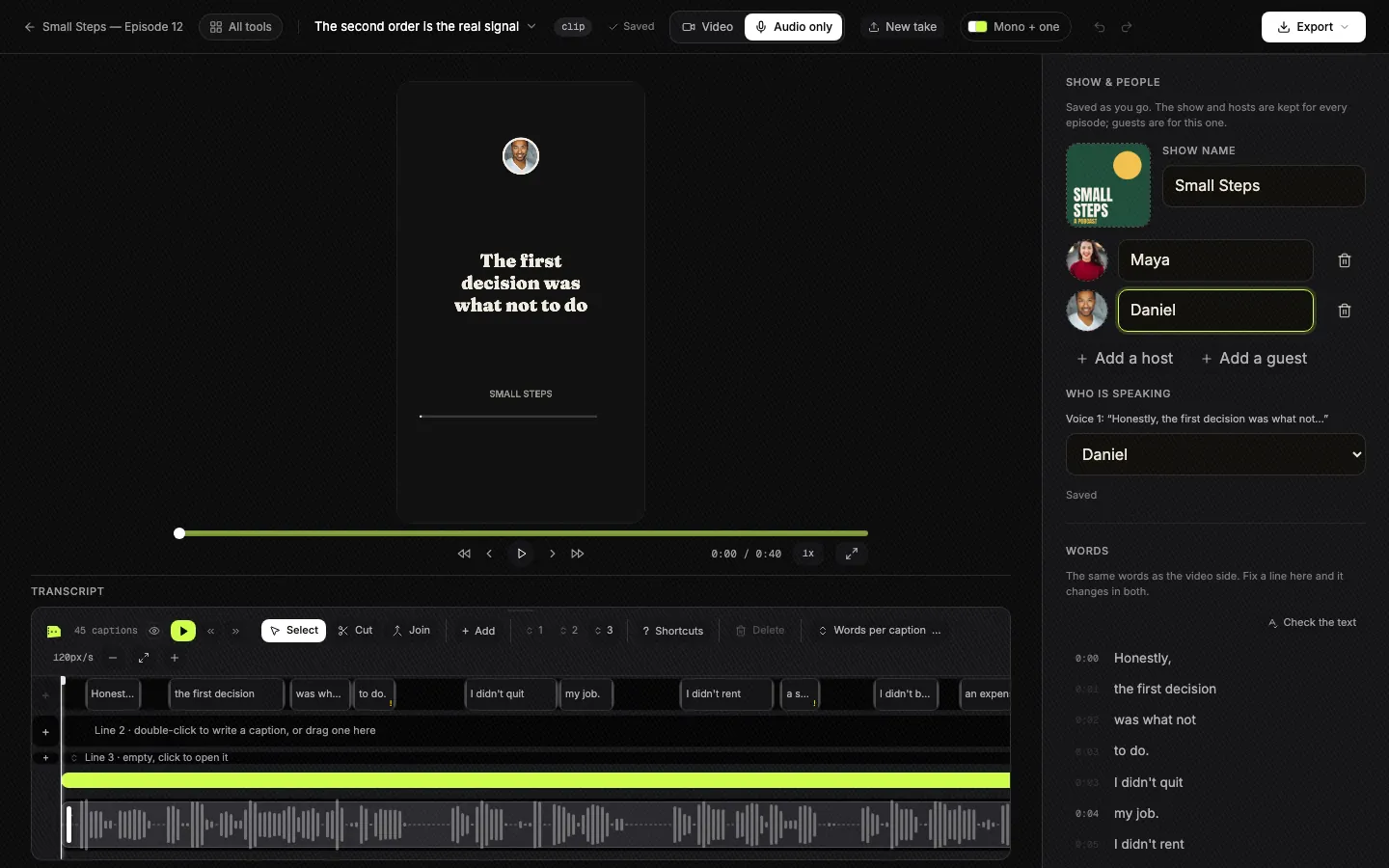
Show & people: the cover, the show name, hosts and guests with photos, and which voice is which. The show and hosts are kept for every episode. Tap to enlarge. - Pick a template
Press Templates. Every one of the 16 plays on your own clip, so you choose by looking, not by name. One template can be the look for the whole episode, and any single clip can have its own from its “...” menu.
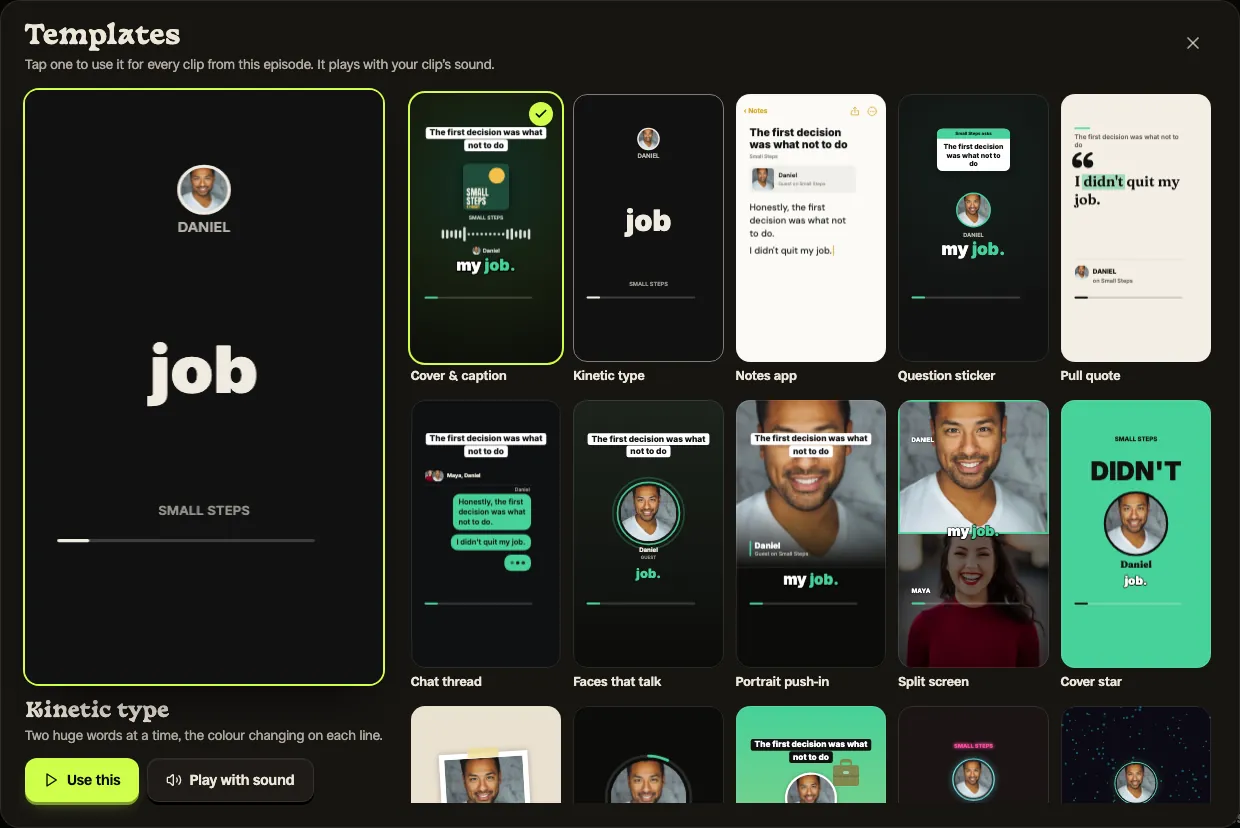
The Templates gallery: every template plays on your own clip, with your show’s photos, and one tap picks it. Tap to enlarge. - Check the words and the cut
Play each clip you like. In the editor, fix any word or name the transcript got wrong and change the background, caption size, position and font, and make sure the clip still means what was said: a clip can join passages from minutes apart, always in the order they were said.
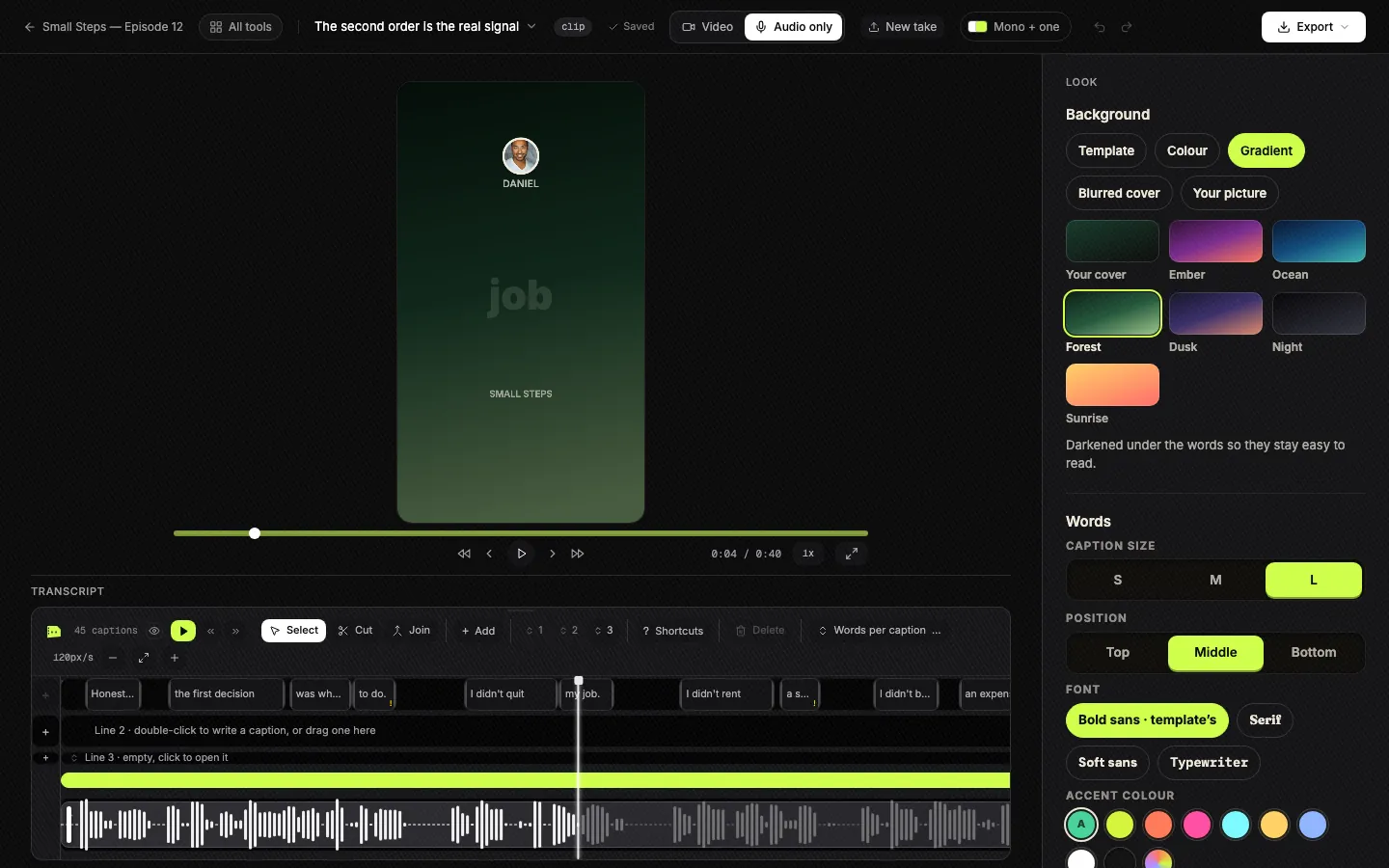
The editor in Audio only mode: the transcript and waveform below, and the Look panel for background, caption size, position, font and colour. Tap to enlarge. - Download and post
Each clip downloads as a vertical MP4 with the sound and the captions in it, ready for TikTok, Reels and Shorts. The Pull quote template also gives you its last frame as a picture, for a post or a story. Your first 3 clips are free with no card; after that a 3-day free trial, then $14.99 a month.
Have a video episode as well? It can use the same templates: the episode page has one switch, Video or Audio only, and each side keeps its own settings. Useful when the camera angle is bad or a guest joined by phone.
Other ways to do it, honestly
Slice is one way. If all you need is the full episode on YouTube with a picture on it, you may need nothing at all: your host or YouTube itself can do that from your RSS feed. For clips:
- Headliner made the audiogram popular and can make one automatically for every new episode in your feed. When we read its pricing page on 3 October 2026, its plans were: Free; $9.99 / $25.99 a month, or $7.99 / $19.99 billed yearly. The free plan gave 1 audiogram a month without a watermark. See Headliner and Slice side by side.
- Canva or CapCut, by hand, for the most control over every frame, at hours a clip.
- Your editor: Descript and Riverside both make clips with captions, and both are built around recordings with video. Our podcast clip makers compared lists them all, priced from their own pages.
Where Slice is not the right pick: it does not post for you, and it does not edit the full episode. It finds the moments and makes the clips.
“My show is audio-only, and I use Headliner to create a video from that. I mainly put it on YouTube for discoverability since so many people listen to podcasts there. But I do get new subscribers there each month, up to around 1300 subscribers now.”
Get the Slice Weekly
One free email every Friday: tools for creators and the best advice we found from people who make things.
Questions
Can I make video clips from a podcast that has no video?
Yes. A clip needs something to look at, not a camera recording: the words as captions, your cover art, photos of the hosts, a moving level of the voice. Upload the audio file to Slice and each clip is drawn with a template instead of a picture.
What is an audiogram?
A short video made from podcast audio, usually the cover art with a waveform that moves with the sound and the words as captions. Headliner made the format popular. Podcasters now say a waveform alone gets scrolled past, so big captions and a strong first line matter more than the wave.
Is there a free way to turn an audio podcast into video?
Yes. Headliner’s free plan gave one audiogram a month without a watermark when we read its pricing page on 3 October 2026, and unlimited ones with a watermark. Canva is free if you do it by hand. Slice’s first 3 clips are free, with no card.
How long should an audio podcast clip be?
As long as the moment, and no longer. Slice’s clips run from 30 seconds to two and a half minutes; the one in our example runs 1:11. What matters more than length is the first two seconds, so start on the line that makes someone stay.
Which audio files can I upload?
MP3, M4A, WAV, OGG or FLAC. A video episode works too, and can switch to the same templates with the Video / Audio only switch.
Do I need the show’s cover art and photos?
No. Half the templates need nothing but the words and the sound. The ones that show a cover or faces fall back to your show’s initials until you add pictures.
More for podcasters
- Best podcast clip makers: every clip tool, priced from its own page.
- One episode for TikTok, Reels and Shorts: what changes between the three.
- The Podcast Census 2026: how few podcasts put video in their feed.
- Transcribe a podcast, free: the words of the episode as text and subtitles.