Guide
How to find the best moments in a long video with ChatGPT
· by the Slice team, who make the plugin
The short answer
Two ways. For free, get a transcript with timestamps, paste it into ChatGPT with the prompt below and ask for the moments that stand on their own; you then cut them yourself. Or add the Slice plugin, attach the video and type “@Slice turn this video into short clips”: Slice transcribes the whole recording, lists the moments with their lengths, opening lines and reasons, and cuts the ones you pick. On an 82-minute podcast it listed four moments three and a half minutes after the upload.
New to the plugin? Set up Slice in ChatGPT or Claude first. It takes a couple of minutes.
The free way: a transcript and a prompt
This works in any ChatGPT plan with no plugin. You need a transcript with timestamps: the free audio to text tool gives you one as an .srt file, which has a time on every line, or the Slice plugin can transcribe it inside ChatGPT. Paste the transcript after this prompt:
The catch is the timestamps. A podcaster asked on OpenAI’s forum exactly what you will run into:
“If I load my assistant with that transcript is there a way to ask it a question and have it tell me the timestamp closest to it?”
“I can get the assistant to answer questions from the transcript but not give me the timestamps… am I just doing it wrong?”
The prompt above asks for the times and the first line word for word for that reason: you can then search the transcript for the line and check the time yourself, rather than trust a time the model wrote down.
Why each part of it is there:
- “on their own, for someone who has never heard this show”: the most common bad pick is a great line that needs the five minutes before it.
- “the first line as it is said”: the opening line decides whether anyone keeps watching, and asking for it word for word lets you find it in the recording.
- “use only lines that are in the transcript”: without it, a model may tidy a quote into something nobody said.
What this leaves to you: checking the times against the recording, cutting each clip, making it vertical and captioning it. If you edit anyway, that is fine. If you don’t, that is the part the plugin does.
The plugin way: a real run on an 82-minute podcast
What a video editor on Hacker News wished for is close to what this route does:
“As someone who has worked as a video editor, the most helpful AI tool would be prompt based editing. For example “find all the interview sections where people are talking about x and make a sequence”.”
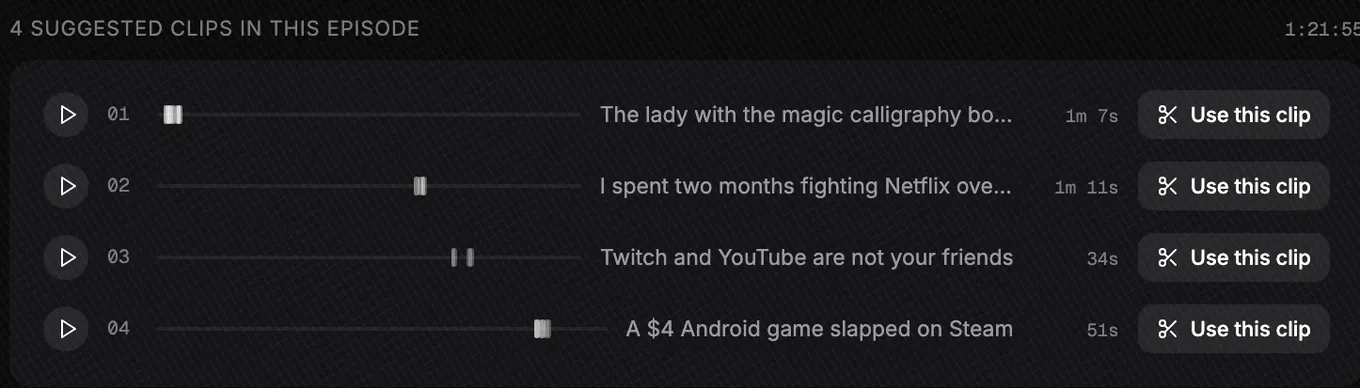
On 2 October 2026 we ran LinuxGameCast Weekly 430 through the Slice plugin: a three-host video podcast, 1:21:55 long, published by LinuxGameCast LLP under CC BY-SA 4.0. Three and a half minutes after the upload finished, it listed four moments; the search itself took 39 seconds once the transcript was ready. Here they are, with where each comes from and the reason Slice gave, word for word:
| # | Title Slice gave it | Length | Taken from | Opens on | Why Slice picked it, word for word |
|---|---|---|---|---|---|
| 1 | The lady with the magic calligraphy books | 1:07 | 1:20 to 4:05, 17 passages | “So gyms have been closed. I'm a powerlifter. I have to get creative with my training.” | Complete self-contained story with a hard left turn — powerlifter pushes a stranger's car up a driveway and gets paid in cancer-curing calligraphy; the 'I thought they were Bibles' beat lands and the Matrix line closes it. |
| 2 | I spent two months fighting Netflix over a copyright claim | 1:11 | 49:37 to 51:12, 6 passages | “Um, you gotta realize how many false claims I currently get on our YouTube channel, man, each month.” | Specific, verifiable first-person war story with a punchline — the claimed song came from YouTube's own audio library — ending on 'be happy to see you in court.' |
| 3 | Twitch and YouTube are not your friends | 0:34 | 56:47 to 1:00:13, 4 passages | Strong language, so we skipped this one | Starts cold on the strongest line in the episode and builds to an actionable takeaway about direct funding; highly shareable for any creator audience. |
| 4 | A $4 Android game slapped on Steam | 0:51 | 1:08:35 to 1:10:46, 9 passages | “The uh developer's solution was to fix this was to disable my firewall and antivirus.” | Opinionated review takedown with receipts — he bought the mobile version to check — plus the absurd 'disable your antivirus' dev support answer as a cold open. |
What the reasons tell you
The reasons keep coming back to two things. A moment that stands on its own: “complete self-contained story”, “first-person war story”. And a line that lands at the start or the end: “the Matrix line closes it”, “ending on ‘be happy to see you in court’”, “as a cold open”. That is the test to apply to any pick, whoever made it: would it make sense to someone who has never heard the show?
The spread matters too. The four moments come from 1:20, 49:37, 56:47 and 1:08:35: the whole episode was read, not just the opening.
What to check yourself
- The language. Moment 3 opens on strong language. Slice ranked it on how well it would play, not on whether it suits your audience. That call is yours.
- The joins. Moment 1 is 17 passages stitched together. One join dropped a word (“There’s not a of heavy things”). Tight joins are the point, and not everyone likes them:
“I've always taken issue with youtube clips content creators automatically (?) cutting pauses between words or people listening to podcasts in 1.5x or 2x speed or even clips already being sped up.”
If you would rather keep the pauses, open the clip on the Slice website and put the passages back.
Was it worth it?
For an 82-minute episode, the alternative is listening to all of it. Someone who edits commercials put the saving for this kind of material like this:
“For interview-like content it cuts work by 30-70% maybe.”
Which way should you use?
| Transcript + prompt | Slice in ChatGPT | |
|---|---|---|
| Cost | Nothing beyond ChatGPT | A Slice plan, after a 3-day trial |
| What you give it | A transcript with timestamps | The video file |
| What you get | A list of moments to cut yourself | A list, then finished vertical clips |
| Joins passages and drops asides | Only if you ask and then edit it yourself | Yes, and says why |
| Moments on one topic | Ask in the prompt | “@Slice find clips about…” |
| Best for | You edit anyway, or want one or two clips | You post clips every week and don’t want to edit |
Step by step with the plugin
First time? Can ChatGPT make clips from my video? shows the whole run, including the finished clips and what we would fix.
- Attach the recording
With Slice added to ChatGPT, start a new chat and attach the video file. MP4, MOV or WebM, up to three hours and 2GB.
- Ask for the moments
Slice transcribes the whole recording and reads it, then lists the moments it found: a title, the length and the opening line of each. Nothing is cut until you choose.
Type@Slice turn this video into short clips - Narrow it to a topic or an audience, if you want
Ask for moments about one thing. Slice searches the recording again for that focus, skips the moments already listed, and adds any it finds, with a line on why each fits. It may find few, or none, when little in the recording fits.
For example@Slice find clips about pricing, for freelancers - Ask ChatGPT to compare them
The moments are now in the conversation, so ChatGPT can rank them for a particular platform or audience without you pasting anything.
Which two of these would work best on TikTok for people new to the show, and why? - Make the ones you choose
Reply with their numbers, up to 10 at a time, and Slice cuts them as vertical clips with captions and a hook title.
Type1 and 3 please
Get the Slice Weekly
One free email every Friday: tools for creators and the best advice we found from people who make things.
Questions
Does ChatGPT watch the video to pick the moments?
It works from what is said. With a pasted transcript, ChatGPT reads your words; with Slice, Slice transcribes the recording and picks from the transcript, then checks each moment against it before you see it. A moment that is only visual, with nothing said, will not be found either way.
How long can the video be?
With Slice, MP4, MOV or WebM, up to three hours and 2GB. If ChatGPT will not take a file that size as an attachment, ask Slice for an upload link and drop the video there. With a pasted transcript, the limit is how much ChatGPT will read in one message; split a long one into parts and ask for the best moments in each.
Why is a clip joined from several passages?
Talk wanders. Slice keeps the lines that carry the point and drops the cross-talk and asides between them. In our run, clip 1 was 17 passages from 1:20 to 4:05, cut to 1:07. The cost is that a join can clip a word, as one did there, so watch the clip; you can open it on the Slice website and put the word back.
Can I ask for moments about one topic?
Yes, once the first list is there: "@Slice find clips about…" with a topic or an audience. It takes about a minute, and it says so plainly when it finds nothing that fits.
Is it free?
The paste-a-transcript route costs nothing beyond ChatGPT, and the transcript can come from the free Slice transcription (90 minutes a file). Finding and making clips with the Slice plugin needs a Slice plan: $14.99 a month after a 3-day free trial.
More guides
- Set up Slice in ChatGPT and Claude: adding the plugin, with pictures
- How to make podcast clips with ChatGPT (2026): Step by step, from attaching the episode to downloading captioned vertical clips, with the exact prompts.
- Can ChatGPT make clips from my video?: What ChatGPT can and cannot do with a video file, and how to get finished clips out of it.
- How to repurpose a podcast for TikTok and Reels with ChatGPT: One episode into TikToks, Reels and Shorts in one chat: the clips, the captions, the hook titles and the post text.
- Can Claude edit video? How to make clips with Claude: What Claude can and cannot do with video, and how to get clips out of it with a connector.
- Can ChatGPT transcribe audio? Yes, with a free plugin: Free transcripts with speaker turns and subtitle files, in either app, with no sign-in.
- AI clipping inside ChatGPT or Claude vs AI clipping apps: An honest comparison of the two ways to work, including where a standalone app is the better choice.
- All guides