Checked 6 October 2026 · 9 tools
The best podcast clip makers.
The AI clip tools podcasters use to turn episodes into Shorts, Reels and TikToks, plus the audiogram makers, compared on price, free plan and watermark, the longest episode each takes, and what their users say.
How we chose. We picked the AI clip makers podcasters most often weigh up for turning a long episode into short clips, plus Headliner (built for audio podcasts) and Kapwing (an editor with a clip generator). Nothing here was tested hands-on. User quotes come from Trustpilot, Reddit (r/podcasting) and App Store, and each was checked word for word against the page it links to; a quote that could not be checked is not here.
We make Slice, a few of whose tools appear here where they do the job; they are marked “ours”. No tool paid to be listed.
Which one, in ten seconds
Find the line that sounds like you.
- You want a free AI clip generator with no watermarkKlap
- You have an audio-only podcast and want something posted for every episode automaticallyHeadliner
- You want the best-reviewed clipper with a schedulerVizard
- You want a virality score and auto-posting, and your monthly footage fits a minutes budgetOpusClip
- You already record your show in RiversideRiverside Magic Clips
- You care most about caption stylingSubmagic
- You want to try an hour of real footage before payingChoppity
- You want a full editor to finish clips by handKapwing
Side by side
| Tool | Best for | Price | Free tier | Key limits | Platforms |
|---|---|---|---|---|---|
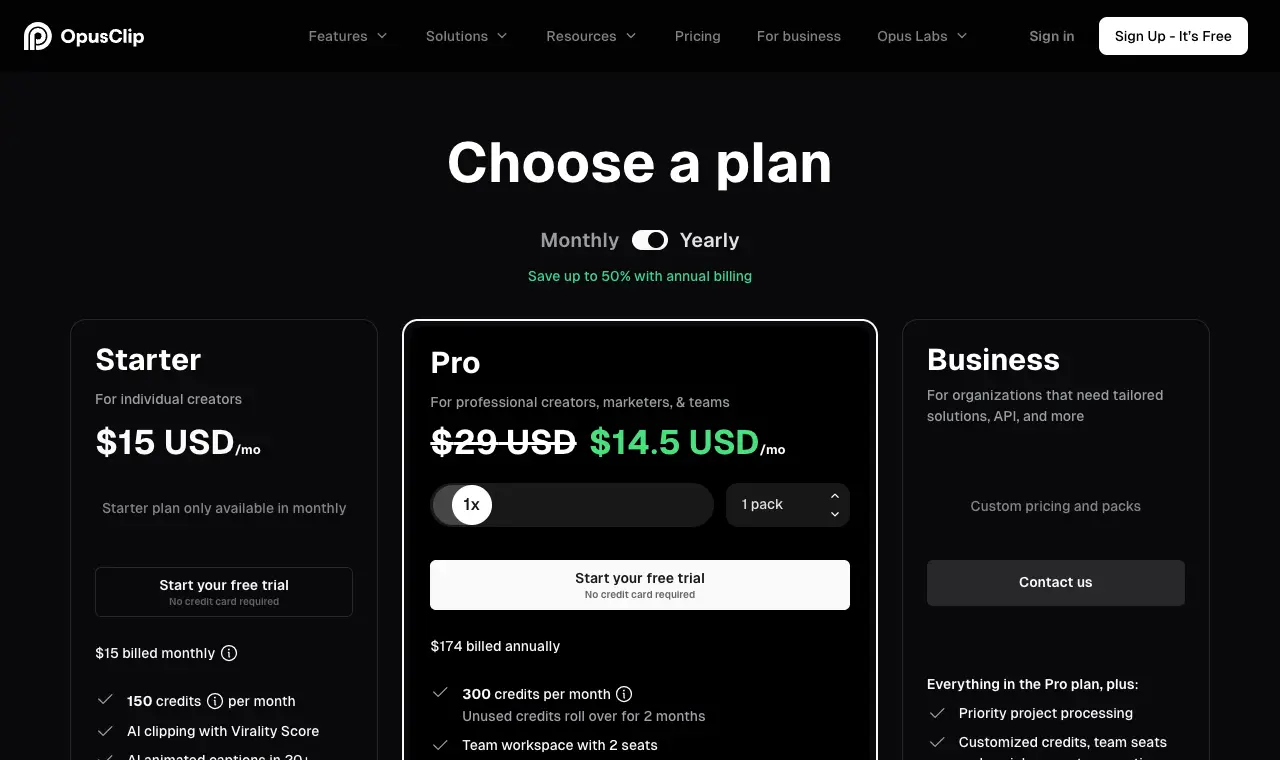
| OpusClip | podcasters who want an AI clip generator that scores each clip, reframes to the speaker and can post or schedule for them | Free; $15/month Starter; $29/month Pro ($14.50/month billed yearly) | 60 credits a month (1 credit = 1 minute of source video), clips up to 1080p, watermarked, and clips can no longer be exported after 3 days. | Priced by minutes of source video: 150 a month on Starter, 300 per pack on Pro. Videos up to 10 hours. Monthly-plan credits expire after 60 days. | Web |
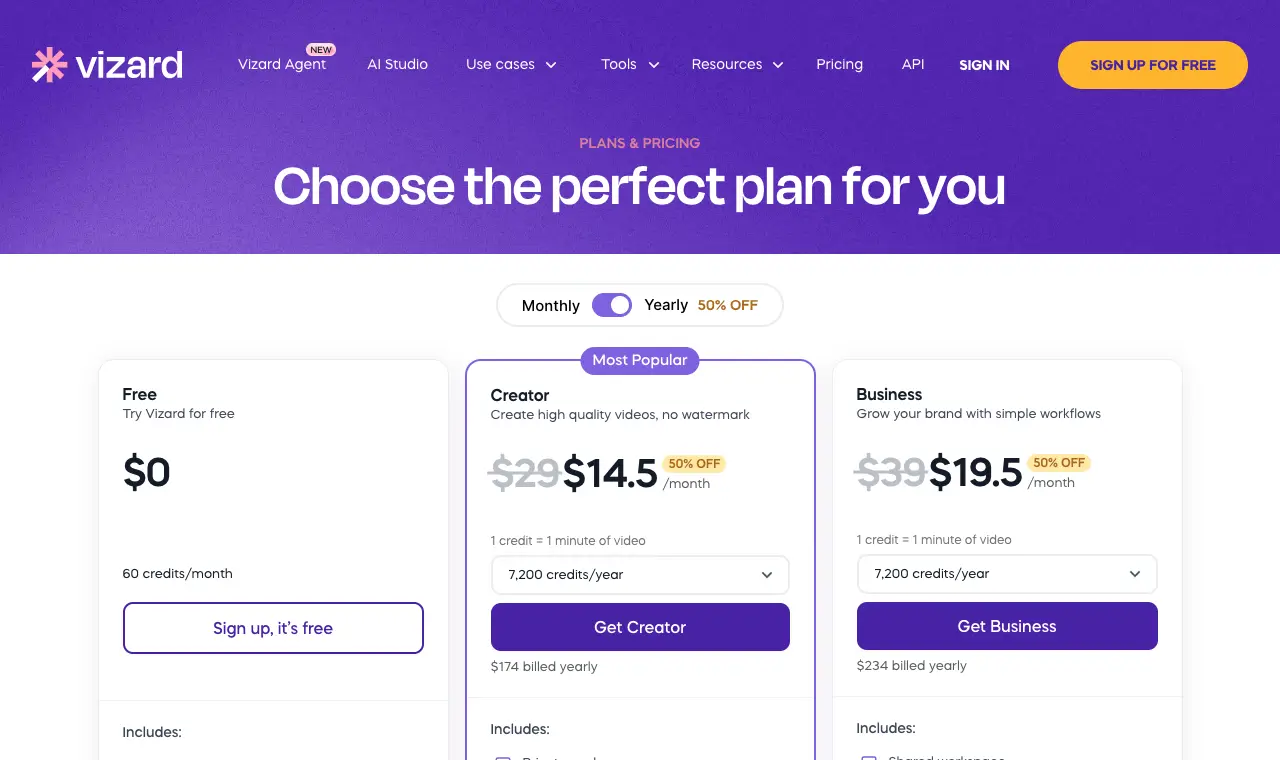
| Vizard | podcasters who want the best-reviewed AI clipper with scheduling built in, at a low yearly price | Free; $29/month Creator ($14.50/month billed yearly); $39/month Business ($19.50/month billed yearly) | 60 credits a month, 720p exports up to 10 minutes long, watermarked, 1GB uploads, files kept 3 days. | 1 credit = 1 minute of video; 600 credits a month on paid plans. Uploads up to 60 minutes on Free and 10 hours on paid plans. | Web |
| Shorts by Sliceours | podcasters who cut many clips from long episodes every week and want them all out in one download, at a flat price | $14.99/month or $149/year | Your first clip is free, no card; then a 3-day free trial | Episodes up to 3 hours and 2GB; clips of 30 to 150 seconds; no cap on videos, up to 1,000 exports a month | Web, in any browser |
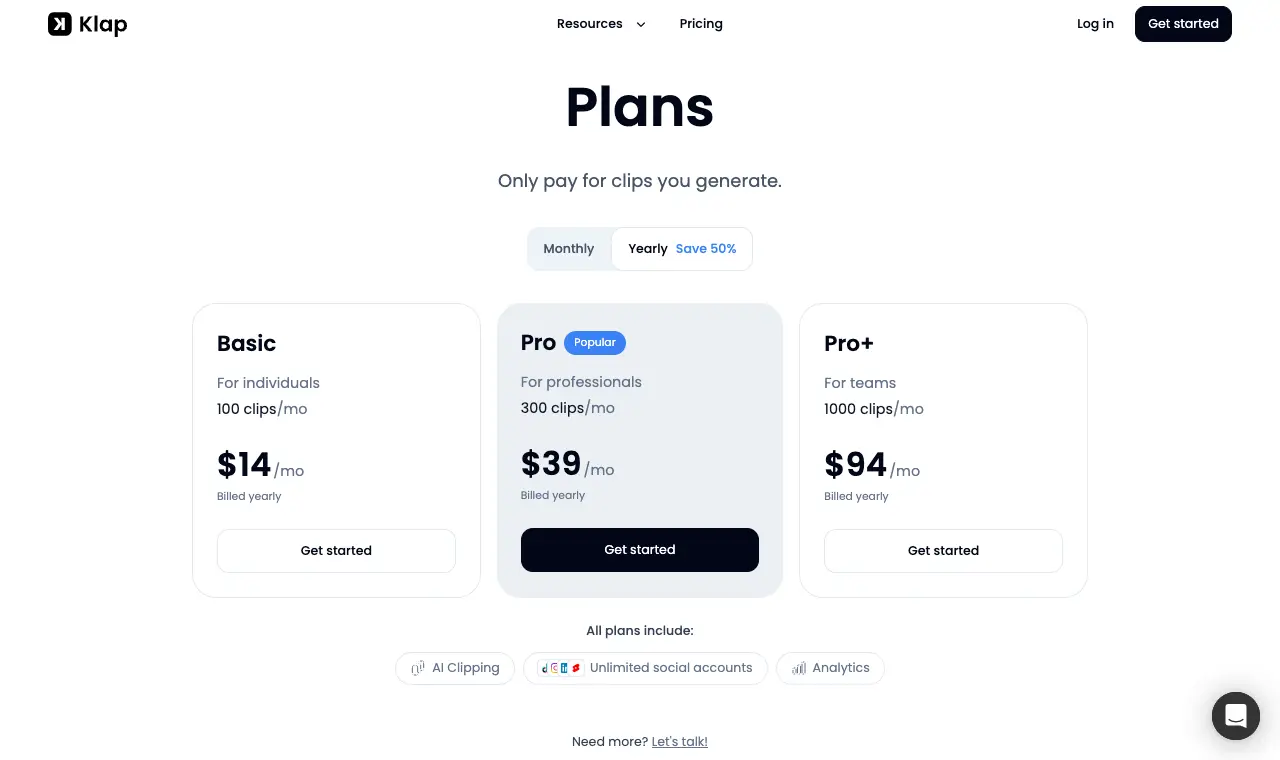
| Klap | trying an AI clip generator free with no watermark: paste a YouTube link and get clips from one video | $29/month Basic ($14/month billed yearly); Pro $39/month and Pro+ $94/month billed yearly | 1 video free, no card. Its own pages say there is no watermark, even on the free plan. | Priced per clip: 100, 300 or 1,000 clips a month. Source videos up to 4 hours. | Web |
| Submagic | podcasters who care most about caption styling, and will pay for an add-on to cut long episodes into clips | $19/month Starter ($12/month billed yearly); Magic Clips add-on $19/month | None (you can try it with no credit card). No watermark on any paid plan. | Plans cap video length at 2 minutes (Starter), 5 (Pro) or 30 (Business). Turning a long episode into clips needs the Magic Clips add-on: $19 a month for 10 uploads. | Web |
| Riverside Magic Clips | podcasters who already record in Riverside and want clips made from the same recording automatically | Free; $29/month Pro ($24/month billed yearly); $39/month Grow | 2 hours of recording once, 720p, Riverside watermark. Magic Clips are included. | One automatic set of Magic Clips per recording plus 2 extra sets on Pro (3 in all). Uploads up to 4 hours and 25GB; 15 hours of uploads a month on Pro. Social scheduling needs Grow. | Web, iOS, Android |
| Choppity | testing an AI clipper on an hour of real footage free before paying, with link import and scheduling | Free; $24/month Starter ($16.80/month billed yearly); $32/month Creator | 1 hour of AI video analysis a month, 2GB storage, projects kept 3 days. Its FAQ says free exports carry a small Choppity watermark. | Metered by hours analysed: 3 a month on Starter, 5 on Creator. Files up to 120 minutes and 10GB. | Web |
| Headliner | audio-only podcasts: automatic audiograms from your feed, plus free AI clips from a video while its video tools are free | Free; $9.99/month Basic ($7.99 billed yearly); $25.99/month Pro ($19.99 billed yearly) | Ad-supported. 'Headliner video tools are FREE for a limited time.' 1 unwatermarked audiogram a month and unlimited watermarked ones; 1080p for videos up to 10 minutes; automatic audiograms for 1 podcast. | Up to 10 AI clips per video. Video up to 2 hours and 10GB per its file-limits article; audio up to 2 hours on Free and Basic, 4 hours on Pro. | Web, iOS, Android |
| Kapwing | teams who want a full browser video editor with an AI clip maker inside, and will finish clips by hand | Free; $24/month Pro ($16/month billed yearly); $64/month Business ($50/month billed yearly), per member | 10 credits lifetime, exports up to 4 minutes at 720p, 30 minutes of exports a month, Kapwing watermark on every export. | Repurpose Studio (its clip generator) costs 2 credits per minute of video and needs a video or audio file of at least 10 minutes, so it does not fit in the free plan's 10 credits. Pro has 1,000 credits a month; exports up to 120 minutes; uploads up to 6GB. | Web |
Prices in US dollars from each vendor’s pricing page, unless a row says otherwise.
01
OpusClip
Best for podcasters who want an AI clip generator that scores each clip, reframes to the speaker and can post or schedule for them.
Price Free; $15/month Starter; $29/month Pro ($14.50/month billed yearly)Free 60 credits a month (1 credit = 1 minute of source video), clips up to 1080p, watermarked, and clips can no longer be exported after 3 days.Runs on Web
What it does well
- A Virality Score on each clip and AI animated captions in 20+ languages (pricing page).
- Starter auto-posts to YouTube Shorts, TikTok and Instagram Reels (pricing page).
- Takes videos up to 10 hours long (help centre, read 30 Sept 2026).
- Pro adds up to 4K, a scheduler and public MP4 link import (pricing page, read 30 Sept 2026).
Where it falls short
- The free plan watermarks every clip and gives you 3 days to export.
- A 3-hour episode uses 180 credits, more than Starter's 150 a month.
- In 16 Trustpilot 1-2 star reviews (June-September 2026), the most common complaints were unresponsive or AI-only support and being charged after cancelling.
What its users say
“I use Opus Clip regularly for my podcast and show editing and clipping.”
“Uploaded fails constantly. The one time it didn't the clips were only like 14 seconds. customer service chat didnt reply. useless software”
“I’ve tried OpusClip and played around with Riverside. They’re fine, but I still end up going back through the episode myself because the best bits are often not the ones they pick.”
“It’s not perfect every time — but it gets me 80–90% of the way there, which is huge when you’re balancing creativity, family, and business.”
In the directoryPricing pageread 6 October 2026
02
Vizard
Best for podcasters who want the best-reviewed AI clipper with scheduling built in, at a low yearly price.
Price Free; $29/month Creator ($14.50/month billed yearly); $39/month Business ($19.50/month billed yearly)Free 60 credits a month, 720p exports up to 10 minutes long, watermarked, 1GB uploads, files kept 3 days.Runs on Web
What it does well
- The strongest review scores in this list: Trustpilot 4.7 from 2,521 reviews.
- Paid plans export in 4K with no watermark and schedule posts to 6 (Creator) or 20 (Business) social accounts.
- Link import from YouTube, Twitch, Google Drive and Vimeo (docs.vizard.ai, read 30 Sept 2026).
Where it falls short
- Free exports are 720p and watermarked.
- Reviewers say unused credits are forfeited when you cancel.
- Reviewers mention limited caption customisation and slow processing on long videos.
What its users say
“It's particularly helpful for repurposing webinars, podcasts, interviews, or longer videos for social media.”
“The credit system is problematic: any unused credits are forfeited upon cancellation with no refund or carryover.”
“Free version they said. Wasted my time uploading the video for free transcription and then they ask to pay to export the text.”
In the directoryPricing pageread 6 October 2026
03
Shorts by Sliceours
Best for podcasters who cut many clips from long episodes every week and want them all out in one download, at a flat price.
Price $14.99/month or $149/yearFree Your first clip is free, no card; then a 3-day free trialRuns on Web, in any browser
What it does well
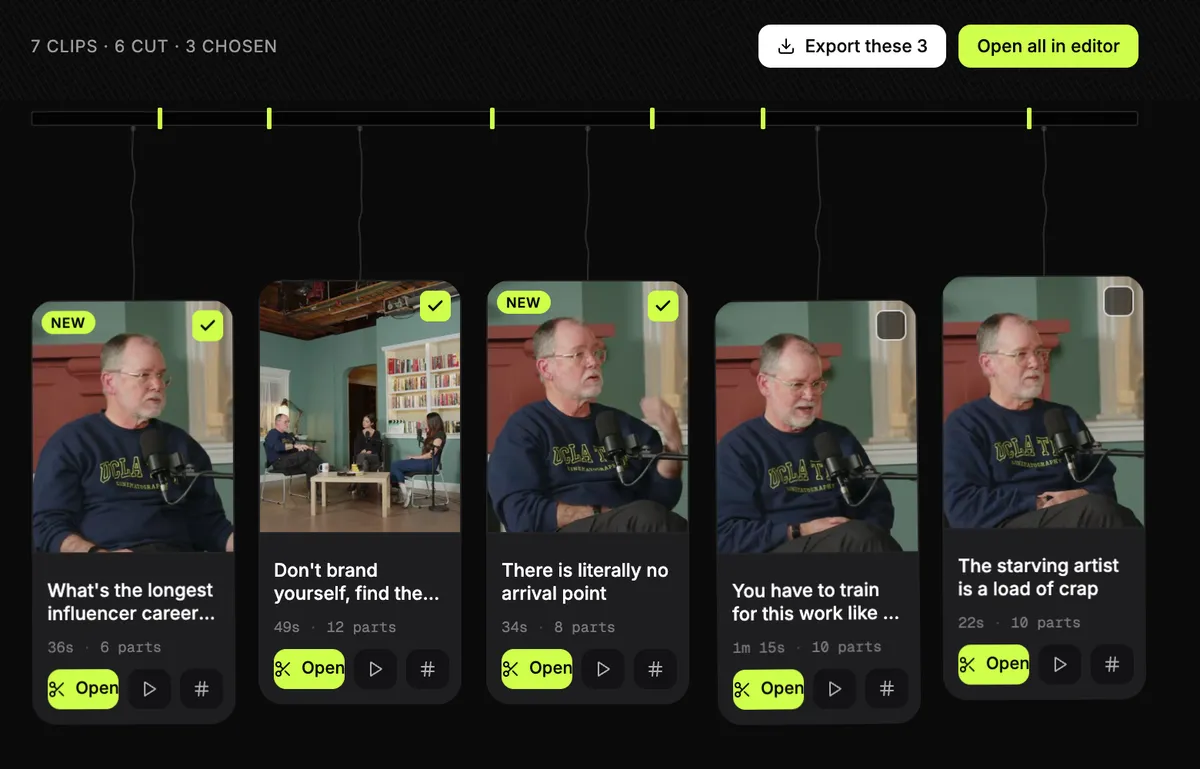
- Takes a whole episode, up to 3 hours, from a file or a YouTube link (one video per link), and finds the clips in it.
- Can join moments from different parts of an episode into one clip, without rewriting what anyone said.
- Tick a dozen clips and export them together: one email, one zip.
- Each clip starts with a hook title and comes with post text and hashtags in the episode's language. Nothing is stamped on the video.
Where it falls short
- It does not post or schedule; you upload the clips yourself.
- No b-roll, and caption fonts cover Latin scripts and Hebrew only.
- Link import takes YouTube links only, and there are no third-party reviews of it to report yet.
04
Klap
Best for trying an AI clip generator free with no watermark: paste a YouTube link and get clips from one video.
Price $29/month Basic ($14/month billed yearly); Pro $39/month and Pro+ $94/month billed yearlyFree 1 video free, no card. Its own pages say there is no watermark, even on the free plan.Runs on Web
What it does well
- Its converter page says 'No watermarks, ever', free plan included.
- Paste a link from YouTube, Vimeo, Twitch, Google Drive and others, or upload a file up to 4 hours long.
- Captions in 52 languages; ranks each clip by a Virality Score.
- Every plan includes unlimited social accounts and analytics (pricing page).
Where it falls short
- The free plan is one video, then it is a paid plan.
- In 11 Trustpilot 1-2 star reviews, the most common complaints were billing after cancelling and not finding how to cancel.
- Few reviews outside Trustpilot (51 there).
What its users say
“The app is very convenient and easy to use.”
“when you try to cancel your subscription there is no where to do it”
“I’ve also used opusclip, klap, and couple other similar apps in the past. The quality is always hit or miss.”
“pretty good tool for posting and stuff like that no bugs although it is a bit expensive for that type of service but im really enjoying it”
In the directoryPricing pageread 6 October 2026
05
Submagic
Best for podcasters who care most about caption styling, and will pay for an add-on to cut long episodes into clips.
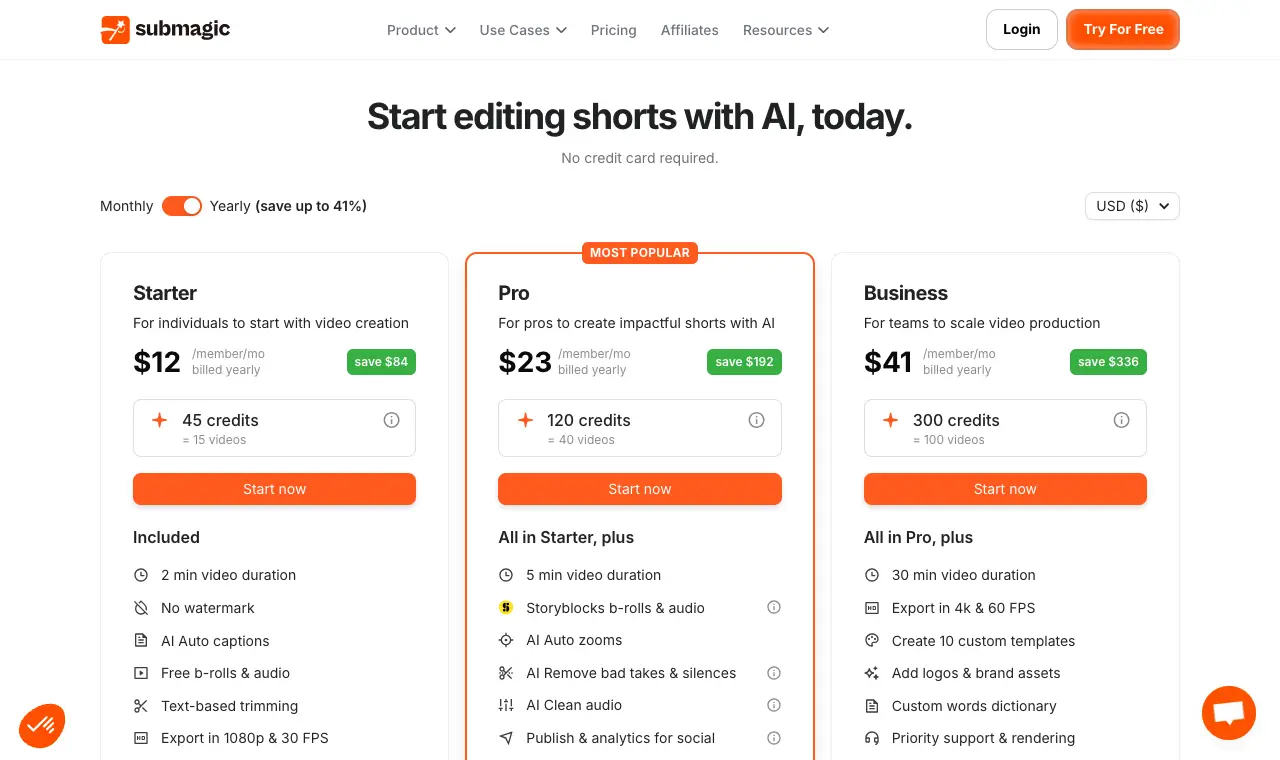
Price $19/month Starter ($12/month billed yearly); Magic Clips add-on $19/monthFree None (you can try it with no credit card). No watermark on any paid plan.Runs on Web
What it does well
- No watermark on any plan (pricing page).
- AI hook titles, silence and bad-take removal, b-roll and caption translation on the plans (pricing page).
- Reviewers praise caption accuracy and timing.
Where it falls short
- Long-video clipping is a separate $19-a-month add-on with 10 uploads.
- No free plan.
- In 25 Trustpilot 1-2 star reviews (read 30 Sept 2026), the most common complaint was surprise renewals and refunds.
What its users say
“Hands down the best caption software.”
“Barely works, submagic is over priced, frequently inaccessible, works poorly when available, and has nearly no customer service”
“tried Submagic for a couple eps. captions are nicer but it doesn't actually pick moments, it just slices.”
“The AI tools save me hours of editing, and the captions are always on point.”
In the directoryPricing pageread 6 October 2026
06
Riverside Magic Clips
Best for podcasters who already record in Riverside and want clips made from the same recording automatically.
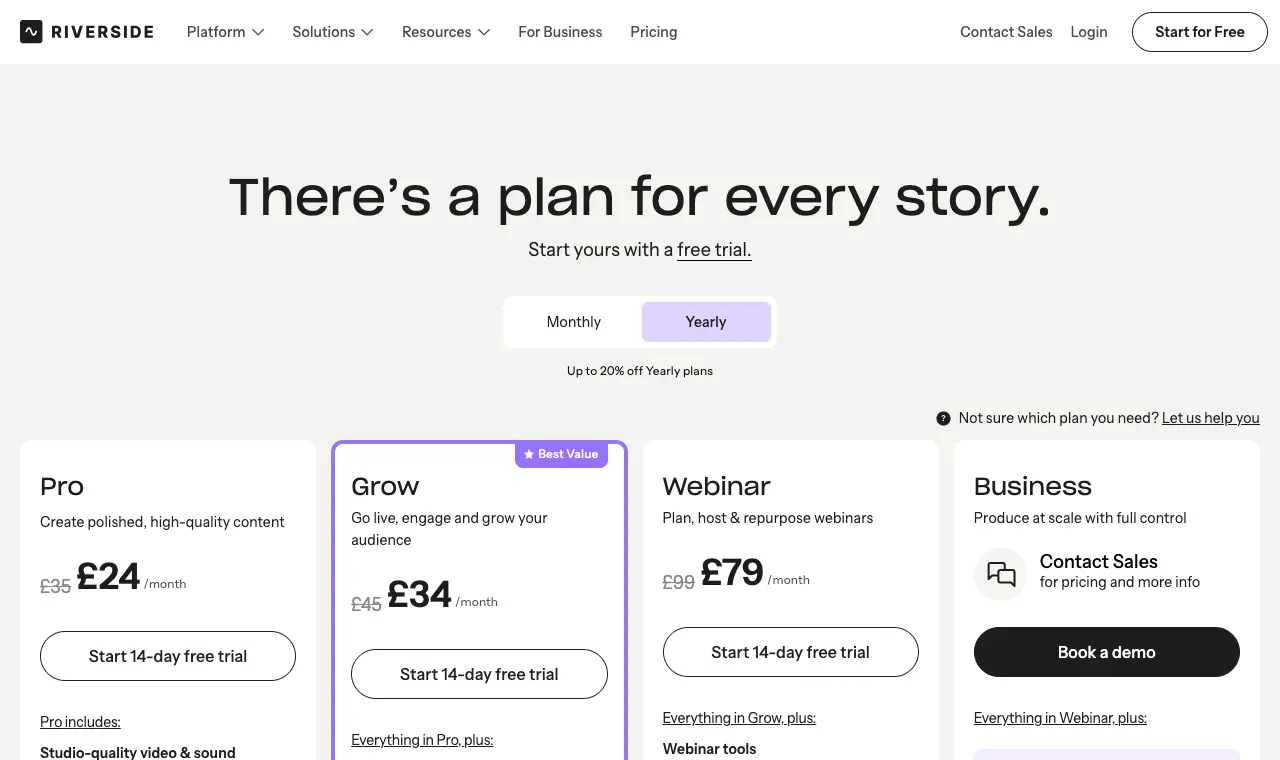
Price Free; $29/month Pro ($24/month billed yearly); $39/month GrowFree 2 hours of recording once, 720p, Riverside watermark. Magic Clips are included.Runs on Web, iOS, Android
What it does well
- Records the show itself (separate tracks, up to 4K) and makes clips from that recording, with no file to move.
- Magic Clips appear for anything over 3 minutes: typically 2 per 5 minutes, 30 to 90 seconds each (help centre).
- Its pricing FAQ says Magic Clips do not use AI credits.
Where it falls short
- Free clips are 720p and watermarked.
- No YouTube link import; its help centre answers 'At the moment, no.'
- In 19 Trustpilot 1-2 star reviews (May-September 2026), billing and support were the most common complaints.
What its users say
“Creates video shorts. Edits podcast. Enhances sound to studio quality and much more.”
“Riverside used to be great, but ever since their big update a few months back, we can't record a single ep without some kind of hiccup, ranging from the merely inconvenient to the "almost lost an episode."”
“Riverside is an absolutely great remote recording platform ( when it doesn't have issues) but an absolutely mediocre editor!”
“Riverside recordings are not synced very well and those interviews take a lot of work for the editors to sync audio to the video because they have to use an elastic wave adjustment to get the entire episode to sync start to finish.”
In the directoryPricing pageread 6 October 2026
07
Choppity
Best for testing an AI clipper on an hour of real footage free before paying, with link import and scheduling.
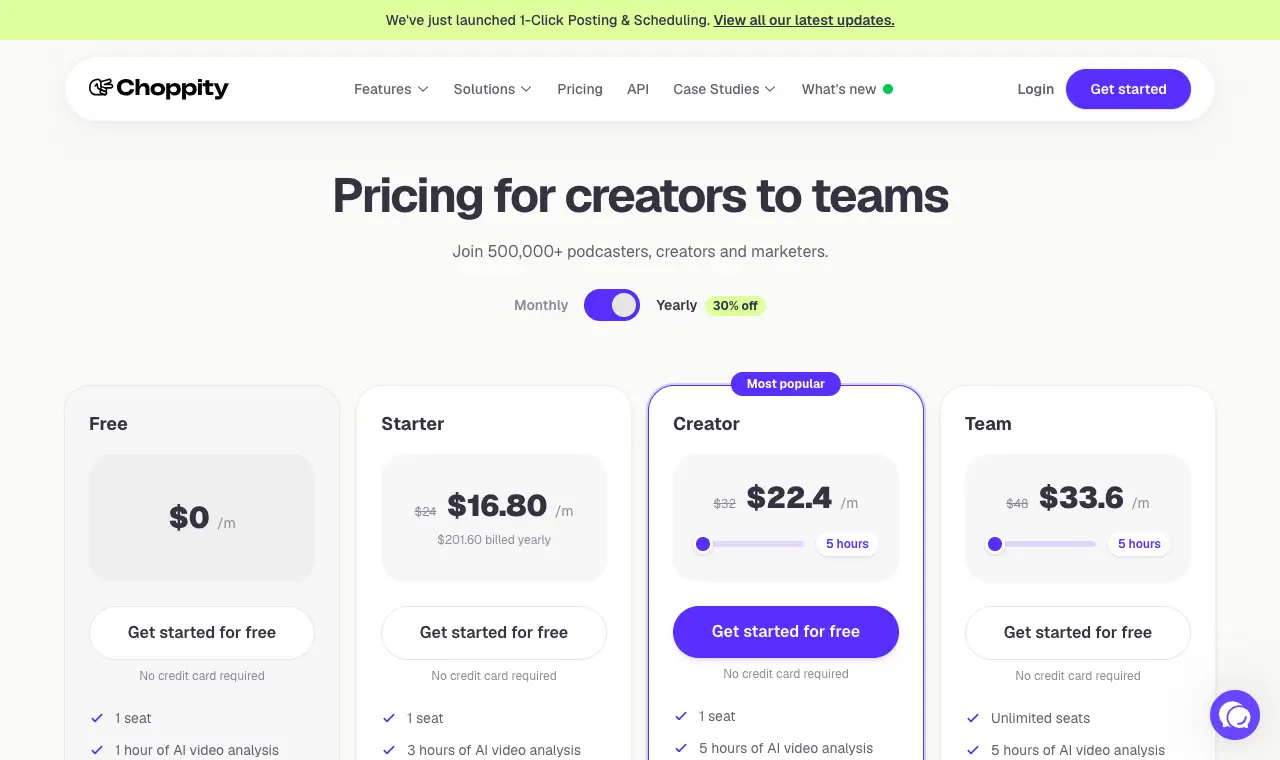
Price Free; $24/month Starter ($16.80/month billed yearly); $32/month CreatorFree 1 hour of AI video analysis a month, 2GB storage, projects kept 3 days. Its FAQ says free exports carry a small Choppity watermark.Runs on Web
What it does well
- Paste a YouTube, Vimeo or Twitch link, or upload.
- Starter lists 1080p and 4K exports and scheduling to 1 social account (pricing page today).
- Reviewers call it easy for beginners.
Where it falls short
- Starter rose from $20 to $24 a month between 30 Sept and 6 Oct 2026.
- A 2-hour cap per file, so long episodes need splitting.
- Small review base (16 on Trustpilot); 7 of its 8 Trustpilot 1-2 star reviews say support did not reply.
What its users say
“I love how intuitive the experience is. I'm not very tech-savvy, but navigating and using Choppity has been effortless.”
“the audio and video don't sync properly so the clips are unusable”
“It's such a shame because this is a fantastic idea - and it is good when it works, which is about 50% of the time.”
In the directoryPricing pageread 6 October 2026
08
Headliner
Best for audio-only podcasts: automatic audiograms from your feed, plus free AI clips from a video while its video tools are free.
Price Free; $9.99/month Basic ($7.99 billed yearly); $25.99/month Pro ($19.99 billed yearly)Free Ad-supported. 'Headliner video tools are FREE for a limited time.' 1 unwatermarked audiogram a month and unlimited watermarked ones; 1080p for videos up to 10 minutes; automatic audiograms for 1 podcast.Runs on Web, iOS, Android

What it does well
- Watches your podcast feed and makes an audiogram for each new episode.
- Works from audio alone, so a show with no video can still post video.
- Clips a video into up to 10 captioned clips from a YouTube link, upload, Google Drive or Zoom, with a 'Most Replayed' option (help centre, read 3 Oct 2026).
- App Store 4.8 from 4,970 ratings.
Where it falls short
- Free audiograms are watermarked after the first each month; whether free video clips are watermarked is not stated.
- The free video tools are offered 'for a limited time'.
- Recent 1-2 star App Store reviews describe app errors and automations switching off.
What its users say
“Headliner and Descript can do it; both have usable freemium tiers.”
“However, the mobile version of the app is inferior to the desktop version for a variety of reasons. For example, you can’t edit a video on mobile.”
“This app was a great easy way to get sound clips from my podcast.”
“Absolutely destroys the quality of any image I put in it, plus the options for customizing the audiograms are very limited.”
Pricing pageread 6 October 2026
09
Kapwing
Best for teams who want a full browser video editor with an AI clip maker inside, and will finish clips by hand.
Price Free; $24/month Pro ($16/month billed yearly); $64/month Business ($50/month billed yearly), per memberFree 10 credits lifetime, exports up to 4 minutes at 720p, 30 minutes of exports a month, Kapwing watermark on every export.Runs on Web
What it does well
- Makes 3-5 vertical clips with subtitles and a title by default; a prompt can steer topics and aspect ratio (help centre).
- Works on audio-only podcasts of at least 10 minutes (help centre).
- A full editor for finishing clips: trim with transcript, Smart Cut silence removal, brand kit, 4K exports on paid plans.
- Pro has no watermark, 4K exports and unlimited exports (pricing page).
Where it falls short
- The free plan watermarks all exports and its 10 lifetime credits are not enough for one Repurpose run.
- Credits are shared with subtitles, dubbing and other AI tools.
- Trustpilot 1.9 from 1,373 reviews; recent 1-star reviews cite credits, refunds and export limits.
What its users say
“I use Kapwing for the AI Voice and subtitles. I like it better than ElevenLabs.”
“i cant export anything over 1 minute long, this website is trash and i do not recommend unless you want to spend all of your goddamn money.”
In the directoryPricing pageread 6 October 2026
Questions
Which podcast clip maker is free without a watermark?
Of the tools here, Klap's own pages say its free plan (one video) has no watermark. OpusClip, Vizard, Riverside, Choppity and Kapwing watermark their free plans. Headliner's video tools are free for a limited time, but its pricing page does not say whether free video clips are watermarked. Submagic has no watermark on any plan but no free plan.
What is an AI podcast clip generator?
A tool that reads a long episode, picks the moments likely to work as short clips, crops them to vertical and adds captions. OpusClip, Vizard, Klap, Choppity, Riverside Magic Clips, Kapwing's Repurpose Studio and Headliner all do this; Submagic does it with its Magic Clips add-on.
Can I make clips from an audio-only podcast?
Yes. Headliner makes audiograms from your RSS feed automatically, and Kapwing's help centre says its Repurpose tool works on audio files of at least 10 minutes.
How long an episode can these tools take?
OpusClip up to 10 hours; Vizard 10 hours on paid plans (60 minutes free); Klap and Riverside up to 4 hours; Headliner 2 hours of video; Choppity and Kapwing 120 minutes per file (Kapwing's export limit on paid plans). Submagic's plans cap videos at 2 to 30 minutes, so long episodes need its Magic Clips add-on.
Which is cheapest for a weekly podcast?
On yearly billing, Klap Basic is $14 a month for 100 clips, and OpusClip Pro and Vizard Creator are $14.50 a month. Paying monthly, OpusClip Starter is $15 for 150 minutes of video. Headliner Basic is $9.99 a month but is built around audiograms.