For podcasters
Everything we make for podcasters
Clips from your episodes, with or without video. Guides to starting a show and growing it. Free tools, our own podcast data, and a directory of the tools everyone else makes.
The short version
Upload an episode to Shorts by Slice and it reads the whole thing, lists the moments that stand on their own, and cuts each one as a captioned vertical clip for TikTok, Reels and YouTube Shorts. A video episode is cropped to whoever is talking. An audio-only episode works too: pick one of 16 templates drawn from the words, your cover art and the sound of the voices, so there is something to watch without a camera. Video: MP4, MOV or WebM, up to three hours and 4GB. Audio: MP3, M4A, WAV, OGG or FLAC. Your first 3 clips are free, with no card.
A few numbers from our own research
- 0.7%of podcasts active in the last 90 days have a video file as their newest episode. The feed every podcast app reads is audio.The Podcast Census 2026
- 56.5%of podcasts that stopped did so before episode 7.The Podcast Census 2026
- 41.8 minis the median length of an episode from a chart podcast in the last year.The State of Podcasting 2026
- 7.2episodes a month: what the median active chart show publishes.The State of Podcasting 2026
Each figure links to the page with its method and its limits.
No video? Audio-only works too
Plenty of podcasts are recorded with no camera, and a clip with nothing moving in it is easy to scroll past. When you upload an audio file, Slice clips it the same way and draws each clip with a template instead of a picture: big captions over your cover art, the conversation as message bubbles, a pull quote that ends on a card, photos of host and guest that light up when each one talks, and more. A video episode can switch to the same templates with one Video / Audio switch, and each side keeps its own settings.
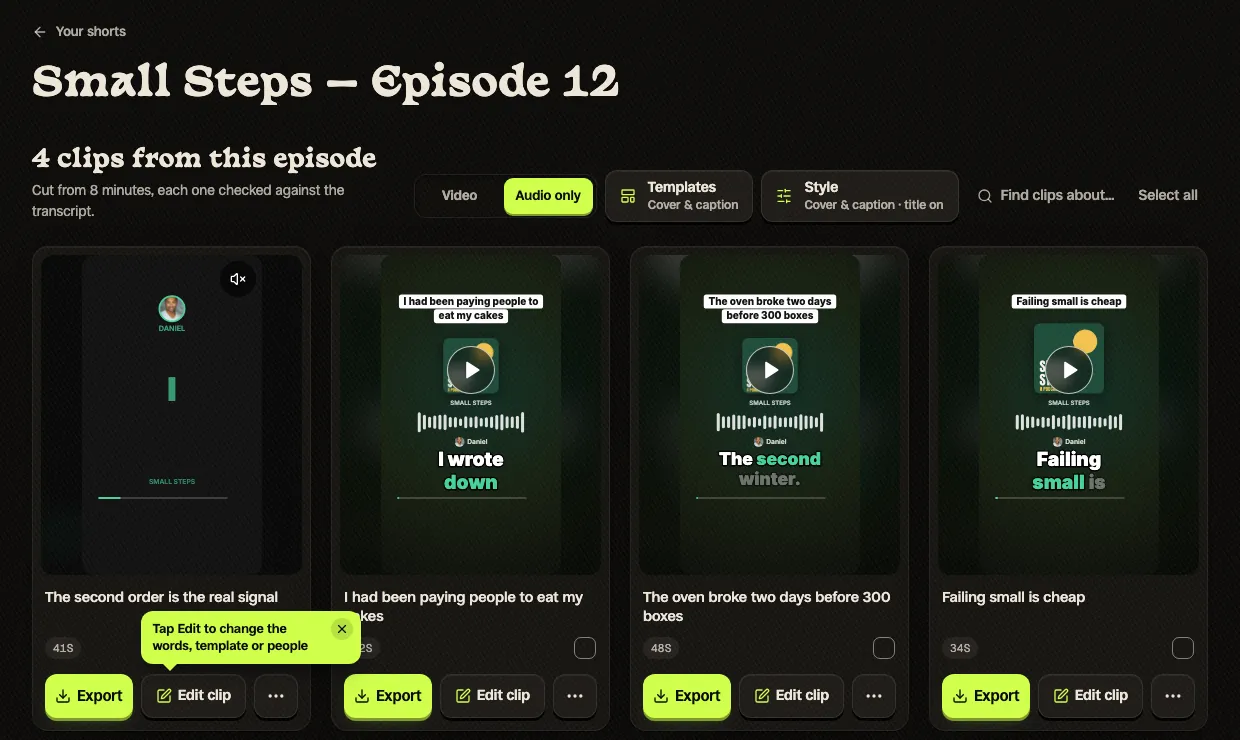
The whole process, with a real episode in all 16 templates: how to turn an audio podcast into video clips.
Everything on this site for podcasters
Clips from your episodes
Shorts by Slice reads the whole episode, lists the moments that stand on their own and cuts them as captioned vertical clips. It works on a video episode and on an audio-only one.
- Shorts for podcastersUpload the episode; get back the exchanges worth posting, with both voices captioned and told apart.
- Podcast to YouTube ShortsWhat a podcast clip needs to work as a Short, and how Slice makes one.
- Clips from interviewsWhen the good line belongs to the guest.
- Clips from long recordingsEpisodes of two and three hours, read end to end.
Guides for podcasters
- Podcast captions that get watchedOn-screen captions people can read, where they go in each app, speaker labels, fixing names, and the post caption under the clip.
- How to make podcast clips your guests will shareWhy most guests never share, and what changes that: asking early, the right moment, finished clips, Instagram collabs and a release.
- One episode, a week of postsA day-by-day plan from one real episode, how often to post clips, when podcasts release, and the free tools for each piece.
- How to pick the best moments from a podcastWhat makes a moment stand on its own, the 10-second setup test, how long clips should be, and the four moments from a real 82-minute episode.
- How to grow a podcast with short clipsWhat podcasters report both ways, where listeners find shows, our data on how far podcasts get, and a routine you can keep.
- How to turn an audio podcast into video clipsNo camera? The five ways audio-only shows make clips, what podcasters say works, and 16 templates on one real episode.
- Should you put an audio-only podcast on YouTube?Three ways to upload it, YouTube’s own rules, what podcasters report, and why Shorts do the finding.
- How to make podcast clips with ChatGPTFrom attaching the episode to downloading captioned vertical clips, with the exact prompts.
- One episode for TikTok, Reels and ShortsOne set of clips, three platforms, and what changes between them.
- Find the best moments in a long videoAsking for moments about one topic, and checking what comes back.
- Transcribe a podcast in ChatGPT or ClaudeFree, with speaker labels and subtitle files.
Starting a podcast
- How to start a remote podcastHost and guests in different places: a track per person, a guest kit, backups, starter kits from $0.
- How to start an in-person podcastEveryone in one room: a mic per person, a recorder with a headphone jack each, a room that does not echo.
- How to start a church podcastSunday’s sermon as a podcast, then original shows.
- The $0 podcast stackEvery free tool you need, stage by stage.
Free tools for podcasters
No sign-up for most of them, and nothing to install.
- Transcribe a podcastAn episode to text, SRT and VTT, free.
- YouTube chapters generatorChapter timestamps for the full episode on YouTube.
- Podcast chapter formatterChapters in the format each app reads.
- Podcast cover art checkerDoes your artwork pass Apple’s rules?
- Podcast loudness checkerIs the episode as loud as the apps expect?
- Guest soundcheckA link your guest opens to test their mic before you record.
- Guest release formPermission to publish, and to clip, what a guest says.
- Podcast media kitOne page for sponsors.
- Podcast name checkerIs the name taken, across 4.4 million shows?
- Podcast stats checkerHow your episode count, age and cadence rank against every podcast.
Our podcast data
Original research, every figure with its method, free to download.
- The State of Podcasting 2026881 chart podcasts and 498,956 episodes: how long episodes run, how often shows publish, when they release.
- The Podcast Census 2026Every podcast in the open Podcast Index: how many are active, when shows stop, how few publish video.
- The cover art of 1,000 top podcastsSizes, formats, colours and how many fail Apple’s rules.
- What podcast producers are paidSalaries and freelance rates, every figure sourced.
The podcast tools directory
Every tool a podcaster might use, reviewed, with no paid placements.
- Podcast tools directoryMore than 540 tools across 16 categories.
- Best podcast clip makersThe clip tools compared from their own pages and prices.
- Best podcast editing softwareEditors for every budget.
- Best podcast hosting platformsFree and cheap hosts compared.
- Best podcast transcription softwareAccuracy, speakers and price.
- Best remote recording softwareA clean track for every guest.
- Best tools for a video podcastStage by stage.
- Free podcast toolsEvery free tool in the directory.
Clip tools compared
We make Slice. These pages say where it loses as well as where it wins.
- Best podcast audiogram makersHeadliner, Wavve, Descript, Recast, EchoWave, Adobe Podcast, Canva and Slice, priced from their own pages.
- Best AI clipping toolsOpusClip, Vizard, Klap, Submagic and the rest, from their own pages.
- Headliner alternativeThe audiogram tool, side by side, for audio and video podcasts.
- Wavve alternativeThe waveform tool, now part of Disctopia, side by side.
- Descript alternativeEditing by transcript versus a clip finder.
- Riverside alternativeMagic Clips side by side.
- OpusClip alternativeThe best-known clipper, compared.
- Every comparisonAll of them in one place.