Guide · For churches
How to turn a sermon into short clips
From Sunday’s livestream to captioned vertical clips for Reels, Shorts and TikTok, step by step, with a real sermon.
The short answer
Copy the YouTube link to the sermon once the livestream has ended (or use the recording file), paste it into Slice, and in a few minutes you get a list of the moments that stand on their own, each with its length and opening line. Watch the ones you like to be sure they keep the preacher’s meaning, fix any names in the captions, and download vertical, captioned clips for Reels, Shorts and TikTok. Three or four is a week of posts. The first clip is free, with no card.
What do you need before you start?
- The sermon as a YouTube link (the finished livestream or an upload), or as a video file: MP4, MOV or WebM, up to three hours and 2GB.
- A free Slice account. No card until your second clip.
- Ten minutes on a Monday, and someone who knows what the pastor meant.
Clip the preaching rather than the worship set: songs belong to their writers, and a reposted song can be muted or blocked. More on that on the page for churches.
How do you turn a sermon into short clips, step by step?
- Get the sermon’s link or file
Wait until the livestream has finished and YouTube has the replay, then copy the video’s link. If your stream is on Facebook or only on your computer, use the recording file instead: MP4, MOV or WebM, up to three hours and 2GB.
- Paste the link into Slice
Sign in at tryslicemedia.com/shorts, paste the link into the box and press Read, or drop the file below it. A new account needs no card.
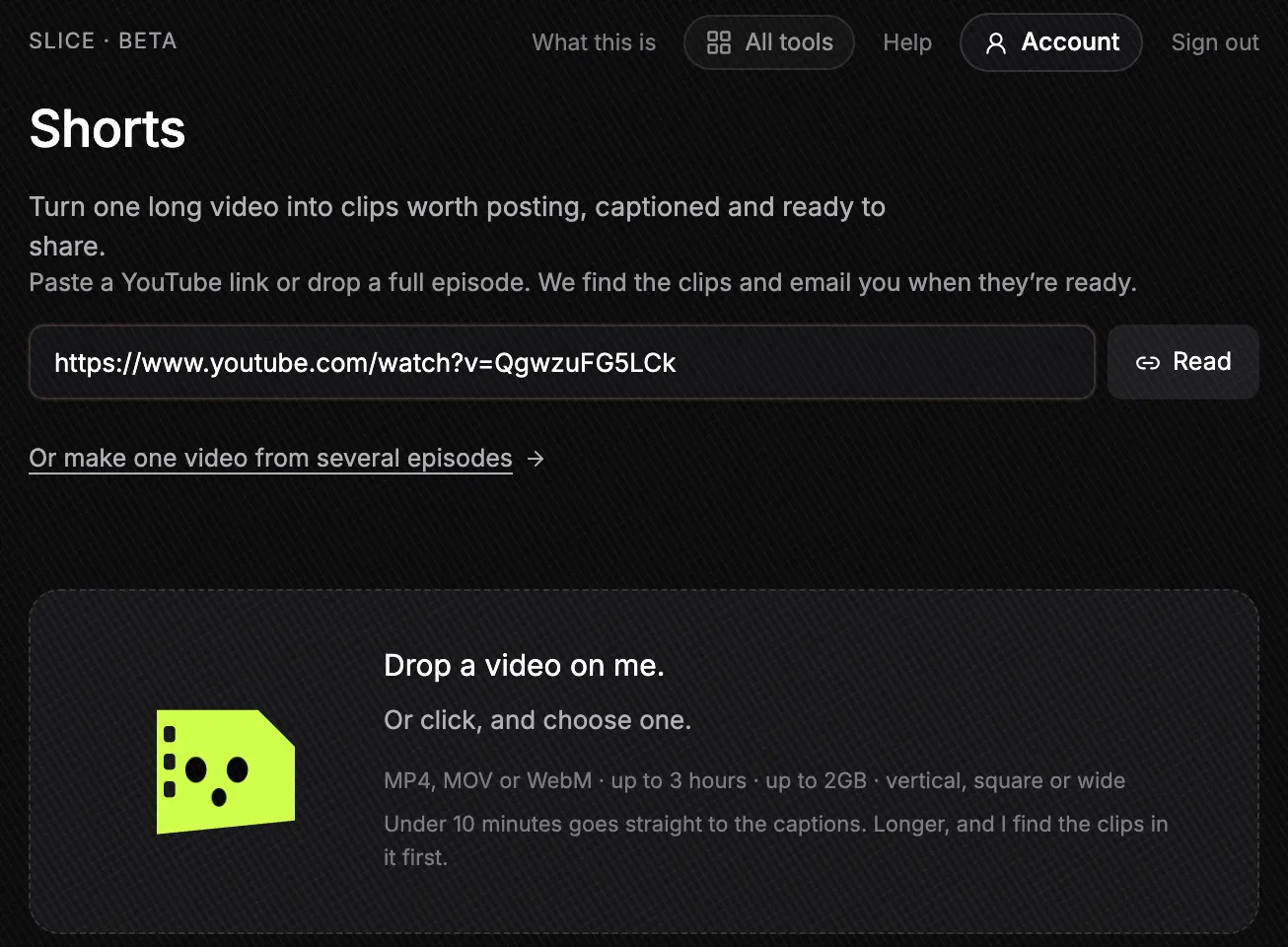
Step one on the Slice website: the link to Tim Keller’s message pasted into the box. Read brings the video in; or drop a file into the area below. Tap to enlarge. - Let Slice read the sermon
Slice brings the video in, transcribes it and looks for moments that stand on their own. Our 40-minute example had its transcript in under two minutes and its moments 49 seconds after that. You can close the tab: an email comes when they are ready.
- Read the moments it found
You get a short list: a title for each moment, how long it runs, and the line it opens on. If you want something specific, such as moments about prayer, you can ask Slice to find clips about that, and to find more once you have read the first list.
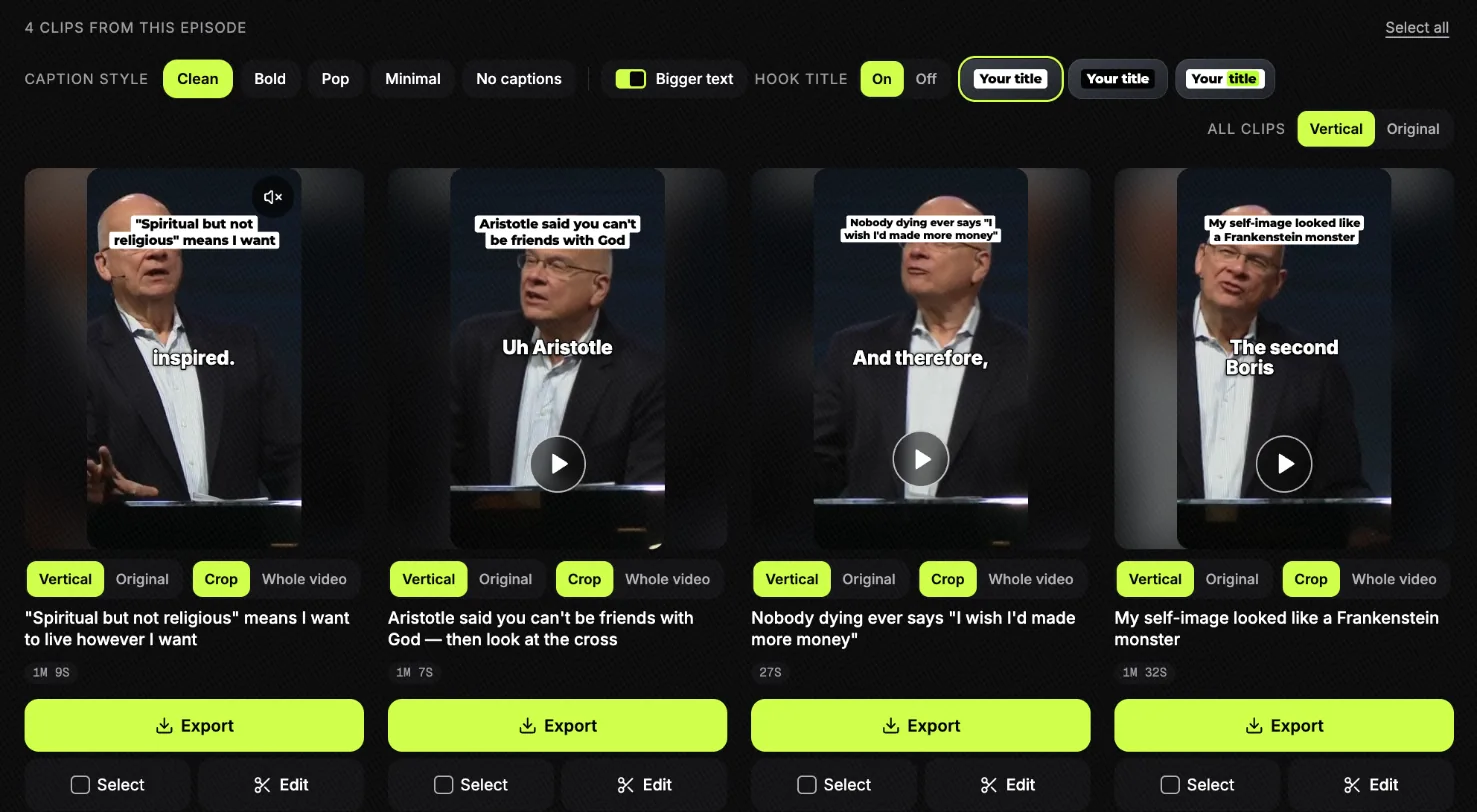
What Slice gave back for the sermon: four clips, already vertical and captioned, with Slice’s suggested title on each. Press play to watch one, or Export to download it. Tap to enlarge. - Check each clip keeps the meaning
Watch the preview of each moment you like. A clip can join passages from minutes apart, always in the order they were preached; make sure it still says what the preacher meant.
- Choose the look
Pick a caption style (Slice remembers it for next week), keep or turn off the title at the top, and choose vertical or the original shape, cropped to the preacher or with the whole picture.
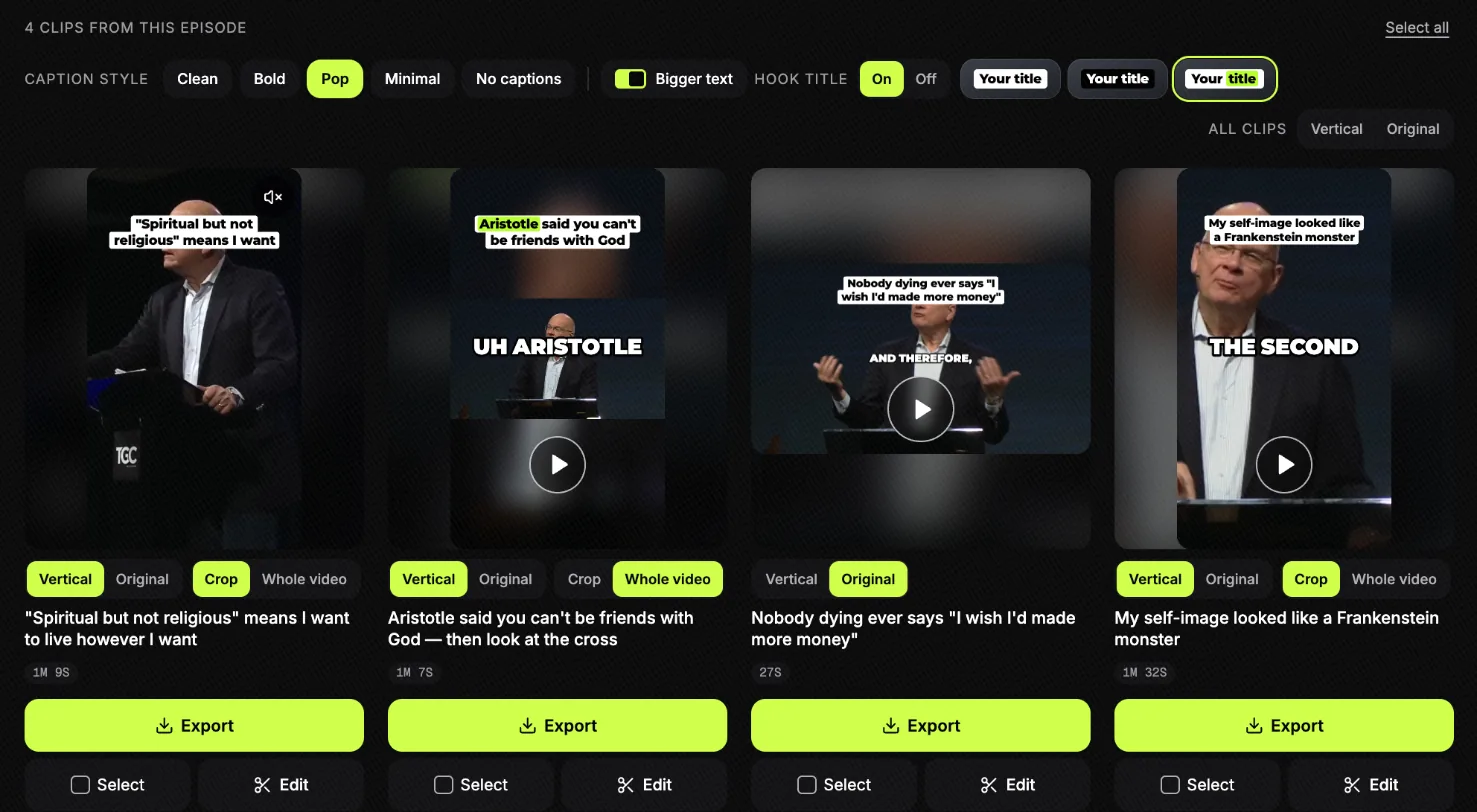
The same clips, a different look: Pop captions, a title with one word picked out, and the choices on each card. The second shows the whole picture instead of cropping to the preacher; the third keeps the original wide shape. Tap to enlarge. - Fix the words and names
Open the clip in the editor and correct any word or name the transcript got wrong. Each caption is a block on the timeline: click it and type.
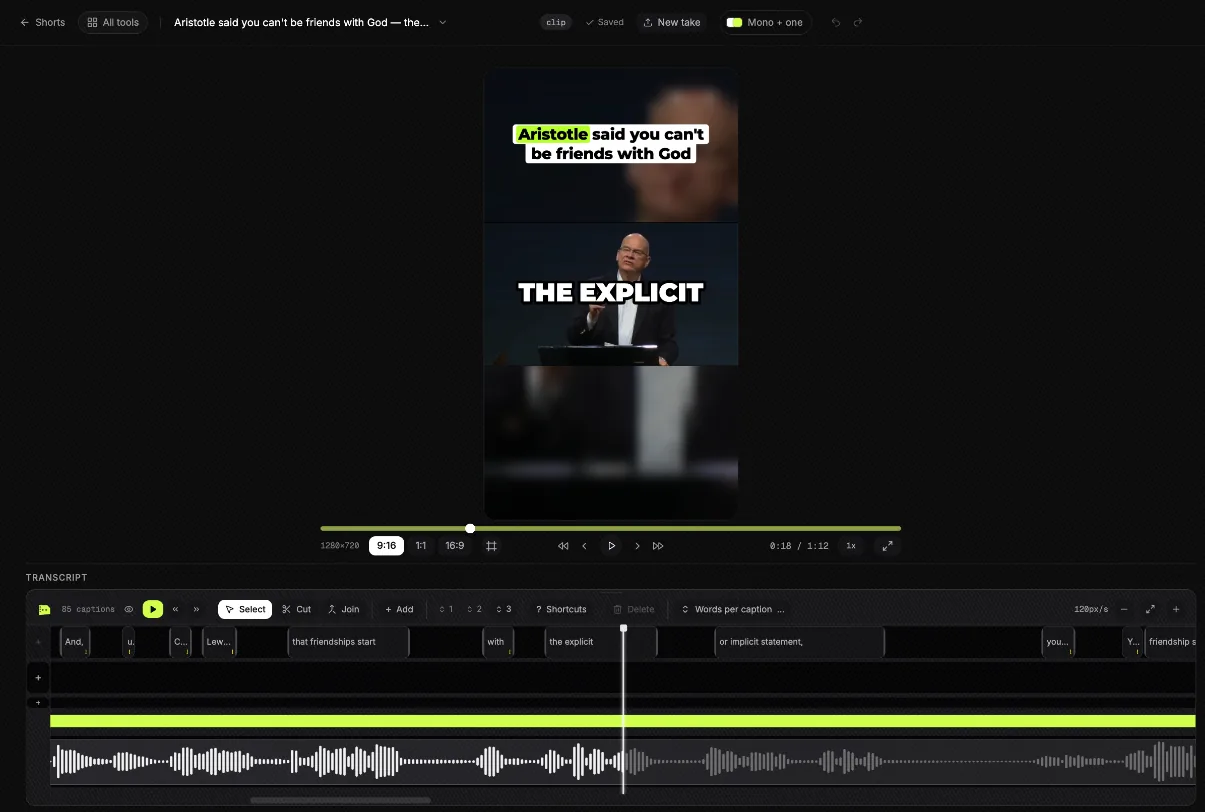
The editor, open on the second clip. Every caption is a block of words on the timeline: click one to fix a word or a name before you post, or switch the shape between 9:16, 1:1 and 16:9. Tap to enlarge. - Download and post
Each clip downloads as a vertical MP4 with the captions burned in, plus suggested post text. Your first clip is free with no card; after that a 3-day free trial, then $14.99 a month.
What did Slice find in a real sermon?
The example is Tim Keller, “Let the Psalms Teach You to Pray”: a 39:46 message from The Gospel Coalition’s 2016 women’s conference, published by The Gospel Coalition on 12 July 2020. We pasted its link on 5 October 2026. These are the four moments Slice listed, with the note Slice wrote for each. The titles and notes are Slice’s; the opening lines are the transcript’s.
| Moment | Length and where | Opens on | Why Slice picked it |
|---|---|---|---|
| “Spiritual but not religious” means I want to live however I want | 1:09, from 2:46 to 4:01, in 6 pieces | And that is, our secular culture loves spirituality, as in, I’m spiritual but not religious. | Sharp, quotable cultural diagnosis that starts cold on a strong opinion and lands on what the alternative actually offers. |
| Aristotle said you can’t be friends with God — then look at the cross | 1:07, from 4:41 to 11:29, in 12 pieces | Uh Aristotle believed that the idea that you could be friends with a god was crazy. | A built argument with a real payoff: the C.S. Lewis “you too?” idea set up early and detonated at the crucifixion, ending on “Aristotle’s wrong.” |
| Nobody dying ever says “I wish I’d made more money” | 0:27, from 8:58 to 9:32, in 5 pieces | And therefore, I’ve been around when people have been dying. | Tight, self-contained pastoral observation with a deathbed hook. |
| My self-image looked like a Frankenstein monster | 1:32, from 36:33 to 38:48, in 13 pieces | The second Boris Karloff Frankenstein movie was called Bride of Frankenstein. | A full story with a personal confession at the end; the Bride of Frankenstein scene earns the admission and the closing line lands hard. |
“In 12 pieces” means the clip joins that many stretches of the sermon and leaves out what is between them. The second moment runs from 4:41 to 11:29: Keller sets up an idea early and pays it off minutes later, and the clip keeps both ends. That is the kind to watch before posting. The third is the opposite: one observation, under half a minute, nothing left out that matters.
What we did and did not do: we picked the clips and opened one in the editor, which is where the screenshots in the steps come from. Nothing was posted or published.
How long does it take?
| Step | Our run | What changes it |
|---|---|---|
| Link in to transcript ready | under two minutes | The length of the sermon |
| Transcript to the list of moments | 49 seconds | The length of the sermon |
| Link in to the list, in all | about two and a half minutes | A longer service takes longer |
| Choosing, checking and downloading | Up to you | How many clips, and how many words to fix |
What can go wrong?
| What you see | What to do |
|---|---|
| “That link isn’t a video” | You pasted a channel or playlist link. Open the sermon itself on YouTube and copy that video’s link. |
| The livestream link won’t come in | The stream may still be live or still processing on YouTube. Wait until it plays as a normal video. |
| Your stream is on Facebook | Links work for YouTube. Download the video from Facebook and upload the file. |
| The video is only a few seconds long | That is a Short, not the sermon. Slice needs the full recording to find moments in it. |
| A Bible name or your pastor’s name is spelt wrong | Click the word in the editor and type the right one before you download. |
| A clip has worship music under it | Choose a different moment, or check your licence terms first. The platform may mute it. |
Can’t you just let the AI post them?
No, and the people who do this every week say the same. The list saves the hours of scrubbing through a sermon; choosing is still yours.
“Something we do at my church for this is to use AI tools (we use opus but there’s many options) to make the clips and then we just choose the best like 3 per week to post..”
“I've found most of the clips from all these AI tools to not really be "bangers". I've found it easier to pull my own.”
The second is a fair warning about every tool, ours included. If none of the moments are right, cut your own from the transcript: the captions and the vertical framing still come with it.
Get the Slice Weekly
One free email every Friday: tools for creators and the best advice we found from people who make things.
Questions
How many clips should we get from one sermon?
Three or four good ones is a week of posts, and that is what most church teams aim for. Slice lists the moments that stand on their own; our 40-minute example gave four. A sermon that is one long argument may give fewer, and that is fine.
How long should a sermon clip be?
As long as the thought, and no longer. In our example the moments ran from under half a minute to about a minute and a half. Reels, Shorts and TikTok all take clips of that length.
Can I paste a livestream link while we are still live?
No. Wait until the stream has ended and YouTube shows the replay as a normal video, then paste that link. One video per link: a channel or playlist link is refused.
Do I need to download anything?
No. Slice runs in the browser, on a laptop or a phone. If your livestream is not on YouTube, you need the recording file to upload.
What if none of the moments are right?
Make your own: pick any stretch of the transcript and turn it into a clip. When a sermon has nothing that stands on its own, Slice tells you instead of padding the list.
Is it free?
Bringing a sermon in, reading the moments and editing are free on a new account, and the first clip you download is free with no card. After that, a 3-day free trial, then $14.99 a month or $149 a year.
More for churches
- Sermon clips for churches: a weekly routine, captions, pricing and the questions churches ask.
- Sermon transcription: the words of the sermon, for notes and small groups.
- Reels safe zone: where the buttons cover your captions.