Guide for podcasters
How to clip a video podcast into vertical clips that follow the speaker
Your show is filmed wide and posted tall. Somebody has to decide whose face is in that tall frame for every second of every clip, and if nobody does, the crop sits in the middle and shows the wall between you.
The short answer
Crop each clip to whoever is talking, and switch only when the voice really changes: ignore anything under a second and a half, and hold every shot for at least three seconds. When the two of you trade quick lines, stack both people one above the other instead of cutting on every line. By hand that is a cut and a reframe at every change of voice. In Slice it happens on its own for any video with two people in it, whether that is a call with two boxes, two people on one camera, or an edited show that cuts between cameras.
Shorts by Slice turns a long podcast or stream into captioned vertical clips. $14.99 a month. Your first video and first 3 clips are free, no card. After that it's one plan, and you can cancel any time.
Try it free →Why a straight crop goes wrong
A vertical clip keeps a slice of your picture about a third as wide as the original. Cut 9:16 out of a 1920x1080 frame at full height and you keep about 608 pixels of the 1,920, which is 31.6%. With one person in the middle of the shot that is fine. With two people, the middle third is usually the gap between them.
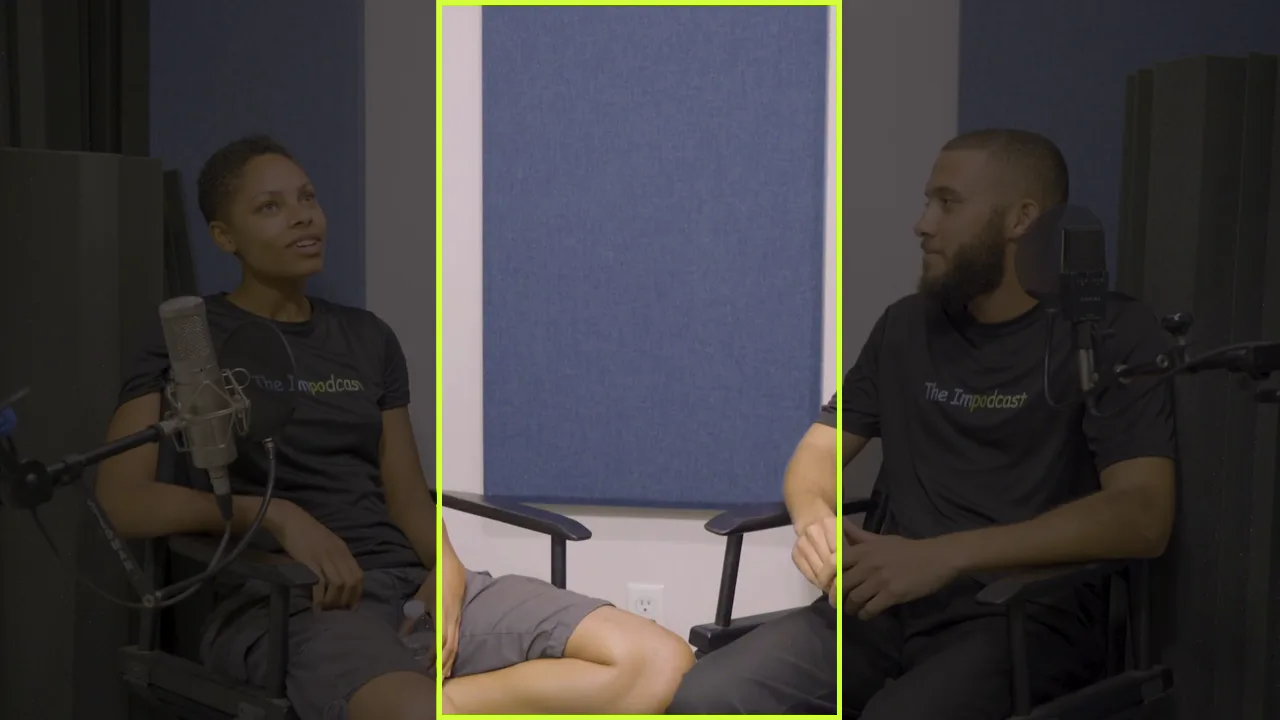
So most podcasters do what this one does for a church client, and crop by hand:
“Basically, one of my clients (a church) is just shooting at 4K off a single cam and I just crop the clips in for the vertical shorts.”
They also say what they would rather have, which is the whole job of speaker framing in one line:
“it would be better to start uploading the long form podcast videos at 1080 with a digital crop switching back and forth between each speaker”
The three pictures that work
Every good vertical podcast clip is made of some mix of three pictures. Getting the mix right matters more than any effect you put on top.
| Picture | Use it for | Watch out for |
|---|---|---|
| The speaker alone | Most of the clip. Anyone mid-answer, any story, any point being made. | Cutting away to the listener for a nod. Pro shows almost never do it. |
| Both people, stacked | Quick back and forth, a laugh you both share, two people talking over each other. | Using it as the default. It halves each face and the clip feels like a video call. |
| The whole picture | Three or more people, or a shot where the room matters, on a blurred copy of itself. | Faces get small. Fine for a few seconds, hard work for a whole clip. |
When to switch, in numbers
The hard part is not the crop, it is the timing. Switch on every “mm-hmm” and the clip flickers. Switch late and you see the wrong face for the first words of an answer. These are the rules Slice uses for vertical clips:
- Ignore short turns. Anything under 1.5 seconds (a “yeah”, a laugh, “right”) does not move the camera.
- No shot under 3 seconds. A shorter one is held until the next real change, so the picture never stutters.
- Cut in the gap. The switch lands just before the new voice starts, in the pause, not on top of the first word.
- Stack for a rally. Three or more alternating turns, each under 3 seconds, show both people. So does a second or more of talking over each other.
- On an edited show, use the editor’s cuts. If your video already cuts between cameras, a change of speaker close to a camera cut moves onto that cut, so the reframe hides inside it.
We did not make these up from nothing. On 12 October 2026 we timed every shot in four full episodes of Lenny’s Podcast (595 shots), plus two of Bubble and one of The Newcomers, all recorded remotely. Those are full episodes, not Shorts, so they switch less often than a clip should, but the habits carry over:
- The cut lands about a fifth of a second before the new person speaks, and cuts inside one person’s turn almost always fall in a pause.
- In about 600 shots we found no listener close-ups. The camera is on whoever is talking, and the side-by-side shot covers the listening.
- A long answer stays on the guest for a long time: the middle shot on the guest ran 36 to 60 seconds, depending on the episode.
- Nobody reframes for hands. When someone gestures, the hands leave the frame and the shot stays put.
In a 45-second clip you have less room, so the same rules give you a few switches, not one. The principle is the same: follow the voice, and do not let the camera chase every noise.
How your recording changes the job
| How you record | What the crop has to do | In Slice |
|---|---|---|
| A call with two boxes (Zoom, Riverside, Meet) | Crop inside one box at a time, never across the line between them. | Finds the two boxes and which voice is which, then crops inside each. |
| Two people on one camera | Pick one side of the picture for each person and keep the crop from showing half of the other. | Finds the two people from where the picture moves, and treats each side as that person’s box. |
| An edited show with several cameras | Find the speaker again after every camera change: wide shot, close-up, reaction shot. | Looks at a frame of each stretch of the clip to find the person talking, and asks again at each camera change. |
| Three or more people | Usually a whole-picture layout, or two of the boxes in a split. | Not followed automatically. Use the whole picture or a two-person split. |
Picture quality is the other half. This podcaster, building a four-camera studio, asked the right question before buying:
“are the individual 1080p ATEM ISO files good enough for cropping into Reels/TikToks/Shorts, or would you record 4K separately somehow?”
From a close camera on each person, 1080p crops fine, because the face already fills the frame. From a wide 1080p shot, the crop is about 608 pixels wide stretched to fill a 1080x1920 clip, and it looks soft. If you film one wide shot, film it in 4K: the same crop is then about 1,215 pixels wide and holds up.
A real two-person episode, framed by Slice
To show what this looks like, we took The Impodcast, Episode 1, a two-host video podcast shared under CC BY 4.0. It is an edited show: it cuts between a wide shot of both hosts and a close-up of each. We uploaded twenty minutes of it (5:00 to 25:00) and let Slice find the clips. Nobody touched the framing.
Slice found four clips, 41 to 44 seconds each. All four turned out to be the same host telling a story or making a point, so the job was not switching between two people. It was finding the same host again every time the edit changed camera. In the first clip the episode goes from the wide shot to a close-up and back again, and the host stays in the tall frame the whole way through:
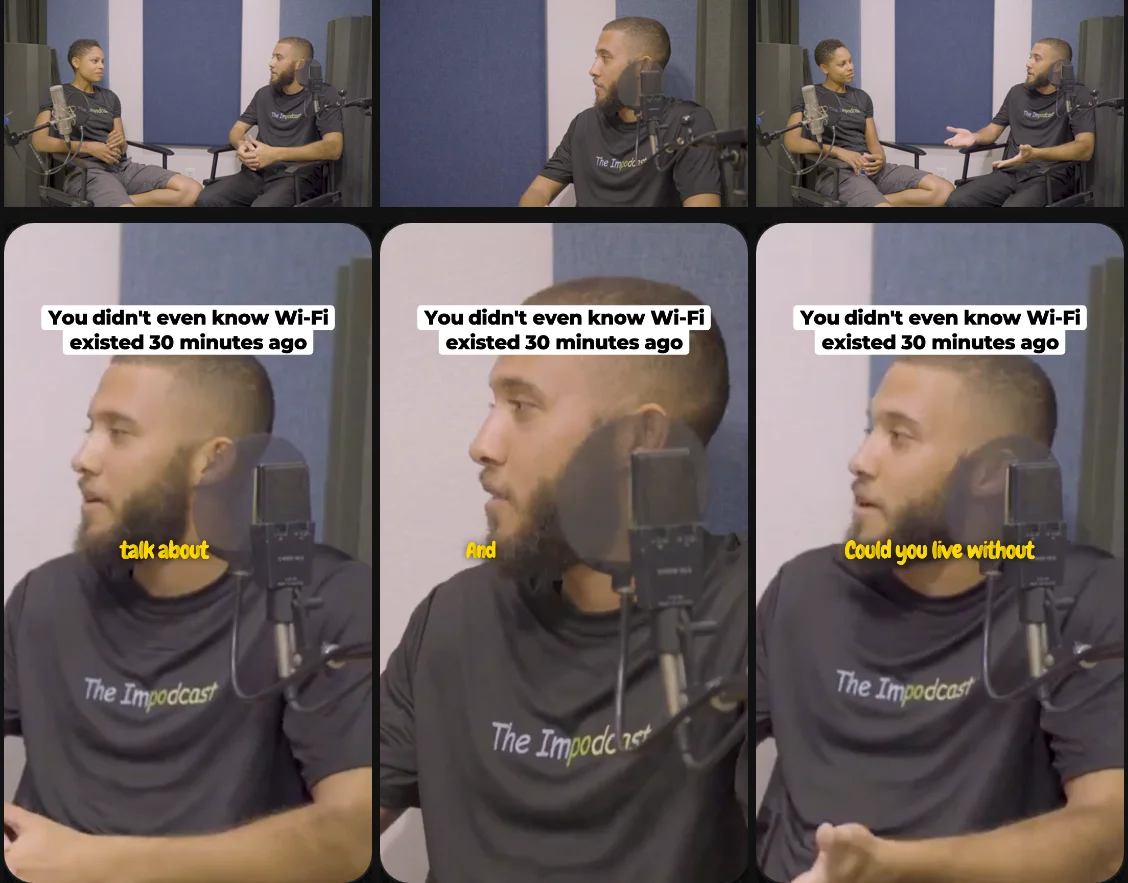
Across the four clips that was ten shots, each one aimed at that host. Here is what we would tell you if you were about to post them:
- The wide shots are soft. This episode is 1080p. Cropping a wide 1080p shot to vertical stretches about 608 pixels across the whole clip, and you can see it in the bottom row above. The close-ups look much better.
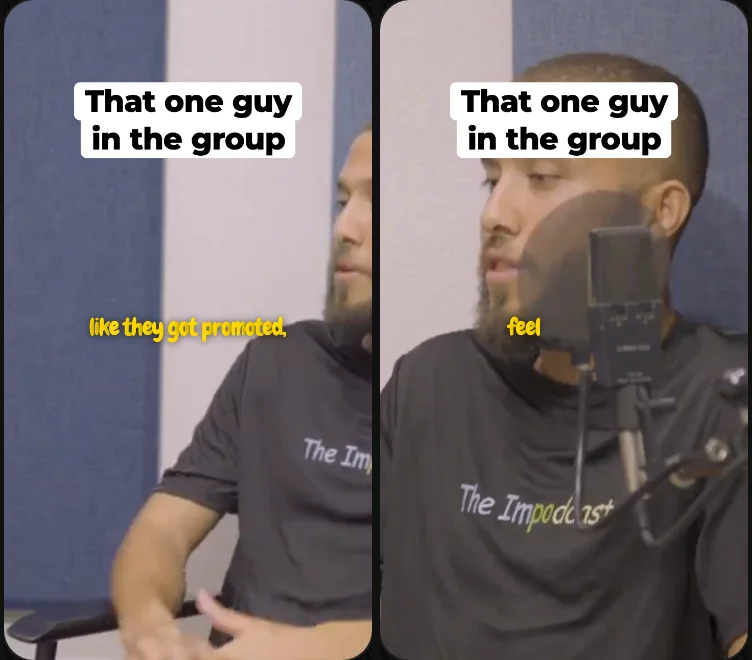
- One clip missed. In the fourth clip the wide shots put the host at the right edge with half their face out of frame. The close-ups in the same clip were fine. Dragging the picture in the editor fixes it, but you have to watch the clip to catch it.
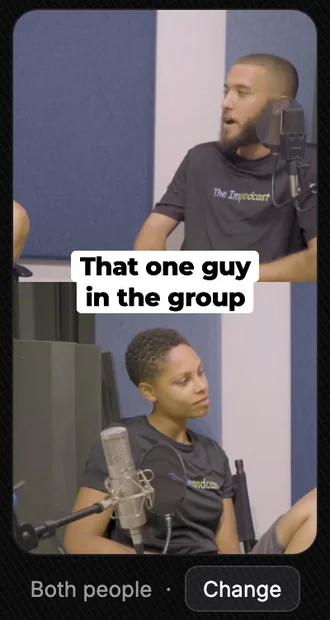
- Both people works. We switched that fourth clip to Both people. On the wide shots it stacked the two hosts, so you see the other host listening. The hook title now sits on the line between them, so it covers neither face. On the close-ups it goes back to the top.
That is a fair picture of where automatic framing is today, in Slice and elsewhere: most of it right with nothing done, and the odd clip that needs a person to look. As one podcaster put it about AI editors in general:
“I’ve tried a few popular AI editors, but the results still feel pretty random.”
The fourth clip is the reason to play every clip once before it goes out, whichever tool made it.
Footage: The Impodcast, Episode 1, CC BY 4.0.
Doing it in Slice, step by step
- Upload the whole episode
Drop the video file into Slice (MP4, MOV or WebM, up to 3 hours and 4.5GB) and say it is a podcast or interview. It transcribes the episode and tells the voices apart.
- Pick the clips you want
Slice suggests the moments worth posting. Tick the ones you want made. If the video has two people in it, each clip it cuts is framed on whoever is talking, without a button to press.
- Play each clip once
Watch for a face shown against the wrong voice and for a switch that lands mid-word. Most clips need nothing.
- Fix the odd one in the editor
On a call recording that matched the faces the wrong way round, Swap speakers in the Frame tab fixes it. In Layouts, pick Both people to keep the two of you stacked. Drag the picture yourself and that clip switches to your framing.
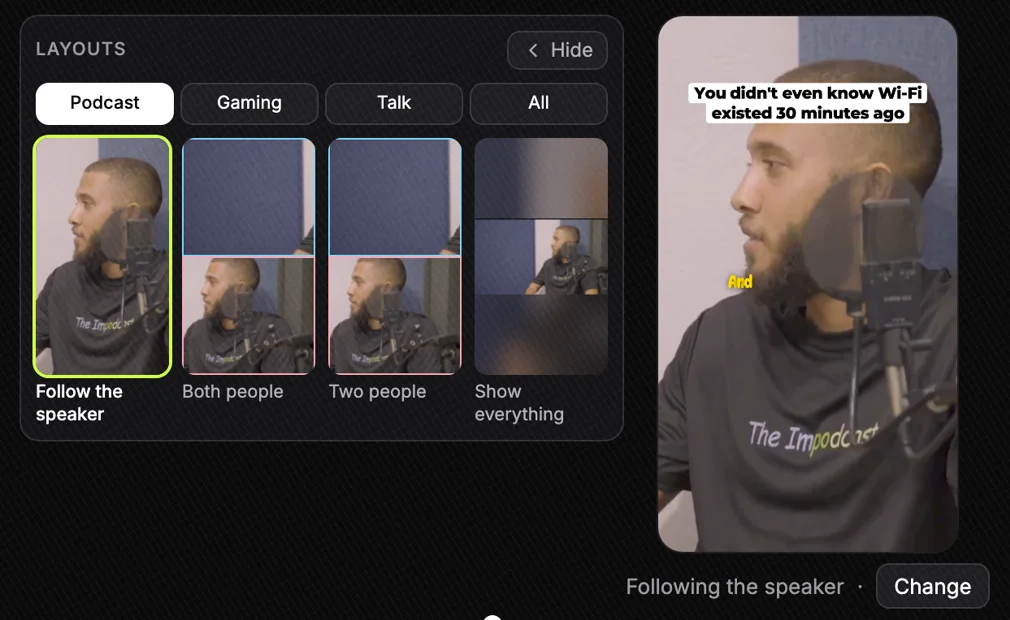
The Layouts panel beside the preview. Each tile is your own clip drawn that way. On a close-up like this one only one person is in the shot, so the two-person tiles have an empty half. Footage: The Impodcast, Episode 1, CC BY 4.0. Tap to enlarge. - Export
Tick the clips and export them together. Each comes out as a vertical MP4 with the captions burned in, ready for Shorts, Reels and TikTok.
Doing it by hand instead? In Premiere, DaVinci Resolve or CapCut, put the clip on the timeline, cut it at every change of voice, then scale and move the picture on each piece so the speaker fills the tall frame. Apply the same rules: skip the short turns, keep each piece at least three seconds, and put the cut in the pause. It works; it is just slow, and it is the step most people drop after the first week.
Already cutting clips in Premiere? Slice can hand you a clip as a Premiere Pro project, framed as it is in Slice, with the captions and title as text you can still edit.
Get the Slice Weekly
One free email every Friday: tools for creators and the best advice we found from people who make things.
Questions
What is speaker framing in a vertical clip?
Cropping a wide podcast video so the tall frame shows whoever is talking, and moving the crop when the voice changes. Without it, a centre crop of a two-person shot often shows the gap between the two people.
How often should a vertical podcast clip switch between speakers?
Only when the voice really changes. Slice ignores turns under a second and a half ("yeah", a laugh) and holds every shot at least three seconds. When people trade three or more short lines in a row, show both of them stacked rather than cutting on every line.
Can I do speaker framing for free?
By hand, yes: in any editor, cut the clip wherever the voice changes and move and scale the picture on each piece. It takes a while per clip. In Slice it happens on its own for two-person videos; your first video and first 3 clips are free, no card, then it is $14.99 a month.
Does it work with three or more people?
Not in Slice yet. It follows two people. For a panel, show the whole picture on a blurred backdrop, or put two of the boxes in a split by hand.
Is a 1080p recording good enough to crop to vertical?
From a wide shot it is soft: a 9:16 crop of a 1920x1080 frame is about 608 pixels wide, stretched to fill a 1080x1920 clip. Record the wide shot in 4K, or crop from a close camera on each person, and the crop holds up.
Does it work on a Zoom or Riverside recording?
Yes, if the recording shows exactly two people, either as two boxes side by side or two people on one camera. Slice finds the boxes and which voice belongs to which, and crops inside each box so a solo never shows half of the other person.