Guide for podcasters
Podcast captions that get watched
Two different jobs share one word. The captions on the video make a clip watchable with the sound off. The caption under the post makes someone open it. Here is how to do both.
The short answer
Caption every clip: big words, a few at a time, inside the part of the frame no app button covers, with each speaker told apart. Read every caption before posting, because names are where transcripts go wrong. Under the post, write the line that makes the clip worth opening, say where the full episode is, and keep hashtags few and specific.
Why podcast clips need captions
People scroll with the sound off, in bed, on a train, at work. And some cannot hear the clip at all. In the World Health Organization’s words:
“Over 5% of the world’s population – or 430 million people – require rehabilitation to address their disabling hearing loss”
For an audience that skews older, which many podcasts and most churches do, it is more: among those older than 60 years, over 25% are affected by disabling hearing loss
. A church media volunteer put the rule simply:
“If you were making TikTok’s or reels, regardless of what you do, use captions.”
And for an audio-only show, captions are not an extra. They are the picture. See how to turn an audio podcast into video clips.
Where captions go on TikTok, Reels and Shorts
Each app covers part of the frame with its buttons, the username and the post caption. Captions placed there get hidden. This is the clear area in each, from Slice’s own measurements:
One clip can serve all three if its words sit inside the area all three leave clear: on a 1080×1920 frame, from 97 to 842 pixels across and from 217 to 1482 down. Check a finished clip against each app with our free safe-zone checkers before you post.
Captions that get read
| Do | Why |
|---|---|
| Show two to five words at a time | A full sentence on screen is read ahead of the voice, or not at all. |
| Use a heavy font with an outline, shadow or box | It has to read over any background, including a bright one. |
| Highlight the word being said, or the key word | It pulls the eye along with the voice. |
| Tell speakers apart | A colour or position per voice, so a conversation does not read as one person. |
| Keep the hook title separate from the captions | A line at the top saying what the clip is about earns the first second. |
| Fix names, places and jargon | The transcript gets these wrong more than anything else. |
Here are the captions on a real clip from our example episode, LinuxGameCast Weekly 430: the hook title, then the words as they are said.
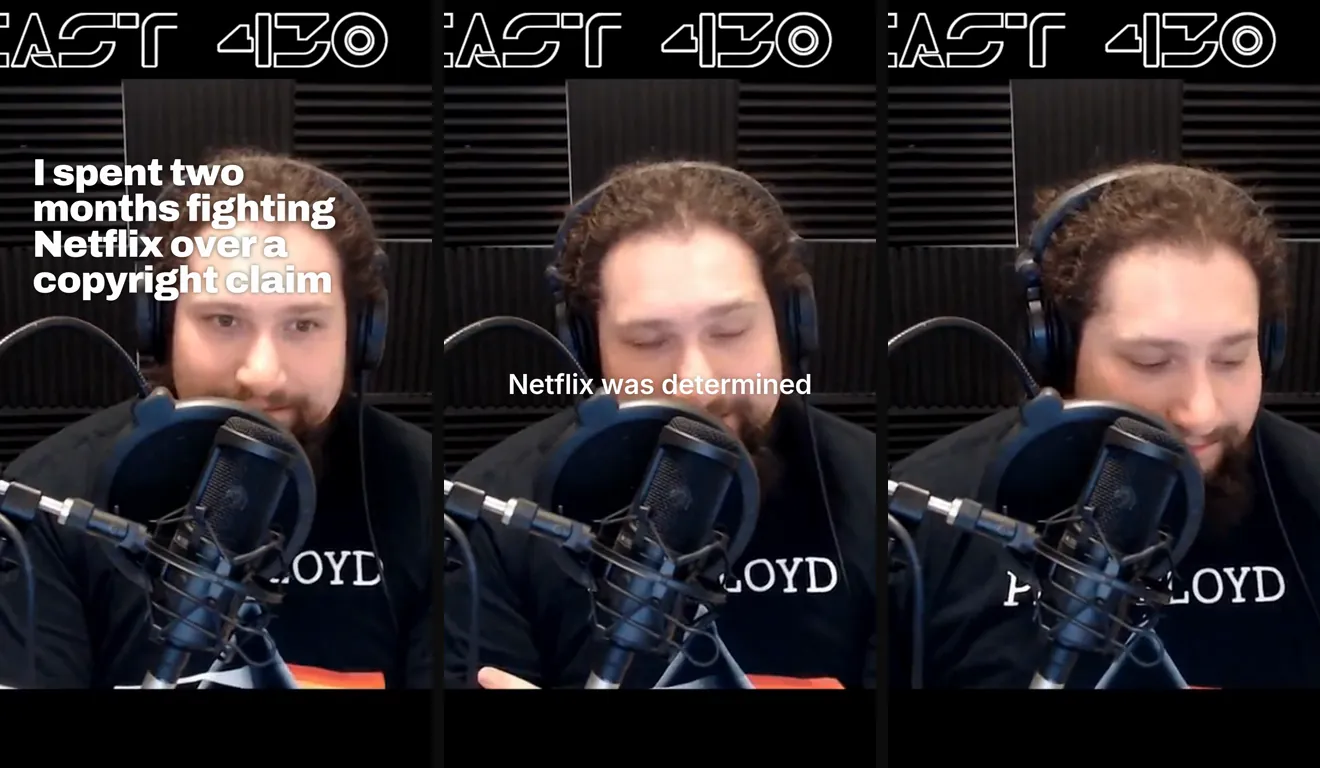
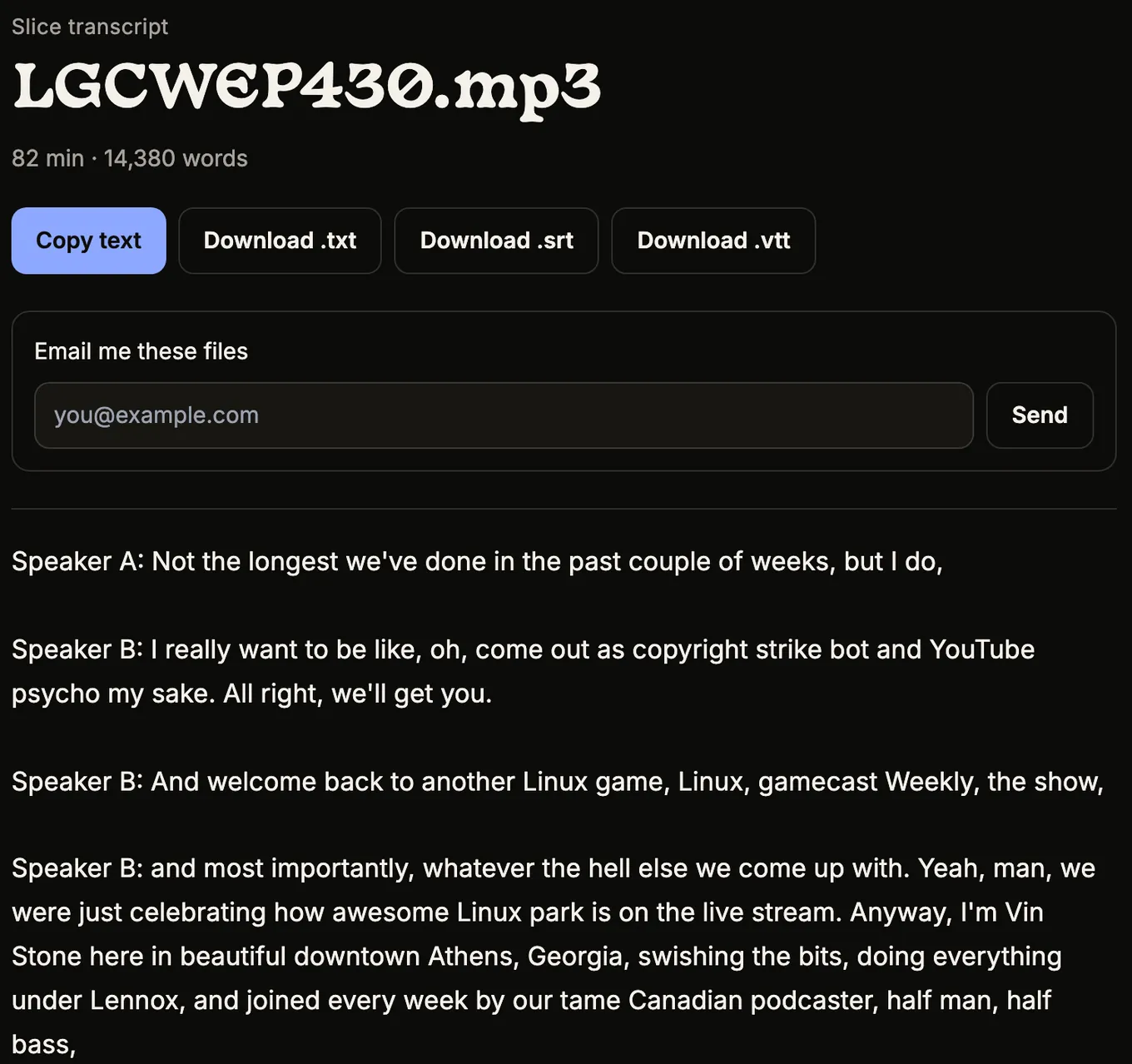
And the reason to read before posting: in the same episode’s transcript, the show’s own name came out as “Linux game, Linux, gamecast”. Slice has 29 caption styles to start from and an editor where each caption is a block you click and retype.
Podcast captions for Instagram and TikTok: the text under the post
This is the other meaning of “podcast captions”, and the one that decides whether anyone taps. What works is short and specific:
- The first line is the hook. Often the question the clip answers, or the most surprising thing said in it.
- Name the show and say where the episode is. “Full episode: [show] on YouTube, Spotify and Apple” beats “link in bio” alone.
- Credit the guest by their handle, and post as a collab where you can.
- A few specific hashtags about the topic, not #podcast and #podcastlife.
Writing it from the clip’s own transcript keeps it honest. One church media volunteer’s method:
“I transcribe the video clip and then provide it to the AI, and ask it to give me an engaging caption. It usually provides 5 choices, so I'll take parts of the options and form my own.”
Slice writes post text and hashtags for each clip in the clip’s own language, as a draft to edit.
Get the Slice Weekly
One free email every Friday: tools for creators and the best advice we found from people who make things.
Questions
Do podcast clips need captions?
Yes. Many people watch with the sound off, and the World Health Organization says over 5% of the world’s population, 430 million people, need rehabilitation for disabling hearing loss. For an audio-only clip, the captions are most of what there is to watch.
Where should captions go on a vertical clip?
Inside the area no app covers: below the top bar, above the caption and username at the bottom, and left of the button column on the right. Slice measured that area in each app; on a 1080×1920 frame it is roughly the middle two thirds, a little left of centre.
How big should captions be?
Big enough to read on a phone held at arm’s length: a few words at a time, in a heavy font, with an outline or a box behind them so they read over any background.
Should captions show who is speaking?
When two people talk in one clip, yes: a change of colour or position for each voice stops the clip reading as one person arguing with themselves.
What should I write in the post caption for a podcast clip?
A line that makes the clip worth opening (often the question the clip answers), the show’s name, where to hear the full episode, and a few specific hashtags. Write it from the transcript of the clip so it matches what is said.
Can I get captions without editing them by hand?
Auto-captions get you most of the way. Read every one before posting: names, places and jargon are where transcripts go wrong. In our example the show’s own name came out wrong.
More for podcasters
- How to pick the best moments from a podcast
- Clips your guests will share
- Social Video Specs 2026: sizes, lengths and safe zones.