Compare
The Pulpit AI alternative for sermon clips (2026)
Pulpit AI, from Subsplash, turns one sermon into many things: clips, discussion guides, devotionals, blog posts and a recap email, plus an assistant for preparing the next one. Churches that mostly want clips, and want them from every service without counting uploads, are the ones who compare it with Slice.
Our bias: we make Shorts by Slice. Compared from Pulpit AI's own pricing and product pages, checked 5 October 2026. We did not test Pulpit AI hands-on, and where it is the better choice we say so.
Shorts by Slice turns Sunday’s sermon into captioned vertical clips. $14.99 a month. Your first clip is free, no card. Then a 3-day free trial for the rest.
Try it free →Slice vs Pulpit AI
| Shorts by Slice | Pulpit AI | |
|---|---|---|
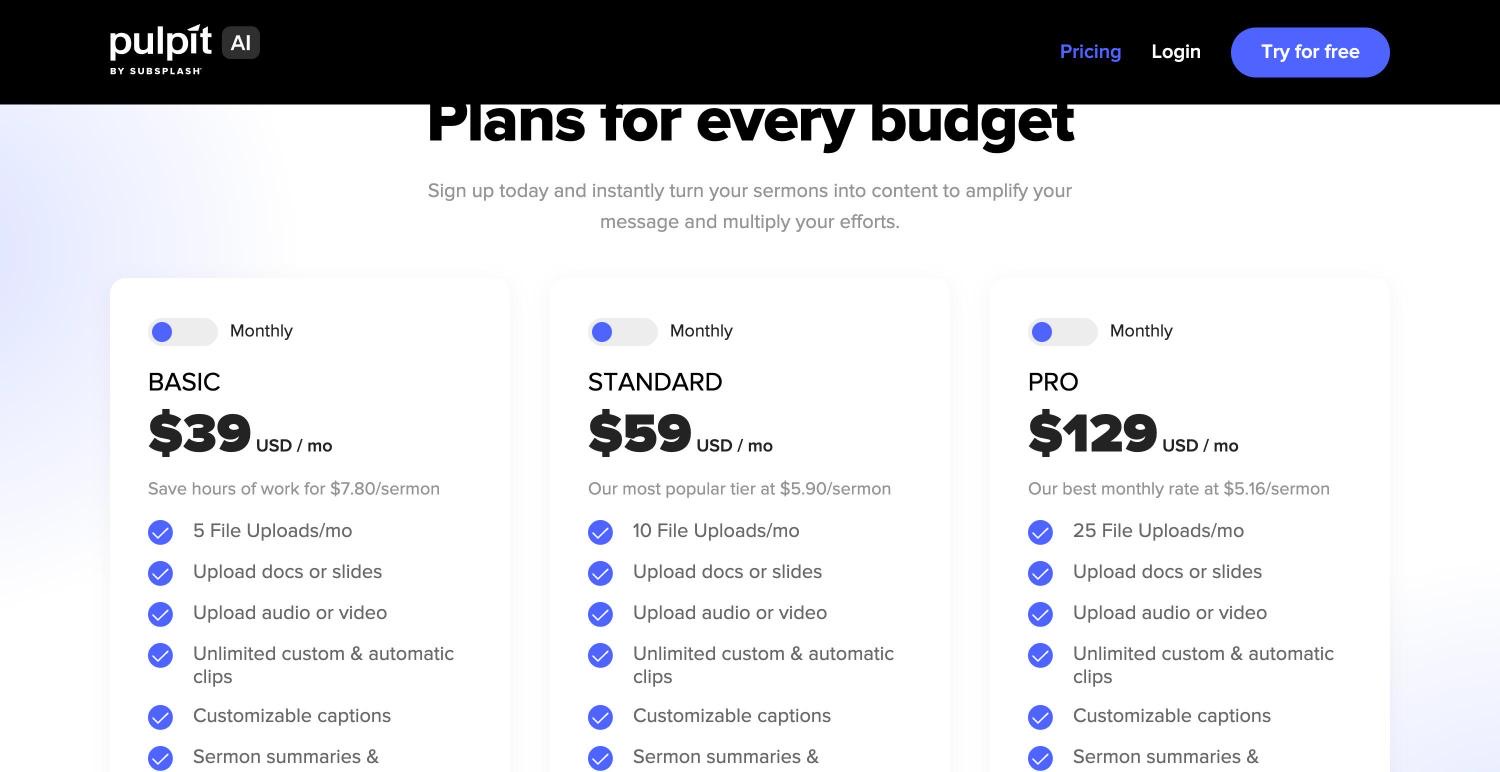
| Price | $14.99 a month or $149 a year; $6.99 a month in lower-income countries | $39 / $59 / $129 a month for 5 / 10 / 25 uploads; 10% less billed yearly |
| Free to try | Your first clip free, no card; then a 3-day free trial, which takes a card | A free trial with 2 uploads, no card |
| How the sermon gets in | A YouTube link, one video per link (YouTube sometimes blocks it; uploading the file works every time), or the file: 3 hours, 2GB | Upload video, audio, PDFs, Word or slides; Subsplash media without re-uploading. A link is not stated |
| Monthly limit | No cap on sermons; up to 1,000 exports a month | 5, 10 or 25 uploads a month |
| Clips | The moments that stand on their own, captioned and framed; any stretch of the transcript too | Unlimited automatic and custom clips, with captions you can style |
| Caption languages | The language preached, in Latin-alphabet languages and Hebrew; not yet Korean, Chinese, Arabic, Hindi or Thai | Not stated |
| Beyond clips | With Transcribe hours ($4.99, $9.99, $24.99, paid once): every Bible passage named with its time, the sermon in parts, starred quotes, an AI outline and small-group questions labelled as AI, Word notes and a print page | Discussion guides, daily devotionals, blog posts, newsletters, a recap email, a sermon-prep assistant |
| Posting | No: you download and post | Not stated |
Pulpit AI’s figures from its pricing page and its own site, 5 October 2026. Prices in US dollars.
Choose Pulpit AI if…
- Your church already runs on Subsplash, so the sermon is there without uploading it again.
- You want discussion guides, devotionals, blog posts and a recap email from each sermon, as much as clips.
- Your pastor would use an assistant for preparing next week's sermon.
- You upload a written sermon or slides, not only a recording.
Choose Slice if…
- You mostly want clips: $14.99 a month against $39, with no count of uploads.
- You have more than five recordings a month: midweek services, youth, several preachers.
- You want to paste the YouTube link rather than download the file and upload it.
- You want a full editor to fix a word, trim a line or change the shape.
Where Slice loses to Pulpit AI
- Pulpit AI writes discussion guides, devotionals, blog posts and recap emails; Slice writes none of these.
- Pulpit AI helps with sermon preparation; Slice works only after the sermon is preached.
- With Subsplash, Pulpit AI reads the sermon where it already is; Slice needs a link or a file.
Pulpit AI, in short
Best for churches that want the whole sermon turned into small-group and devotional material, with clips included, and that already use Subsplash.
Pricing, in plain words
- Free trial: 2 free uploads, no credit card.
- Basic: $39 a month for 5 file uploads a month.
- Standard: $59 a month for 10 uploads a month.
- Pro: $129 a month for 25 uploads a month.
- Every plan has every feature; the difference is the number of uploads. Billed yearly, the page says you save 10%.
Reviews
We did not read Pulpit AI's reviews for this page, so there are no ratings, praise or complaints here: its own site is the only source above.
Slice, in short
Best for a church that wants to choose its own moments from every sermon, at a flat price, with as many clips as it likes.
$14.99 a month or $149 a year. Your first clip is free, no card, then a 3-day free trial for the rest. Paste the YouTube link to the sermon, or upload the file: YouTube sometimes blocks a link, and uploading works every time.
What it does not do yet, plainly: there are no team accounts, so each volunteer has their own; it does not post or schedule; it does not check the worship music for you; and it writes no devotionals or blog posts. More on the page for churches.
Slice on a real sermon
We did not run Pulpit AI, so we will not guess how it does. Here is what Slice did with a real one: Tim Keller’s “Let the Psalms Teach You to Pray”, a 40-minute message published on The Gospel Coalition’s YouTube channel, brought in by its link on 5 October 2026.
- About two and a half minutes from the link to the list: the transcript took under two minutes, and finding the moments 49 seconds.
- It listed 4 moments, already cut, captioned and vertical, running 1:09, 1:07, 0:27 and 1:32.
- The one built from the most pieces, “My self-image looked like a Frankenstein monster”, joins 13 passages from 36:33 to 38:48. That is the kind of clip to read before posting, to be sure it still says what the preacher said.
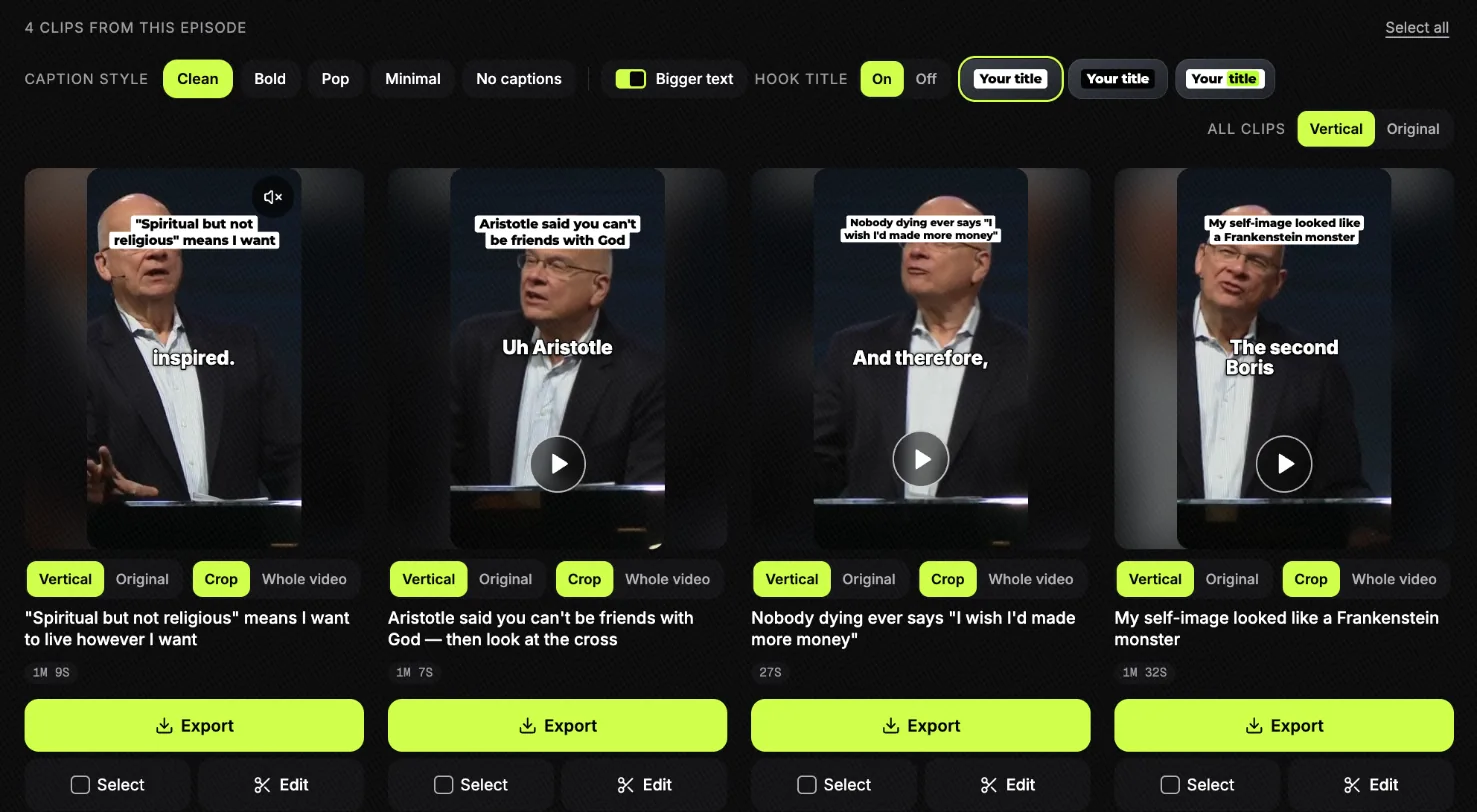
Nothing was posted. The titles are Slice’s suggestions, not the preacher’s words. The whole run, step by step, is in how to turn a sermon into short clips.
Get the Slice Weekly
One free email every Friday: tools for creators and the best advice we found from people who make things.
Questions
Is Slice cheaper than Pulpit AI?
For clips, yes: $14.99 a month with no cap on sermons, against $39 for 5 uploads a month. Pulpit AI's price includes written material (guides, devotionals, blog posts) that Slice does not make; Slice's sermon notes, outline and small-group questions need Transcribe hours ($4.99, $9.99, $24.99, paid once). Checked 5 October 2026.
Who makes Pulpit AI?
Subsplash. Its site carries "© 2026 Subsplash" and its logo reads "by Subsplash", and it can work from media already in the Subsplash dashboard.
Does Pulpit AI take a YouTube link?
Its pricing and home pages talk about uploading files (video, audio, PDFs, Word and slides) and about Subsplash media; we did not find a link import on them on 5 October 2026. Slice takes a YouTube link or a file.
How was this compared?
Compared from Pulpit AI's own pricing and product pages, read in a browser on 5 October 2026, not signed in. We did not read its reviews and did not test Pulpit AI hands-on. We make Slice.
More comparisons
- Best sermon clip tools for churches (2026)
- The Sermon Clips alternative
- The Sermon Shots alternative
- Sermon clips for churches
- How to turn a sermon into short clips
- Sermon transcription
All comparisons, in one list.
Try Shorts by Slice on your next sermon. If Pulpit AI fits you better, use it.