Shorts by Slice · Sermon clips for churches
Turn Sunday’s sermon
into a week of clips.
Paste the link to your livestream or YouTube video, or upload the file. Slice finds the strongest moments in the sermon, captions them and frames them for Reels, Shorts and TikTok.
Your first clip is free, no card. Then a 3-day free trial for the rest.
- 01
Paste Sunday’s link
The YouTube link to the service or the finished livestream, or the recording itself. Slice transcribes it and reads the whole sermon.
- 02
Read the moments it found
A short list: a title for each, how long it runs and the line it opens on. Pick the ones that say what your pastor meant.
- 03
Download and post
Each clip comes back captioned and vertical. Fix a word or a name if you need to, then post one a day through the week.
A real sermon, run through Slice
We pasted the link to Tim Keller’s “Let the Psalms Teach You to Pray”, a 40-minute message from The Gospel Coalition’s 2016 women’s conference, published on The Gospel Coalition’s YouTube channel. About two and a half minutes later, Slice had transcribed it and listed four moments, each already cut, captioned and vertical:
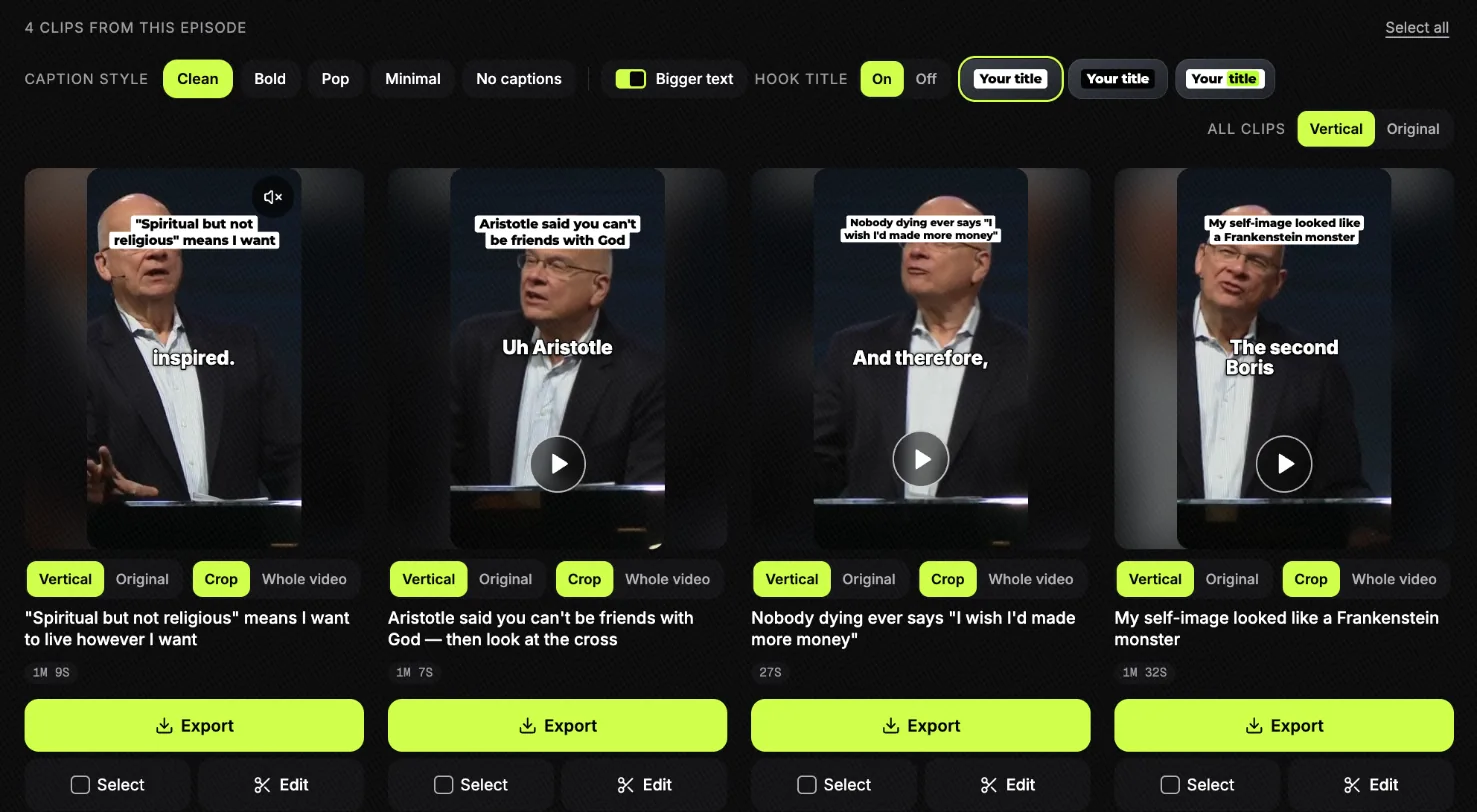
Here they are side by side, with where each one comes from in the sermon:
| Moment Slice suggested | Length | From the sermon | Opens on |
|---|---|---|---|
| “Spiritual but not religious” means I want to live however I want | 1:09 | 2:46 to 4:01 | And that is, our secular culture loves spirituality, as in, I’m spiritual but not religious. |
| Aristotle said you can’t be friends with God — then look at the cross | 1:07 | 4:41 to 11:29 | Uh Aristotle believed that the idea that you could be friends with a god was crazy. |
| Nobody dying ever says “I wish I’d made more money” | 0:27 | 8:58 to 9:32 | And therefore, I’ve been around when people have been dying. |
| My self-image looked like a Frankenstein monster | 1:32 | 36:33 to 38:48 | The second Boris Karloff Frankenstein movie was called Bride of Frankenstein. |
Two things worth seeing. The third is the shortest and simplest: one pastoral observation, half a minute, ready to post. The second is built from passages almost seven minutes apart, which is how an argument gets into a minute. A clip like that is the one to watch before you post, to be sure it still says what the preacher said.
For this page we picked the clips and opened one in the editor, as a church media volunteer would. Nothing was posted or published. The titles are Slice’s suggestions, not the preacher’s words. The step-by-step guide walks through the same sermon from the paste to the post.
Make it look like your church
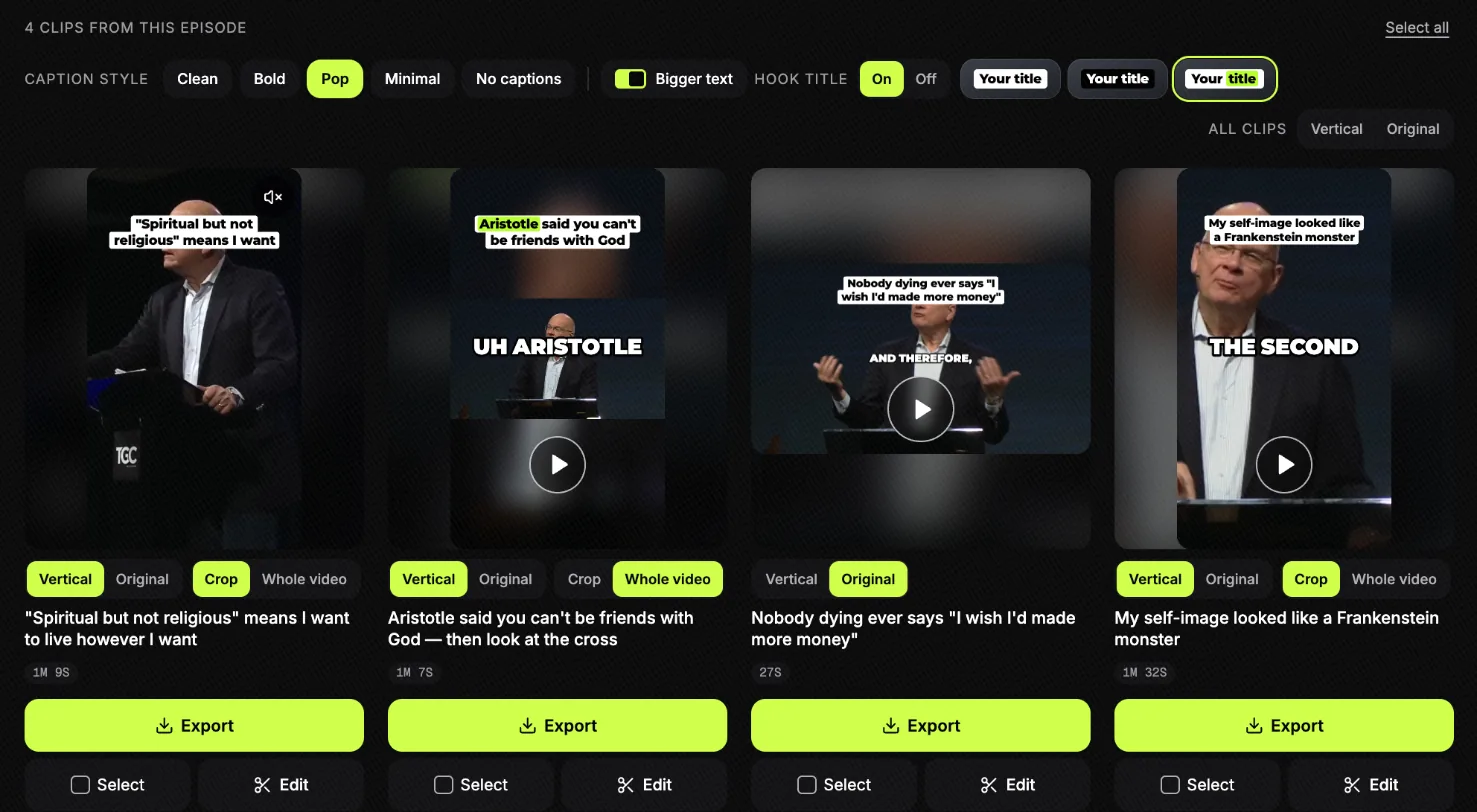
The clips come back ready to post, and every part of the look is a tap away. Choose it once and every clip that week follows it.
- Caption style. Clean, Bold, Pop or Minimal, bigger text if you want it, or no captions at all.
- A title on top. A short line at the top of the clip, in one of three styles, or turned off.
- Vertical or the original shape. Vertical for Reels, Shorts and TikTok, or the wide shape of the service video.
- Crop or the whole picture. Crop in on the preacher, or keep the whole stage in the frame.
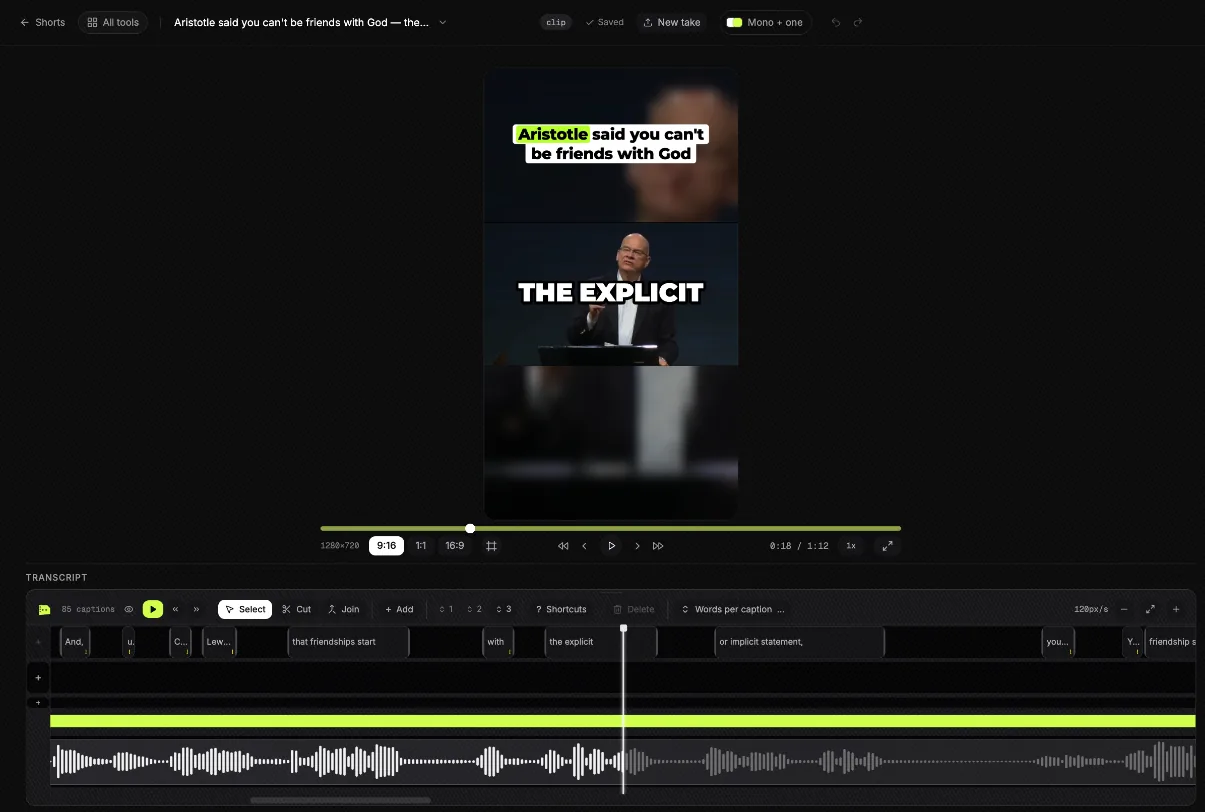
Before you post, open a clip in the editor. Fix a word or a name the transcript got wrong, trim a line, or change the shape.
What makes a good sermon clip
- It stands on its own. Someone who never heard the first half understands it. One idea, not “part three of Sunday”.
- It starts on the line, not the run-up. The first sentence is the one that makes someone stop scrolling.
- It ends where the thought lands. Not mid-breath, and not two sentences into the next point.
- Stories and confessions travel. An illustration, something the pastor admits about themselves, a moment at a bedside. In the example above, two of the four are exactly that: a deathbed and a confession.
- It keeps the meaning. A complex point cut to a sound bite can say less than the sermon did, or something else. If it can’t be said in a minute, leave it in the sermon.
Slice looks for these. It is still a first pass, and the people who do this every week say so:
“What doesn't work: auto-posting whatever the AI grabbed with no human pass. Those get scrolled past and the team burns out maintaining them.”
So the list is for choosing, not for posting blind. When a sermon has nothing that stands on its own, Slice says so rather than padding the list. And if you would rather pick a moment yourself, you can make a clip from any stretch of the transcript.
A weekly routine for a church media team
Most churches that keep this up do it as a rhythm, not a project. One church communicator on r/churchtech plans the month on a printed calendar, with Monday kept for sermon clips:
“I try to keep each day of the week for specific things.”
With Slice, a week can look like this:
- Sunday. Preach, stream, and let the recording finish uploading to YouTube.
- Monday. Paste the link. While Slice reads the sermon, write the week’s other posts. Then pick three or four moments.
- Tuesday to Thursday. Post one clip a day. Each one comes with suggested post text you can edit.
- Friday. Point to Sunday: the next sermon title, or the clip that did best this week, on your stories.
The point is that it is small enough to keep doing. The hard part was never one week:
“We tried this once at my last church and found that it got a heck of a lot of view, but we didn't have the bandwidth to keep finding the right clips and posting them.”
Captions that let everyone follow
Every clip has its words burned onto the picture, appearing as they are spoken. Most people scroll with the sound off, and some of the people you most want to reach are deaf or hard of hearing. Captions are how both groups hear the sermon.
“If you were making TikTok’s or reels, regardless of what you do, use captions.”
Speech recognition is good on ordinary speech and still gets names wrong: Habakkuk, Melchizedek, your pastor’s surname. Every word can be fixed in the editor before you download, and there is an .srt subtitle file too if you want one. Pick a caption style once and every clip that week follows it, so your posts look like your church’s.
Sermon transcripts and notes
Clips are one use of a sermon. The words are another: notes for the website, a study guide for small groups, a sermon your deaf members can read, a quote for Monday’s email. Slice Transcribe turns the recording into text.
- What you get, free: one recording a day up to 90 minutes, as a transcript in paragraphs, with each speaker labelled when more than one person talks (a guest speaker, a Q&A), plus .txt, .srt and .vtt files.
- With hour packs: recordings up to 3 hours, notes with a timestamp on every paragraph, Word (.docx) and Copy for Notion. Paid once, and the hours never expire: 5 hours for $4.99, 15 hours for $9.99, 40 hours for $24.99.
- What it does not do: it does not summarise the sermon or write discussion questions. You get what was preached, in order. Transcribe takes a file, not a link.
More on the sermon transcription page, where you can try it on a sermon now.
Questions churches ask
Can we clip the worship songs too?
Clip the preaching, not the worship set. The sermon is your church’s own words, but the songs belong to their writers. Your church’s licences may cover singing them in the service and streaming them, and posting a song as a Reel or TikTok can be a different use: the platform may mute or block the clip. If a moment has music under it, check your licence terms before you post it. Slice does not check music for you.
Can we clip another church’s sermon?
Only with their permission. Slice will bring in any public YouTube video, but a sermon belongs to the preacher and the church that published it. Ask first, and credit them in the post.
We have more than one campus. Does that work?
Each Slice account is one person’s, and there is no shared team space yet. Most churches have one person make the clips for every campus from the main recording. If each campus preaches its own sermon and has its own media volunteer, each needs their own account.
Our media team is volunteers. Do they need editing skills?
No. They paste a link or drop a file, read the list of moments, and download the ones they want. The editor is there for anyone who wants to fix a word or trim a line, and it works in a browser, on a laptop or a phone. Nothing to install.
Our service is preached in Spanish (or another language). Does it work?
In many languages, yes. The language is detected from the recording and the captions come back in it: Spanish, Portuguese, French and other languages written in the Latin alphabet work, and so does Hebrew. Korean, Chinese, Arabic, Hindi and Thai do not yet, because there are no caption fonts for them.
Our livestream is on Facebook, not YouTube. Can we paste that?
Not yet: links work for YouTube. Download the video from Facebook (or from your streaming software’s recording) and upload the file instead: MP4, MOV or WebM, up to three hours and 2GB.
Will it take a line out of context?
It can cut out the run-up to a point and join the parts that carry it, always in the order they were preached. It never moves a sentence to make the preacher seem to say something they did not. Still, read every clip before you post it: a short clip of a long argument is the place meaning gets lost, and only you know your pastor’s meaning.
What does it cost?
Your first clip is free, with no card. After that, a 3-day free trial, then $14.99 a month or $149 a year for as many clips as you make. In lower-income countries the price is $6.99 a month ($69 a year), shown automatically. Transcripts are separate: one a day free, or hour packs paid once (5 hours for $4.99, 15 hours for $9.99, 40 hours for $24.99).
More for churches
- How to turn a sermon into short clips: the steps, with the same sermon.
- Sermon transcription: the words, for notes and small groups.
- Reels safe zone: where the buttons cover your captions.
What goes in, what comes out
In
The sermon. A YouTube link to the service or the livestream once it has ended, or the file: MP4, MOV or WebM, up to three hours and 2GB.
Out
An MP4 with the captions burned in. Vertical, for Reels, Shorts and TikTok, with the words on screen as they are preached.
What you get
One price. Make as much as you want.
You’re not charged per export, and there’s no cap on how many videos you make. An upload can be three hours and 2GB, so a full recording is fine.
Cancel any time
Your first clip is free, no card. Then a 3-day free trial for the rest; cancel before it ends and you pay nothing. One subscription, and it includes Captions by Slice.