Compare
Best sermon clip tools for churches (2026)
For church media teams turning Sunday’s sermon into Reels, Shorts and TikToks. Seven tools: three made only for churches, three general clippers with a church page, and ours. What each costs, how the sermon gets in, which languages it captions, what it does about the worship set, and what it makes besides clips.
How we compared: Compared from each tool's public pages and pricing on 5 October 2026; we make Slice. (Shorts by Slice is ours.) We did not test the others hands-on or read their reviews. Where a tool’s own pages do not say something, the table says “not stated”. Where another tool is the better choice, this page says so.
Shorts by Slice turns Sunday’s sermon into captioned vertical clips. $14.99 a month. Your first clip is free, no card. Then a 3-day free trial for the rest.
Try it free →The short version
| Tool | Price | Free tier | Sermon in by | Caption languages | Done by a person? | Worship music | Beyond clips |
|---|---|---|---|---|---|---|---|
| Shorts by Slice | $14.99/month or $149/year ($6.99/month in lower-income countries) | First clip free, no card; then a 3-day free trial | A YouTube link, one video per link (YouTube sometimes blocks it; uploading the file works every time), or a file: 3 hours, 2GB | Captions in the language preached, for languages written in the Latin alphabet and Hebrew; not Korean, Chinese, Arabic, Hindi or Thai | No: you pick and fix the clips yourself | Not handled: it does not check music, so clip the preaching | With Transcribe hours ($4.99, $9.99, $24.99, paid once): Bible passages with their times, the sermon in parts, starred quotes, an AI outline and small-group questions, Word notes, a print page |
| Sermon Clips | $23.99/month, or $9.99/week | 2 sermons, no card (free clips end on a 1.5-second card) | A YouTube link or an MP4/MOV, services up to 4 hours | Captions in the language preached; names English, Spanish, Swahili, Korean and Afrikaans "and most others" | No: automatic, with a few adjust controls | Not stated; it skips openings, announcements and the closing prayer | A Sermon Packet with every sermon: transcript, notes, a five-day devotional, key quotes, a discussion guide |
| Pulpit AI | $39 / $59 / $129 a month for 5 / 10 / 25 uploads | A free trial: 2 uploads, no card | Upload video, audio, PDFs, Word or slides; Subsplash media without re-uploading. A link is not stated | Not stated | No: automatic clips, and you make your own from the transcript | Not stated | Discussion guides, daily devotionals, blog posts, newsletters, a recap email, a sermon-prep assistant |
| Sermon Shots | $63 / $67 / $97 a month, or $53 / $57 / $87 billed yearly | 2 free sermon clips, no card; 14-day trial on paid plans | YouTube, a file or a livestream; Switcher, Resi and WordPress integrations | Captions: not stated. Dubbing into 33 languages on Gold | A free sample made from your sermon on request; no paid human-editing plan on its pricing page | Not stated; you can add music to a clip | Discussion guides, 5-day devotionals, blog posts, summaries, quotes and verses, quote images, thumbnails (Silver and up) |
| OpusClip | Free; $15/month Starter; $29/month Pro, or $14.50/month billed yearly (read 30 September 2026) | 60 minutes a month, watermarked (its church page adds 90 free minutes for new users) | Upload or a YouTube link; on Pro, links from Facebook, Vimeo, Zoom, Rumble, Google Drive and more | English, German, Spanish, French, Portuguese "and other 20 more languages", per its church page | No | Not stated | None sermon-specific; a church page, b-roll and brand templates |
| Choppity | $20/month, or $14/month billed yearly; Team $48/month with unlimited seats (read 30 September 2026) | 1 hour of analysis a month | A YouTube sermon link, or upload MP4, MOV, MP3, WAV or M4A up to 10GB | Captions in over 40 languages | No | Not stated | None sermon-specific; a church page, edit by transcript, vertical, square and wide |
| Clypse | $14.99/month Pro (100 clips), $29.99/month Studio (250 clips); a third less billed yearly | One 30-minute video, about 10 clips, watermarked, kept 3 days | A YouTube, Facebook or Rumble link, or a file; up to 6 hours | Not stated | No | "Worship-Safe Clipping": its sermon page says the AI tells the sermon from worship and music | None beyond clips; up to 15 clips per sermon |
Prices in US dollars, read from each tool’s own pages on 5 October 2026 (OpusClip’s and Choppity’s on 30 September 2026). Scroll the table sideways on a phone.
Where Slice loses
Since we make it, the weak spots first. Slice has no team accounts yet, so each volunteer needs their own. YouTube sometimes blocks its link import; uploading the file works every time, but that is an extra step on the weeks it happens. It does not post for you (Sermon Shots, OpusClip, Choppity and Clypse do). It writes no devotionals, discussion guides or blog posts (Sermon Clips, Pulpit AI and Sermon Shots do; Slice’s sermon notes and small-group questions come with Transcribe hours, bought separately). It does not keep the worship set out for you, and its captions do not yet cover Korean. And someone still has to read the list and pick the clips; Sermon Clips sends finished ones.
What church media people say about these tools
From an r/churchtech thread titled “SermonClips Vs OpusClip, any preference?”, two answers that apply to every tool on this page, ours included:
“What doesn't work: auto-posting whatever the AI grabbed with no human pass. Those get scrolled past and the team burns out maintaining them.”
“I've found most of the clips from all these AI tools to not really be "bangers". I've found it easier to pull my own.”
And from another thread, the way many teams use any of them:
“Something we do at my church for this is to use AI tools (we use opus but there’s many options) to make the clips and then we just choose the best like 3 per week to post..”
So whichever you pick, plan for a person to choose and check the clips. The tools differ in how much of that choosing they leave to you: Sermon Clips leaves the least, Slice and the general clippers the most.
Shorts by Sliceours
Best for a church that wants to choose its own moments from every sermon, at a flat price, with as many clips as it likes.
The right choice if…
- You want to read the list of moments and choose the ones that say what your pastor meant, rather than receive a fixed few.
- You make more than five clips a sermon, or clips longer than a minute.
- You want the lowest flat price here: $14.99 a month, with no cap on sermons.
- You want vertical, square or wide from the same clip.
Where it falls short for a church
- No team accounts yet: each account is one person's, so two volunteers need two accounts.
- YouTube sometimes blocks the link import. Uploading the file works every time.
- It does not post or schedule: you download the clips and post them.
- It does not check worship music, and it writes no devotionals, discussion guides or blog posts.
- Caption fonts cover Latin-alphabet languages and Hebrew, not yet Korean, Chinese, Arabic, Hindi or Thai.
- No third-party reviews to report yet.
Pricing, in plain words
- $14.99 a month or $149 a year, for as many sermons as you put through it (up to 1,000 exports a month). In lower-income countries, $6.99 a month or $69 a year, shown automatically.
- Your first clip is free, no card. Then a 3-day free trial for the rest.
- Transcripts are separate: one recording a day free, or Transcribe hour packs paid once ($4.99, $9.99, $24.99). With hours, the sermon tools: Bible passages with their times, the sermon in parts, starred quotes, an AI outline and small-group questions, Word notes, a print page.
Sermon Clipsmade for churches
Best for a church that wants up to five finished clips from every Sunday with nothing to edit, captioned in the language the sermon was preached in.
The right choice if…
- You want finished clips in your inbox and no editing at all.
- Five clips a week is plenty.
- Your sermon is preached in Korean or another language Slice's caption fonts do not cover.
- You want sermon notes and a devotional included in the price.
What it does well
- Paste a YouTube link or upload an MP4 or MOV; services up to four hours.
- Up to five clips per sermon, 30 to 60 seconds each, vertical with the preacher tracked, captions burned in and the audio cleaned up. One email when they are ready.
- Captions in the language preached: its page names English, Spanish, Swahili, Korean and Afrikaans "and most others".
- Skips openings, announcements and the closing prayer when it picks moments, per its page.
- A Sermon Packet with every sermon: a cleaned transcript, sermon notes, a five-day devotional, key quotes and a discussion guide.
- If a sermon comes back with fewer clips than asked for, its pricing page says that sermon's credit goes back on the account.
Where it falls short
- Up to five clips per sermon, 30 to 60 seconds each.
- Vertical only: its page says square and landscape are not made yet.
- Changes are limited: start and end move up to 15 seconds, 3 re-renders per clip, and up to 3 moments of your own per sermon while the recording is kept (30 days).
- It does not post for you, dub, or add music or b-roll, as its own page says.
Pricing, in plain words
- Free: your first 2 sermons, no card. Every feature, but each free clip ends with a 1.5-second sermon-clips.com card.
- Weekly Pass: $9.99 a week, cancel any week.
- Founding Pastor: $23.99 a month, which the page says is "grandfathered for life as long as your subscription stays active".
- Every plan gets the same features; the plans differ in how many Sundays and the end card.
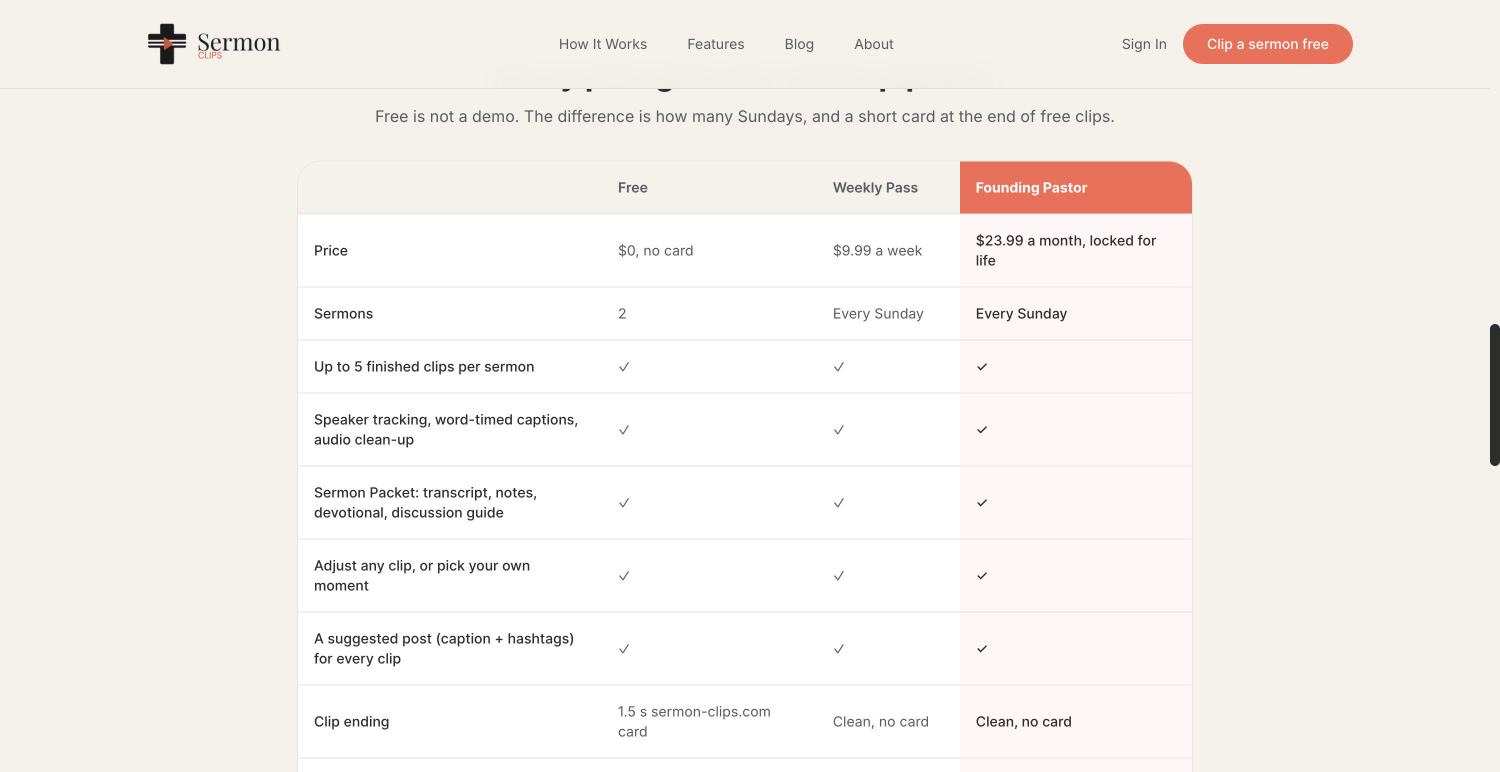
Source: Sermon Clips’s pricing page and its home page, read 5 October 2026.
Weighing Sermon Clips against Slice? Slice as a Sermon Clips alternative, side by side.
Pulpit AImade for churches
Best for churches that want the whole sermon turned into small-group and devotional material, with clips included, and that already use Subsplash.
The right choice if…
- Your church already runs on Subsplash.
- The written material (guides, devotionals, recap emails) matters as much as the clips.
- Your pastor wants help preparing next week's sermon too.
What it does well
- Every plan includes unlimited custom and automatic clips, captions you can style (fonts, colours, karaoke highlighting), transcripts and summaries.
- Small-group discussion guides, daily devotionals, blog posts, newsletters and a weekly recap email from each sermon.
- A sermon assistant for preparation: openers, illustrations, application and related passages.
- Takes video, audio, PDFs, Word files and slides; with Subsplash, any media item in the Subsplash dashboard, without uploading it again.
- Made by Subsplash, the church app and media company.
Where it falls short
- Priced per upload: 5 a month on Basic, so a church with midweek services or several preachers uses them fast.
- Its pages talk about uploading files; they do not say it takes a YouTube link.
- Its pages do not say which languages it covers or how long a recording can be.
Pricing, in plain words
- Free trial: 2 free uploads, no credit card.
- Basic: $39 a month for 5 file uploads a month.
- Standard: $59 a month for 10 uploads a month.
- Pro: $129 a month for 25 uploads a month.
- Every plan has every feature; the difference is the number of uploads. Billed yearly, the page says you save 10%.
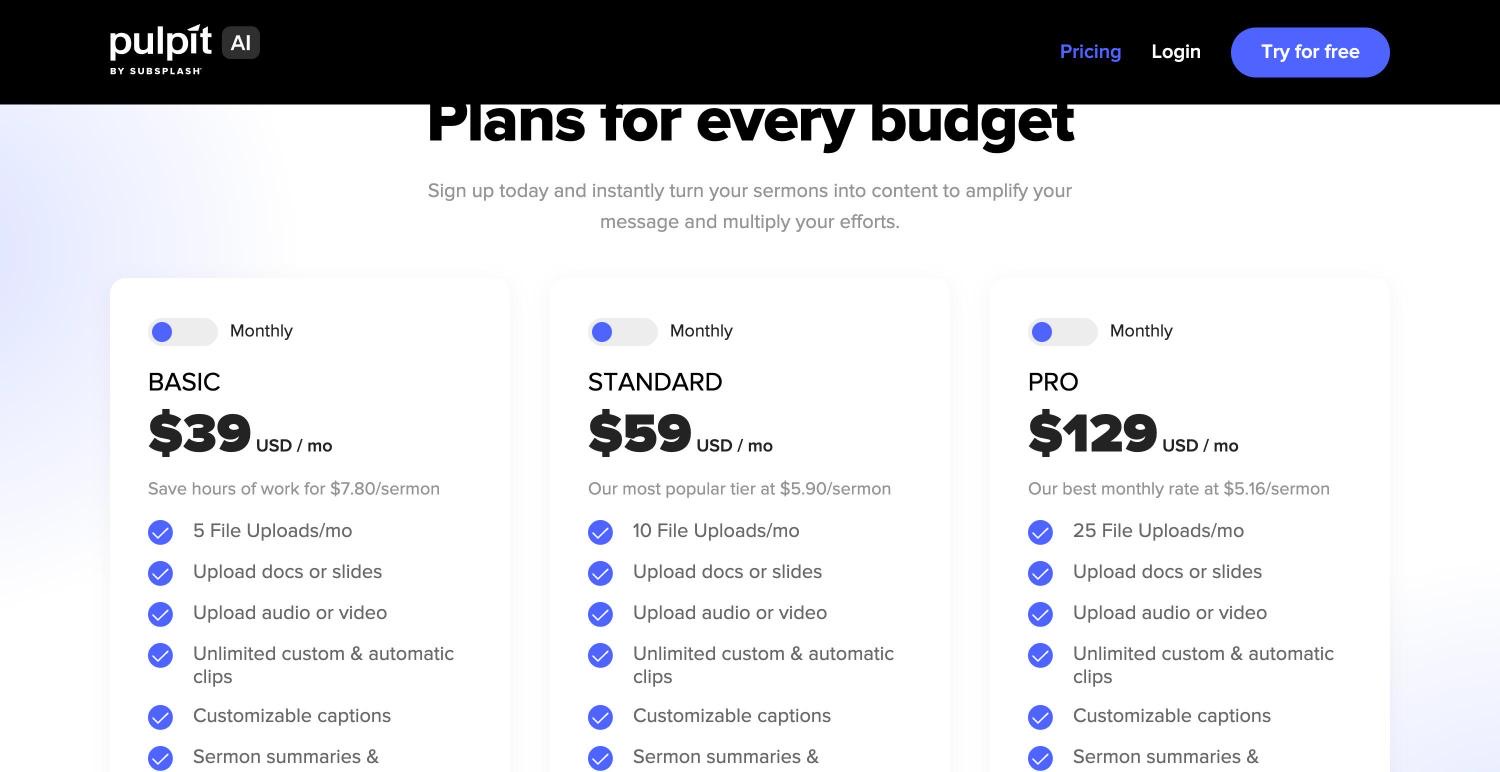
Source: Pulpit AI’s pricing page and its home page, read 5 October 2026.
Weighing Pulpit AI against Slice? Slice as a Pulpit AI alternative, side by side.
Sermon Shotsmade for churches
Best for churches that want clips plus a week of written content from each sermon (discussion guides, devotionals, blog posts, quote images) and can budget about $60 a month.
The right choice if…
- You want one tool for the whole week's content, written and video, and the budget allows about $60 a month.
- You stream through Switcher or Resi and want the sermon to arrive without a download.
- You want sermons dubbed into other languages.
What it does well
- Built only for sermons: its home page says the AI analyser "has been built specifically for sermons".
- Brings a sermon in from YouTube, a file, or a livestream, with integrations for Switcher, Resi and WordPress, and an API.
- An "AI Camera Crew" that follows the speaker, captions, hook animations, music, and cutting the video by choosing sentences.
- Beyond clips (Silver and up): discussion guides, 5-day devotionals, blog posts, summaries, quote and verse lists, quote images and thumbnails.
- Dubs a sermon into other languages on Gold.
Where it falls short
- The entry plan is $63 a month, or $53 billed yearly: about four times Slice, and more than double Sermon Clips or Pulpit AI's Basic.
- Discussion guides, devotionals and publishing to Facebook and Instagram start on Silver, not Plus.
- Uploads are capped at 10 hours a month on every paid plan.
- Its pages do not say which languages its captions cover.
Pricing, in plain words
- Free: 2 free sermon clips, no card required.
- Plus: $63 a month, or $53 a month billed yearly ($636 a year). Unlimited sermon clips, full sermon transcription, audio for a podcast, 10 hours of uploads a month, uploads from a livestream and integrations.
- Silver Suite: $67 a month, or $57 a month billed yearly ($684 a year). Adds shareable sermon pages, quote images, thumbnails, social carousels, discussion guides, blog posts, 5-day devotionals, quotes and verses, summaries, and direct publishing to Facebook and Instagram.
- Gold Suite: $97 a month, or $87 a month billed yearly ($1,044 a year). Adds AI video dubbing (33 languages, per its feature table) and more discussion guides.
- Paid plans start with a 14-day free trial, and the page offers a 30-day money-back guarantee.
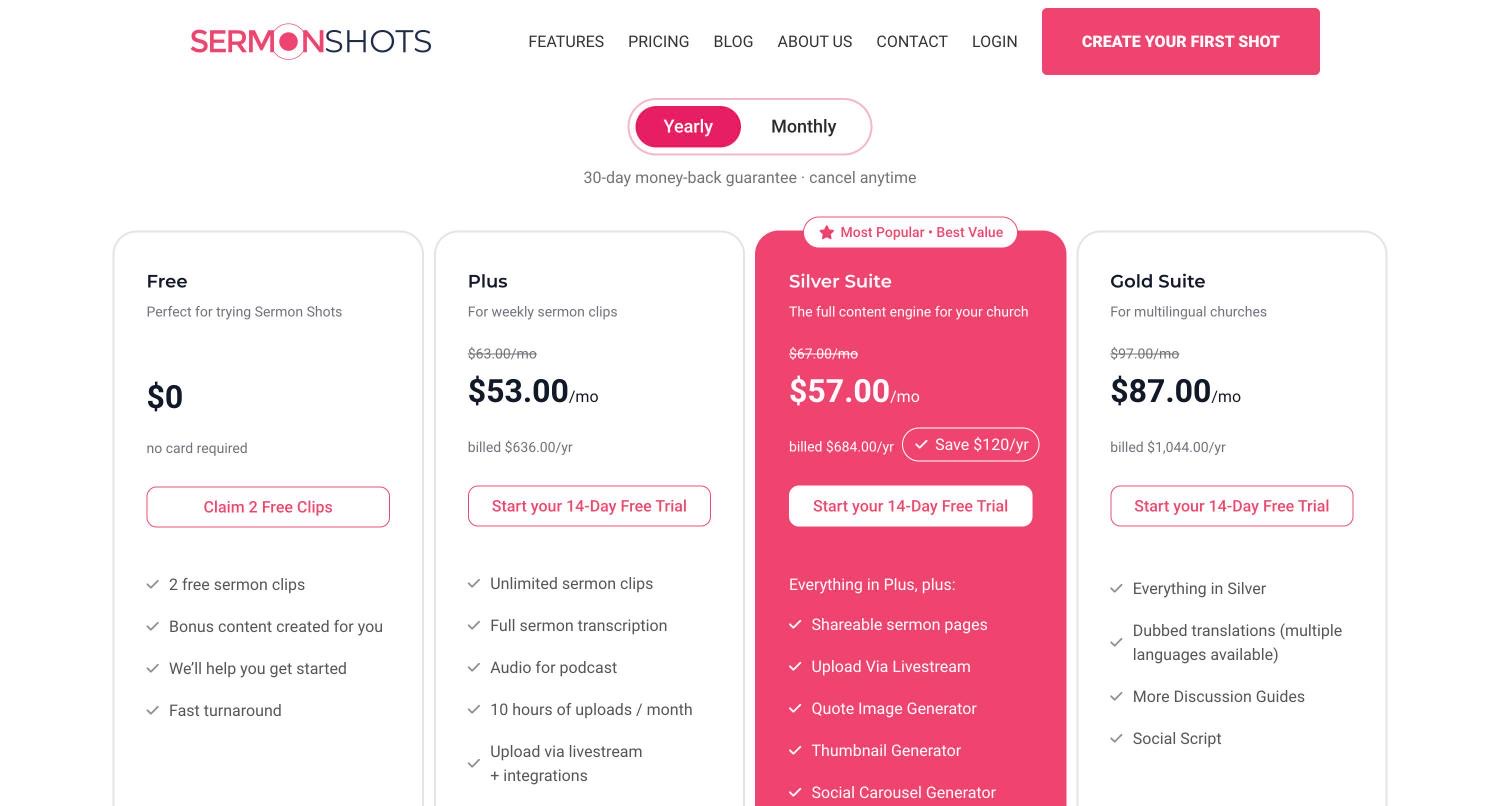
Source: Sermon Shots’s pricing page and its home page, read 5 October 2026.
Weighing Sermon Shots against Slice? Slice as a Sermon Shots alternative, side by side.
OpusClipa general clipper with a church page
Best for a church media team that wants b-roll, a virality score and scheduled posting, and records more than an hour or two a month.
The right choice if…
- You want it to post and schedule to YouTube, TikTok, Instagram and LinkedIn.
- You want b-roll added automatically.
- Your livestream is on Facebook and you want to paste that link (Pro).
For a church
- Price: Free; $15/month Starter; $29/month Pro, or $14.50/month billed yearly (read 30 September 2026).
- Free: 60 minutes a month, watermarked (its church page adds 90 free minutes for new users).
- The sermon gets in by: Upload or a YouTube link; on Pro, links from Facebook, Vimeo, Zoom, Rumble, Google Drive and more.
- Caption languages: English, German, Spanish, French, Portuguese "and other 20 more languages", per its church page.
- Worship music: Not stated.
- Beyond clips: None sermon-specific; a church page, b-roll and brand templates.
Source: OpusClip’s church page, read 5 October 2026.
Weighing OpusClip against Slice? Slice as a OpusClip alternative, side by side.
Choppitya general clipper with a church page
Best for a volunteer team that wants many clips per sermon, edits by text, and needs more than one person on the account.
The right choice if…
- Several volunteers need their own seats on one account (Team).
- You want it to post to TikTok, Reels and Shorts for you.
- You want 20 or more clips from one sermon to choose from.
For a church
- Price: $20/month, or $14/month billed yearly; Team $48/month with unlimited seats (read 30 September 2026).
- Free: 1 hour of analysis a month.
- The sermon gets in by: A YouTube sermon link, or upload MP4, MOV, MP3, WAV or M4A up to 10GB.
- Caption languages: Captions in over 40 languages.
- Worship music: Not stated.
- Beyond clips: None sermon-specific; a church page, edit by transcript, vertical, square and wide.
Source: Choppity’s church page, read 5 October 2026.
Weighing Choppity against Slice? Slice as a Choppity alternative, side by side.
Clypsea general clipper with a church page
Best for the longest services and the most clips per sermon at a low price, from a YouTube, Facebook or Rumble link.
The right choice if…
- Your services run long and your livestream is on Facebook or Rumble.
- You want it to keep the worship set out of the clips for you.
- You want social posting included at $14.99.
For a church
- Price: $14.99/month Pro (100 clips), $29.99/month Studio (250 clips); a third less billed yearly.
- Free: One 30-minute video, about 10 clips, watermarked, kept 3 days.
- The sermon gets in by: A YouTube, Facebook or Rumble link, or a file; up to 6 hours.
- Caption languages: Not stated.
- Worship music: "Worship-Safe Clipping": its sermon page says the AI tells the sermon from worship and music.
- Beyond clips: None beyond clips; up to 15 clips per sermon.
Source: Clypse’s church page, read 5 October 2026, and its pricing page the same day.
Slice on a real sermon
Here is what Slice did with a real one: Tim Keller’s “Let the Psalms Teach You to Pray”, a 40-minute message published on The Gospel Coalition’s YouTube channel, brought in by its link on 5 October 2026.
- About two and a half minutes from the link to the list: the transcript took under two minutes, and finding the moments 49 seconds.
- It listed 4 moments, already cut, captioned and vertical, running 1:09, 1:07, 0:27 and 1:32.
- The one built from the most pieces, “My self-image looked like a Frankenstein monster”, joins 13 passages from 36:33 to 38:48. That is the kind of clip to read before posting, to be sure it still says what the preacher said.
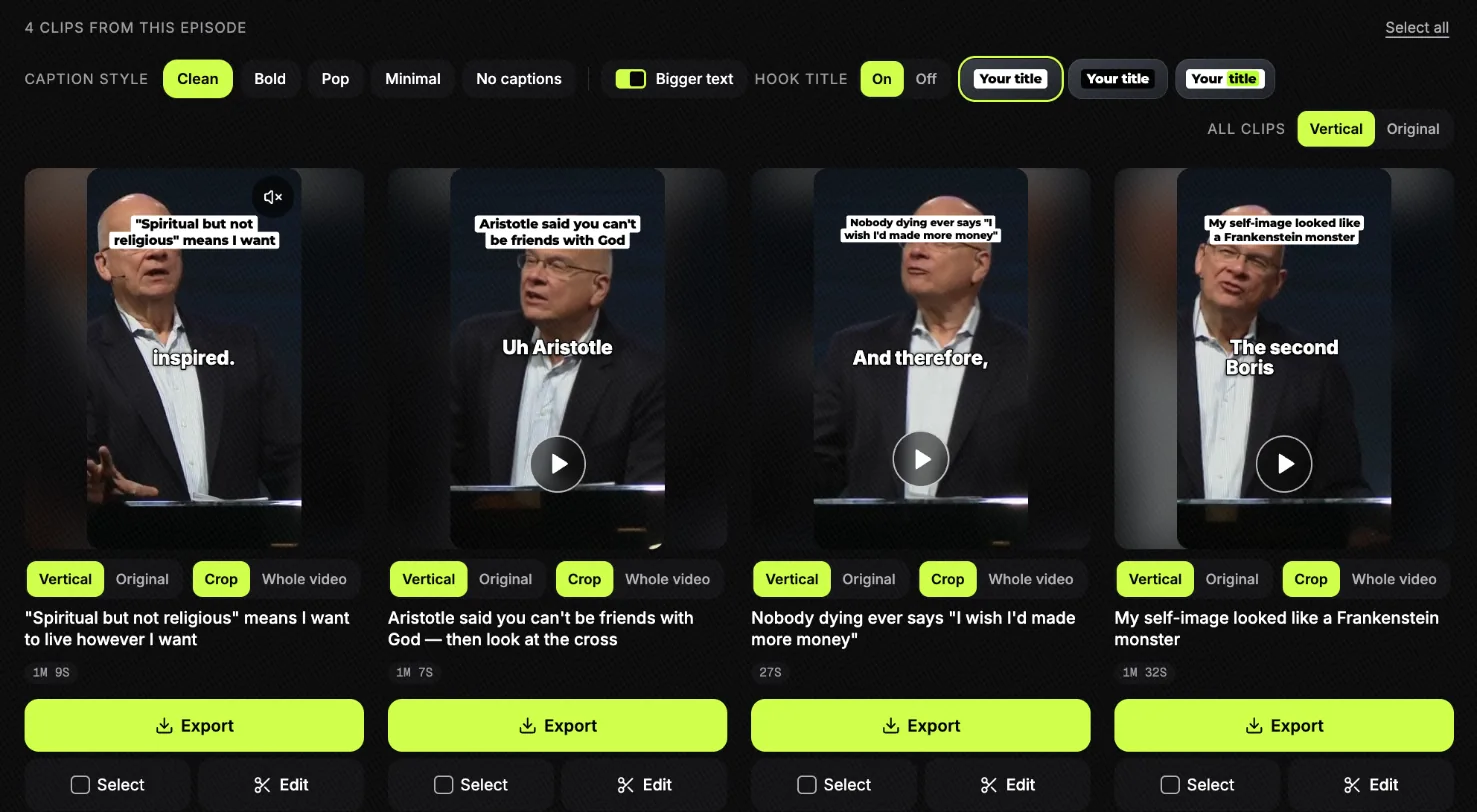
Nothing was posted. The titles are Slice’s suggestions, not the preacher’s words. The whole run, step by step, is in how to turn a sermon into short clips.
How we compared
Compared from each tool's public pages and pricing on 5 October 2026; we make Slice. For each tool we opened its pricing page and its home, feature or church page in Chrome, not signed in and with no cookies accepted, and took the pricing screenshots shown for Sermon Clips, Pulpit AI and Sermon Shots. We read what each page states about price, the free tier, how a sermon gets in, languages, worship music, and what it makes besides clips. Where a page does not say, we wrote “not stated” rather than borrow a figure from a review site or another roundup.
We did not test the other tools, and we did not read their reviews: Trustpilot asked for a browser check, and a rating we could not read is not one we report. OpusClip’s and Choppity’s prices are from our check on 30 September 2026, on the best AI clipping tools; their church pages were read on 5 October 2026.
Slice is described from the product itself: its prices and limits are read from the same code the app runs on (for example, files up to 3 hours and 2GB), and the sermon run is a real one, read back from our database. Prices change, so check a tool’s page before you pay.
Get the Slice Weekly
One free email every Friday: tools for creators and the best advice we found from people who make things.
Questions
What is the best sermon clip tool?
It depends on who does the work. If nobody has time to edit, Sermon Clips emails up to five finished clips a sermon for $23.99 a month. If you want written material too (discussion guides, devotionals), Pulpit AI from $39 a month or Sermon Shots from $63. If you want to choose every moment yourself at a flat price, Shorts by Slice (ours) is $14.99 a month. Checked 5 October 2026.
Is there a free sermon clip tool?
Not one you can keep using for free every week, among the church tools. Sermon Clips gives 2 free sermons, Sermon Shots 2 free clips, Pulpit AI a trial with 2 uploads, all with no card. OpusClip and Clypse have free plans that watermark. On Slice your first clip is free with no card, then a 3-day free trial.
Which sermon clip tools take a YouTube link?
Sermon Clips, Sermon Shots, Choppity, Clypse and Slice take a YouTube link; OpusClip does too, and more sources on Pro. Pulpit AI's pages talk about uploading files. On Slice, YouTube sometimes blocks the link; uploading the file works every time.
Do any of them keep the worship songs out of the clips?
Clypse's sermon page says it tells the sermon from worship and music. Sermon Clips says it skips openings, announcements and the closing prayer. The others do not say. Slice does not check music, so clip the preaching: a worship song in a Reel can be muted or blocked, whatever your church licence covers for the service.
Can more than one volunteer use the same account?
On Slice, not yet: each account is one person's, with no shared team space. Choppity's Team plan has unlimited seats and OpusClip's Pro has 2 seats per pack. Sermon Clips' page mentions one place for "the whole team"; Pulpit AI and Sermon Shots do not state seats on their pricing pages.
Which ones post to Facebook and Instagram for you?
Sermon Shots publishes to Facebook and Instagram on Silver and up. OpusClip, Choppity and Clypse post to social accounts. Sermon Clips and Slice do not: you download the clips and post them.
How did you compare these tools?
Compared from each tool's public pages and pricing on 5 October 2026; we make Slice. We read each tool's pricing page and its home, feature or church page in a browser, not signed in. We did not test the other tools hands-on and did not read their reviews. OpusClip's and Choppity's prices are from our earlier check on 30 September 2026.
Side by side, and more for churches
- Slice vs Sermon Clips: the Sermon Clips alternative for churches
- Slice vs Pulpit AI: the Pulpit AI alternative for churches
- Slice vs Sermon Shots: the Sermon Shots alternative for churches
- Sermon clips for churches
- How to turn a sermon into short clips
- Church Reels ideas
- Sermon transcription
- Best AI clipping tools for podcasts and streams (2026)
All comparisons, in one list. If another tool here fits your church better, use it.