Guide for churches
Bible study and small group clips: what to share and how
A Tuesday night study can say more about your church than any Sunday promo: real people, an open Bible, a leader explaining one passage well. It is also the room where people say things they would never say in public. So clipping a small group is mostly about knowing which half of the evening is shareable.
The short answer
Share the leader’s teaching, never the group’s sharing. Agree it with the group first, record only the part where the passage is being taught, and stop before prayer and personal stories. A phone on the table is enough: upload the audio and turn the clearest one-minute explanation into a clip, with the passage reference and an invitation to join.
Shorts by Slice turns a long podcast or stream into captioned vertical clips. $14.99 a month. Your first video and first 3 clips are free, no card. After that it's one plan, and you can cancel any time.
Try it free →The half of the evening you share, and the half you never do
Most studies have a rhythm: someone reads, the leader opens up the passage, then the group talks about what it means for them and prays. The first part is teaching, and teaching can travel. The second part is the reason people come back, and it only works because it stays in the room.
| Part of the evening | Clip it? | Why |
|---|---|---|
| The reading | Sometimes | Short and clear readings work with the reference on screen. |
| The leader explaining the passage | Yes | One clear point is the best clip you have. |
| A good question the leader asks | Yes | It invites the viewer into the study. |
| Members discussing it | Only with everyone’s yes | Most people speak more freely when they know they won’t be posted. |
| Personal stories, struggles, confession | Never | This is what the group is for. |
| Prayer requests and prayer | Never | Not even blurred or with names removed. |
Ask the group, and give people an easy no
Tell the group before the first recorded week: what will be recorded, who will see it, and what never will be. Make saying no easy and private, by message rather than in front of everyone. If someone who does not want to be on camera asks a great question, the leader can repeat it before answering, so the clip only carries the leader’s voice.
And when a moment involves one person, they should see it before anyone else does. Churches already do this with baptism videos:
“Our solution is to put the video on Google Drive and send a link to the person in the video. That way it isn't public on YouTube”
Recording a room with one phone
- Put the phone near the leader, not in the middle. The teaching is what you are clipping; the leader’s voice should be the clearest thing on it.
- Turn on airplane mode or do not disturb. A notification chime ruins the best minute of the night.
- Start when the passage opens, stop before sharing. Say “I’m stopping the recording now” out loud, so everyone knows.
- Sound only is fine. You do not need to film the room. Audio-only clips are drawn from the words, and nobody’s face appears.
- Online group? Record the leader’s tile and clip it like a class; our webinar to clips guide covers framing a call.
Clips from audio only
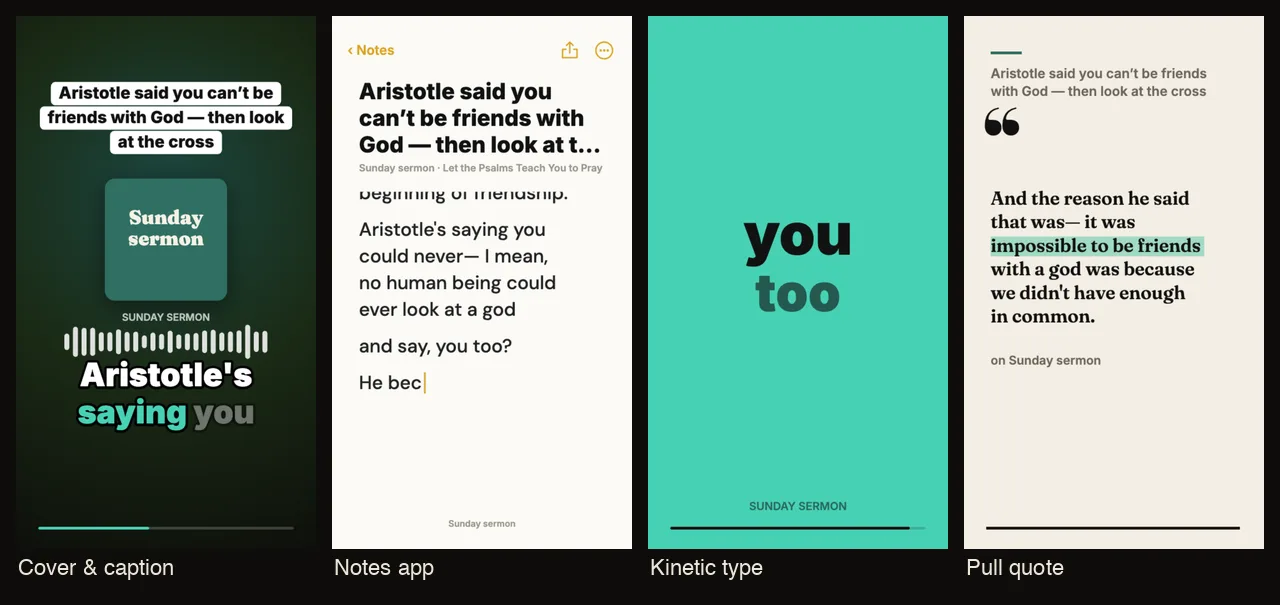
Upload the recording as an MP3, M4A or WAV and Slice finds the moments, writes captions from the words, and draws each clip in a template that moves with the voice. You choose the look per clip, add your church’s name and artwork, and fix any word the transcript got wrong before posting. Names of books, places and people from the passage are worth checking every time.
One study, one clip
You do not need a content plan. One clip after each study, posted the next day, with the passage reference and the line “we meet Tuesdays at 7, all welcome” is a steady invitation that costs the leader nothing extra. If your church also clips the Sunday sermon, the study clip fits mid-week between them; our church Reels ideas page has a weekly plan built around Sunday.
Small group to clips in Slice, step by step
- Agree it with the group first
Say which part will be recorded (the leader’s teaching), that sharing and prayer never are, and that anyone can ask for something to be left out.
- Record only the teaching part
Start the recording when the leader opens the passage and stop it before people share. A phone on the table is enough.
- Upload the audio or video to Slice
MP3, M4A or WAV for sound only, or the video if you filmed the leader. Ask for clips about the passage, or let it find the strongest moments.
- Listen to every clip before it goes anywhere
Check for names, voices from the group and anything personal. Cut or drop the clip if in doubt.
- Post with the passage reference
Put the book, chapter and verse in the title or post text, and say when the group meets so people can join.
Get the Slice Weekly
One free email every Friday: tools for creators and the best advice we found from people who make things.
Questions
Can you record a small group or Bible study?
You can record the teaching if the group agrees beforehand. Stop before personal sharing and prayer. Many groups never record at all, and that is a good choice too.
What should never be shared from a small group?
Prayer requests, confession, personal stories, anyone’s struggles, and anything said by a member who has not agreed to it being public. If you would not say it from the front on Sunday, it stays in the room.
How do you make clips if the study has no video?
Upload the audio. Slice draws each clip from the words and the sound of the voice, in one of 46 templates, so a phone recording on the table is enough.
What makes a good Bible study clip?
One clear point about one passage: why a verse matters, a question the leader asks, a short explanation of a word or a background detail. Thirty to ninety seconds.
Should small group clips go on the church account?
They work best on the church’s own accounts as an invitation: a minute of the kind of thing you study, and when and where the group meets.