Guide · For churches
Church Reels ideas from the life of your church
Ideas grouped by where they come from: the sermon, worship, baptisms, announcements, volunteers, kids and youth, Easter and Christmas, and prayer. With what to watch for, and a weekly plan you can keep.
The short answer
The best church Reels come from what already happens: the line from Sunday’s sermon people repeated at the door, a story the pastor told, a baptism shared with the person’s blessing, the volunteers setting up before anyone arrives. Start with the sermon, because one message can give a week of posts. Keep worship songs out unless you are sure of your licence, ask before you post anyone’s face (and never a child’s without a parent’s written yes), and make it a weekly rhythm small enough to keep.
Start with a rhythm, not a list of ideas
Lists of ideas are easy to find and hard to keep up. The church communicators who keep going say the same thing: decide what each day is for, then fill it.
“The key for me was establishing rhythms before establishing content that uses those rhythms.”
“once I realized one Sunday message could produce 4-5 posts with the same routine every week, it was suddenly easy for me to make 4-5 posts a week”
And be honest about what your team can do. A small church with one volunteer should not try to post like a church with a media staff.
“I have accepted that this is what we can manage without burnout.”
“God called us to be diligent but not burnout.”
The ideas below are grouped by where they come from in church life. Each one says what it is, why it works, how long it should run, and how to make it. There is a weekly plan at the end.
Sermon moments
The sermon is the one thing you record every week, so it is where most churches start. The work is finding the moments that stand on their own. Brady Shearer of Pro Church Tools describes doing it by hand:
“I begin by watching the entire sermon in its entirety.”
A simpler habit, from r/churchtech: write down the times during the service, so Monday is quicker.
“If you note down times in the sermon that could work as a short, you could publish shorts later.”
The one-line truth
The single sentence from Sunday that people repeated at the door. Often the pastor slows down for it, says it twice, or pauses after it.
- Why it works
- It needs no set-up. Someone who never heard the sermon understands it, and it is the kind of thing people send to a friend.
- Length
- Under 30 seconds. The line, a breath either side, and stop.
- How to make it
- Note the time during the service, or find it in the transcript afterwards. In our example, Slice’s shortest moment was 0:27 long: “Nobody dying ever says “I wish I’d made more money””.
The story
An illustration with a turn in it: a hospital visit, a film the pastor saw, something that happened at the school gate.
- Why it works
- People stay for a story to find out how it ends, and the point arrives inside it rather than being announced.
- Length
- Up to about a minute and a half. A story that takes four minutes to tell is a sermon, not a clip.
- How to make it
- Start on the first sentence of the story, not the “let me tell you about…” before it. Keller’s Frankenstein story in our example runs 1:32, cut into 13 pieces to leave out the asides.
The confession
The moment the preacher admits something about themselves: a fear, a failure, a habit they are not proud of.
- Why it works
- It is honest, and honesty is rare in a feed. It shows the church is made of people, the pastor included.
- Length
- 30 seconds to a minute.
- How to make it
- Often it sits at the end of a story. Ask the pastor before you post it: it was said to a room of people who know them, and a clip goes much further.
The argument in a minute
A point the sermon builds over several minutes, pulled together: the set-up, then the pay-off.
- Why it works
- It gives people something to think about, not just something to feel. It is also the kind most likely to lose its meaning.
- Length
- About a minute.
- How to make it
- This is where a clip joins passages from minutes apart. Slice’s Aristotle moment runs 1:07 but reaches from 4:41 to 11:29, in 12 pieces. Watch the whole clip before posting and ask: would the pastor say this is what they meant?
The question
A question the preacher put to the room: “What would you do if you knew you couldn’t fail?”
- Why it works
- It invites a reply, so it starts a conversation in the comments instead of ending one.
- Length
- 15 to 30 seconds.
- How to make it
- Cut it to end on the question, not the answer. Put the question in the post text too, so people can reply to it.
What one real sermon gave
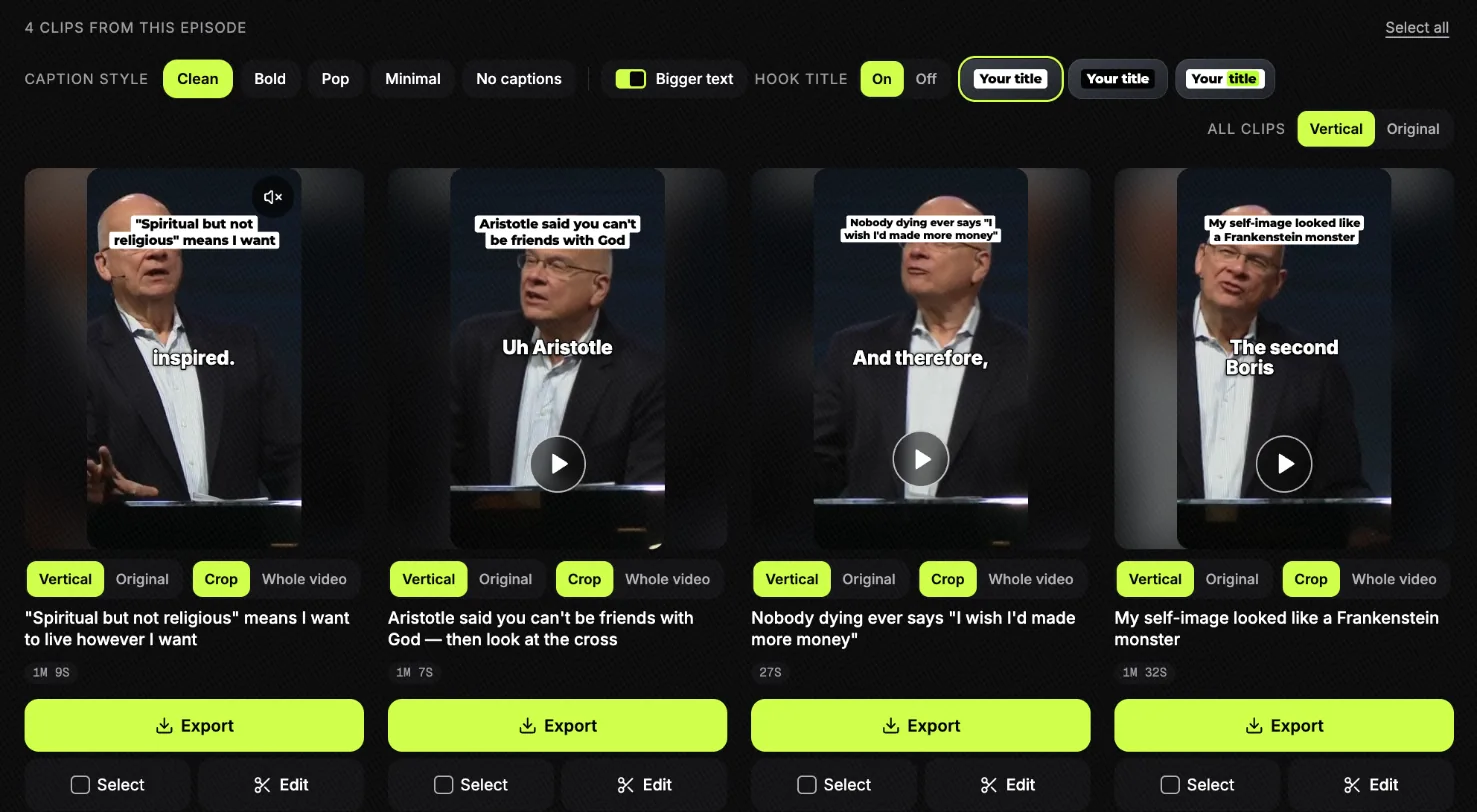
We ran Tim Keller’s “Let the Psalms Teach You to Pray”, a 40-minute message published by The Gospel Coalition, through Slice. It listed four moments, and between them they cover most of the ideas above: a sharp observation about culture (1:09, titled “Spiritual but not religious” means I want to live however I want), an argument built across seven minutes, a short line about the dying, and a story that ends in a confession. The titles are Slice’s, not Keller’s.
Whichever moment you choose, the first seconds decide whether anyone watches the rest:
“Write a hook and inject it into the video's first three seconds.”
And link every clip back to the full sermon, so someone who liked a minute can hear the rest:
“Our YouTube channel has the full sermons, which all the clips link back to.”
The step-by-step for making these is in how to turn a sermon into short clips.
Worship, and the music problem
Worship is the heart of Sunday, and the hardest part to post. The songs belong to their writers. A streaming licence may cover your livestream, and platforms still mute or take down clips with music in them. CCLI, which sells that licence, says so on its own page:
“Unfortunately, some platforms may still issue a warning when music is played.”
Church media teams describe the same thing from the other side:
“We were fully CCLI compliant, and were being taken down on Facebook every 2-3 weeks.”
“It’s rarely a problem live but when the video is posted permanently on the channel it can be funky.”
“We stream live on FB for a few elderly/infirm folks, and I know there’s a service we pay for that’s supposed to cover the copyright aspect, yet we are having more and more trouble there.”
What to do about it:
- Mute it, or use your own sound. Most worship clips work without the song: the room, the people, someone speaking over it.
- If you post music, say what covers it. CCLI asks churches to put their licence numbers in the post (quoted below).
- Know a claim from a strike. A claim usually mutes or limits a video; a strike is a warning against your account. If you get one for a song your licence covers, dispute it with the proof (also below).
“include both your Church Copyright License and CCLI Streaming License numbers in the description”
“If you are getting strikes,then do a challenge, give proof of your current ccli license and that the song is covered by ccli.”
Check with your licence provider what it covers for short clips on Instagram, TikTok and YouTube Shorts: it can differ from what it covers for a livestream. Slice does not check music for you.
The room, not the song
A few seconds of the church worshipping, filmed from the back or the side: hands raised, the band, the light. With the music muted, or with someone speaking over it.
- Why it works
- It shows what Sunday feels like without posting a song you don’t own.
- Length
- 10 to 20 seconds.
- How to make it
- Film vertical from the back, with permission for anyone close enough to recognise. Mute the music, or lay the pastor’s spoken welcome over it.
The worship leader’s why
The worship leader, speaking to camera after the service, about why they chose a song this week or what a line in it means to them.
- Why it works
- It is personal, and nobody has a claim on someone talking.
- Length
- 30 to 60 seconds.
- How to make it
- Spoken only, no singing over it. Film in a quiet corner with the phone at eye level.
A song your church wrote
If your church writes its own songs, those are yours to post, as long as everyone who wrote them agrees.
- Why it works
- It is the one kind of worship clip that is safe to use in full.
- Length
- A verse and a chorus.
- How to make it
- Use the sound desk’s feed, not the phone’s microphone.
Baptisms and testimonies
Nothing a church posts means more to the person in it, which is exactly why it needs their permission. Ask beforehand, in writing; let them watch the clip first; and if they would rather it stayed private, send it to them instead of posting it.
“Our solution is to put the video on Google Drive and send a link to the person in the video. That way it isn't public on YouTube”
There is a second reason to be careful with baptisms on YouTube. Its automatic filters have been known to misread them:
“One but one is if you baptize or some dedication of infants have been flagged as a violent act by the AI filter.”
If a baptism video is removed, you can appeal. It is one more reason to keep your own copy of every video you post.
The baptism moment
The few seconds of going under and coming up, and the cheer from the room.
- Why it works
- It is joy, plainly, and the person and their family will treasure it.
- Length
- 15 to 30 seconds.
- How to make it
- Ask beforehand, in writing, and ask again after. Film from where you won’t block the family’s view.
The testimony in their own words
Someone telling, in a minute, what changed for them. Recorded on a separate day, sitting down, or cut from a testimony shared in the service.
- Why it works
- It is the most persuasive thing a church can post, because it is not the church talking about itself.
- Length
- 60 to 90 seconds.
- How to make it
- Seat them, put the phone on a stand at eye level, and keep them in the middle of the frame so a vertical crop never cuts them off. If it was given in the service, it is in your service recording: you can make a clip of it from the transcript. Let them watch the clip before anyone else does.
For any interview you film yourself, one tip from a church tech volunteer makes the vertical crop easy:
“so you don't need to do anything extra besides consistently frame your shots in the middle.”
Announcements that people watch
The notice-sheet read aloud to camera is the post everyone scrolls past. Three ways to do it that work better:
One event, one person, one reason
The person who runs the event says what it is, when, who it’s for, and one reason to come.
- Why it works
- People come for a person, not a poster. And one announcement per video is the only kind anyone finishes.
- Length
- 15 to 20 seconds.
- How to make it
- Film them where the event happens. Put the date, time and sign-up link in the post text, not only on screen.
The answer to the question at the welcome desk
“Where do I park?” “What do I do with my kids?” “How long is the service?” One question, answered on camera by the person who usually answers it.
- Why it works
- These are the questions that stop a first visit, and they are almost never on a church’s feed.
- Length
- 15 to 30 seconds.
- How to make it
- Ask your welcome team which question they hear most this month, and film that.
The sermon clip that points ahead
A sermon clip that ends on the pastor naming next week’s series or passage.
- Why it works
- It is an announcement that is worth watching for its own sake.
- Length
- As long as the clip.
- How to make it
- Look at the last few minutes of the sermon: pastors often trail next week there.
Behind the scenes and volunteers
Before you film the tech booth or the welcome desk, look at the screens and papers in shot: check-in lists, children’s names and prayer lists should never be in a video.
Before anyone arrives
The church being set up: chairs going out, the coffee on, the sound check.
- Why it works
- Most people never see it. It says thank you to the people who do it without saying a word.
- Length
- 10 to 15 seconds, sped up.
- How to make it
- Prop the phone up vertically in a corner on Sunday morning and leave it.
One volunteer, one question
A volunteer answers one question: “Why do you serve on the coffee team?”
- Why it works
- It puts a face to the team, and it is the most honest recruiting there is.
- Length
- 20 to 40 seconds.
- How to make it
- Ask, don’t script. Use their first name only if they want it used.
Kids and youth, safely
Here the rule is simple: no child appears without a parent’s written permission, and your church’s safeguarding policy comes first. Many parents will say no, and that is their right.
“Most of the parents in our church do not want pictures of the kids out there (v. understandable) but we have strong intergenerational programming and participation in services and events. It renders 70% of photos unusable.”
What makes it workable is a system, not a judgement call on the day:
- A photo permission question on every form. Registration, camps, holiday clubs. Church Communications Group has two sample media release forms, one for adults and one for children, to start from.
- A no-photo list the person filming has seen. One youth minister’s form does this automatically:
“For example I have a form for VBS that asks for photo permission. If a parent says no, it triggers a workflow that adds that child’s name to a list of those who should not be included in our end-of-week video”
- No names, schools or places. Not in the video, the caption or the location tag.
- Post afterwards, never live. Nobody should be able to tell where a group of children is right now.
Hands, not faces
The craft table, the Bible verse on the whiteboard, small hands gluing a paper lamb.
- Why it works
- It shows the children’s ministry is alive without showing a single child’s face.
- Length
- 10 to 20 seconds.
- How to make it
- Film from above or behind. Check the background for name badges and anything that says where the children are.
The leader’s recap
A kids or youth leader says, in their own words, what the children learned this week and a question parents can ask at home.
- Why it works
- Parents find out what their children did, and it costs nobody their privacy.
- Length
- 20 to 40 seconds.
- How to make it
- Film the leader after the session, with the room empty or out of focus behind them.
The youth event recap
A few seconds of the evening: the game, the talk, the food.
- Why it works
- The students who were there will want to share it, and their friends see it.
- Length
- 15 to 30 seconds.
- How to make it
- Only students whose parents have said yes, and only when they say yes too. Post afterwards, never live, and leave the place out of the post.
Easter, Advent and Christmas
The big seasons are when people visit who don’t usually come, so the posts around them are mostly for visitors: an invitation before, practical answers, and something to remember it by after.
The invitation
The pastor, two weeks before Easter or Christmas, saying who the service is for and when it is.
- Why it works
- These are the services people often bring a friend to, and a clip is easy to send to that friend.
- Length
- 15 to 20 seconds.
- How to make it
- Film it straight after a Sunday service, vertical, with the pastor in the middle of the frame.
If it’s your first time
What happens, how long it takes, what to do with the children, where to park.
- Why it works
- A visitor’s worries are practical. Answer them and the clip does more than any graphic.
- Length
- 30 seconds.
- How to make it
- The welcome team or the pastor, filmed where visitors will walk in.
A reading for each week of Advent
If your church lights the Advent candle with a reading, that reading, read aloud.
- Why it works
- Four weeks, four short posts, already written, and a Bible reading brings no music rights with it.
- Length
- 20 to 40 seconds.
- How to make it
- Read without music under it, and caption it so it can be watched with the sound off.
The line from Easter Sunday, on Monday
The one-line truth from the Easter or Christmas sermon, posted the day after.
- Why it works
- It reaches the visitors who came once, the day after they came.
- Length
- Under 30 seconds.
- How to make it
- Bring the recording into Slice on Sunday night and pick on Monday morning.
Prayer
Prayer posts are some of the most personal a church makes. Never post anyone’s prayer request, name or situation, even with good intentions, unless they have asked you to.
A prayer for the week
A pastor prays, to camera, for the week ahead: for work, for school, for the people who are struggling.
- Why it works
- Someone scrolling on a hard day finds someone praying for them.
- Length
- 30 to 60 seconds.
- How to make it
- Film it quietly and simply, with captions. If the sermon ended in prayer, the prayer is often the clip.
Where to find prayer
When and where your church prays with people: after the service, a weekday morning, by message.
- Why it works
- It tells someone what to do next, which is what a prayer post usually leaves out.
- Length
- 15 to 20 seconds.
- How to make it
- Someone from the prayer team says it, in their own words.
Where Slice helps, and where it doesn’t
Slice makes sermon clips. Paste the YouTube link to the sermon (or upload the recording), and it lists the moments that stand on their own, each already cut, captioned and vertical, cropped to the preacher. Then you choose the look:
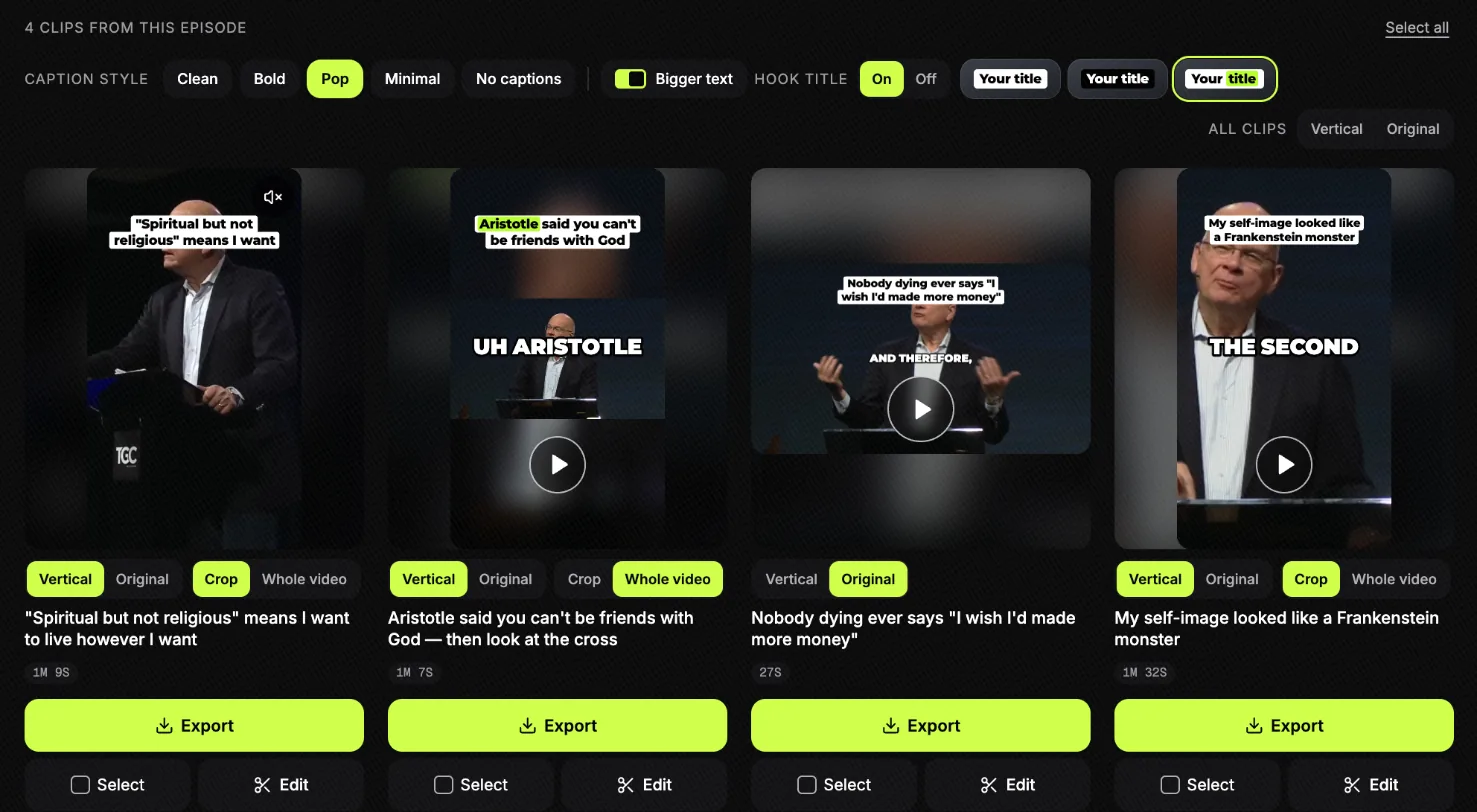
Captions matter most: many people watch with the sound off. Keep them away from the buttons and text the app puts on top of the video:
“Keep captions clear of on-screen elements.”
The Reels safe zone page shows where those are. Before you post, fix any name the transcript got wrong in the editor:
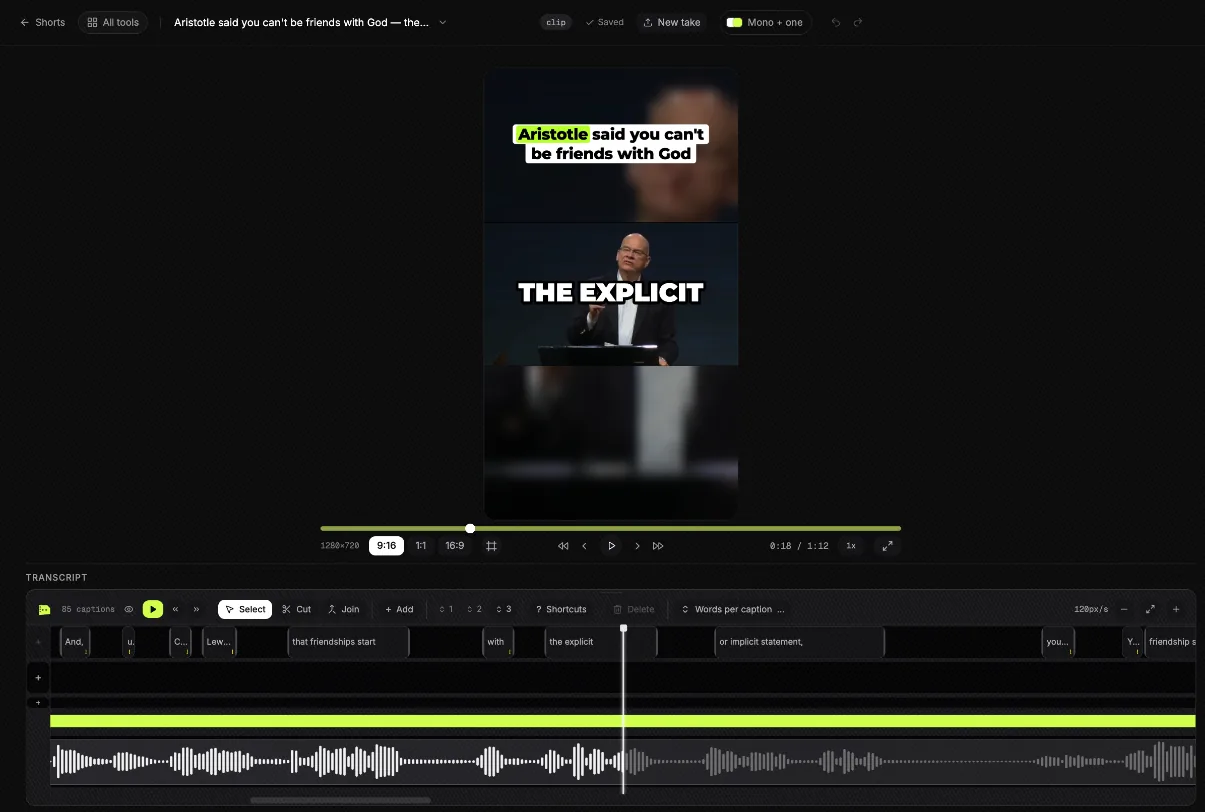
Each clip comes with suggested post text. Some teams write theirs the same way, with a person in charge of the result:
“I transcribe the video clip and then provide it to the AI, and ask it to give me an engaging caption. It usually provides 5 choices, so I'll take parts of the options and form my own.”
What Slice does not do, so you can plan for it:
- It does not film anything. Baptisms, volunteers and invitations are yours to shoot.
- It does not check music or licences.
- It does not make graphics or design templates.
- It does not post or schedule for you. You download the clips and post them.
Your first clip is free with no card. After that a 3-day free trial, then $14.99 a month.
A weekly template you can keep
This is a plan, not a design: what to post each day and where it comes from. Three of the posts come from the sermon, so the week costs one recording and one short session of choosing, plus a few minutes of phone filming on Sunday.
| Day | Post | Where it comes from | Length |
|---|---|---|---|
| Sunday | Nothing, or a story from the morning | Film the three Sunday shots below. Let the recording finish uploading. | — |
| Monday | Sermon clip: the one-line truth | The sermon, the moment people repeated | Under 30 seconds |
| Tuesday | Behind the scenes or a volunteer | Sunday’s phone footage | 10 to 40 seconds |
| Wednesday | Sermon clip: the story | The sermon | Up to 1½ minutes |
| Thursday | Prayer, or Sunday’s passage read aloud | The end of the sermon, or a reader | 30 to 60 seconds |
| Friday | Sermon clip: the confession, the question or a testimony | The sermon, or a testimony with consent | 30 seconds to 1½ minutes |
| Saturday | The invitation | The pastor, filmed after last Sunday’s service | 15 to 20 seconds |
The Sunday shot list. Three things, on a phone held upright, ten seconds each:
- The room before the service, from the back, with no children’s faces in shot.
- One volunteer at work, after asking them.
- The pastor’s invitation for next week, filmed straight after the service, in the middle of the frame.
If that is too much, keep two: the Monday sermon clip and the Saturday invitation. Some teams go further and post a clip every day, which works when the clips come from the same routine:
“I've been posting a clip every day of the week on YouTube shorts, Facebook, Instagram, and TikTok.”
And if someone on your team uses AI to help, the rule one church communicator works to is a good one: the ideas and the last check are human.
“I create all of the ideas and give all of the information and the details the 80% grant work in the middle is done by AI and the last 10% is me proofreading it”
Get the Slice Weekly
One free email every Friday: tools for creators and the best advice we found from people who make things.
Questions
How often should a church post Reels?
As often as you can keep up without burning out. A rhythm you keep every week beats a burst you give up after a month. One Sunday sermon can give three or four clips, which with one invitation is a week. If that is too much, two a week is fine.
Can we post worship songs in our Reels?
Be careful. The songs belong to their writers. A streaming licence such as CCLI’s may cover your livestream and recorded service, and platforms may still mute or remove a clip with music in it: CCLI says so itself. Check what your licence covers for short clips, put your licence numbers in the description, and when a clip doesn’t need the music, mute it or use your own sound. Slice does not check music for you.
Do we need permission to post someone’s baptism or testimony?
Yes. Ask beforehand, in writing, and let them see the clip before it goes out. If they would rather it was not public, send them the video privately. Some churches share baptism videos only as a private link to the family.
What about children in our videos?
Only with a parent’s written permission, and a list of children who must not appear that the person filming has actually seen. Follow your church’s safeguarding policy. Many ideas work with no faces at all: hands, the room, a leader’s recap.
Is there a church Reels template?
Not a design template from us. Slice makes sermon clips with captions and a title; it does not make graphics. What helps most is a weekly template: what to post each day and where it comes from. There is one on this page.
Can we clip another church’s sermon?
Only with their permission. A sermon belongs to the preacher and the church that published it. Ask first, and credit them.
How long should a church Reel be?
As long as the thought and no longer. A one-line truth can be fifteen seconds; a story can run a minute and a half. Every idea on this page has a suggested length.
More for churches
- How to turn a sermon into short clips: the steps, with the same sermon.
- Sermon notes from a YouTube video: passages, quotes and a small-group page from the recording.
- Sermon clips for churches: a weekly routine, captions, pricing and the questions churches ask.
- Sermon transcription: the words of the sermon, free to try.