Guide for churches
How to turn sermon audio into clips for Reels, Shorts and TikTok
Plenty of churches never film the sermon. The sound desk records it, maybe it goes out as a podcast, and that is it. Every sermon clip tool assumes video. Here is how to make Reels, Shorts and TikToks from the audio alone.
The short answer
Record the sermon from the sound desk, or use your sermon podcast file. Upload it to a tool that takes audio, pick the moments that stand on their own, and give each one something to watch: the words as big captions over your church’s artwork, or a single line as a quote card. Check every clip keeps the preacher’s meaning, and leave the worship songs out.
Why so many churches only have the audio
Filming a sermon well takes a camera, someone to run it, and light. Recording it takes a cable from the sound desk. So the sermon podcast and the audio archive are often the only copy, and the church’s social accounts post a graphic and a Bible verse instead of the preaching itself.
The people who do clip sermons say the hard part is not the editing:
“We tried this once at my last church and found that it got a heck of a lot of view, but we didn't have the bandwidth to keep finding the right clips and posting them.”
“My biggest needs is centering the speaker on vertical video and identifying the best parts to post.”
With audio, half of that problem goes away: there is no speaker to keep in frame.
Which sermon clip tools take audio?
From each tool’s own pages, read 5 October 2026 and re-read 6 October 2026. We make Slice.
| Tool | Audio-only sermons | Price | What else it makes |
|---|---|---|---|
| Shorts by Slice (ours) | Yes: MP3, M4A, WAV, OGG or FLAC, drawn with 16 templates | $14.99 a month; first 3 clips free | Clips; sermon transcripts and notes in Slice Transcribe |
| Pulpit AI | Its pricing page lists “Upload audio or video” | $39 / $59 / $129 a month; 10% less billed yearly | Discussion guides, devotionals, recap emails and a sermon-prep assistant; part of Subsplash |
| Sermon Shots | Its pages describe bringing in YouTube, a file or a livestream; audio-only is not stated | Free (2 clips); $63 / $67 / $97 a month, or $53 / $57 / $87 billed yearly | Discussion guides, 5-day devotionals, blog posts and quote images from each sermon |
| Sermon Clips | A YouTube link or an MP4 or MOV, per its pages: video | $23.99 a month | Up to five finished clips a sermon, by email |
| Choppity | Its church page lists MP3, WAV and M4A uploads; what the clips show is not stated | $20 a month, or $14 billed yearly (read in September) | Editing by text; team seats |
The full comparison, with Sermon Clips, OpusClip, Choppity and Clypse, is in the best sermon clip tools. And if you are weighing the two church-only tools above, see Pulpit AI vs Sermon Shots.
One sermon moment, four ways
Here is a real moment from the sermon the rest of our church guides use: Tim Keller’s “Let the Psalms Teach You to Pray”. Slice titled it “Aristotle said you can’t be friends with God — then look at the cross” (1:07). Below, its audio-only version drawn by Slice’s own template code, with no artwork added and the show name set to “Sunday sermon”, the way a church would see it before uploading its own.
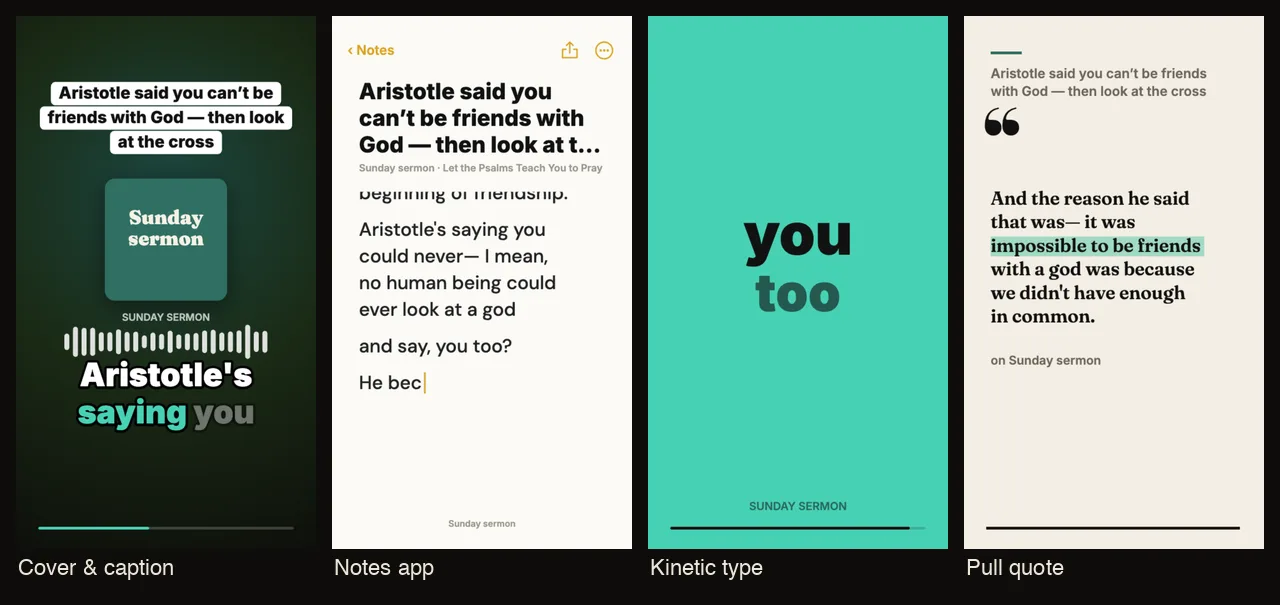
Notice the pull quote: the line it lands on is the setup of the argument, not its conclusion. That is the kind of thing to check before posting. On the episode page you can pick a different template for that one clip, or trim it to end on “Aristotle’s wrong.”
Music, consent and captions
Leave the worship songs out. Church media teams who do this every week report takedowns even with licences in place:
“We were fully CCLI compliant, and were being taken down on Facebook every 2-3 weeks.”
Only the preacher. If the recording catches a congregant’s prayer or testimony, ask before clipping it. Our church Reels ideas guide has more on consent.
Caption everything. With audio-only clips the captions are the picture, and they let people who are hard of hearing follow.
“If you were making TikTok’s or reels, regardless of what you do, use captions.”
How to turn sermon audio into clips, step by step
- Get the sermon audio
Record from the sound desk to a recorder or laptop, or use the file you publish as a sermon podcast. Cut the worship songs and announcements first if you can: clip the preaching.
- Upload it to Slice
Sign in at tryslicemedia.com/shorts and drop the audio file (MP3, M4A, WAV, OGG or FLAC). Slice transcribes the sermon and lists the moments that stand on their own.
- Add your church once
In Your show, add your church or series artwork, a name and a colour. Add the preacher as host, with a photo if you want templates that show a face. These are kept for next week.
- Choose a template
Press Templates and watch each of the 16 play on your own clip: big captions over your artwork, a pull quote that ends on a card, the words typed into a note, and more.
- Check every clip keeps the meaning
Read each clip as someone who did not hear the sermon. A moment joined from different minutes must still say what the preacher meant, in the order he or she said it. Fix any misheard words, especially names and Bible references.
- Download and post
Each clip downloads as a vertical MP4 with the sound and captions. The pull quote also gives you a still card for a post or a story. First 3 clips free, no card; then a 3-day free trial and $14.99 a month.
“once I realized one Sunday message could produce 4-5 posts with the same routine every week, it was suddenly easy for me to make 4-5 posts a week”
Get the Slice Weekly
One free email every Friday: tools for creators and the best advice we found from people who make things.
Questions
Can I make sermon clips without video?
Yes. A clip needs something to look at, not a camera recording: the words as captions, your church’s artwork, a photo of the preacher. Upload the sermon audio to Slice and each clip is drawn with a template instead of a picture.
Which sermon clip tools take audio?
On the pages we read (5 October 2026), Pulpit AI says you can upload audio or video, Choppity’s church page lists MP3, WAV and M4A, and Slice takes MP3, M4A, WAV, OGG and FLAC. Sermon Clips takes video; Sermon Shots does not say. Check each tool’s own page before you buy.
How do I get audio of the sermon?
Record a feed from the sound desk to a small recorder or a laptop, or use the file you already publish as a sermon podcast. Our guide to starting a church podcast covers both.
Can I use worship songs in sermon clips?
Avoid it. Whatever your church licence covers for the service, a worship song in a Reel can be muted or blocked. Clip the preaching.
How long should a sermon clip be?
As long as one thought: usually 30 seconds to a minute and a half. In our example the moments ran from under half a minute to about a minute and a half.
How much does it cost?
On Slice your first 3 clips are free with no card, then a 3-day free trial and $14.99 a month or $149 a year, audio and video alike.
More for churches
- How to turn a sermon into short clips: the same, from video, with real timings.
- How to start a church podcast: getting the sermon audio from the desk.
- Sermon notes from a recording: passages, quotes and a small-group page.