Guide for church media teams
How churches can make Reels and Shorts from Sunday services
Sunday already gives you a week of short videos. Here is a routine a small volunteer team can keep: record so the service can be clipped, pick the moments, caption them, put scripture and names on screen where they stay readable, and post through the week.
The short answer
Record a clean feed of the preacher, note three to five moments during the sermon, and on Monday cut them into captioned vertical clips. Check every caption for names and Bible references, keep text away from the bottom and right edge, leave the worship songs out, and post one clip a day or two through the week, each pointing back to the full sermon.
The checklist
- Record a clean feed, not only the livestream with graphics on it.
- Frame the preacher in the middle of the wide shot.
- Note three to five moments while the sermon is preached.
- Cut the clips on Monday, checked by a person.
- Caption every clip and read it for names and references.
- Put the scripture reference and a name title where they help.
- Keep text out of the app buttons.
- Post on the same days every week, linking to the full sermon.
On Sunday: record so it can be clipped
Most churches already stream the service. The stream is made for a wide screen, and often carries song lyrics, scripture slides and name graphics along the bottom. A vertical clip keeps only the middle third of a wide picture, so those graphics come out cut in half. Teams that clip every week keep a second recording without them:
“Program feed, clean feed, and camera isos get stored locally and creative / social media does uses it for reels, socials, promos, etc.”
“I build the propresenter screens (lyrics and scripture) to fit lower thirds.”
If your switcher records each camera separately (ATEM switchers and most streaming software can), keep the preacher’s camera on its own. If it cannot, ask whoever runs the slides to keep scripture off the preacher’s shot during the sermon, and put it full screen instead.
Frame the preacher near the centre, with a little room above the head. The vertical crop then has someone to follow without any change to how the camera is run.
During and after: pick the moments
Whoever is on the camera or the stream can jot down the time of anything a stranger would understand without the rest of the sermon: a story, a one-line point, a question the sermon answers. That list makes Monday quick. Then get the recording file (from the recorder, or from YouTube Studio if the service is on YouTube) and cut the clips.
A clip tool can read the whole sermon and suggest the moments for you. This is what Slice gave back for a real 40-minute sermon: four moments, already vertical and captioned, each with a suggested title.
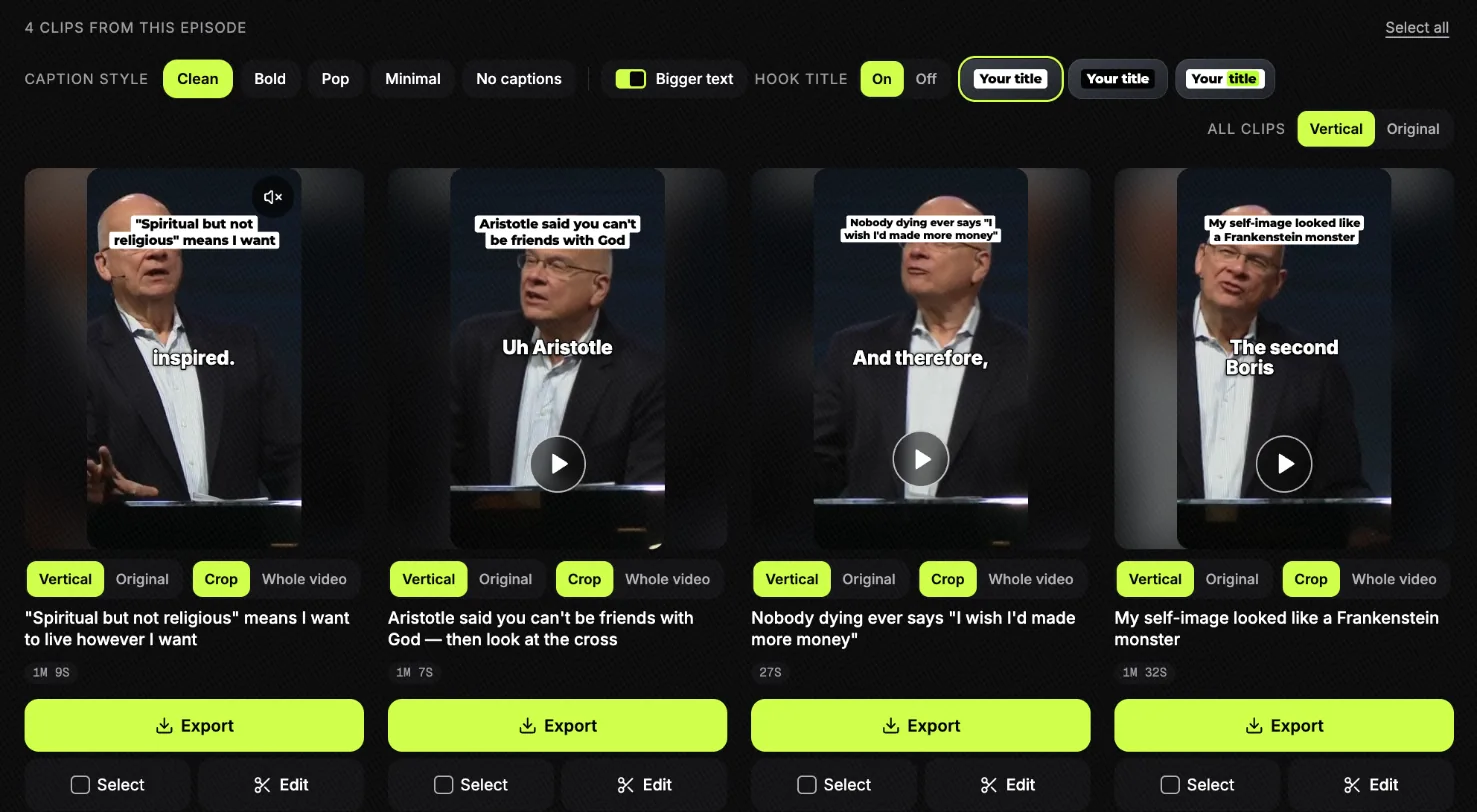
Whatever tool you use, a person reads each suggestion and asks one question: does this still say what the preacher meant, heard on its own? If not, move the start or end, or drop it. For the click-by-click version, see how to turn a sermon into short clips; to compare tools, see the best sermon clip tools.
Captions on every clip
Many people scroll with the sound off, so a sermon clip without captions loses most of them in the first second. Burn the captions into the video, large enough to read on a phone, a few words at a time.
“If you were making TikTok’s or reels, regardless of what you do, use captions.”
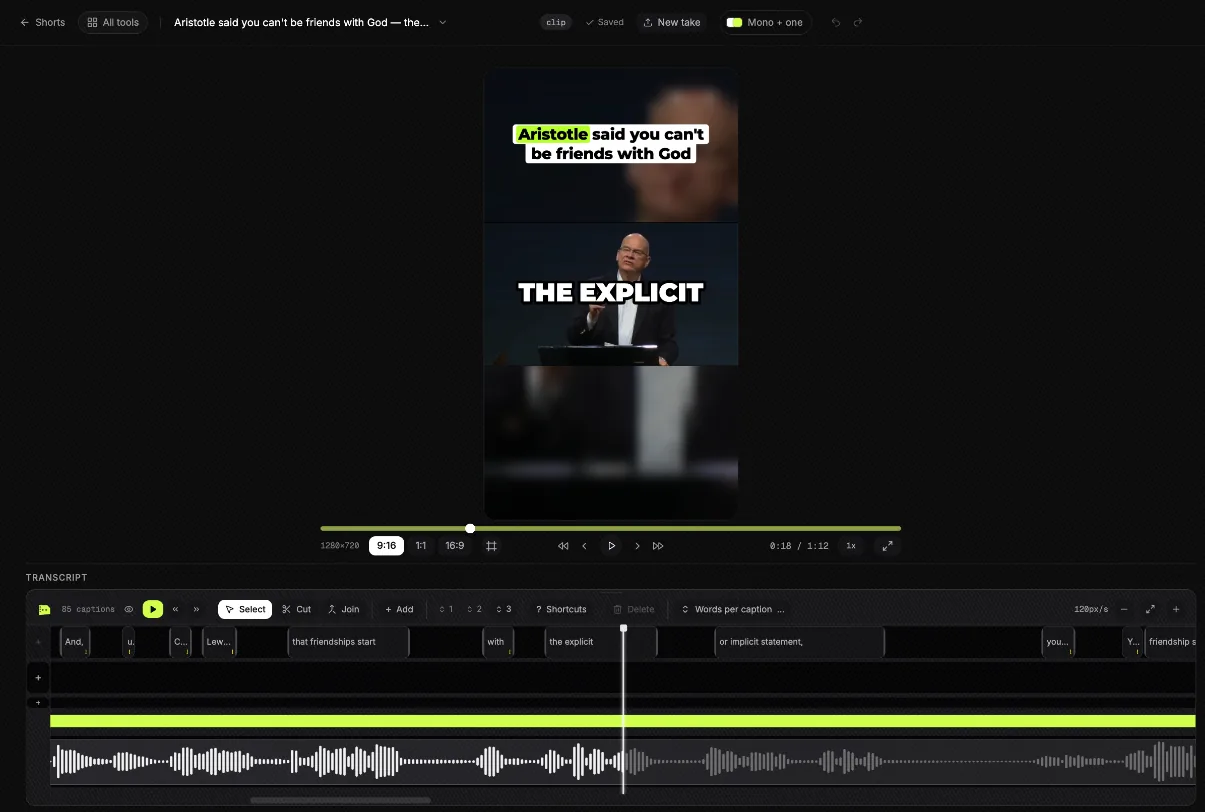
Automatic captions get most words right and some names wrong. Read every caption before you export, and fix the names of people and places, the church’s own name and every Bible book. In Slice’s editor every caption is a block of words on the timeline you can click and correct:
Scripture references and name titles
Live, a church puts the verse on the screen and the preacher’s name in a lower third. On a vertical clip neither works as it did on Sunday: the bottom of the frame is where the app puts its own text, and a wide slide will not fit. What works instead:
- The reference, not the passage. The captions already carry the words being read, so a short reference near the top of the frame (John 15:5) is enough. If you show the words of a verse, name the translation.
- Only when it is read. Put the reference up while the verse is being read or quoted, and take it down after.
- Check the reference against the sermon notes. A misheard chapter number in a caption is the mistake people notice.
- Name the preacher once. A title in the first seconds (name, role, church), or the name in the post text, is enough. On a clip from a guest preacher, always say who it is.
- Make it a template. Use the same title style for every clip in a sermon series, so the week’s clips look like one set.
“This is not only limited to lyrics but it is also for name titles!”
“Design: Canva - make a template based on your current series, and reuse it each week with new content from Sunday's sermon.”
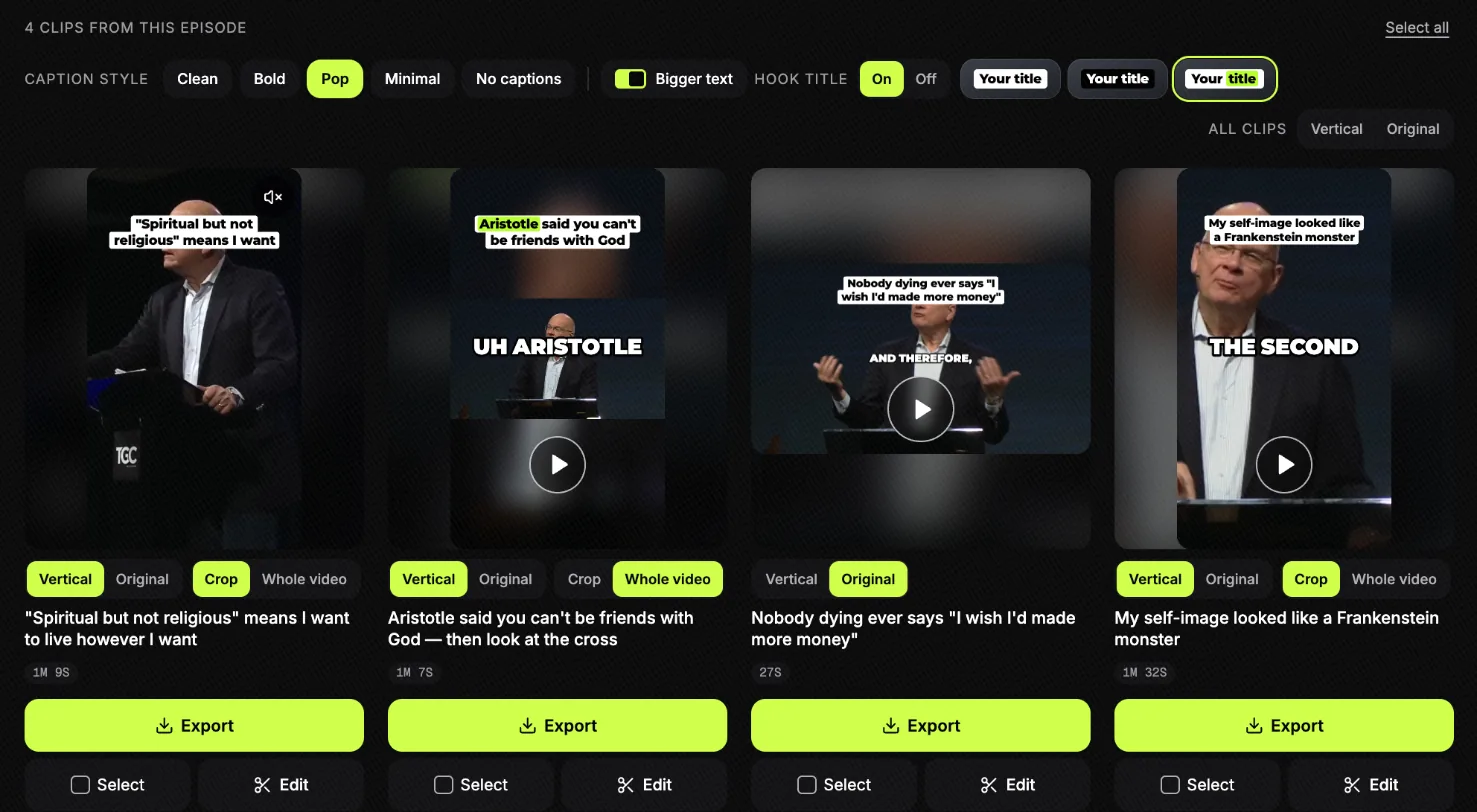
In Slice, each clip’s title and caption look are chosen on the clips page, and the same clip can be exported vertical, square or wide:
Safe zones: keep text out of the buttons
Each app lays its own buttons, account name and post text over the bottom and the right-hand side of a vertical video. Captions or a reference placed there are covered. Keep them in the upper and middle part of the frame, and check one clip before the first post: drop it into a free checker and see where each app’s buttons land.
| Platform | How long a clip can be | Check a clip |
|---|---|---|
| Instagram Reels | Up to 20 minutes, recorded and edited in the app. Reels over 3 minutes are not recommended to new audiences. | Instagram Reels safe zone checker |
| YouTube Shorts | Up to 3 minutes, recorded or uploaded. No minimum. | YouTube Shorts safe zone checker |
| Facebook Reels | No minimum or maximum. | Facebook Reels safe zone checker |
| TikTok | Up to 10 minutes through the API. In the app: not confirmed on an official page we could read; widely reported as 10 minutes recorded and up to 60 minutes uploaded. | TikTok safe zone checker |
Posting: a rhythm your team can keep
The churches that keep this going do not post more; they post on the same days every week, and they share the work.
“The key for me was establishing rhythms before establishing content that uses those rhythms.”
“It helps when it’s not a one person does all type of position.”
“i use resi's studio AI to upload a couple sermon clips per week - that's been really helpful just for keeping quality content flowing.”
A week that fits a small team, starting from Sunday’s sermon:
| Day | What | Who |
|---|---|---|
| Sunday | Record the clean feed; note the times of three to five moments. | Camera or stream volunteer |
| Monday | Get the file, make the clips, check captions, names and references. Post clip 1. | Media lead |
| Tuesday | Post clip 2 with a question in the post text. | Anyone with the login |
| Wednesday | Post clip 3; share it to the church’s Stories or groups. | Anyone with the login |
| Thursday | Post clip 4, or a short from the week’s event instead. | Anyone with the login |
| Friday | Post clip 5, or rest. | Anyone with the login |
| Saturday | Post an invitation for tomorrow; the full sermon link stays in the bio. | Media lead |
Point every clip to the full sermon (the link in your bio, or YouTube’s related-video link on a Short). For what else to post through the week, and how to handle music, baptisms and children safely, see church Reels ideas; for YouTube’s own rules, see church YouTube Shorts.
The whole routine, step by step
- Record a clean feed of the preacher
Record the camera on the preacher without lyrics, scripture slides or lower thirds on top, as well as the livestream. A vertical clip crops the sides off the picture, so graphics made for a wide screen get cut in half.
- Frame the preacher in the middle
Keep the preacher near the centre of the wide shot, with some room above the head. Then the vertical crop finds them without a camera operator doing anything different.
- Note the moments during the sermon
Someone on the team writes down the time of anything that would make sense to a stranger: a story, a one-line point, a question the sermon answers.
- Get the recording file on Monday
Take the clean recording from your switcher or recorder, or download the service from YouTube Studio. MP4, MOV or WebM, up to three hours and 4GB.
- Pick three to five moments
Choose moments that stand on their own and keep the meaning the preacher intended. Leave out the worship songs. A clip tool can suggest moments; a person checks every one.
- Caption every clip, and check names and scripture
Burn in captions, because many people watch with the sound off. Read every caption for names, places and Bible references before you export.
- Add the reference and a name title where they matter
When the clip quotes a verse, put the reference on screen (for example John 15:5, with the translation if you show the words). Name the preacher and the church once, in the opening seconds or in the post text.
- Check the safe zones
Keep captions and titles away from the bottom and the right-hand side, where each app puts its buttons and the post text. Check one clip on a phone or with a safe-zone checker before the first post.
- Post through the week, on a rhythm
Post one clip a day or every other day from Monday, each linking back to the full sermon. The same days every week are easier for a volunteer team than more clips.
Shorts by Slice does the Monday part: upload the sermon, read the moments it finds, check the captions, export. $14.99 a month. Your first video and first 3 clips are free, no card. After that it's one plan, and you can cancel any time.
Get the Slice Weekly
One free email every Friday: tools for creators and the best advice we found from people who make things.
Questions
How many Reels or Shorts should a church post from one sermon?
Three to five is a rhythm many church media teams keep: one every day or two from Monday to Saturday. Fewer clips posted every week beat more clips posted when someone has time.
Should we clip the livestream or record separately?
Record a clean feed of the preacher if your setup allows it (most switchers can record a camera on its own). The livestream often has lyrics, scripture and name graphics on it that are cut in half when the picture is cropped to vertical.
How do we show a Bible verse in a Reel?
Put the reference on screen while the verse is read, near the top or the middle of the frame, not the bottom. If you show the words of the verse, name the translation. The captions already carry the words, so the reference alone is often enough.
Can we use worship songs in church Reels and Shorts?
Avoid it. A church licence covers the service, and recorded songs in a Reel or Short can be muted, claimed or blocked. Clip the preaching; our church Reels ideas guide covers music licences in more detail.
How long should a sermon clip be?
Long enough for the point to land and no longer: often under a minute, sometimes two. YouTube Shorts can run up to three minutes, but Shorts over a minute with a Content ID claim are blocked, which matters if any music is in the clip.
What tool should a church use to make sermon clips?
It depends on who does the work. Done-for-you tools send a few finished clips; others suggest moments for you to choose. Our comparison of sermon clip tools lists prices and limits for each. Shorts by Slice (ours) is $14.99 a month for as many sermons as you like; you upload the recording and choose the clips.
More for churches
- Best sermon clip tools: prices, limits and who each suits.
- How to turn a sermon into short clips: the clip steps with a real sermon.
- Church Reels ideas: what else to post, music licences, consent.
- Church YouTube Shorts: the full sermon and the Shorts on one channel.
- Sermon audio to clips: when there is no video.
- Sermon transcription: the words, the passages and small-group notes.