Guide for live shows and panels
How to clip a live recording or panel recorded on a room mic
A live show has the best energy you will ever get on tape: a real crowd, real laughs, guests who rise to the room. It also has the worst sound. Chairs scrape, the speakers lean away from their mics, and the audience question that set up the best answer of the night is a murmur from the back. Here is how to record it so the clips survive, and how to cut them when they nearly do not.
The short answer
Get a microphone as close to each speaker as you can, because distance hurts more than a cheap recorder does. Ask the host to repeat every audience question into their mic. Record a few events you never plan to release before the one that matters. When you clip, start on the answer, put an inaudible question on screen as the hook title, and fix the names the room blurred.
Shorts by Slice turns a long podcast or stream into captioned vertical clips. $14.99 a month. Your first video (we search the first hour) and first 2 clips are free, no card. After that, buy clips one at a time or take the plan, which you can cancel any time.
Try it free →Where to put the microphone
The rule that matters most is distance. A podcaster answering someone about recording at a bookshop put numbers on it:
“Each time you halve the distance between someone's mouth and the mic, their voice comes up about 6 dB against the room”
In practice that means a recorder on the table between two speakers beats one on a tripod at the front of the room, and a microphone on each person beats both. A media production teacher in the same thread was blunt about it:
“Any cheap lav will work better than an ambient / room mic, for sure.”
| Setup | How the clips sound | Good for |
|---|---|---|
| A lapel or handheld mic per speaker | Close and clear, like a studio | Anything you plan to clip |
| A feed from the venue’s sound desk | Clear voices, thin crowd | Theatres and venues with a technician |
| One recorder on the table, close to the speakers | Usable, a bit of room | Two or three people at a table |
| One recorder or camera at the front of the room | Distant and echoey | A record of the event, rarely clips |
If you take the desk feed, add one thing. A podcaster who records live variety shows found the crowd went missing:
“Add an extra mic pointed at the audience. You think the onstage mics will pick up the crowd and they do, but the result is quiet and thin.”
A live show without the laugh is a studio show with worse sound. A cheap recorder pointed at the seats, synced in the edit, puts it back.
The audience question nobody can hear
This is the most common way a live clip dies. The best answer of the night starts with “That’s a great question”, and the question itself is a murmur. The fix costs nothing, and it has to happen on the night:
“Also ask the hosts to repeat audience questions into the mics, because the questions won't be usable from where the recorders sit.”
Tell the host before the show starts, and put it on their notes. If it did not happen, you can still save the clip: trim off the murmur, start on the answer, and type the question on screen as the hook title. People read the question in the first second and hear the answer straight after, which is often a stronger opening than the original. Our guide to first lines has more on this.
Practise in the room before the night that counts
Every venue sounds different, and you find out how only by listening back. A podcaster who records at San Diego Comic-Con every year gave this advice to someone planning their first live taping:
“I would recommend recording a couple with no plans to release them to see how the space works with your equipment and process.”
If you cannot do a full practice, do the short version: record thirty seconds of the speakers talking in their seats before the doors open, and listen on headphones. Moving a recorder a foot is easy at that point and impossible afterwards.
Which parts of a live show make clips
- Answers to good questions. A clear question and a strong answer is the most reliable live clip there is.
- The moment the room reacts. A big laugh or a gasp from a real audience is proof the moment works. Start just before it.
- Disagreements on the panel. Two people seeing it differently explains itself, even to someone who missed the start.
- Leave out the welcome, the sponsor thanks, anything that relied on a slide, and jokes about the venue that only the room got.
Framing several people for a phone
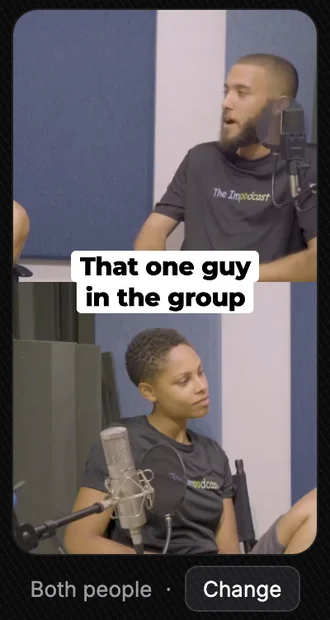
Most clips should show the person speaking, filling the frame. For a quick exchange between two people, both of them stacked in the frame keeps the back and forth readable. A row of four on a stage only works shown whole and small, so save that for the moment everyone laughs at once. Our guide to clips that follow the speaker has the switching rules in detail.
Live recording to clips in Slice, step by step
- Upload the best recording you have
The desk feed or the closest recorder, not the camera’s own microphone. Video: MP4, MOV or WebM up to 3 hours. Sound only: MP3, M4A, WAV, OGG or FLAC.
- Ask for answers, not introductions
On the episode page, finish “Find me clips about…” with the topic of the best answer you remember, or let Slice look for itself.
- Start each clip on the answer
If the question was off mic, trim it out and type it as the hook title instead, so people read the question and hear the answer.
- Fix the words the room blurred
Names and technical words are where room sound trips up any transcript. Click a word in the captions on the preview to correct it.
- Frame the speaker, or the whole panel
One speaker fills the frame best. For a quick back and forth, show both people; for a row of four, show the whole stage small.
Slice works from what it can hear. A clean desk feed or a close recorder gives it a clean transcript, and a clean transcript is what lets it find the answers in the first place, so the microphone decisions above matter twice.
Questions
What is the best microphone for recording a live panel?
A microphone for each speaker, close to their mouth: a cheap lapel mic beats any room mic. If you can only have one recorder, put it on the table as close to the speakers as you can, not out in front of them.
How do I record audience questions?
Either pass a handheld microphone, or ask the host to repeat every question into their own mic before it is answered. The second costs nothing and works every time.
Can I take audio from the venue’s sound desk?
Often, yes. Ask the venue’s technician for a recording or an output you can plug a recorder into, and run your own recorder as a backup. The desk mix is usually built for the room, so add a separate mic for audience laughter and applause.
Do live recordings make good clips?
The answers do. A live crowd laughing or reacting is something a studio show cannot fake. The parts that do not travel are introductions, housekeeping and anything that depends on what the audience could see.
Do I need permission to post clips of the audience?
Tell people at the door or on the ticket that the event is being recorded and may be shared. Keep members of the public out of the frame unless they have agreed, and never post a question from the floor with the person’s face without asking them. This is good practice, not legal advice.
Get The Cut
More guides
- Vertical clips that follow the speaker
- How to pick the best moments from a podcast
- Podcast captions that get watched
- Free seminar transcription
Example footage on this page: The Impodcast, Episode 1, CC BY 4.0.