Guide for podcasters
The best AI tool for clips from a two-person podcast
Every AI clip tool can find a good moment. With two people, the harder job is the picture: whose face is in the tall frame, when it moves to the other person, and what happens when you both talk at once. Here is what each tool says it does, read from its own pages, and how to choose for the way you record.
The short answer
The best AI tool for clips from a two-person podcast is the one that matches how you record. One video file with both of you in it, from Zoom, Riverside’s gallery or one camera: use a clipper that follows the active speaker, such as Shorts by Slice (ours), OpusClip, Klap, Choppity or Vizard. Separate camera tracks for each person: Riverside makes clips from its own multi-track recordings, and Descript’s Automatic Multicam picks the camera for whoever is talking. Slice also stacks both people for quick back and forth and costs $14.99 a month, but it takes one file and does not post for you.
Shorts by Slice turns a long podcast or stream into captioned vertical clips. $14.99 a month. Your first video (we search the first hour) and first 2 clips are free, no card. After that, buy clips one at a time or take the plan, which you can cancel any time.
Try it free →What matters when there are two of you
A tool that crops to the middle of a two-person shot shows the gap between you. A tool that follows the voice too eagerly cuts to your co-host every time they say “right”. A podcaster asking r/podcasting for help put the frustration plainly:
“I’ve tried a few popular AI editors, but the results still feel pretty random.”
Four questions sort the tools:
- Does it follow whoever is talking? Most clippers now say they do.
- When does it switch? Pro shows ignore short interjections and hold each shot for a few seconds. Slice ignores turns under 1.5 seconds and holds every shot at least 3 seconds. The other tools do not publish their rules.
- Can it show both of you? For a laugh you share or a quick exchange, two faces stacked beats cutting on every line.
- Does it read separate tracks? Only matters if you record a camera per person.
What each tool says it does with two people
Read on each tool’s own pricing, feature or help page on 13 November 2026. We make Slice. We did not test the others hands-on, and where a page does not say something, the table says “not stated”.
| Tool | Follows the speaker | Both people on screen | Separate camera tracks | Price |
|---|---|---|---|---|
| Shorts by Slice (ours) | Follows whoever is talking on a two-box call, two people on one camera, or an edited show. Switches 0.17s before the next voice and holds each shot 3s or more | Yes: both people stacked, as a layout per clip | No: one video file per upload | $14.99 a month; your first video (we search the first hour) and first 2 clips are free, no card |
| OpusClip | Fill layout: “focus on the speaker and crop them to fill the 9:16 screen” | Split layout, when both speakers appear together in the original frame | Not stated | Free plan with a watermark; Starter $15 a month |
| Klap | Active-speaker reframing on every plan | Lists a split-screen layout among its reframe layouts | Not stated | Free on 1 video; $29 a month billed monthly |
| Vizard | Its reframe tool “identifies active speakers and shifts focus accordingly” | Not stated on its reframe page | Not stated | Free plan, 60 credits a month, watermarked; paid prices did not load for us |
| Choppity | “Detects who is talking and switches focus” | Not stated for clips | Not stated for clips | Starter $24 a month billed monthly |
| Riverside | Magic Clips lets you pick the speaker to focus on; following the speaker is not stated on that page | Not stated on its Magic Clips page | Yes: it records separate audio and video tracks for each person | Pro $29 a month, or $24 a month billed yearly |
| Descript | Automatic Multicam picks “layouts & cameras to show active conversations” | Yes, through multicam layouts | Yes: Automatic Multicam only works with multi-track recordings | See its pricing page |
Prices in US dollars, the cheapest paid plan billed monthly unless the cell says otherwise. Klap’s source videos run up to 3 hours. For free plans, watermarks and episode length across more tools, see the best AI tools to turn podcasts into clips.
Which to choose for the way you record
| How you record | Start with |
|---|---|
| Zoom, Meet or a Riverside gallery: two boxes in one file | A clipper that follows the speaker: Slice, OpusClip, Klap, Choppity or Vizard. Our Zoom guide has the recording settings. |
| Two people on one camera, side by side | A clipper that can split one picture into two people: OpusClip’s split layout, or Slice, which treats each side as that person’s shot. |
| Riverside, with a track per person | Riverside’s Magic Clips, from the same recording. Or export the edited episode and use any clipper. |
| A camera per person, edited in Descript | Descript’s Automatic Multicam, then its clips. |
| An edited show that already cuts between cameras | A clipper that finds the speaker again after each camera change. Slice does this; the others do not say. |
If you record separate camera tracks
Separate tracks give the best picture of each person, because each camera is full size. They also mean the tool has to know the tracks belong together. Riverside and Descript do, on recordings made in them. Most clippers, Slice included, take one video file. If that is your setup, put the tracks together first: an edited episode, or a side-by-side export, then upload that one file. A clipper that follows the speaker inside it will then crop from the full-size picture of each person.
Picture quality is the reason to bother. One podcaster building a four-camera studio asked exactly this before buying:
“are the individual 1080p ATEM ISO files good enough for cropping into Reels/TikToks/Shorts, or would you record 4K separately somehow?”
What Slice does with a two-person episode
We took a two-host video podcast shared under CC BY 4.0, uploaded twenty minutes and let Slice cut the clips. Nobody touched the framing. The episode cuts between a wide shot and close-ups; in each clip the host who is talking stays in the tall frame. The full run, misses included, is in our speaker framing guide.
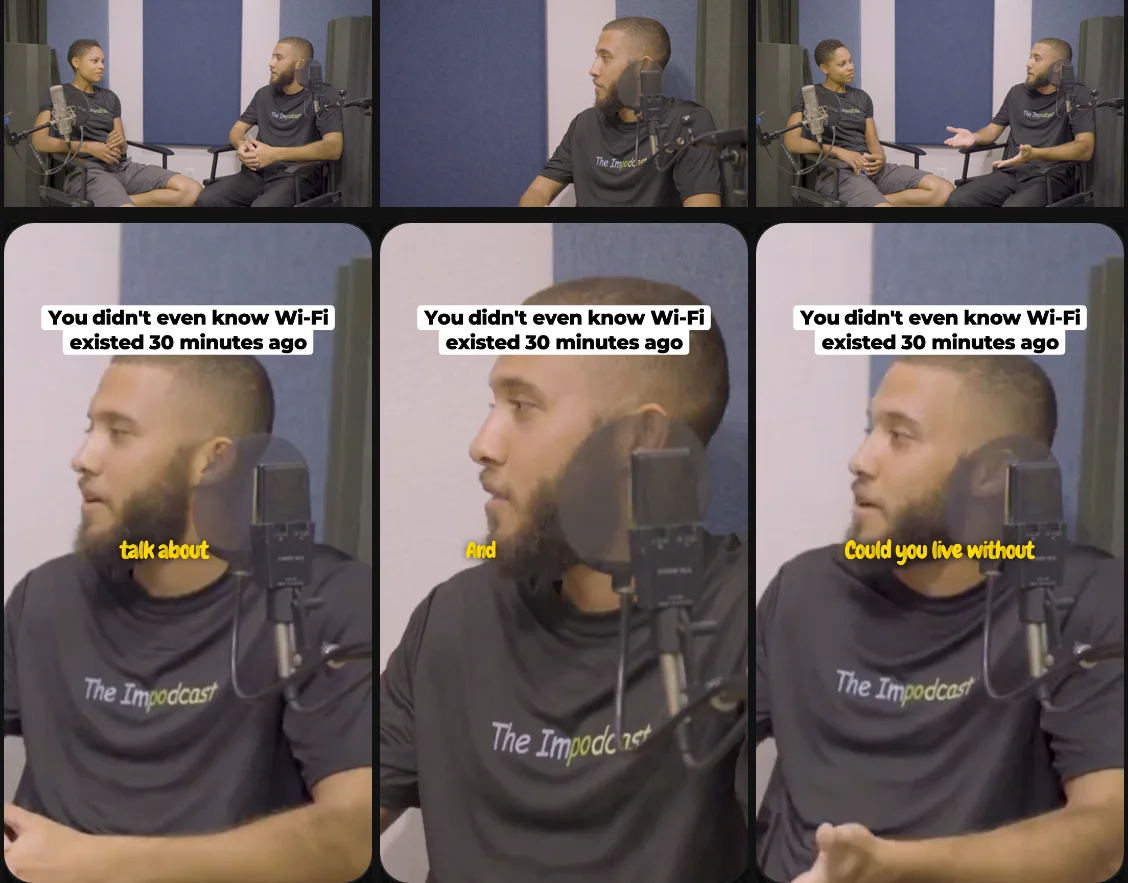
What it does not do, so you can rule it out quickly: it does not read separate camera tracks, it follows two people and not three, and it does not post or schedule. It is $14.99 a month, and your first video (we search the first hour) and first 2 clips are free, no card.
Questions
What is the best AI tool to make clips from a two-person podcast?
It depends on how you record. If you record in Riverside, it records each person on separate tracks and makes Magic Clips from that same recording. If you edit in Descript with a camera per person, its Automatic Multicam picks the camera for whoever is talking. If you have one video file with both of you in it (a Zoom or Riverside gallery, or one camera on both), you want a clipper that follows the active speaker: Shorts by Slice (ours, $14.99 a month), OpusClip (from $15), Klap ($29 billed monthly), Choppity ($24) and Vizard all say they do. Slice also stacks both people for quick exchanges and switches close to the timing we measured in professional podcasts. Read on each tool's own pages, 13 November 2026.
How do I make podcast clips from separate camera tracks?
Either use a tool that reads the tracks, or put them together first. Riverside records separate audio and video for each person and makes clips from that recording. Descript’s Automatic Multicam works on multi-track recordings and picks the camera for whoever is talking; Premiere Pro and DaVinci Resolve have multicam editing for doing it by hand. Clippers that take one file, Slice included, need the tracks put together first: export a side-by-side or edited version of the episode and upload that, and the clipper follows the speaker inside it.
Do AI clip tools work when both people are on one camera?
Some do. OpusClip’s split layout needs both speakers in the same frame, and Slice finds two people sitting side by side on one camera from where the picture moves, then treats each side as that person’s shot. For how to frame it, see our speaker framing guide.
Which tools caption the clips automatically?
All the clippers here add captions as they cut: Slice, OpusClip, Klap, Vizard and Choppity. Riverside adds them to Magic Clips with a click, and Descript has captions in its editor. Our podcast captions guide compares them.
Does any of them handle three or more people?
OpusClip’s help page lists three- and four-person layouts. Slice follows two people; for a panel it shows the whole picture on a blurred backdrop or two people in a split. For the others, their pages do not say.
Get The Cut
More guides
- Vertical clips that follow the speaker
- Vertical clips from a Zoom podcast recording
- Podcast captions that get watched
- The OpusClip alternative
- Slice or Riverside for podcast clips
Example footage: The Impodcast, Episode 1, CC BY 4.0.