Guide · Starting a podcast
How to start a remote podcast
Host and guests in different places. The one rule that saves remote shows, the tools that follow it, a kit for every budget, and what real podcasters say went wrong.
The short answer
Record every person on their own machine, not the call. Use a recorder that does it for you (Riverside, Descript Rooms and Zencastr all have free plans), give everyone wired headphones, and put a dynamic microphone a few inches from your mouth. You can start at $0 with the laptop and earbuds you own; about $120 buys the microphone that matters most. Then edit, host the episode on a free or cheap host, submit the feed to Apple Podcasts and Spotify once, and make short clips so new people find it.
The one rule: record everyone where they sit
A video call squeezes each voice to get it across the internet, and when the connection stutters the voice stutters. If you record the call, that is your episode. Remote shows avoid it by recording each person on their own computer at full quality while the call carries the conversation. Audio people call it a double-ender. Marcus Mendes put it plainly when Apple added it to the iPad:
“each participant records their own end of the conversation locally so that all the tracks are full quality when it’s time to edit.”
- Each person talks into their own micWith headphones on, so the other voice stays out of it.
- Their browser records them, locallyAt full quality, whatever the internet does.
- The call is only for hearing each otherIf it stutters, the recording does not.
- Each track uploadsDuring the call and after it. Wait for 100%.
- You edit a track per personLevel each voice, cut a cough without cutting the guest.
The tools below all do this. What it looks like when the files arrive, from Descript’s page for its recorder:
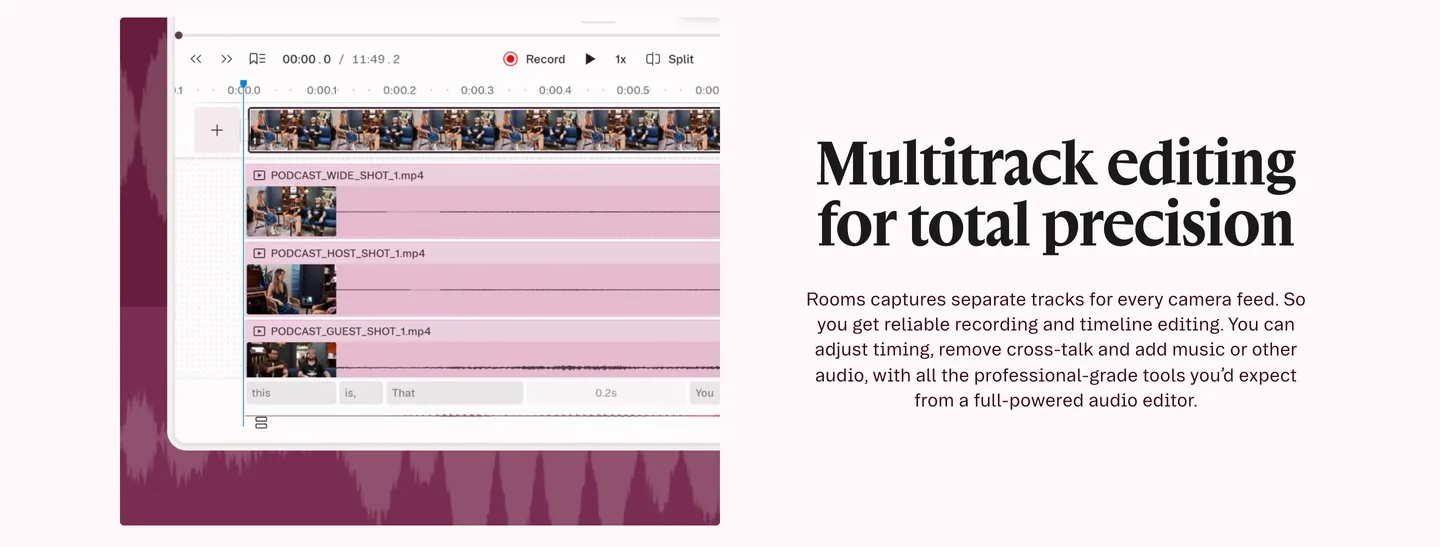
And what podcasters say they value about it:
“Especially with the exporting of separate tracks directly to your drive on completion of recording.”
Starter kits, from $0 to a desk studio
Four levels, for one host. Your guests need far less (the guest kit is further down). Every price was read on 6 October 2026; click a price to see where.
- $0What you already ownYour first three episodes, to find out whether you like doing it.
- The laptop or phone you have$0
- Wired earbuds with a mic$0
- Riverside, Descript Rooms or Zencastr, free plan$0
- Audacity or GarageBand$0
- Spotify for Creators$0
- About $120One good microphoneYou have published a few episodes and you are going to keep going.
- Samson Q2U Recording and Podcasting Pack$99.99
- InnoGear desk boom arm$19.99
- Your wired earbuds$0
- About $490Ready for a weekly showA weekly show, with video on YouTube.
- Shure MV7+$299
- Sony MDR-7506$98
- InnoGear desk boom arm$19.99
- Logitech C920x webcam$69.99
- $1,000+A desk studioA show with sponsors or a team, where a lost recording costs real money.
- Shure SM7B$439
- RØDECaster Duo$498
- RØDE PSA1+ boom arm$129
- Sony MDR-7506$98
- Logitech Brio Ultra 4K webcam$169.99
- Elgato Key Light Air MK.2$139.99
Two podcasters people still quote on gear agree on where to begin. Tim Ferriss, on the setup behind one of the biggest interview shows:
“If you’re on a budget, even an iPhone will do, but–bang for the buck–the ATR-2100 is hard to beat.”
Marco Arment, after testing dozens of microphones, on the same model:
“I don’t know of a cheaper or simpler all-in-one solution to recommend, especially for a beginner or a minimal travel setup.”
That microphone, the ATR2100x-USB, is no longer sold: Sweetwater lists it as no longer available. The Samson Q2U in the $120 kit is the same idea, a dynamic mic with both USB and XLR, so it moves with you when you add an interface. Dynamic is the word that matters: it hears the voice in front of it far more than the room around it.
$0 What you already own
Your first three episodes, to find out whether you like doing it.
| What | Price | Why this one | Skip |
|---|---|---|---|
| The laptop or phone you have | Free | Every recorder below runs in Chrome on a laptop. On an iPhone or iPad with iOS 26, Local Capture in Control Center records your own side of a call at full quality. | Buying anything before you have published an episode. |
| Wired earbuds with a mic | Free | The pair from an old phone. Wired, so your guest’s voice stays in your ears and out of your mic. | AirPods and other Bluetooth earbuds: their mics sound worse than the laptop’s. |
| Riverside, Descript Rooms or Zencastr, free plan | Free | Each records every person on their own machine and gives you a separate track per person. | Recording the call itself as your only copy. |
| Audacity or GarageBand | Free | Free editors. Cut the start and the end, the false starts, and level the voices. | — |
| Spotify for Creators | Free | Free hosting with an RSS feed, so the show reaches Apple Podcasts and the rest too. | — |
Total: $0
About $120 One good microphone
You have published a few episodes and you are going to keep going.
| What | Price | Why this one | Skip |
|---|---|---|---|
| Samson Q2U Recording and Podcasting Pack | $99.99 Sweetwater | A dynamic mic, so it hears you and not the room. USB today, XLR later when you add an interface. The pack has the stand and both cables. | A condenser mic such as a Blue Yeti in an untreated room. |
| InnoGear desk boom arm | $19.99 Amazon, sale price; list $24.99 | Puts the mic a few inches from your mouth, where a dynamic mic sounds its best, and off the desk you type on. | A $100 arm. This one holds a Q2U fine. |
| Your wired earbuds | Free | Still fine. Headphones are the next thing to buy, not this one. | — |
Total: $119.98 · Software can stay free. Riverside’s free plan gives you 2 hours of separate-track recording to try it; Zencastr’s free plan lists unlimited separate audio and video recording.
About $490 Ready for a weekly show
A weekly show, with video on YouTube.
| What | Price | Why this one | Skip |
|---|---|---|---|
| Shure MV7+ | $299 Sweetwater | A dynamic mic with USB and XLR, built for speech, with enough level over USB that you need no interface yet. | The SM7B for now: it needs a lot of gain, which means an interface and often a booster. |
| Sony MDR-7506 | $98 Sweetwater | Closed-back studio headphones: you hear exactly what is being recorded, and nothing leaks into the mic. | — |
| InnoGear desk boom arm | $19.99 Amazon, sale price; list $24.99 | The MV7+ is light enough for it. | — |
| Logitech C920x webcam | $69.99 Amazon | For the video version. A window in front of you does more for the picture than a better camera. | A 4K webcam before you have a light. |
Total: $486.98 · Plus a paid recorder once the free hours run out: Riverside Pro is $24 a month billed yearly ($29 month to month).
$1,000+ A desk studio
A show with sponsors or a team, where a lost recording costs real money.
| What | Price | Why this one | Skip |
|---|---|---|---|
| Shure SM7B | $439 Sweetwater | The broadcast standard. Forgiving of a so-so room and of a guest who drifts. | — |
| RØDECaster Duo | $498 Sweetwater | RØDE lists 76 dB of gain, enough to drive the SM7B with no booster, and it records to a microSD card as a backup of your side. | A Cloudlifter with this interface. |
| RØDE PSA1+ boom arm | $129 Sweetwater | A heavy arm that holds an SM7B still and quiet. | — |
| Sony MDR-7506 | $98 Sweetwater | The same headphones as the level below. They are not the thing to upgrade. | — |
| Logitech Brio Ultra 4K webcam | $169.99 Amazon | A sharper picture for YouTube and for vertical clips cropped out of a wide shot. | — |
| Elgato Key Light Air MK.2 | $139.99 Amazon | Light is what makes a webcam look expensive. | — |
Total: $1,473.98 · Worth considering at this level: send your regular co-host a Samson Q2U pack ($99.99) and a pair of ATH-M20x headphones ($59), so the other half of the conversation sounds as good as yours.
Choose the recorder
What each one does for a remote show, from each maker’s pricing page on 6 October 2026. All of them run in a browser, so your guest installs nothing.
| Recorder | Free plan | Paid | A track per person? | Worth knowing |
|---|---|---|---|---|
| Riverside | Free: 2 hours of separate-track recording to try it, video up to 720p, with a watermark | Pro: $24 a month billed yearly, $29 month to month | Yes, recorded on each machine and uploaded as you go | The best known. Its AI clean-up has caught some people out (below). |
| Descript Rooms | Free: Rooms with 2 hours of recording; exports carry a watermark | Hobbyist: $16 a month billed yearly, $24 month to month | Yes | SquadCast is now part of Descript. A guest whose upload stops can resume it for up to 7 days. |
| Zencastr | Free plan lists unlimited separate audio and video recording, up to 6 people | Enterprise by quote | Yes | The most generous free plan we found. |
| StreamYard | Free: 2 hours a month of local recordings | Core: $35.99 a month billed yearly, $44.99 month to month | Yes, as “local recordings” | Built for live shows; records locally as well. |
| Zoom | Records to your computer on the free plan | Paid plans add cloud recording | Only with a setting turned on first | Records the call as it arrives, dropouts and all. See below. |
| Cleanfeed | Free for up to two guests, with no time limit; one mixed track | Pro: $36 a month ($23 at the subsidised rate) | On Pro | Audio only, no video. Unlimited recording time on every plan. |
Each has loyal users and people who left. Two of each, from one r/podcasting thread:
“we switched to Cleanfeed a few years ago and it has been solid.”
“We were happy with Streamyard until the price increase.”
Whatever you choose, keep the raw tracks. One podcaster found Riverside’s audio clean-up added noise to an export that sounded fine in the app, and the advice in the thread was the same advice we give:
“Go back to your recording and export/download all the raw files to somewhere else first.”
More recorders, compared side by side: the best free podcast recording tools in our directory.
Zoom works, if you set it up before the call
Zoom is what your guests already have, and plenty of shows use it. It can save a file per person, but only for a recording saved to your computer, and only if this is switched on in the desktop app first:
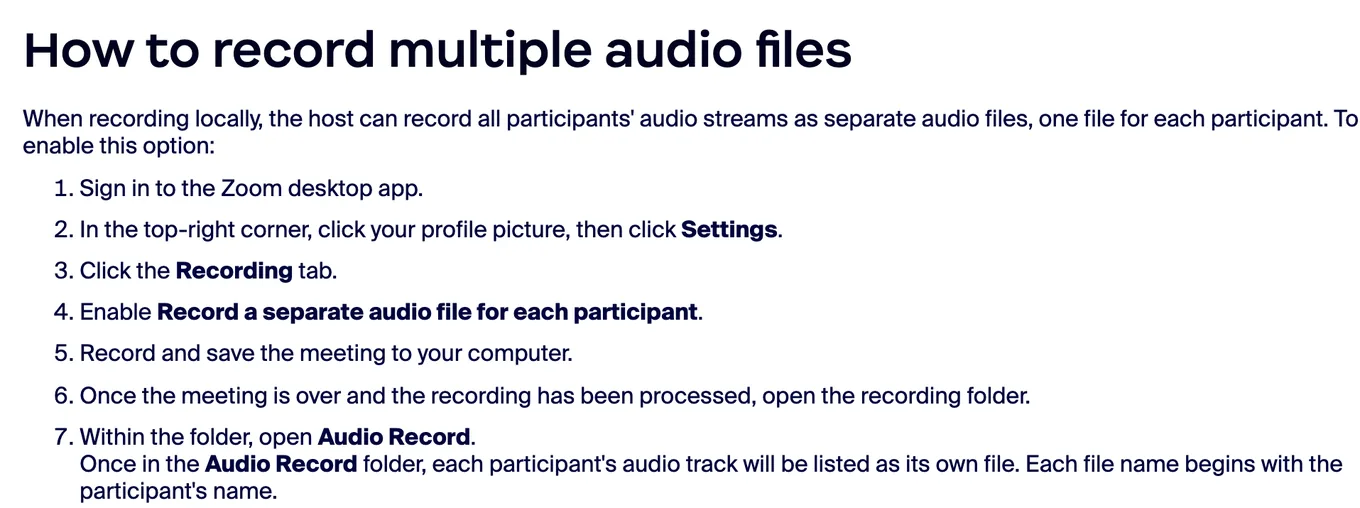
The catch is that Zoom records what reached you, after the internet and Zoom’s own noise suppression have had their way with it. A podcaster who uses Riverside summed up both sides:
“Zoom is ok, and many people use it, but I have had choppy audio when internet connections on either end aren’t stable.”
“It’s easy to use and give you the separate audio tracks which is great.”
- Turn on the separate audio files (above), and record to the computer, not the cloud.
- Ask the guest to record themselves too. Voice Memos on their phone, held close, is a backup you will be glad of.
- Computer recording does not work from Zoom’s phone or tablet apps, so the host needs a laptop or desktop.
Internet, backups and the things that lose an episode
Remote recorders upload each person’s track while you talk and after you stop. Most lost episodes are a track that never finished uploading, or the wrong microphone. From one r/podcasting thread about episodes that could not be released:
“Each time there was something wrong with Zencastr's connection and one of our audio channels was garbled.”
“Missing track for one participant was the most common”
“It’s the reason we switched to hardware recording, and have never looked back.”
- Plug in. An Ethernet cable beats the best Wi-Fi, for you and for the guest if they can.
- Close everything else: cloud backups, other tabs, game updates.
- Record a backup of yourself. QuickTime, Voice Memos, or a recorder like the RØDECaster Duo writing to its card.
- Wait for 100%. Nobody closes the tab until every upload has finished. Riverside and Zencastr upload as you go; Descript lets a guest resume an upload for up to 7 days.
- Download the raw tracks the same day and keep them somewhere that is not the recording service.
The guest kit
Your guest’s audio is half your episode, and most guests have no microphone. What helps, in order, from a podcaster answering exactly that question:
“Get them to use wired earbuds with the mic (way better than laptop mics), have them record locally on their phone's voice memo app while you chat”
Wired matters. Bluetooth earbuds swap to a low-quality microphone during a call:
“if a guest is using AirPods or the like, the sound is always worse than if they’re using no headphones at all.”
And headphones of some kind are not optional. Without them, the guest’s mic hears your voice from their speakers, and the recorder’s echo cancellation garbles whoever talks over whom:
“Headphones are required for remote recording if you want to avoid this issue.”
“If both parties have head phones/ear buds you can turn it off and it records clean.”
What to send a guest, the day before
- The link, the time with their time zone, and how long you will record.
- “Please use wired earbuds or headphones, not AirPods.”
- “Sit in the smallest, softest room you can: a bedroom beats a kitchen. Close the door and the window.”
- “Use Chrome on a laptop, plugged into power, and on a cable to the router if you can.”
- “Please keep the tab open at the end until the upload says 100%.”
- The release form, if you use one: a free guest release form.
For guests you want to sound their best, the same podcaster’s tip:
“Pro tip: Send them a $20 Amazon gift card for decent earbuds before the interview.”
Our guest soundcheck lets a guest test their mic and room in the browser before the day.
Step by step, from idea to published episode
- Decide the show before the gear
Write one sentence: who it is for and what they get from an episode. Pick a length and a day, and plan three episodes before you record one.
- Set up and test with a friend
Sign up to a recorder that keeps a track per person, plug in your mic and headphones, and record ten minutes with a friend. Listen back to both tracks on earbuds before you book a guest.
- Record with a track per person
Send the guest the link and the guest kit, check that each person’s own mic is selected, press record, and keep the tab open until every upload reaches 100%.
Say the date and the guest’s name at the start. It costs nothing and helps you find the file in a year.
- Edit
Download every track, cut the start and the end, the false starts and the long pauses, level the voices, and export an MP3 for audio and an MP4 if you publish video.
- Host it
Upload the episode to a podcast host such as Spotify for Creators (free), Buzzsprout or Transistor. The host makes the RSS feed that every podcast app reads.
- Publish to Apple Podcasts, Spotify and YouTube
Submit the RSS feed once in Apple Podcasts Connect and in Spotify for Creators, and upload the video to YouTube or connect the feed there. New episodes then appear on their own.
- Make clips and a transcript
Cut two or three short vertical clips from the episode for Reels, Shorts and TikTok, and publish the transcript with the episode so search engines and readers can find it.
On the editing step, keep it simple:
“use the simplest editing software you can, or pay someone to do it for you.”
And launch with more than one episode. Tim Ferriss again:
“Upload at least 2-3 pre-recorded episodes when you launch your podcast”
The submitting is a one-time job. Apple Podcasts Connect asks for your feed, checks it, and reviews the show; Apple’s rules ask that your cover art be a square JPG or PNG between 1400 and 3000 pixels (our cover art checker tests it). Spotify for Creators publishes to Spotify by itself if it is your host. More on hosts and feeds is in the church guide, which goes through it step by step.
Clips and the transcript: how new people find the show
YouTube is now the service American weekly podcast listeners use most: 37% of them, ahead of Spotify (21%) and Apple Podcasts (12%), in Edison Research’s Podcast Consumer 2026. People meet a show there, and on Reels and TikTok, as a minute of video before they ever subscribe; and they find it by its words in a search. That is the step Slice does. You upload the episode, or paste its YouTube link, and it reads the whole conversation, lists the moments that stand on their own, and makes each one a captioned vertical clip you can edit and download.
“YouTube must be taken seriously, including for audio only podcasts.”
On 2 October 2026 we ran LinuxGameCast Weekly 430, a 82-minute three-host show recorded over webcams, through Slice. It listed four moments:
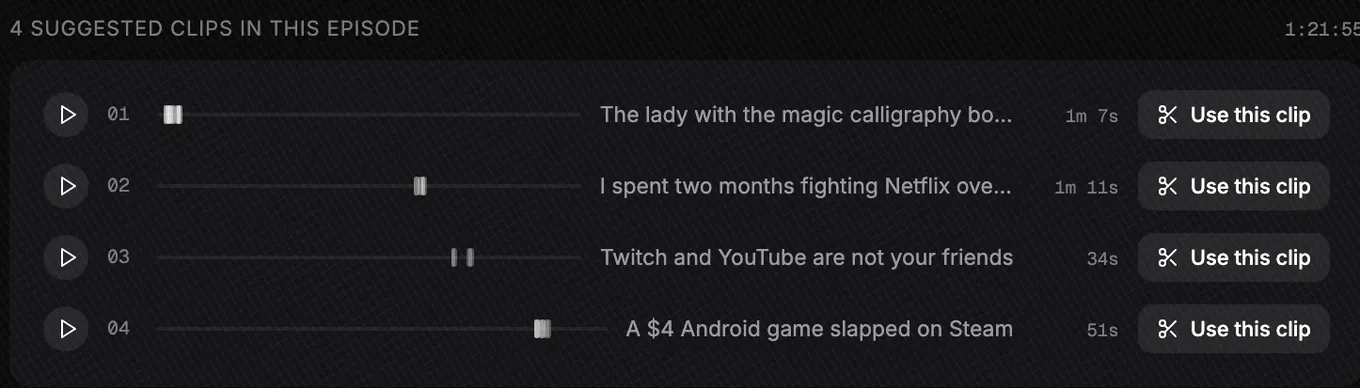
The transcript comes from the same upload, and the free podcast transcription tool does the words on their own, up to 90 minutes, with no sign-in. Check the names before you publish it: the free transcript of the same episode spelled “Linux” as “Lennox”.
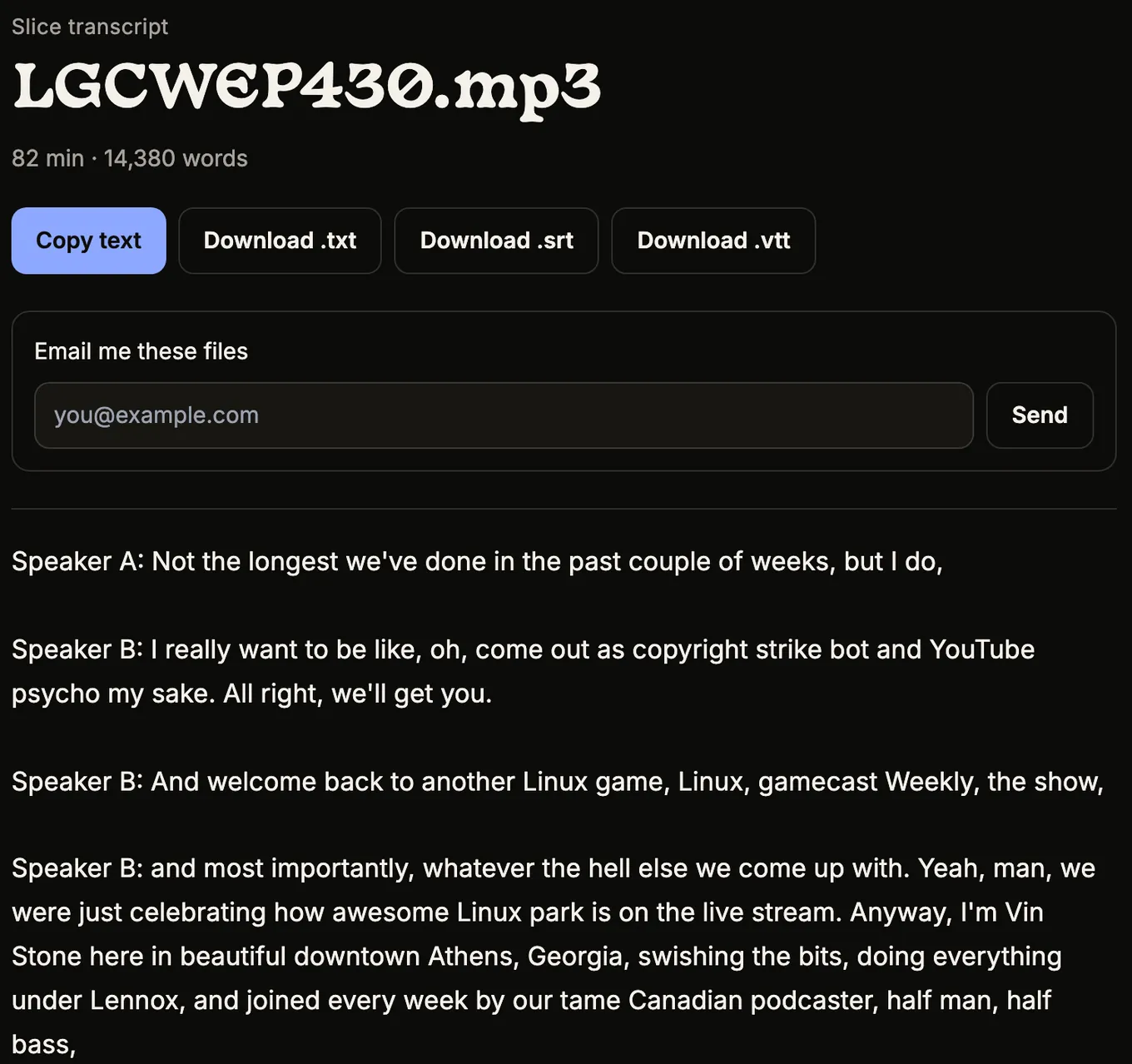
What Slice does not do: it does not record, host or publish your podcast, and it does not post the clips for you. Your first clip is free with no card; after that a 3-day free trial, then $14.99 a month.
Shorts by Slice
From the team behind these free tools
One video. A week of posts.
Upload an episode and get back the moments worth posting, cut and captioned.
- Reads the whole episode, then picks the excerpts worth posting
- Captions burned in and framed vertical, ready to post
- Your first clip is free, no card
The mistakes podcasters say they made
Not from a listicle: from podcasters describing their own worst recordings. Almost all of them are fixed by a test recording and a checklist.
“It's a dash of true humility when the host (me) has forgotten to do a sound check to make sure my sound is coming from my mic and not the onboard mic on my PC.”
“I've also run into the issue you've got, where the laptop microphone recorded instead of my Yeti.”
“Try having three guests on with a co-host and then realizing over an hour in that you forgot to hit record.”
“The very first podcast I ever released had audio split in the left and right ears, and I didn't know because it wasn't what I heard during post production.”
And the way most shows actually end: they stop.
“Most would-be blockbuster podcasters quit because they get overwhelmed with gear and editing.”
“perfection is the enemy of complete. One or two episodes won't hurt.”
How long an episode actually takes
The recording is the short part. One podcaster logged every minute of a weekly show for a month:
“Total: roughly 6.5 hours for one episode.”
“The recording was maybe 10% of the total time.”
It varies enormously with the format. At one end, a show that barely edits; at the other, a heavily cut one:
“I spend about 5 mins per episode.”
“Just the rough edit takes 7-8hrs.”
For a 45-minute remote interview with light editing, this is what we would plan for. It is our estimate, not a measurement:
| Task | Time | Where it goes |
|---|---|---|
| Booking and preparing the guest | 1 hour | Emails, research, questions, the guest kit |
| Recording | 1 hour | Ten minutes of checks, then the conversation |
| Editing | 1 to 3 hours | Most of it listening; less with a text-based editor |
| Publishing | 30 minutes | Title, show notes, upload, schedule |
| Clips and the transcript | 30 to 60 minutes | Choosing and checking clips, fixing names in the transcript |
| Total | 4 to 6½ hours | An episode a week is a part-time job |
If that is too much, cut the format before you cut the frequency: shorter episodes, fewer segments, every other week.
What it costs each month
The gear is a one-off. These are the bills that repeat, at the prices on 6 October 2026:
| Setup | Recorder | Host | Clips | A month |
|---|---|---|---|---|
| Free | Riverside, Descript or Zencastr free plan | Spotify for Creators | By hand in a free editor | $0 |
| Typical | Riverside Pro, $24 billed yearly | Buzzsprout, $15 billed yearly | By hand | $39 |
| With clips | Riverside Pro, $24 | Buzzsprout, $15 | Slice, $14.99 | $53.99 |
Buzzsprout’s free plan keeps each episode for only 90 days, so it is a trial, not a home. Transistor and Captivate start at $19 a month. A podcaster on r/podcasting describes the cheapest real start:
“Our show started with £90 a year hosting on Soundcloud and a Zoom H2n recorder and that was it.”
What to upgrade first
In this order, and only when the thing before it is holding you back:
- Your microphone, to a dynamic one on an arm, close to your mouth. The $120 kit.
- Your guest’s audio: the guest kit, and wired earbuds for anyone who comes back.
- Closed headphones for you, so you hear what is being recorded.
- Recorder hours, when the free plan runs out.
- Light, then camera, if you publish video.
- An interface and an XLR microphone, last. It is the smallest difference for the most money.
“I recommend not buying more gear until you hit the limit with your current gear and know that it's holding back your quality.”
“Your listeners/viewers will put up with bad video but not with bad audio.”
“You do NOT need concert hall-quality audio; most people will be listening in the subway or car anyway, and they’ll forgive you if recordings are rough around the edges.”
Get the Slice Weekly
One free email every Friday: tools for creators and the best advice we found from people who make things.
Questions
What do I need to start a remote podcast?
A computer with Chrome, a microphone close to your mouth, wired headphones, and a recorder that records each person on their own machine, such as Riverside, Descript Rooms or Zencastr. All of them have a free plan, so you can start at $0 with the laptop and earbuds you own.
Can I record a podcast on Zoom?
Yes, if you turn on “Record a separate audio file for each participant” before you start and record to your computer, not the cloud. Zoom records the call as it arrives, so a bad connection is in the recording. A recorder that records each person locally avoids that.
What is a double-ender?
Each person records their own voice on their own machine while you talk over a call; afterwards the files are put together. The call is only for hearing each other. Riverside, Descript Rooms, Zencastr and StreamYard’s local recordings do this for you.
What should a remote guest use?
Wired earbuds with a mic at the least, a quiet room with soft things in it, a laptop on power and a wired connection if possible, and Chrome. Not AirPods or other Bluetooth earbuds: their microphones sound worse. Ask them to keep the tab open until their upload finishes.
How much does a remote podcast cost each month?
It can cost nothing: free recorder plans plus Spotify for Creators. A typical paid setup is a recorder plan (Riverside Pro is $24 a month billed yearly) and a host (Buzzsprout from $15 a month billed yearly), about $39 a month, before any editing or clip tools.
How long does a podcast episode take to make?
Longer than the recording. A podcaster who logged a month of a weekly show found about 6.5 hours an episode, with recording about 10% of it. We would plan four to six and a half hours for a 45-minute interview with light editing; a scripted show takes far more.
Should I start with video?
If you can, record it, because YouTube is where many people now watch podcasts and clips need a picture. You do not have to publish the full video at first. A webcam and a window in front of you are enough to start.
More on starting a podcast
- How to start an in-person podcast: Everyone in one room: a mic per person, a recorder with a headphone jack each, a room that does not echo, and starter kits from $0.
- How to start a church podcast: Sunday’s sermon as a podcast from the sound desk or the livestream, then original shows: volunteers, hosting, music licences, consent and a weekly routine.
Compare the tools
- Best free podcast recording tools and free editing tools, from the podcast tools directory.
- Podcast tools for beginners, tools for video podcasts and every tool with a free plan.
- The whole podcast tools directory: recording, editing, hosting and more.
Free tools for the jobs around an episode
- Podcast name checker: is the name taken?
- Cover art checker: Apple’s size and format rules, checked.
- Guest soundcheck and guest release form.
- Loudness checker: is the episode as loud as the shows around it?
- Free podcast transcription, up to 90 minutes.