Guide · Starting a podcast
How to start an in-person podcast
Everyone at one table. Why one room is harder than it looks, a mic and a track per person, headphones, a room that does not echo, cameras, and a kit for every budget.
The short answer
Give everyone their own dynamic microphone, a few inches from their mouth, and record each microphone on its own track with a recorder that has a headphone jack per person. Record in the softest room you have, with blankets behind anyone facing a bare wall. You can start at $0 with two phones; about $130 buys one good recorder to share, and about $500 buys a mic, a track and headphones each. Then edit, host, publish, and make clips.
Why one room is harder than it looks
Nothing drops out when you are face to face, but every microphone hears every voice. That is bleed, and it is the whole craft of in-person recording. Jason Snell, who records most of his shows remotely and some live, on what changes in a room:
“even if you clip the sound out of one microphone, it’ll still be audible on the others.”
So the gear and the seating are chosen to make each mic hear one person far more than the rest:
“The best trait of a microphone for live recordings is that it rejects sound that isn’t directly in front of the microphone.”
- One dynamic mic per personA few inches from the mouth, pointing away from the others.
- One recorder, an input eachEvery mic on its own track, all on the same clock.
- Headphones on everyonePeople who hear themselves stay on their mic.
- A soft roomLess echo for every mic to pick up.
- You edit a track per personLower each track when that person is quiet.
Starter kits, from two phones to a table for four
Priced for two people, except the last, which seats four. Every price was read on 6 October 2026; click one to see where.
- $0Two phones and a soft roomTwo people at a table, finding out whether the conversation works.
- Each person’s phone, recording themselves$0
- The softest room in the house$0
- Audacity$0
- Spotify for Creators$0
- About $130One recorder between youTwo people who sit close and want one simple box.
- Zoom H1essential$109.99
- Moving blankets, 2-pack (40×72 in)$18.99
- About $500A mic each, a track eachTwo hosts and sometimes a guest, every week.
- Zoom PodTrak P4next$179.99
- 2 × Samson Q2U Recording and Podcasting Pack$199.98
- 2 × Audio-Technica ATH-M20x$118
- $1,250+A table for fourA panel or a show with regular guests in the room.
- RØDECaster Pro II$595
- 4 × RØDE PodMic$344
- 4 × InnoGear desk boom arm$79.96
- 4 × Audio-Technica ATH-M20x$236
$0 Two phones and a soft room
Two people at a table, finding out whether the conversation works.
| What | Price | Why this one | Skip |
|---|---|---|---|
| Each person’s phone, recording themselves | Free | Voice Memos or any recorder app, the phone propped on books a hand’s width from each mouth. Two phones give you two tracks. Clap once at the start so you can line them up. | One phone in the middle of a big table: you get the room, not the voices. |
| The softest room in the house | Free | A sofa, a rug, curtains, a bookcase. Hang a duvet behind whoever faces a bare wall. | The kitchen. Hard floors and tiles echo. |
| Audacity | Free | Free. Put both phone recordings on one timeline, line up the clap, and edit. | — |
| Spotify for Creators | Free | Free hosting with an RSS feed for Apple Podcasts and the rest. | — |
Total: $0
About $130 One recorder between you
Two people who sit close and want one simple box.
| What | Price | Why this one | Skip |
|---|---|---|---|
| Zoom H1essential | $109.99 Sweetwater | A small stereo recorder that sits between two people, runs on batteries and writes to a card. One file, nothing to sync, nothing to set up. | Two USB mics plugged into one laptop: they drift out of sync and Windows makes it hard. |
| Moving blankets, 2-pack (40×72 in) | $18.99 Amazon | Hang them behind you or over a clothes rack. Soft, heavy and cheap. | A pack of thin foam squares stuck to the wall. |
Total: $128.98 · If you want a track each for this money, the Zoom PodTrak P2 ($79.99) records two USB microphones on their own tracks; with two FIFINE K688s ($67.99 each on Amazon) it comes to $215.97.
About $500 A mic each, a track each
Two hosts and sometimes a guest, every week.
| What | Price | Why this one | Skip |
|---|---|---|---|
| Zoom PodTrak P4next | $179.99 Sweetwater | Four mic inputs, four headphone outputs with a volume knob each, and every mic on its own track on a microSD card. No laptop needed. | A headphone splitter: the recorder already has a jack per person. |
| 2 × Samson Q2U Recording and Podcasting Pack | $99.99 × 2 Sweetwater | Dynamic mics, plugged in by XLR. They hear the person in front of them and much less of the person across the table. | Condenser mics: in a shared room they pick up everyone. |
| 2 × Audio-Technica ATH-M20x | $59 × 2 Sweetwater | Everyone hears themselves, so everyone stays on their mic. | — |
Total: $497.97 · Bring a microSD card. For a third person, add one more Q2U pack and one more pair of headphones ($158.99).
$1,250+ A table for four
A panel or a show with regular guests in the room.
| What | Price | Why this one | Skip |
|---|---|---|---|
| RØDECaster Pro II | $595 Sweetwater | Four mic inputs and four headphone outputs, a fader per person, pads for intros, and a recording of every channel to a card or a computer. | — |
| 4 × RØDE PodMic | $86 × 4 Sweetwater | Dynamic, made for speech, built to sit on an arm. | — |
| 4 × InnoGear desk boom arm | $19.99 × 4 Amazon, sale price; list $24.99 | An arm each, clamped to the table, so nobody leans to find their mic. | — |
| 4 × Audio-Technica ATH-M20x | $59 × 4 Sweetwater | A pair each. Not glamorous, and not where the money should go. | — |
Total: $1,254.96 · For video, add a camera per two people and one wide shot: two Logitech Brio Ultra 4K webcams are $339.98; two Sony ZV-E10 II cameras with the kit lens are $2,596, plus a capture card or a recorder for each.
A real two-person setup from r/podcasting, close to the $500 kit and recorded in a room nobody treated:
“Two Shure SM58s with goose neck pop filters on desk top mic stands.”
“Two sets of over the ear headphones going to a 4 channel headphone amp.”
And another, on a recorder like the one in that kit:
“I record in my dining room with no foam pads at the moment.”
A microphone per person, and which kind
Sharing one microphone between two people looks thrifty and costs you hours in the edit. From a thread about seating six people at one table:
“if you share 4 mics between 6 people the bleed will be a nightmare to edit.”
- Dynamic, not condenser. A condenser such as the Blue Yeti hears the whole room, including the person opposite.
“Using a condenser mic in an untreated room is not going to go well.”
- XLR into one box. The Q2U and the MV7+ do USB and XLR; in a shared room, use the XLR.
- Desk mics on arms, or lavaliers? People disagree, for good reasons:
“We switched from lavs to desk dynamics after a few months and the audio got way more consistent.”
“I switched to lavs specifically because I got tired of interrupting interviews by reminding people to speak into the microphone.”
Two things people learn the hard way about XLR microphones. They need a box to plug into, and that box needs enough gain:
“just want to be sure you are aware the mics are XLR and NOT USB. Which means you are going to need something to connect them to record.”
“Either way if you're going dynamic mics, make sure your interface has enough gain.”
The Shure SM58 is the classic answer for a table, and the most copied. Buy it from an authorised dealer:
“Shure SM58 (don’t buy from Amazon, huge counterfeit issue)”
The Shure SM58 was $109 at Sweetwater on 6 October 2026. Marco Arment’s long test of podcasting microphones is the best place to compare more. His note on a cheap dynamic mic shows what the type is good at:
“Compared to other inexpensive USB mics aimed at beginners like the Blue Yeti, the ATR2100x picks up far less room echo and background noise”
Interfaces, recorders and mixers
This is the box every microphone plugs into. Count your people, then check two numbers: inputs and headphone jacks.
| Box | Mic inputs | Headphone jacks | A track per mic without a computer? | Price |
|---|---|---|---|---|
| Zoom H1essential | Its own two mics (stereo) | 1 | No: one stereo file | $109.99 |
| Zoom PodTrak P2 | 2 USB mics | 2 | Yes, to a card | $79.99 |
| Focusrite Scarlett 2i2 4th Gen | 2 XLR | 1 | No: records into a computer | $224.99 |
| Zoom PodTrak P4next | 4 XLR | 4, a volume knob each | Yes, to a microSD card | $179.99 |
| RØDECaster Duo | 2 XLR | 2 | Yes, to microSD or a computer | $498 |
| RØDECaster Pro II | 4 XLR | 4 | Yes, to microSD or a computer | $595 |
RØDE’s own table makes the same point for its two models:
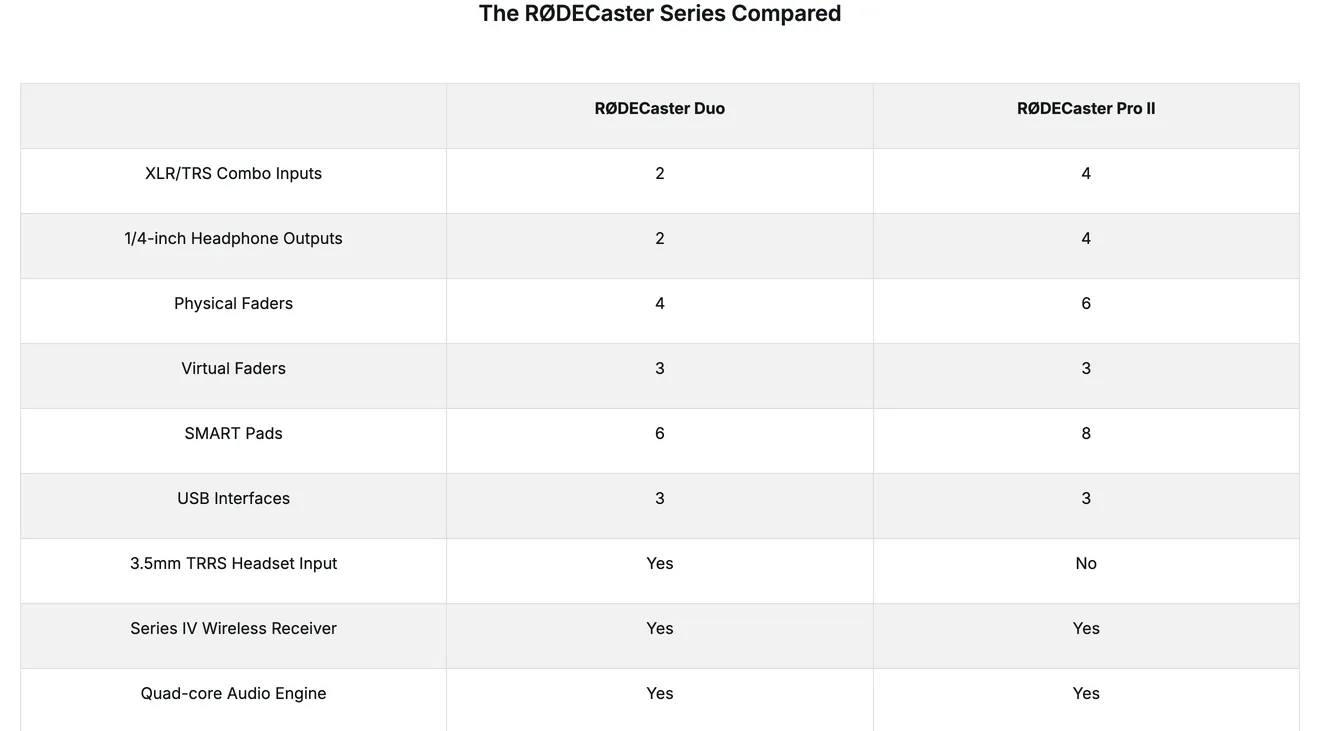
The Zoom PodTrak P8 that many older guides recommend is no longer sold at Sweetwater, and the P4 has been replaced by the P4next. And whichever box you choose, do not build the setup out of two USB microphones on one laptop. Jason Snell tried it:
“I don’t recommend it. I’ve tried it in the past and the microphones generally seem to get out of sync, so when it comes time to put the tracks together later, it gets all echoey and weird.”
“You should really go with an interface, two usb mics are a nightmare to set up in Windows.”
A recorder that writes to a card is also your backup: if the laptop crashes, the card still has the episode.
“I use the SD on the rodecaster as the backup”
“the rodecaster pro 2 has a more powerful pre-amp and doesn’t need a cloudlifter.”
Headphones and splitters
Everyone wears headphones, so they hear what the mic hears and stay on it. Closed-back studio headphones (the ATH-M20x at $59, the Sony MDR-7506 at $98) keep the sound in.
- If the recorder has a jack per person (the P4next, the RØDECasters), you need nothing else.
- If it has one jack (most interfaces), a four-way headphone amp such as the Behringer MicroAMP HA400 ($24.90) gives everyone their own volume.
- A plain Y-splitter works for two people, but they share one volume and the sound gets quieter for both.
Room treatment on a budget
The advice with the most votes in a thread about building a podcast studio was not about microphones:
“Before you go buying all the expensive stuff people are about to recommend, figure out where you're going to record and make sure the space has good isolation from ambient noise during the time(s) you plan on recording.”
The test is simple:
“If the room you are in echos just standing in it talking, then you have issues.”
“Record where you can record; if you can avoid super echoey spaces (empty walls, high ceilings, huge glass windows or doors), do so.”
And it does not have to cost much:
“For a podcaster, a dynamic mic with a cardioid pattern, an absorbent barrier to stop on-axis reflections, and good mic technique are, like, 95% of it.”
“Can be as simple as moving blankets hung from walls by Command hooks & tarp clips with an air gap.”
- Pick the room: carpet, curtains, a sofa, a full bookcase. A bedroom beats a kitchen.
- Treat behind the speakers. Blankets on a clothes rack behind each person stop the echo their mic hears most.
- Mind the table. Arms clamped to it carry every tap; a towel under a desk stand helps.
- Skip the thin foam squares. They soak up a little of the high end and almost none of the echo you hear.
- Choose the time. Traffic, the dishwasher and the neighbour’s mower are in the room too.
Mic technique and bleed
Closeness is the cheapest upgrade there is. The closer the mouth, the less gain you need, and the less of everyone else you record:
“2-4” is the typical distance for a dynamic when recording dialog.”
“The fastest, cheapest way to improve the sound in an untreated room is to get closer to the microphone”
“I'd say mics are right at 6" or less. With 12" you are going to get lots of bleed and any background noise.”
Then space and aim the microphones:
“follow the 3:1 spacing rule so it doesn’t get phasey.”
“Don’t have anyone facing a mic other than their own.”
The 3:1 rule: each microphone should be at least three times as far from the next person as it is from its own. In the edit, lower each track when its person is not speaking (a gate or an expander does it automatically) and the bleed mostly disappears.
Cameras for a video podcast
Start with one wide shot of the table, then add a camera per person (or per two) so you can cut to whoever is talking. Record the sound on the audio recorder, not the cameras, and clap at the start so everything lines up.
| Option | Price each | Good for |
|---|---|---|
| Logitech Brio Ultra 4K webcam | $169.99 | A close-up per person into a computer; simple |
| Sony ZV-E10 II with 16–50mm lens | $1,298 | A proper camera look; needs a capture card or records to its own card |
| Elgato Cam Link 4K | $99.99 | Turns a camera into a webcam for a computer |
| NEEWER 9-inch LED panel | $49.99 | Light. Do this before buying a better camera |
What going to video cost one podcaster:
“Switching to video required additional investment on camera and lights so around £150.”
Frame people in the middle of the shot: vertical clips are cut from the centre of a wide picture, and a person at the edge is cut off.
Step by step, from an empty room to a published episode
- Decide the show and the seats
Write one sentence about who the show is for. Count the people who will be at the table on a normal episode: that number decides how many microphones, inputs and headphone jacks you need.
- Set up the room
Choose the softest room you have, hang blankets behind anyone facing a bare wall, and seat people so nobody faces another person’s microphone.
- Test before the first episode
Record ten minutes, then listen to each track on earbuds: check every voice is on its own track, nobody is too quiet or distorted, and the left and right channels are what you expect.
- Record
Put headphones on everyone, set each level while they talk normally, press record on the recorder, clap once in view of any cameras, and keep each mouth a few inches from its mic.
- Edit
Load every track into one project, line them up on the clap, cut the start, the end and the long pauses, lower the bleed when someone is not talking, and export an MP3 (and an MP4 for video).
- Host and publish
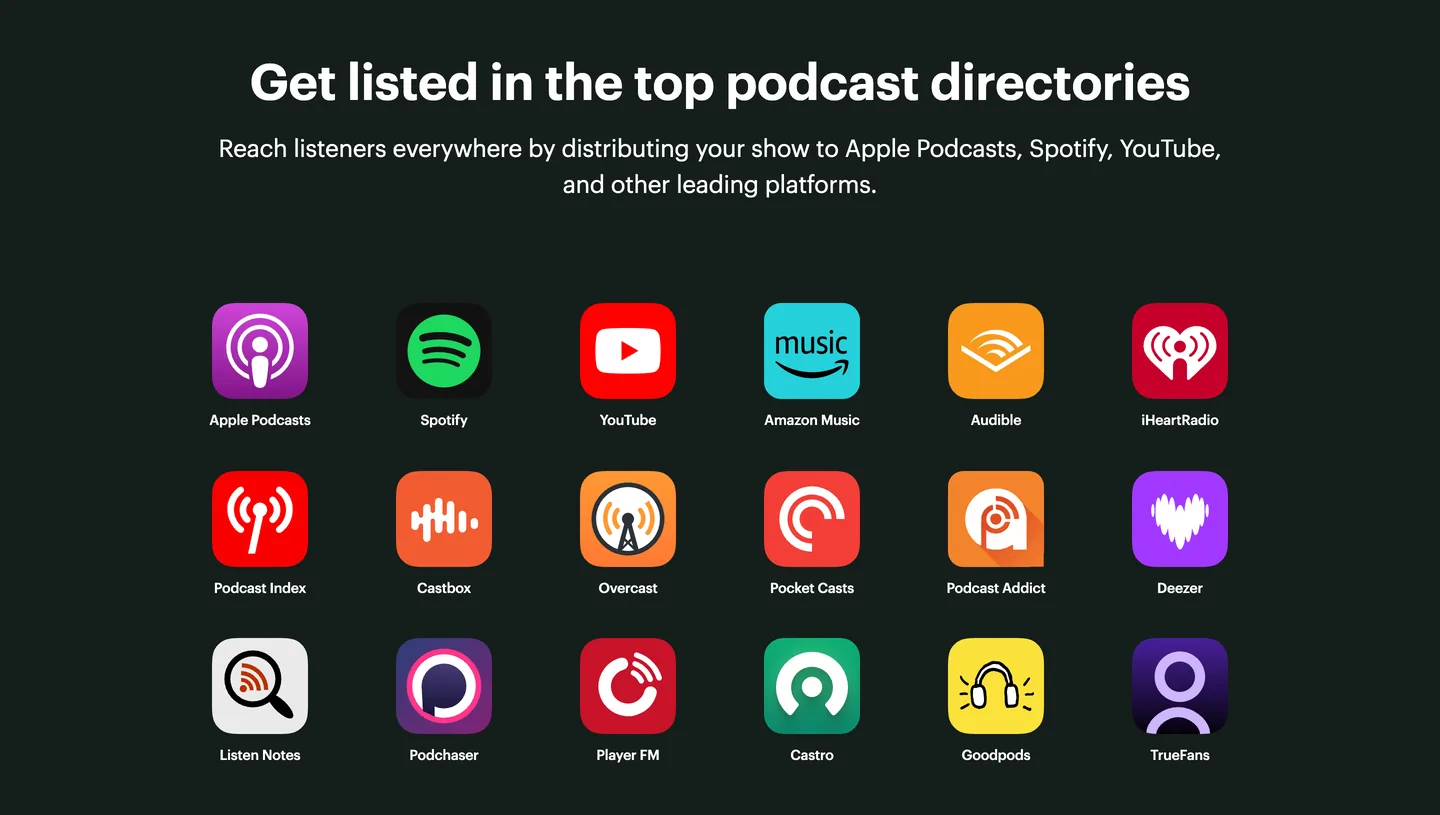
Upload the episode to a host such as Spotify for Creators, Buzzsprout or Transistor, then submit the RSS feed once to Apple Podcasts and Spotify; new episodes follow on their own.
- Make clips and a transcript
Cut two or three short vertical clips for Reels, Shorts and TikTok, and publish the transcript with the episode.
Hosting and publishing work the same as for any show: the host makes your RSS feed, you submit it once to Apple Podcasts and Spotify, and every app follows. The church guide walks through it in detail.
Clips and the transcript
A table of people talking is the best raw material there is for short clips: the laugh, the disagreement, the story. Slice reads the whole episode, lists the moments that stand on their own, and makes each a captioned vertical clip, cropped to the person speaking, that you edit and download. On 2 October 2026 we ran LinuxGameCast Weekly 430, a 82-minute three-host show, through it:
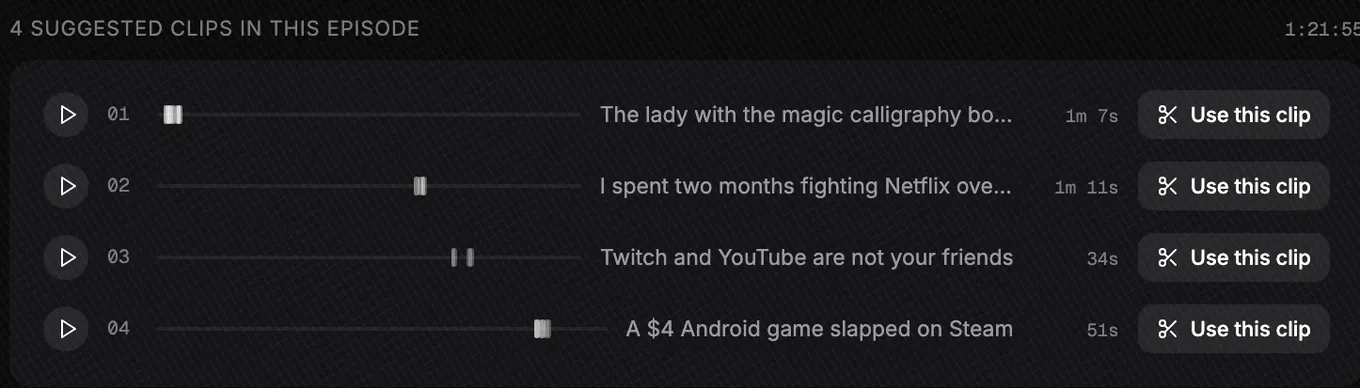
The words on their own come free from podcast transcription, up to 90 minutes, no sign-in. Slice does not record, host or post anything. Your first clip is free with no card; after that a 3-day free trial, then $14.99 a month.
Shorts by Slice
From the team behind these free tools
One video. A week of posts.
Upload an episode and get back the moments worth posting, cut and captioned.
- Reads the whole episode, then picks the excerpts worth posting
- Captions burned in and framed vertical, ready to post
- Your first clip is free, no card
The mistakes podcasters say they made
“The very first podcast I ever released had audio split in the left and right ears, and I didn't know because it wasn't what I heard during post production.”
“Try having three guests on with a co-host and then realizing over an hour in that you forgot to hit record.”
“It was my impression that all I have to do is set everything up and press record?”
“If you haven't done post production before, assume it's going to be more than you expect.”
And the most common one of all is stopping:
“Consistency is essential, but that's hard to do when your life goes sideways.”
How long an episode actually takes
In person there is no guest to book over email, but there is a room to set up. Our estimate for a 45-minute, two-person episode with light editing:
| Task | Time | Where it goes |
|---|---|---|
| Planning the episode | 30 to 60 minutes | Topics, notes, any research |
| Setting up and packing away | 20 to 30 minutes | Mics, levels, cameras, a test |
| Recording | 45 to 60 minutes | Plus a few minutes of chat you will cut |
| Editing | 1 to 3 hours | More with several cameras |
| Publishing, clips and the transcript | 1 to 1½ hours | Title, notes, upload, two or three clips |
| Total | 3½ to 6½ hours | An episode a week is a part-time job |
Research is what grows most for scripted shows:
“Researching and coming up with a script is the longest part of the process for me.”
“I used to spend a further 10-12 hours a week on promotion and marketing. That nearly broke me.”
What it costs each month
In-person shows need no recording subscription; the recorder is the box on the table. The repeating bills:
| Setup | Host | Clips | A month |
|---|---|---|---|
| Free | Spotify for Creators | By hand in a free editor | $0 |
| Typical | Buzzsprout, $15 billed yearly (Transistor or Captivate from $19) | By hand | $15 to $19 |
| With clips | Buzzsprout, $15 | Slice, $14.99 | $29.99 |
Plus microSD cards, batteries, and a spare XLR cable, which always goes on the day you need it.
What to upgrade first
- The room. Blankets and a better seat cost less than any microphone and help every one of them.
- A microphone each, dynamic, on an arm.
- A recorder with a track and a headphone jack per person.
- Headphones for everyone.
- Light, then cameras, if you publish video.
- Better microphones, last.
“you could get a couple SM58s and a Scarlet 2i2. With that and proper mic technique your audio will improve dramatically.”
“Mics matter, but production basics matter more.”
“Your listeners/viewers will put up with bad video but not with bad audio.”
Get the Slice Weekly
One free email every Friday: tools for creators and the best advice we found from people who make things.
Questions
What equipment do I need for a two-person podcast in the same room?
A dynamic microphone each, a recorder or interface that records each microphone on its own track and has a headphone jack for each person, two pairs of closed headphones, and a soft room. The Zoom PodTrak P4next with two Samson Q2U packs and two pairs of ATH-M20x headphones came to $497.97 on 6 October 2026.
Can I plug two USB microphones into one computer?
You can, but it is the setup podcasters warn against most. The two mics keep separate clocks and drift apart, and on Windows it is hard to set up at all. Use XLR microphones into one interface or recorder, or a recorder made for two USB mics such as the Zoom PodTrak P2.
How do I stop mic bleed when we are in the same room?
You cannot stop it, only reduce it: dynamic mics, each mouth two to four inches from its own mic, mics pointing away from each other, people sitting apart, and a soft room. In editing, lower each track when that person is not speaking.
Do I need to soundproof the room?
No. Soundproofing keeps outside noise out and is expensive. What a podcast needs is treatment: soft, heavy things that stop echo, such as rugs, curtains, sofas, bookcases and moving blankets. Choose the quietest time and the softest room first.
Lavalier mics or desk mics?
Desk dynamics on arms give the most consistent sound when people sit at a table. Lavaliers are easier for people who move and for video where you do not want mics in the shot, but the sound changes as people turn and laugh.
How many cameras does a video podcast need?
One wide shot of the table is enough to start. A camera per person, or per two people, lets you cut to whoever is talking. Record the sound on the audio recorder, not the cameras, and clap at the start to line everything up.
What does an in-person podcast cost each month?
With no recorder subscription, the only bill is hosting: $0 on Spotify for Creators, or about $15 to $19 a month on Buzzsprout, Transistor or Captivate.
More on starting a podcast
- How to start a remote podcast: Host and guests in different places: the recorders that keep a track per person, the guest kit, backups, and starter kits from $0.
- How to start a church podcast: Sunday’s sermon as a podcast from the sound desk or the livestream, then original shows: volunteers, hosting, music licences, consent and a weekly routine.
Compare the tools
- Best free podcast recording tools and free editing tools, from the podcast tools directory.
- Podcast tools for beginners, tools for video podcasts and every tool with a free plan.
- The whole podcast tools directory: recording, editing, hosting and more.
Free tools for the jobs around an episode
- Podcast name checker: is the name taken?
- Cover art checker: Apple’s size and format rules, checked.
- Guest soundcheck and guest release form.
- Loudness checker: is the episode as loud as the shows around it?
- Free podcast transcription, up to 90 minutes.