Guide · For churches
How to start a church podcast
Start with the sermon you already preach, recorded from the sound desk or the livestream. Then the rota, the hosting, the music question, consent, and a second show when you are ready.
The short answer
Start with the sermon you already preach. Take the audio from your livestream, or record the sound desk with a handheld recorder (about $120), trim it to the sermon, and upload it to a podcast host: Spotify for Creators is free. Submit the feed once to Apple Podcasts and Spotify. Leave the worship songs out, because CCLI’s streaming licence covers recordings of your services but not other shows, and platforms remove music anyway. Ask before you include anyone else’s voice, give the weekly work to a small rota, and add an original show only when the sermon feed runs without you.
Start with the sermon you already preach
A church records forty minutes of prepared speech every week. Most of a podcast is already done. Church communications writers say the same:
“When it comes to launching a church podcast, the easiest first step is to publish your sermon in audio form”
“Many churches and religious organizations already use a mic and speakers to broadcast every sermon around the church”
Who listens? The people who missed Sunday, and the people deciding whether to come:
“Visitors and newcomers (ie people getting involved) have said that they did their early "church shopping" by listening and watching the podcast and recorded livestream.”
“this is the best way for our ppl to hear the last week’s sermon”
“Most people "streaming" are likely more wanting to just listen to the message because they missed it, and an audio only podcast is more convenient and easy”
Be honest about what to expect, though. Not every church’s podcast finds listeners, and the one that does is the one that keeps going:
“We used to only have an audio podcast of the services, and we do still have that, but I hardly ever hear of anyone using it.”
“Podcasting is hard. It takes work. It takes consistency.”
That is why the sermon comes first: it costs almost nothing to keep going, because the content arrives every Sunday whether or not anyone records it.
Two ways to get the sermon audio
From the livestream
If you stream to YouTube or Facebook, the sermon is already recorded. Download the service from YouTube Studio (or the streaming computer), cut out the sermon, and export the audio. It is what many churches do:
“The audio from the sermon is pulled out of the Youtube video and published as a podcast.”
“YouTube allows you to cut out bits, but then that's more work.”
From the sound desk
Better sound comes straight from the desk, not from a microphone in the room. A church tech, on the difference even a desk feed into a camera makes:
“even if you took the main mix from the board and put that into the camera, you would be way ahead of using the camera mic”
Better still is a mix of only the speaking microphones, so the podcast is not at the mercy of a mix made for the room:
“I created a submix one that has just the mics used for speaking and announcements.”
- The preacher’s microphoneHeadset or lapel; the same one the room hears.
- The sound deskA send or submix with only the speaking mics.
- A recorder or the stream computerRecords it every Sunday, ideally on a schedule.
- Trim to the sermonMonday: start where the preacher starts, export an MP3.
- The host and every appOne upload; Apple, Spotify and the rest follow.
Volunteer-run audio will not always be perfect, and that is fine. A free tool can rescue most of it:
“Volunteer tech staff, so. sometimes recordings are a little hot or there's some sibilance or pops on the voice.”
Starter kits for a church
The first two are for the sermon feed; the last two add an original show. Every price was read on 6 October 2026.
- $0The recording you already makeA church that livestreams or records its service.
- Your service livestream or recording$0
- Audacity$0
- Spotify for Creators$0
- About $120Record the sound deskA church with a sound desk and no livestream, or a livestream with poor sound.
- Tascam DR-05XP$109
- Hosa CMP-159 (3.5mm to dual ¼-inch, 10 ft)$11.90
- About $500A second show: the pastor’s conversationA church ready for an original show recorded in the office.
- Zoom PodTrak P4next$179.99
- 2 × Samson Q2U Recording and Podcasting Pack$199.98
- 2 × Audio-Technica ATH-M20x$118
- $1,350+A small studio a volunteer can runA larger church with a team and a room to give the show.
- RØDECaster Pro II$595
- 3 × RØDE PodMic$258
- 3 × InnoGear desk boom arm$59.97
- 3 × Sony MDR-7506$294
- Logitech Brio Ultra 4K webcam$169.99
$0 The recording you already make
A church that livestreams or records its service.
| What | Price | Why this one | Skip |
|---|---|---|---|
| Your service livestream or recording | Free | Download it from YouTube Studio (or your streaming computer), cut out the sermon, and export the audio. | A phone on a stand in the pews: it records the room, not the pastor. |
| Audacity | Free | Free. Trim the sermon, add a short spoken intro, export an MP3. | — |
| Spotify for Creators | Free | Free hosting with an RSS feed you can send to Apple Podcasts, Amazon Music and YouTube. | — |
Total: $0
About $120 Record the sound desk
A church with a sound desk and no livestream, or a livestream with poor sound.
| What | Price | Why this one | Skip |
|---|---|---|---|
| Tascam DR-05XP | $109 Sweetwater | A handheld recorder with a line input. Plug in the desk’s record or aux output and press record. It runs on batteries and writes to a card. | Recording the room with the recorder’s own mics. |
| Hosa CMP-159 (3.5mm to dual ¼-inch, 10 ft) | $11.90 Amazon | From the desk’s two ¼-inch outputs to the recorder’s 3.5mm line input. Ten feet, so the recorder can sit in the booth. | — |
Total: $120.90 · If the booth already has a computer, the Behringer UCA202 ($24.90 at Sweetwater, backordered when we looked) takes the desk’s RCA output into it instead.
About $500 A second show: the pastor’s conversation
A church ready for an original show recorded in the office.
| What | Price | Why this one | Skip |
|---|---|---|---|
| Zoom PodTrak P4next | $179.99 Sweetwater | Records up to four people on their own tracks with a headphone jack each, and it has a call-in input for a remote guest. | — |
| 2 × Samson Q2U Recording and Podcasting Pack | $99.99 × 2 Sweetwater | Dynamic mics that forgive a church office with hard walls. | — |
| 2 × Audio-Technica ATH-M20x | $59 × 2 Sweetwater | So the pastor and guest stay on their mics. | — |
Total: $497.97 · The sermon feed stays as it is. Hosting can stay free, or move to Buzzsprout at $15 a month billed yearly for a second show and support.
$1,350+ A small studio a volunteer can run
A larger church with a team and a room to give the show.
| What | Price | Why this one | Skip |
|---|---|---|---|
| RØDECaster Pro II | $595 Sweetwater | Big faders, a channel per mic, and recording at the press of one button: easier to teach a new volunteer than software. | — |
| 3 × RØDE PodMic | $86 × 3 Sweetwater | For the pastor, a co-host and a guest. | — |
| 3 × InnoGear desk boom arm | $19.99 × 3 Amazon, sale price; list $24.99 | An arm each. | — |
| 3 × Sony MDR-7506 | $98 × 3 Sweetwater | Durable headphones for a room many people use. | — |
| Logitech Brio Ultra 4K webcam | $169.99 Amazon | A video version for YouTube, where many people now watch podcasts. | — |
Total: $1,376.96
For more on recording a conversation in one room, the in-person podcast guide goes into microphones, headphones and the room. For guests who join from home, see the remote podcast guide.
Who does what: a rota volunteers can keep
A small church can run a sermon podcast with the people already in the booth:
“We only have two people in our AV booth, one person on the sound mixer and one person to run the lyric overheads, streaming, and podcast.”
“After uploading the podcast, updating our CCLI reporting, and turning off the lights and projectors, we are out maybe 10 minutes after the service ends.”
| Role | When | Time | What they do |
|---|---|---|---|
| Sound desk | Sunday | No extra time | Checks the podcast send is up and the recorder is running; presses stop at the end |
| Editor | Sunday afternoon or Monday | 15 to 30 minutes | Trims to the sermon, levels it, exports the MP3 |
| Publisher | Monday | 10 minutes | Uploads, writes the title (series, passage, preacher), schedules it |
| Clips | Monday or Tuesday | 20 to 40 minutes | Two or three short clips, each linking to the full sermon |
| Pastor or a staff member | Before it goes out | A few minutes | Approves anything that is not the plain sermon |
- Automate the record button. It is the step people forget:
“the application we use for recording the audio of our sermons is not programmable and people always forget to start it.”
- The church owns the show. Sign up with a church email address and pay with a church card, so the podcast survives a volunteer moving on.
- Write the steps down, with screenshots, where the next volunteer can find them.
- Keep your own copies. Platforms can and do freeze accounts:
“YouTube is also known to freeze accounts, so you always want your own backups locally.”
Hosting, the RSS feed, Apple Podcasts and Spotify
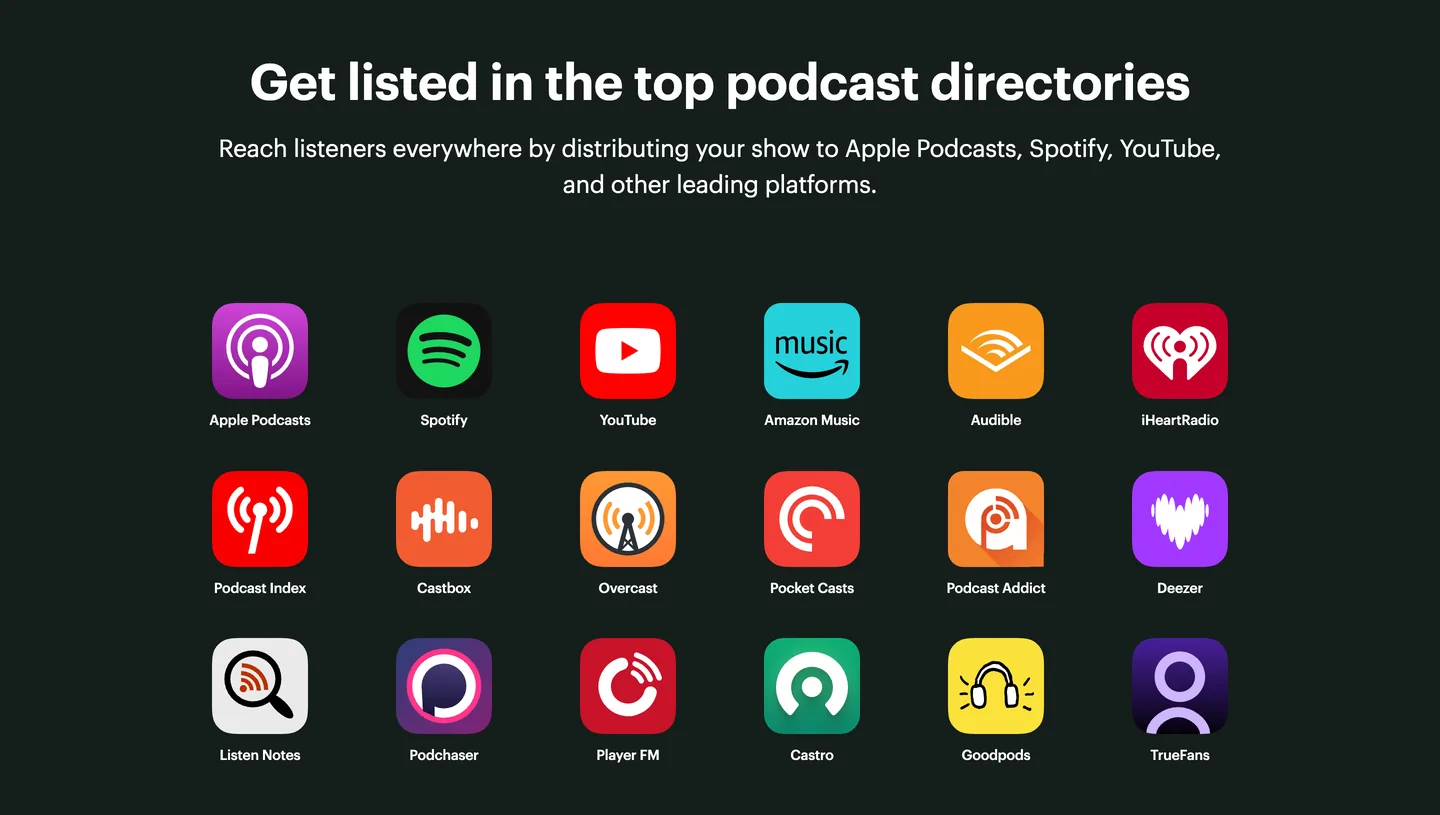
A podcast is an RSS feed: a list of episodes that every podcast app reads. A host stores the audio and makes the feed. You submit the feed once to each directory, and from then on every episode you upload appears everywhere.
“You upload it one place then tell every other place where to find it.”
| Host | Price on 6 October 2026 | Good for |
|---|---|---|
| Spotify for Creators | Free | Free hosting, audio and video, with an RSS feed for every other app |
| Buzzsprout | $15 a month billed yearly. Free: 2 hours of uploads a month, each episode kept for 90 days | Simple, with support; the free plan is a trial, not a home |
| Transistor | From $19 a month | Several shows on one plan: sermons and an original show |
| Captivate | From $19 a month | Growth tools and a website |
| RSS.com | Free plan; paid from $15 a month billed yearly | A free plan with unlimited episodes |
Submitting the feed
- Apple Podcasts. In Apple Podcasts Connect, add a show with an RSS feed, paste the feed address, and set the content rights. Apple checks the feed and reviews the show before it appears. Apple’s rule on rights is plain:
“Creators must ensure their podcasts only include content that they have the rights to use.”
- Spotify. If Spotify for Creators is your host, the show is on Spotify already. If not, claim it in Spotify for Creators with the feed; Spotify sends a code to the email address in the feed.
- YouTube. Upload the sermon video to your channel, or (in the countries where YouTube offers it) submit the RSS feed and YouTube makes a video of each episode with your cover art. Episodes from a feed arrive as private videos until you publish them.
- Cover art. Square, JPG or PNG, 1400 to 3000 pixels. Our cover art checker tests it.
Music licensing: what covers a podcast
This is where churches most often get caught, so here is what the licences say in their own words, read on 6 October 2026. Your CCLI Church Copyright License is for printing and projecting lyrics. Anything online is an add-on, as CCLI explains:
“The CCLI Streaming License® and CCLI Streaming Plus License® extend the cover of the Church Copyright License® to include online worship.”
Among the things the CCLI Streaming License permits:
“Distribute audio or video files of Songs used in your Church Services via the Internet to personal computers, portable media players or a similar device capable of receiving such files.”
That covers a recording of your service, songs included, as a file people download. Christian Copyright Solutions, which sells a rival licence, reads it the same way:
“The CCLI Streaming License allows podcasting and streaming of worship services only.”
What the Streaming License does not cover is just as important:
“Streaming Songs contained in non-Church Service audio and/or video content such as a non-Church Service teaching video, televised events or special productions.”
- An original show is “non-Church Service” content. Worship songs in a pastor’s conversation podcast are not covered by the Streaming License.
- Recorded tracks by artists are not covered either (CCLI’s Streaming Plus License adds them for services).
- CCS’s WORSHIPcast license, by its maker’s own description, does not cover podcasting.
- ONE LICENSE sells a Podcast / Streaming License for the songs of its member publishers:
“both versions of the Podcast / Streaming License cover self-made recordings or live worship services.”
And a licence does not stop a platform muting or removing a recording it thinks contains someone else’s music. CCLI says so itself, and Spotify’s guidance for podcasters is blunt:
“Unfortunately, some platforms may still issue a warning when music is played.”
“There isn’t a universal rule that allows you to use copyrighted material simply because the clip is short.”
The simple, safe answer: make the podcast the sermon, with the songs cut out. For the intro and outro, use music you wrote, or a track licensed for podcasts, and keep the licence. If you want to include worship, confirm with CCLI or your provider what covers your exact use before you publish. Slice does not check music for you.
Consent for other people’s voices
The preacher has agreed to be recorded. Nobody else in the room has. Anyone whose voice is more than background needs to say yes first: a testimony, an interview, a question from the floor, a prayer.
- Ask in writing, beforehand, and let them hear the episode before it goes out. A guest release form does it in a page.
- Cut prayer requests and names that were shared in the room, even when they were said into a microphone.
- Children only with a parent’s written permission, and your safeguarding policy first.
- Offer a private copy instead. One church’s answer for baptisms works for testimonies too:
“Our solution is to put the video on Google Drive and send a link to the person in the video. That way it isn't public on YouTube”
Church Communications Group publishes sample forms to start from:
“two examples of media release forms, one for adults and one for children.”
A weekly routine
| Day | Job | Time |
|---|---|---|
| Sunday | The service is recorded from the desk or the stream, automatically if you can | None |
| Sunday or Monday | Trim to the sermon, level it, export the MP3 | 15 to 30 minutes |
| Monday | Upload, title (series, passage, preacher), schedule | 10 minutes |
| Monday or Tuesday | Two or three clips for Reels, Shorts and TikTok, each pointing to the full sermon | 20 to 40 minutes |
| Midweek | Small-group notes from the transcript, if your church uses them | 15 minutes |
That is under an hour for a sermon feed, and the content never runs out. For the small-group notes, see sermon notes from a YouTube video and the free sermon notes template.
The second step: an original show
Once the sermon feed runs on its own, some churches add a show of their own: the pastor and a guest talking about Sunday’s passage, a short daily devotional, answers to questions people send in, or conversations with people in the congregation. It is a different kind of work, closer to the in-person and remote guides than to recording a service.
“Churches are content machines — you’re cranking out tons of fresh content every single week.”
The best-known example in church leadership started small. Carey Nieuwhof, a pastor, launched his leadership podcast in September 2014:
“It took 20 months to reach 1 million downloads, but then just 8 months to reach 2 million.”
Twenty months is the honest timescale. A podcaster on r/podcasting puts it more bluntly:
“If you expect overnight success, you will only be disappointed.”
- Decide who it is for before what it is: your own congregation, other church leaders, or people who do not go to church.
- Pick a length and a day you can keep for a year, and record three before you launch.
- Remember the music rule: songs in an original show are not covered by the Streaming License.
- Give it its own feed, so sermon listeners and show listeners each get what they subscribed to.
Step by step
- Agree what the podcast is
Decide with the pastor and leadership what goes in the feed (the sermon only, or the whole service), who approves each episode, and who owns the accounts. Use a church email address and a church card for every service you sign up to.
- Get clean sermon audio
Record a feed from the sound desk with only the speaking microphones in it, or take the audio from the service livestream. Record the room only as a backup.
- Set up a host and the show
Create the show on a podcast host such as Spotify for Creators, Buzzsprout or Transistor, with the church’s name, a one-line description, and square cover art between 1400 and 3000 pixels.
- Publish the first three sermons
Trim each sermon to start where the preacher starts, add a short spoken intro if you like, export an MP3, and upload three so new listeners have more than one to try.
- Submit the feed to Apple Podcasts, Spotify and YouTube
Add the RSS feed once in Apple Podcasts Connect and confirm the show has the rights to its content, claim it in Spotify for Creators, and upload the video or connect the feed on YouTube. New episodes then appear by themselves.
- Set the weekly rota
Name who records on Sunday, who trims and uploads on Monday, and who makes clips, so the podcast does not depend on one person. Write the steps down where the next volunteer can find them.
- Make clips and a transcript
Cut two or three short vertical clips from the sermon for Reels, Shorts and TikTok, each linking back to the full message, and keep a checked transcript for notes and search.
Clips and the transcript
A sermon podcast reaches people who already know your church. Short clips reach people who do not. Slice takes the sermon’s YouTube link or the recording, lists the moments that stand on their own, and makes each a captioned vertical clip, cropped to the preacher. We ran Tim Keller’s 40-minute message “Let the Psalms Teach You to Pray” through it:
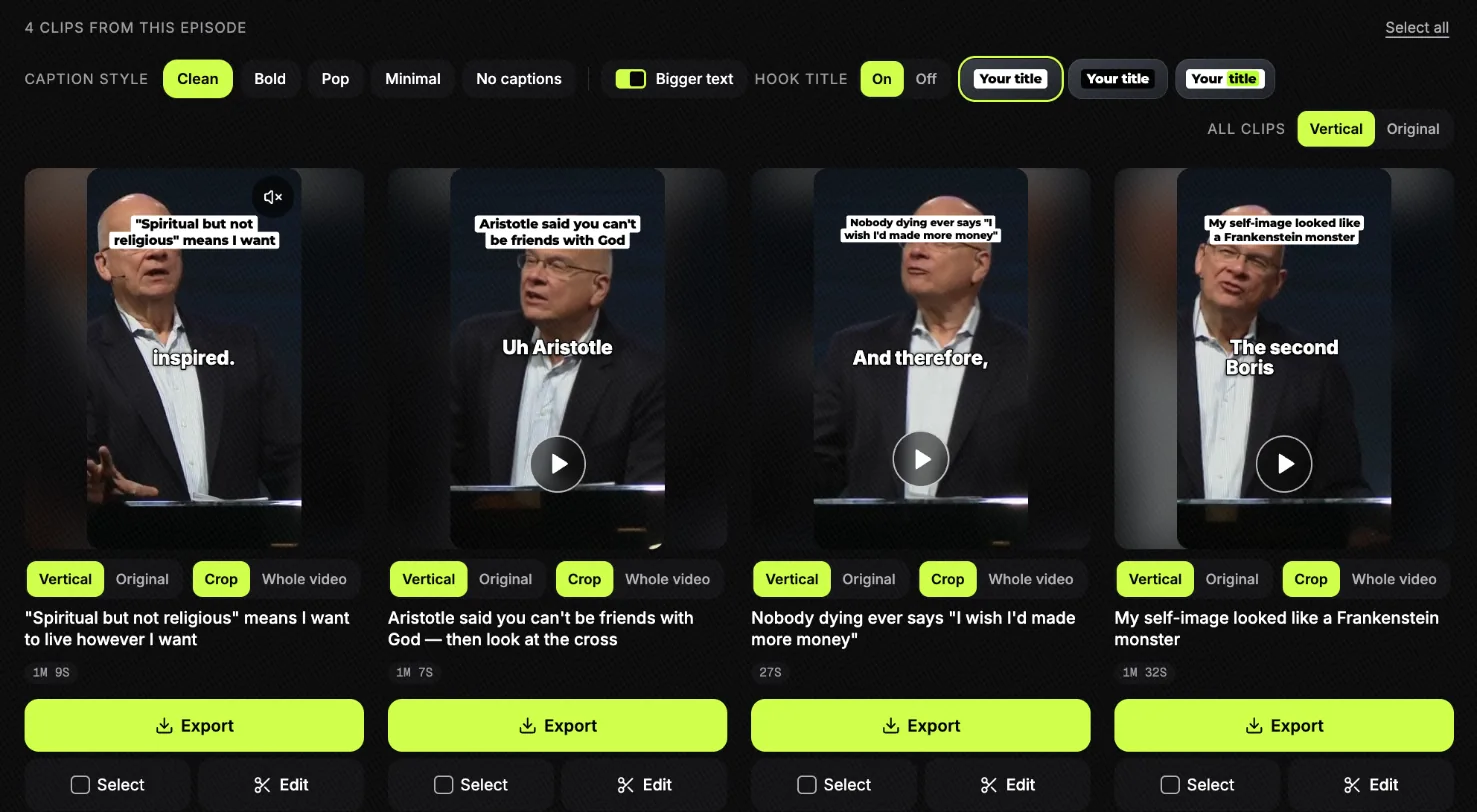
Link every clip back to the full sermon, on YouTube and in the podcast:
“Our YouTube channel has the full sermons, which all the clips link back to.”
The words come from the same recording. Check a transcript before anything is published from it, as one church does with every episode:
“That transcript is checked, word for word, against the actual audio before the episode is released.”
- How to turn a sermon into short clips, step by step.
- Sermon transcription, free to try.
- Sermon clips for churches and the best sermon clip tools, compared.
Slice does not record, host or publish your podcast, check music, or post for you. Your first clip is free with no card; after that a 3-day free trial, then $14.99 a month.
Shorts by Slice
From the team behind these free tools
One video. A week of posts.
Upload an episode and get back the moments worth posting, cut and captioned.
- Reads the whole episode, then picks the excerpts worth posting
- Captions burned in and framed vertical, ready to post
- Your first clip is free, no card
Mistakes to avoid
- Recording the room instead of the desk.
- Publishing the whole service, songs included, without checking what your licence covers.
- One volunteer doing everything, so the podcast stops when they go on holiday.
- Accounts in a volunteer’s name. Use church email and a church card.
- Prayer requests and names left in. Listen to the edges of the sermon before you publish.
- Stopping. Most podcasts do:
What it costs
| Setup | One-off | Each month |
|---|---|---|
| Sermon from the livestream, free host | $0 | $0 |
| Sermon from the desk, free host | About $120 | $0 |
| Sermon and an original show, paid host | About $620 | $15 (Buzzsprout, billed yearly) |
| With clips | As above | Plus $14.99 for Slice |
Add a music licence only if you publish songs, and check its price with the provider for your congregation’s size.
What to upgrade first
- Record the desk, not the room. The $120 kit.
- A speaking-only send from the desk, so the podcast is not the room mix.
- Automate the recording, so nobody has to remember.
- A paid host, when you add a second show.
- Microphones and headphones for an original show.
- Video, last, if your church is not already streaming.
Get the Slice Weekly
One free email every Friday: tools for creators and the best advice we found from people who make things.
Questions
Does our CCLI licence cover our podcast?
Not the Church Copyright License on its own: CCLI sells online use as an add-on. The CCLI Streaming License summary permits distributing audio or video files of songs used in your church services over the internet, which covers a recording of your service; it does not cover songs in other content, such as an original show, or artist recordings. The simplest safe answer is a sermon-only feed. Check with CCLI for your case.
Can we use worship music in a church podcast?
Songs sung in your own service can be covered for a service recording by the CCLI Streaming License, and ONE LICENSE sells a Podcast / Streaming License for its publishers’ songs. Recorded tracks by artists, and music in an original show, need other permission. Podcast platforms also remove music they think is not cleared, licence or not. Most church podcasts publish the sermon without the songs.
Should a church podcast be the whole service or just the sermon?
The sermon on its own, for most churches. It is what people come back for, it needs no music licence, and it is short enough to finish on a commute. Keep the full service on the livestream for people who want all of it.
What equipment does a church need to start a podcast?
Often nothing new. If you livestream, take the sermon audio from the stream. If you have a sound desk, a handheld recorder with a line input and a cable (about $120) records it directly. An original show in the office needs a microphone and headphones per person.
Where should a church host its podcast?
Any podcast host that gives you an RSS feed: Spotify for Creators is free, Buzzsprout costs $15 a month billed yearly, Transistor and Captivate start at $19. The host sends the feed to Apple Podcasts, Spotify and the other apps once you submit it. Do not rely on YouTube alone.
Do we need permission to include people from the congregation?
Yes, for anyone whose voice is more than background: testimonies, interviews, prayers and questions from the floor. Ask in writing beforehand, let them hear the episode first, and cut any prayer request or personal detail they did not agree to share. Never include a child without a parent’s written permission.
How much time does a sermon podcast take each week?
Once it is set up, about 15 to 45 minutes: trimming the sermon, exporting and uploading. One small church on r/churchtech says the whole booth, podcast included, is done about 10 minutes after the service ends.
More for churches and podcasters
- Church media tools: streaming, slides, people, giving and clips, priced and compared.
- Church Reels ideas: what to post from Sunday and the week around it.
- Sermon notes from a YouTube video and the sermon notes template.
- How to start a remote podcast: Host and guests in different places: the recorders that keep a track per person, the guest kit, backups, and starter kits from $0.
- How to start an in-person podcast: Everyone in one room: a mic per person, a recorder with a headphone jack each, a room that does not echo, and starter kits from $0.
Compare the tools
- Best free podcast recording tools and free editing tools, from the podcast tools directory.
- Podcast tools for beginners, tools for video podcasts and every tool with a free plan.
- The whole podcast tools directory: recording, editing, hosting and more.
Free tools for the jobs around an episode
- Podcast name checker: is the name taken?
- Cover art checker: Apple’s size and format rules, checked.
- Guest soundcheck and guest release form.
- Loudness checker: is the episode as loud as the shows around it?
- Free podcast transcription, up to 90 minutes.