Or (MP3, M4A, WAV or MP4). Up to 90 minutes and 600MB. Spotify links can’t be read, so type the show’s name instead.
How do I find the best clips in an interview podcast?
In an interview the best clip is almost always the guest, not the host: a story told in their own words, an opinion they hold strongly, a detail nobody expected. The host’s question is often worth keeping only as the first line.
Slice’s podcast clip finder is a free web tool that finds the best moments to clip in a podcast episode. Paste an Apple Podcasts link, an RSS feed or the show’s name, pick an episode, and it transcribes the whole episode and picks its 3 best moments of 30 to 90 seconds, each with its start time, length, opening line in the speaker’s own words, and one sentence on why it works. You can play each moment from the episode itself and see the top one as a finished audio clip with the show’s cover art, captions and a waveform. It is free with an email address and no account: 3 episodes a month per person, each up to 90 minutes. It does not take YouTube links. It is made for podcasters, including audio-only shows, and for churches that publish sermons as a podcast.
- Price
- Free: 3 episodes a month per person (shared with Slice’s free transcription tool). Making the clips in Shorts by Slice: the first 3 exports free, then $14.99 a month or $149 a year.
- Input
- An Apple Podcasts link, an RSS feed, the show’s name (found in Apple’s podcast directory), or an uploaded MP3, M4A, WAV or MP4. Not YouTube links. Spotify links can’t be read because Spotify doesn’t share feeds; type the show’s name instead.
- Length
- Episodes up to 90 minutes.
- Output
- 3 moments of 30 to 90 seconds, each with a title, start time, length, opening line and why it works; playable from the episode; the top one previewed as a finished audio clip. The full transcript by email.
- Account
- None needed to see the moments; an email address is. A free Slice account to make the clips (Google sign-in works).
- Kept
- Your moments for 30 days behind a private link, then deleted unless you made them into clips.
What makes a good clip from an interview podcast
- A story with a beginning and an end, told by the guest in one go.
- A specific, surprising detail about how they work or live.
- A clear opinion, stated without hedging.
- Not the introductions, the “thanks for having me” or the plug at the end.
A real example: Fresh Air
We ran the finder on “A John Prine Appreciation” from Fresh Air (50 minutes, public RSS feed) on . These are the three moments it picked, unedited, in the order it ranked them. The quotes are the speakers’ own words, shortened.
How John Prine wrote songs with Pat McLaughlin
“we can finish each other's sentences. You know, I'll just throw an image at him and he comes back with…”
Why it works: A specific, relatable insight into creative collaboration that works as standalone advice about songwriting.
John Prine practiced guitar in the dark
“I learned how to finger pick. Playing, trying to pick like Elizabeth Cotton and Mississippi John hurt.”
Why it works: An unusual, memorable personal anecdote about extreme dedication to learning an instrument.
How John Prine wrote Paradise for his father
“I wrote the song probably just after I got out of the army. I wrote it for my dad. I…”
Why it works: A touching story about why he wrote one of his most famous songs, revealing his motivation to connect with his father.
Excerpts from Fresh Air, quoted to show how the tool works; listen to the full episode. Not an endorsement by the show. Finding these moments cost us $0.14 in transcription and AI.
How it works
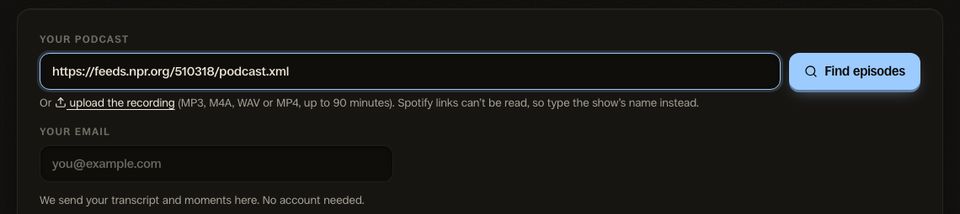
1. Paste your show
Your Apple Podcasts link, your RSS feed, or just the show’s name. The latest episodes appear, newest already picked.
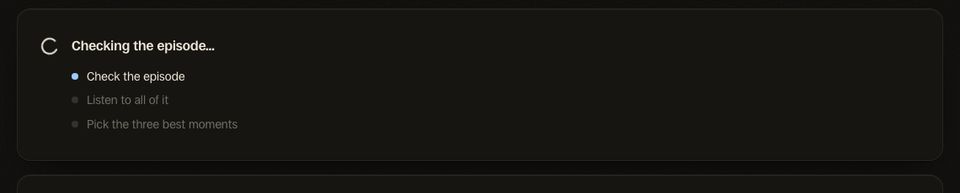
2. Let it listen
It transcribes the whole episode and reads it for moments that stand on their own. A 15-minute episode took under a minute in our test.
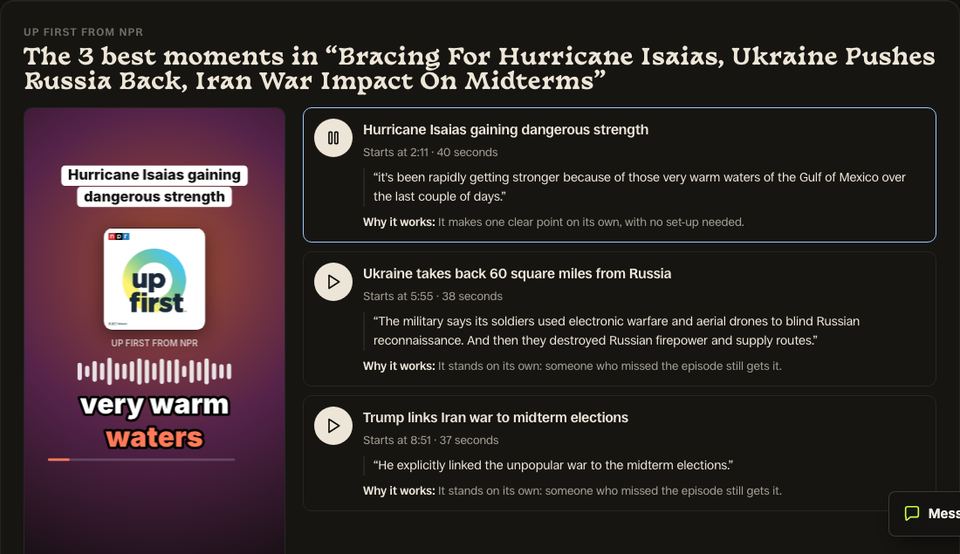
3. Hear your 3 moments
Each with its time, opening line and why it works. Play them from the episode, see the top one as a finished clip, then make all three.
Tips for interview podcasts clips
- Send the three moments to your guest the day the episode goes out: guests share clips of themselves.
- Name the guest in the first caption, so the clip makes sense to a stranger.
- Keep the host’s question only if the answer needs it.
- One clip a day for three days beats three on launch day.
Questions
Does it tell host and guest apart?
My interviews are an hour long. Is that OK?
Can I get more than three moments?
Do I need the video?
Can I paste a Spotify link?
What happens when I press Make these 3 clips?
The clip finder for other shows
Related
- Clips your guests will share
- How to find the clips worth posting
- Transcribe a podcast
- Free audio to text transcription
- Audio podcast clips with your cover art
- Audio clip templates
- Shorts by Slice: clips from long videos
- Descript alternatives for podcast clips
- Riverside alternatives
- The best AI clipping tools
More Free Tools
Shorts by Slice
From the team behind these free tools
One video. A week of posts.
Upload an episode and get back the moments worth posting, cut and captioned.
- Reads the whole episode, then picks the excerpts worth posting
- Captions burned in and framed vertical, ready to post
- Your first video and first 3 clips are free, no card