Or (MP3, M4A, WAV or MP4). Up to 90 minutes and 600MB. Spotify links can’t be read, so type the show’s name instead.
How do I find the best clips in a storytelling or true crime podcast?
A narrative episode is built on tension, so the best clip is a scene that raises a question rather than answers it: a character introduced in one vivid line, a moment where things turn. The reveal belongs in the episode.
Slice’s podcast clip finder is a free web tool that finds the best moments to clip in a podcast episode. Paste an Apple Podcasts link, an RSS feed or the show’s name, pick an episode, and it transcribes the whole episode and picks its 3 best moments of 30 to 90 seconds, each with its start time, length, opening line in the speaker’s own words, and one sentence on why it works. You can play each moment from the episode itself and see the top one as a finished audio clip with the show’s cover art, captions and a waveform. It is free with an email address and no account: 3 episodes a month per person, each up to 90 minutes. It does not take YouTube links. It is made for podcasters, including audio-only shows, and for churches that publish sermons as a podcast.
- Price
- Free: 3 episodes a month per person (shared with Slice’s free transcription tool). Making the clips in Shorts by Slice: the first 3 exports free, then $14.99 a month or $149 a year.
- Input
- An Apple Podcasts link, an RSS feed, the show’s name (found in Apple’s podcast directory), or an uploaded MP3, M4A, WAV or MP4. Not YouTube links. Spotify links can’t be read because Spotify doesn’t share feeds; type the show’s name instead.
- Length
- Episodes up to 90 minutes.
- Output
- 3 moments of 30 to 90 seconds, each with a title, start time, length, opening line and why it works; playable from the episode; the top one previewed as a finished audio clip. The full transcript by email.
- Account
- None needed to see the moments; an email address is. A free Slice account to make the clips (Google sign-in works).
- Kept
- Your moments for 30 days behind a private link, then deleted unless you made them into clips.
What makes a good clip from a storytelling or true crime podcast
- A character drawn in a sentence or two, so the viewer wants to know more.
- A scene told in sequence: this happened, then this.
- A line that raises a question the clip doesn’t answer.
- Not the ending, the credits or the recap of last week.
A real example: Criminal
We ran the finder on “The Midnight Slider” from Criminal (38 minutes, public RSS feed) on . These are the three moments it picked, unedited, in the order it ranked them. The quotes are the speakers’ own words, shortened.
Philip Boudreau lived in the cracks
“People described him as a strange genius and said, quote, that he figured out exactly where the holes were in…”
Why it works: A vivid character description that captures Philip's outsider status and cleverness in a memorable phrase.
What happened on the Twin Maggies
“They steamed out of petre de Gras wharf, took a right outside the harbor.”
Why it works: A clear, dramatic account of the moment Philip Boudreau was killed, told as a complete sequence of events.
They dragged him out to sea
“They then gaffed Philip with a gaff hook, something that you use to haul up a trap or corral rope…”
Why it works: A stark description of what happened after the shooting, showing the deliberate nature of the crime.
Excerpts from Criminal, quoted to show how the tool works; listen to the full episode. Not an endorsement by the show. Finding these moments cost us $0.11 in transcription and AI.
How it works
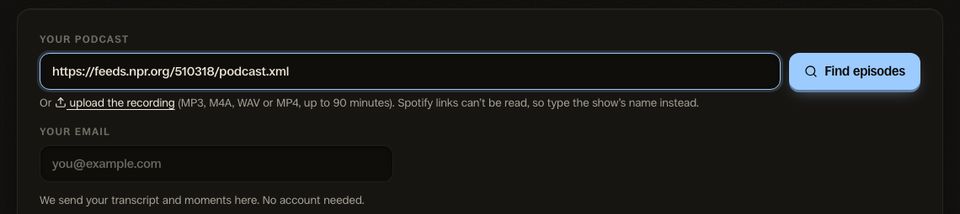
1. Paste your show
Your Apple Podcasts link, your RSS feed, or just the show’s name. The latest episodes appear, newest already picked.
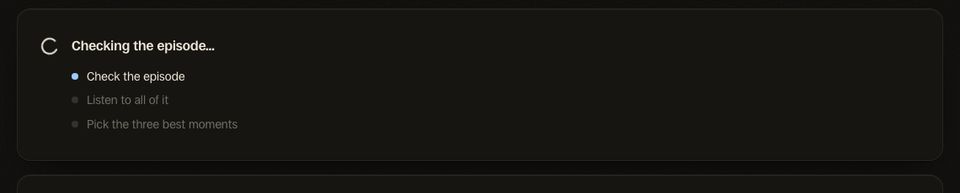
2. Let it listen
It transcribes the whole episode and reads it for moments that stand on their own. A 15-minute episode took under a minute in our test.
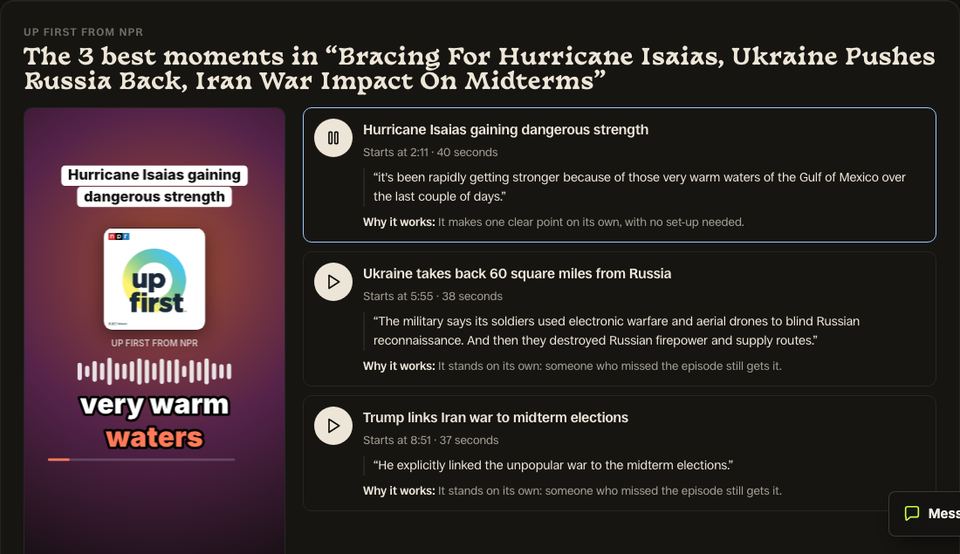
3. Hear your 3 moments
Each with its time, opening line and why it works. Play them from the episode, see the top one as a finished clip, then make all three.
Tips for storytelling and true crime clips
- Choose the clip that asks a question, and post the episode link as the answer.
- Check a clip about a real crime for anything a victim’s family would not want shared out of context.
- Narrated clips work well as audio-only: the narrator’s voice and the captions carry them.
- End the clip on the turn, not after it.
Questions
Will the clips spoil the episode?
Does it handle narration plus interview tape?
Can I use it for fiction podcasts?
How long are the clips?
Can I paste a Spotify link?
What happens when I press Make these 3 clips?
The clip finder for other shows
Related
More Free Tools
Shorts by Slice
From the team behind these free tools
One video. A week of posts.
Upload an episode and get back the moments worth posting, cut and captioned.
- Reads the whole episode, then picks the excerpts worth posting
- Captions burned in and framed vertical, ready to post
- Your first video and first 3 clips are free, no card