Compare
The Kapwing alternative for podcast clips (2026)
Kapwing is a full video editor in the browser, and Repurpose Studio is its clip maker: it finds clips in a long video, joins related segments and keeps the speaker in frame, then hands you each clip in the editor to finish. Podcasters look at Slice when they want the clips finished for them, every episode, without spending credits that also pay for subtitles and everything else.
Our bias: we make Shorts by Slice. Compared from Kapwing's own pricing and product pages, checked 15 October 2026. We did not test Kapwing hands-on, and where it is the better choice we say so.
Shorts by Slice turns a long podcast or stream into captioned vertical clips. $14.99 a month. Your first video and first 3 clips are free, no card. After that it's one plan, and you can cancel any time.
Try it free →Is Kapwing free?
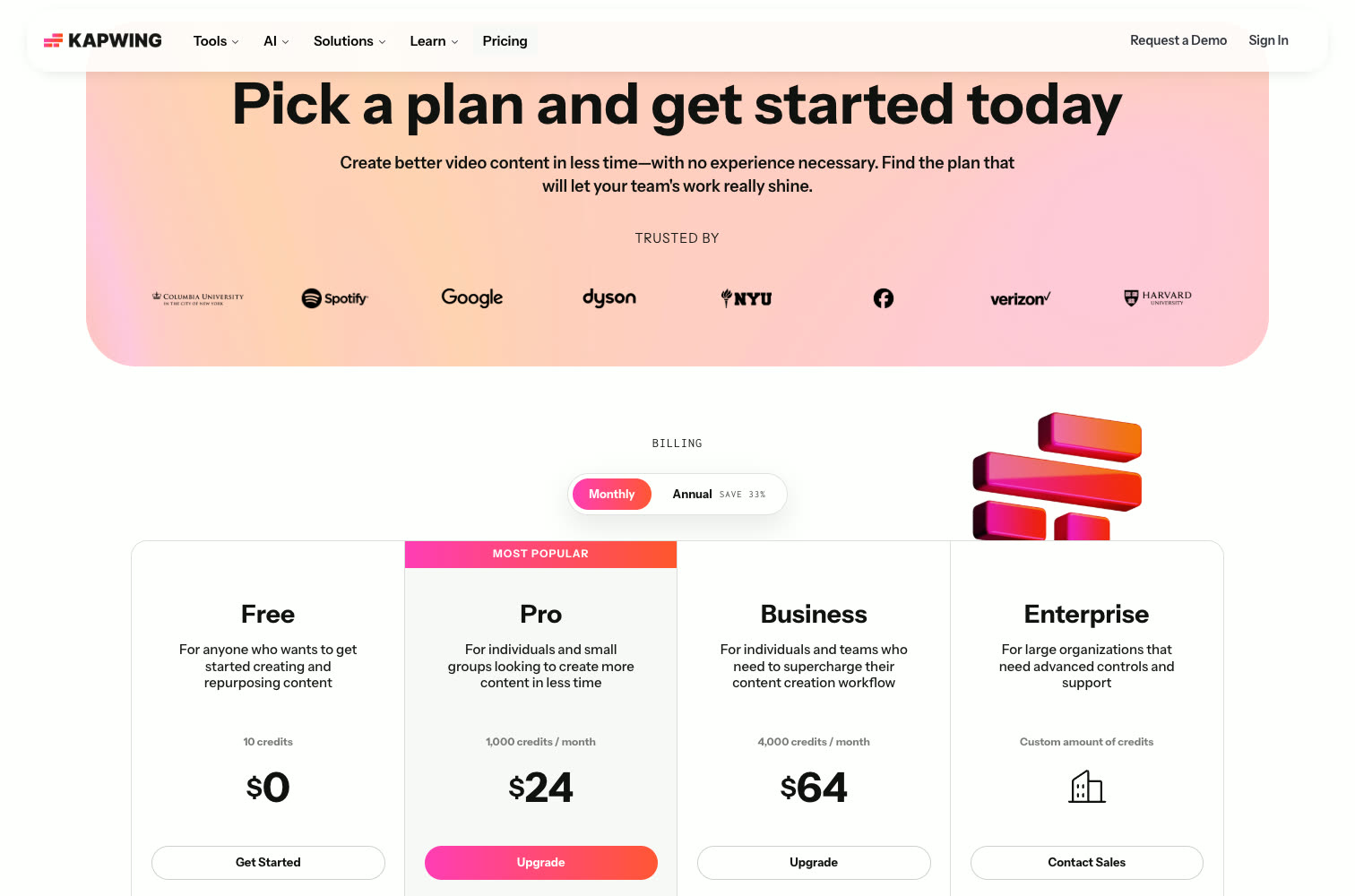
Yes, with limits. Kapwing's free plan is $0 with 10 credits, "Unlimited exports with a watermark", exports up to 4 minutes long and 720p, and files kept for 3 days. Pro removes the watermark at $24 a month, or $16 billed yearly. Its FAQ says: "We do not currently offer a free trial for Kapwing's paid plans." Checked 15 October 2026.
- 10 credits in total; Repurpose Studio uses 2 credits a minute of video, so about 5 minutes of clipping.
- Exports up to 4 minutes long, 30 minutes of exports a month, at 720p, with a watermark.
- Uploads up to 2GB and 5GB of storage, kept for 3 days.
Read on from Kapwing pricing and How do Kapwing credits work?, not signed in. On Slice, your first video and first 3 clips are free, no card, and nothing is ever watermarked.
Want to know which moments are worth clipping before you choose a tool? Slice’s free podcast clip finder picks the three best from your podcast feed, with timestamps, no account needed.
Slice vs Kapwing
| Shorts by Slice | Kapwing | |
|---|---|---|
| Price | $14.99/month or $149/year | Free; $24 / $64 a month, or $16 / $50 a month billed yearly |
| What the entry plan gets | Everything: no cap on videos, up to 1,000 exports a month, no watermark | Pro: 1,000 credits a month for every tool, no watermark, 4K |
| Clipping limit | No cap on videos; up to 1,000 exports a month | Repurpose Studio: 2 credits a minute of video, from the shared credits |
| Longest file | 3 hours and 4.5GB (MP4, MOV or WebM) | Uploads up to 6GB on Pro (2GB free); exports up to 120 minutes |
| Audio-only episodes | Yes: upload MP3, M4A, WAV, OGG or FLAC; each clip is drawn with one of 46 templates from the words, your cover and the sound | An audio-only audiogram template in Repurpose Studio |
| Watermark | Never | On free exports; none from Pro |
| B-roll | Your own pictures on the timeline | Unlimited stock assets on paid plans and an AI B-Roll Generator |
| Link import | Upload only for now: MP4, MOV or WebM, up to 4.5GB | Paste a link, or upload |
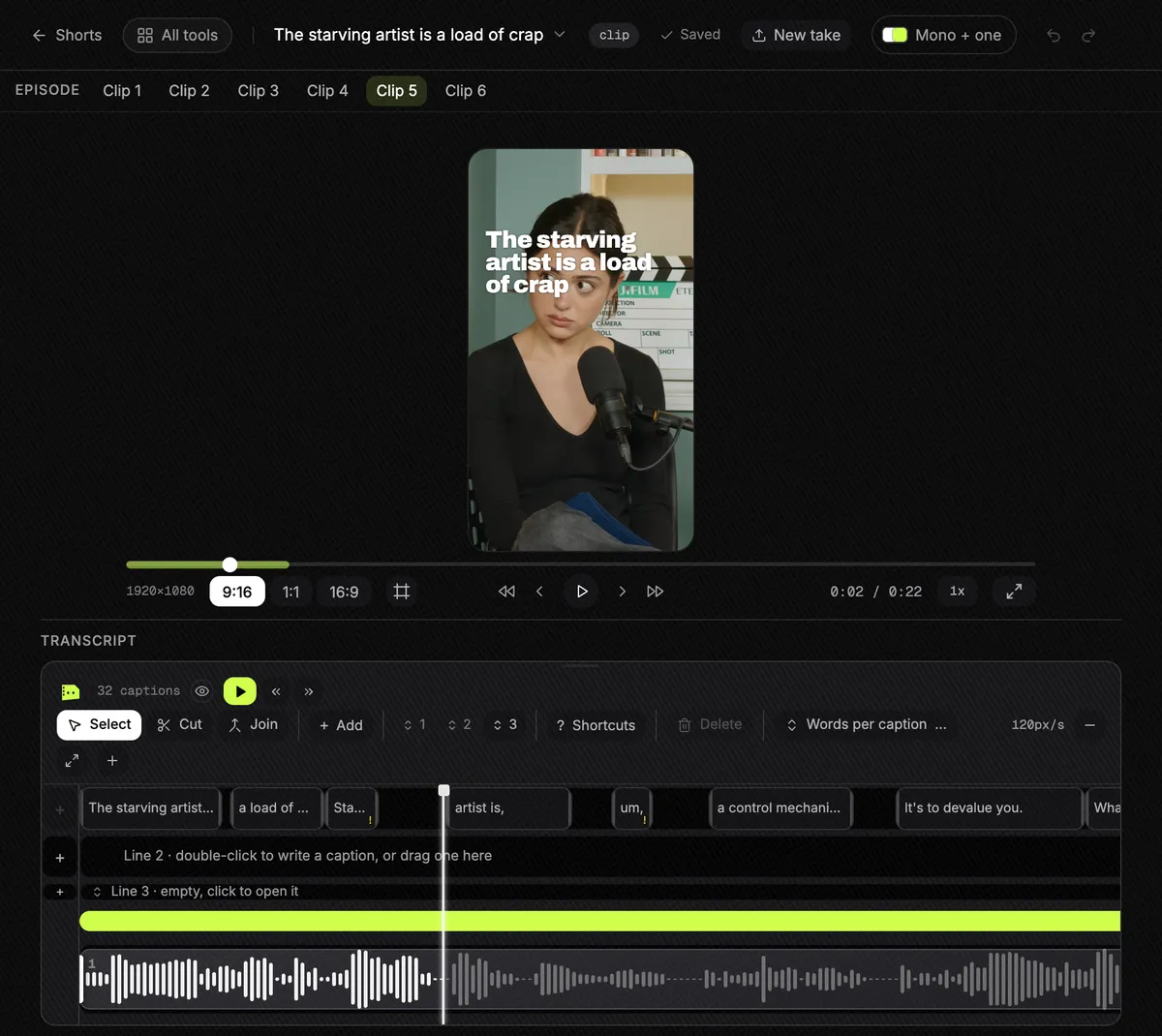
| Editing | A clip editor: captions, hook title, framing, cover, b-roll | A full timeline editor with transcript editing, effects and collaboration |
Kapwing’s figures from its pricing page and its own site, 15 October 2026. Prices in US dollars.
Choose Kapwing if…
- You want a full video editor in the browser, for clips and for everything else your team makes.
- You want stock footage and AI b-roll inside the tool.
- You style every clip by hand to a brand, with a shared workspace and comments.
- You need dubbing, voice clones or lip sync.
Choose Slice if…
- You want every episode clipped without counting credits: Slice has no cap on videos and one price.
- You want the clips finished, with captions, a hook title and framing, ready to post, not a starting point in an editor.
- You want to tick a dozen clips and export them together, with one email and one zip.
- Your show is audio-only and you want more than one look: Slice draws each clip in one of 46 templates.
- You do not want files deleted after 3 days while you are still trying it.
Where Slice loses to Kapwing
- Kapwing is a far bigger editor: effects, a full timeline, collaboration and dubbing that Slice does not have.
- Kapwing has a stock library and AI b-roll; Slice only takes pictures you add.
- Kapwing takes a pasted link; Slice takes uploads only for now.
Kapwing, in short
Pricing, in plain words
- Free: $0. 10 credits, unlimited exports with a watermark, exports up to 4 minutes long and 30 minutes a month, 720p, 2GB uploads, 5GB of storage kept for 3 days.
- Pro: $24 a month, or $16 a month billed yearly. 1,000 credits a month, no watermark, uploads up to 6GB, 4K exports up to 120 minutes long, 200GB, brand kit and custom fonts.
- Business: $64 a month, or $50 a month billed yearly. 4,000 credits a month, voice clones, lip sync, extra credits to buy, 800GB.
- Enterprise: custom.
- Credits, per its help centre: Repurpose Studio costs 2 credits a minute of video, subtitles 1 credit a minute, and every tool at least 1 credit.
Reviews
We did not read Kapwing's reviews for this page, so there are no ratings, praise or complaints here: its own pages, read on 15 October 2026, are the only source.
Slice, in short
$14.99 a month or $149 a year. Your first video and first 3 clips are free, no card. It does not post, schedule or add b-roll. Upload the file (MP4, MOV or WebM, up to 4.5GB).
Slice on a real episode, start to finish
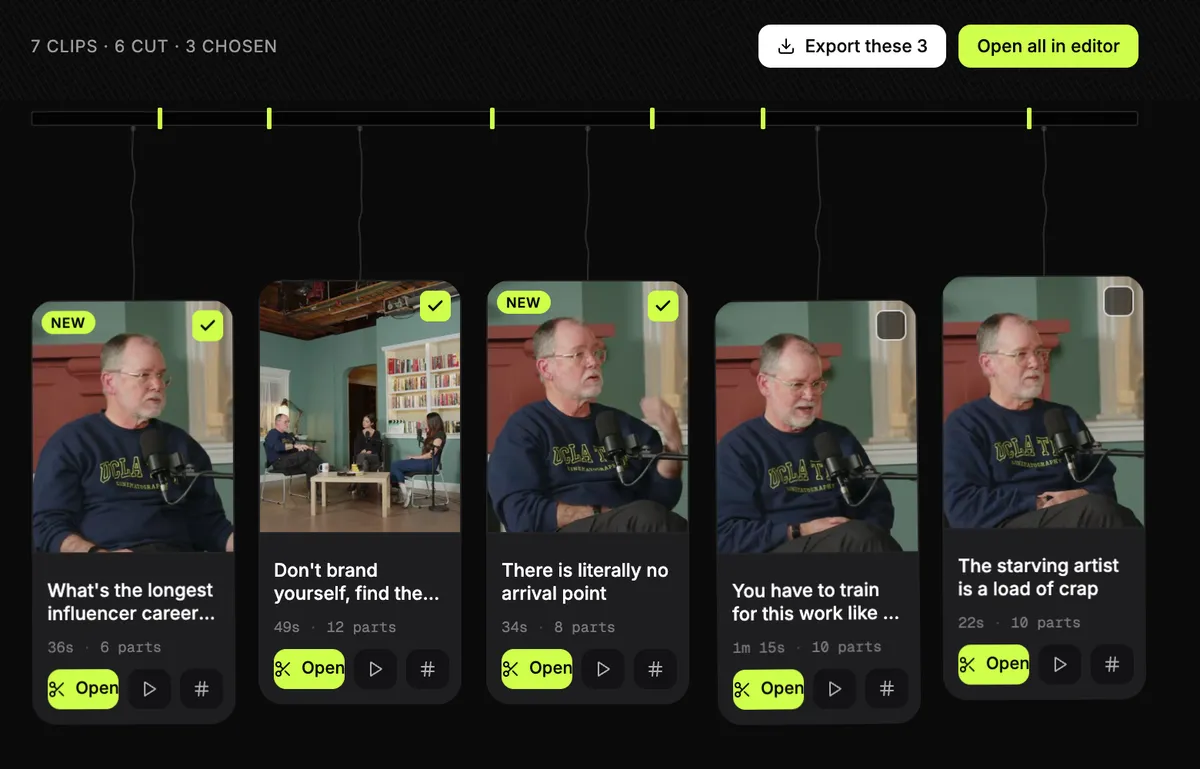
We did not run Kapwing, so we will not guess how it does. Here is what Slice did with a real one. The episode is LinuxGameCast Weekly 430, a three-host video podcast, 1:21:55 long, 1280×720, 531MB, published by LinuxGameCast LLP under CC BY-SA 4.0. We ran it through Slice on 2 October 2026 and read the times back from our own database afterwards.
- Upload of the 531MB file: about two minutes.
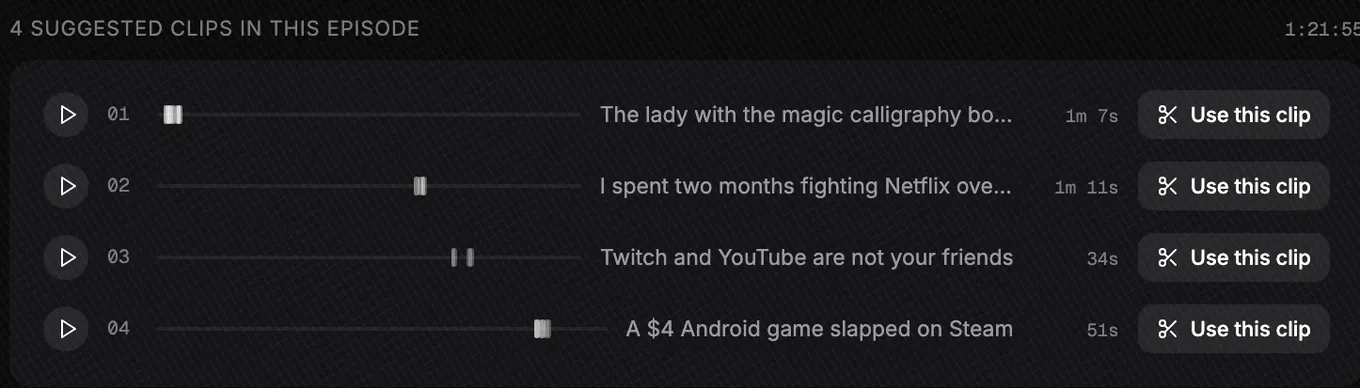
- Three and a half minutes after the upload finished, Slice listed four moments. Most of that was the transcript; the search itself took 39 seconds.
- No moment was one unbroken stretch. “The lady with the magic calligraphy books” runs 1:07, joined from 17 passages between 1:20 and 4:05; “I spent two months fighting Netflix over a copyright claim” runs 1:11, from 6 passages.
- We picked two. Both were finished 4 minutes later: 1080×1920 MP4s at 30 frames a second: 1:08 and 1:11 long, 70MB and 56MB.
What came out wrong
- The framing. The episode is three webcams side by side under the show’s logo. Slice kept the middle camera, cut the logo to “AST 430”, and a line of stream chat shows in the first clip.
- The joins. One join dropped a word; another left a stray “have.” between two sentences.
- The language. The show swears, and the third moment opens on it, so we skipped that one.
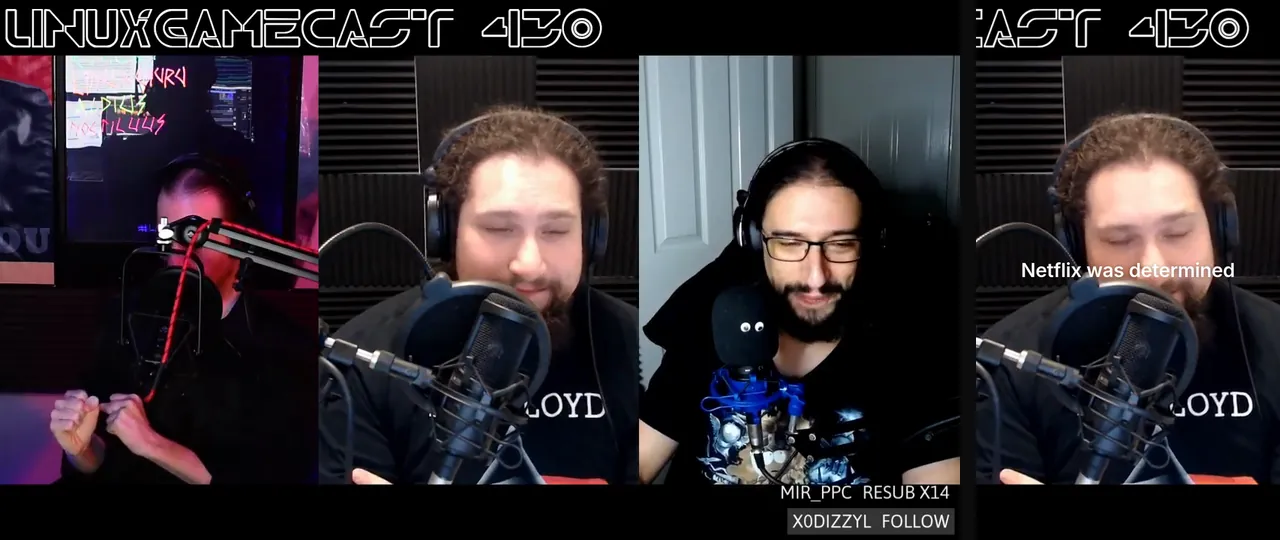
Each of those is a fix in the editor before posting. The full run, with both clips frame by frame, is in Can ChatGPT make clips from my video?.
Or do it inside ChatGPT
If you already work in ChatGPT, you don’t have to open another app. Add Slice to ChatGPT once, attach the video in a chat and type “@Slice turn this video into short clips”. Slice lists the moments it found with their lengths and opening lines; reply with the numbers you want and you get download links for vertical clips with captions and a hook title. Clips need a Slice plan (your first 3 clips on the website are free).
Can ChatGPT make clips from my video? has a real run from upload to finished files. The full steps are in how to make podcast clips with ChatGPT, and adding Slice takes a couple of minutes with the setup guide.
Get the Slice Weekly
One free email every Friday: tools for creators and the best advice we found from people who make things.
Questions
Is Kapwing free?
Yes, with limits. Kapwing's free plan is $0 with 10 credits, "Unlimited exports with a watermark", exports up to 4 minutes long and 720p, and files kept for 3 days. Pro removes the watermark at $24 a month, or $16 billed yearly. Its FAQ says: "We do not currently offer a free trial for Kapwing's paid plans." Checked 15 October 2026.
How many credits does Kapwing use to make clips?
Repurpose Studio costs 2 credits a minute of video, per Kapwing's help centre on 15 October 2026, from the same credits as subtitles (1 a minute) and other tools. Pro has 1,000 credits a month, so up to about 500 minutes of clipping if you use them for nothing else.
Does Kapwing have a free trial?
Not of its paid plans. Its pricing FAQ says: "We do not currently offer a free trial for Kapwing's paid plans." The free plan is $0 with 10 credits and watermarked exports.
Does Kapwing add a watermark?
On the free plan, yes: "Unlimited exports with a watermark". Pro and up have none. Slice puts nothing on your video, on any plan or on free clips.
Is Slice cheaper than Kapwing?
Slice is $14.99 a month or $149 a year; Kapwing Pro is $24 a month or $16 a month billed yearly. Kapwing's price buys a full editor and credits for many tools; Slice's buys clips with no cap on videos, plus four other tools.
How was this compared?
Compared from Kapwing's own pricing and product pages, read in a browser on 15 October 2026, not signed in. We did not read its reviews and did not test Kapwing hands-on. We make Slice.
More comparisons
- Best AI clipping tools for podcasts and streams (2026)
- Best AI clipping tools for Twitch and Kick streamers (2026)
- The OpusClip alternative
- The Klap alternative
- The Vizard alternative
- The Submagic alternative
- The Descript alternative
- The Riverside alternative
- The Choppity alternative
- The quso.ai alternative
- The reap alternative
- The Ssemble alternative
- The Headliner alternative
- The Wavve alternative
- The Castmagic alternative
- The Recast Studio alternative
- The EchoWave alternative
- The Podcastle (now Async) alternative
- AI clip tools compared: prices and caps in one table
- AI clipping inside ChatGPT or Claude vs AI clipping apps
- How to make podcast clips with ChatGPT (2026)
All comparisons, in one list.
Try Shorts by Slice on your next episode. If Kapwing fits you better, use it.