Checked 3 October 2026
The quso.ai (vidyo.ai) alternative for long podcasts and streams (2026)
quso.ai is vidyo.ai under a new name: a clipper with a scheduler, a content planner and link import from almost anywhere. Podcasters look elsewhere when a month of episodes outruns the credits, or when they want a straight answer on how long a video it takes: its own pages say 5 hours in one place and 75 minutes in another.
Our bias: we make Shorts by Slice. Compared from published pricing, limits, features and user reviews, checked 3 October 2026. We did not test quso.ai hands-on, and where it is the better choice we say so.
Shorts by Slice turns a long podcast or stream into captioned vertical clips. $14.99 a month. Up to 3 videos free with no card; downloading starts a 3-day trial.
Try it free →Slice vs quso.ai
| Shorts by Slice | quso.ai | |
|---|---|---|
| Price | $14.99/month or $149/year | Free; $29 / $39 / $49 a month, or $19 / $26 / $33 a month billed yearly |
| What the entry plan gets | Everything: no cap on videos, up to 1,000 exports a month, no watermark | Lite: 100 credits a month (about 100 minutes of video), 1080p, publishing to TikTok |
| Longest video | 3 hours and 2GB (MP4, MOV or WebM) | Its pages disagree: 5 hours (help centre) or 75 minutes (clips page) |
| Monthly limit | No cap on videos; up to 1,000 exports a month | 100, 300 or 600 credits a month; twice that on yearly plans |
| Watermark | Never, trial included | On the free plan, which exports 720p |
| Link import | YouTube video links, one video per link; or upload a file | YouTube, Vimeo, X, Facebook, Twitch, Rumble, Loom, LinkedIn, Zoom, Google Drive and Dropbox, on every plan |
| Posting | No: you download and post | TikTok on Lite; scheduling to 7 platforms on Essential and up |
| Reviews | No third-party ratings to report yet | Product Hunt 4.3 (11), Trustpilot 3.2 (1), G2 5.0 (1) |
quso.ai’s figures from its pricing page and review sites, 3 October 2026. Prices in US dollars.
Choose quso.ai if…
- You want to paste links from Twitch, Vimeo, Zoom, Loom or Dropbox, not only YouTube.
- You want scheduling to seven platforms and a content planner in the same app.
- You want a free plan to keep using, and a watermark at 720p is fine while you do.
- You clip about an hour or two of video a month, which the credits cover.
Choose Slice if…
- You put out a long episode every week. Lite's 100 credits a month is about one 90-minute episode; Slice has no cap on videos.
- You want one limit, stated once: 3 hours and 2GB per file.
- You want to tick a dozen clips and export them together, with one email and one zip.
- You want clips that join moments from different parts of the episode, for $14.99 a month against Lite's $29.
Where Slice loses to quso.ai
- quso.ai posts and schedules, with a content planner. Slice gives you files to post.
- quso.ai takes links from eleven places; Slice takes YouTube links and uploaded files.
- quso.ai has a free plan you can keep; Slice has up to 3 videos free and a 3-day trial when you download.
quso.ai, in short
Best for creators who want clipping, a content planner and scheduling to 7 platforms in one app, and can work within a minutes-based credit budget.
Pricing, in plain words
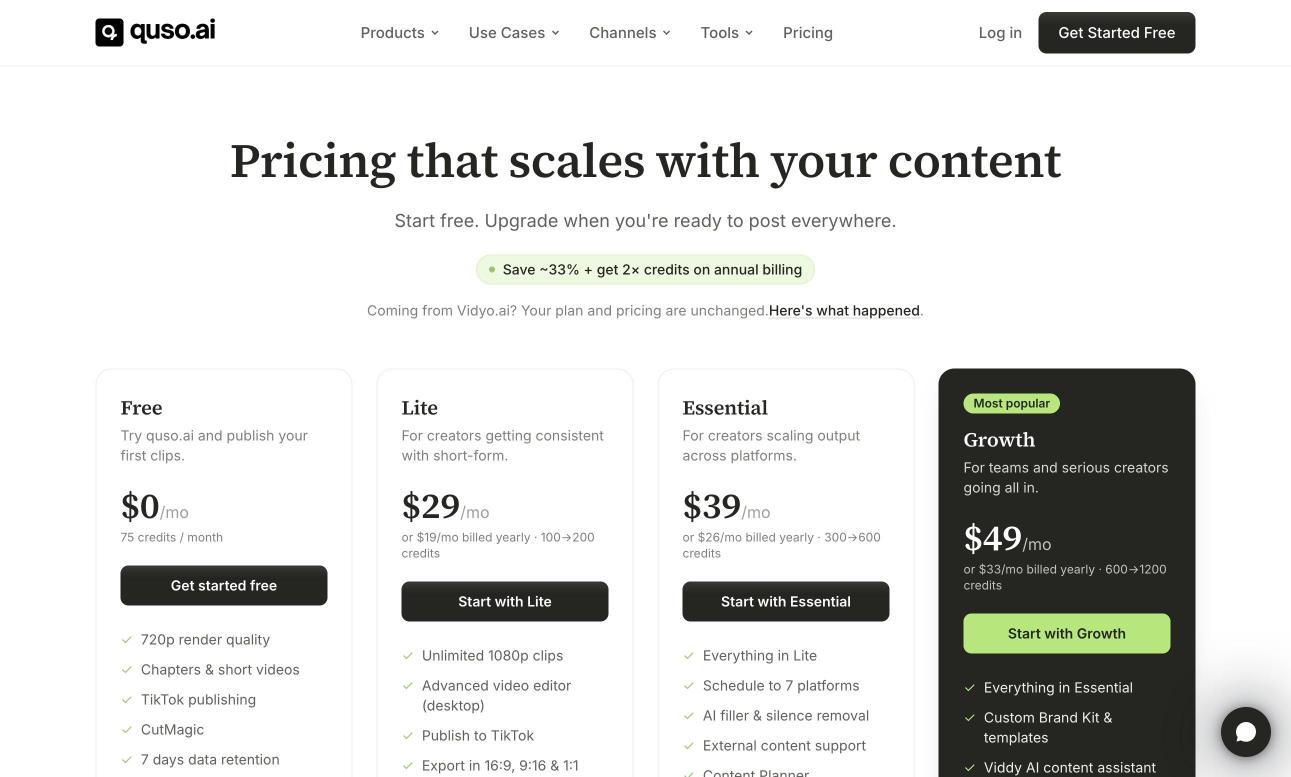
- Free: 75 credits a month (one credit is about one minute of video, rounded up), 720p with a quso.ai watermark, downloads up to 5 minutes per clip, uploads kept 7 days.
- Lite: $29 a month, or $19 a month billed yearly. 100 credits a month, or 200 on the yearly plan; 1080p, no watermark, publishing to TikTok.
- Essential: $39 a month, or $26 a month billed yearly. 300 credits (600 yearly), scheduling to 7 platforms, filler and silence removal, a content planner.
- Growth: $49 a month, or $33 a month billed yearly. 600 credits (1,200 yearly), brand kit, analytics, priority support.
- Yearly plans get the whole year's credits up front. On monthly plans, unused credits expire.
What quso.ai’s reviewers say
| Site | Rating | Reviews |
|---|---|---|
| Product Hunt | 4.3 / 5 | 11 |
| Trustpilot | 3.2 / 5 | 1 |
| G2 | 5.0 / 5 | 1 |
Praise: Simple to use; Quick resizing for each platform; Easy to adjust the suggested clips.
Recurring complaints: Buggy, with edits lost (1 of 2); Pushed to buy, and no way to delete the account (1 of 2).
Source: Product Hunt 1-2 star reviews, both of them, from October and November 2024, when it was still vidyo.ai. Read them on Product Hunt.
“It is SO buggy and so many times it glitches out & i have to start completely over and redo all of my editing.”A reviewer on Product Hunt, October 2024, as vidyo.ai
Slice, in short
Best for podcasters and clippers who cut long episodes and streams into lots of clips and export them in one go.
$14.99 a month or $149 a year, up to 3 videos free with no card, and a 3-day trial when you download. It does not post, schedule or add b-roll. Paste a YouTube link or upload the file.
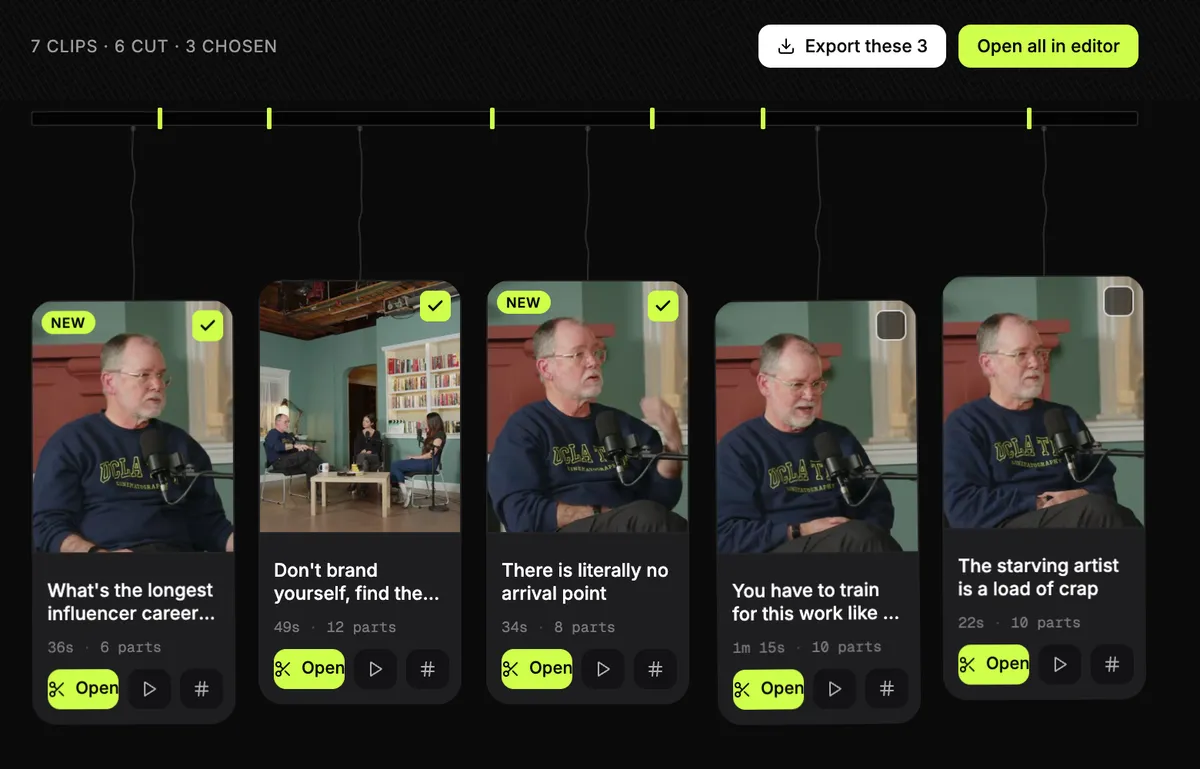
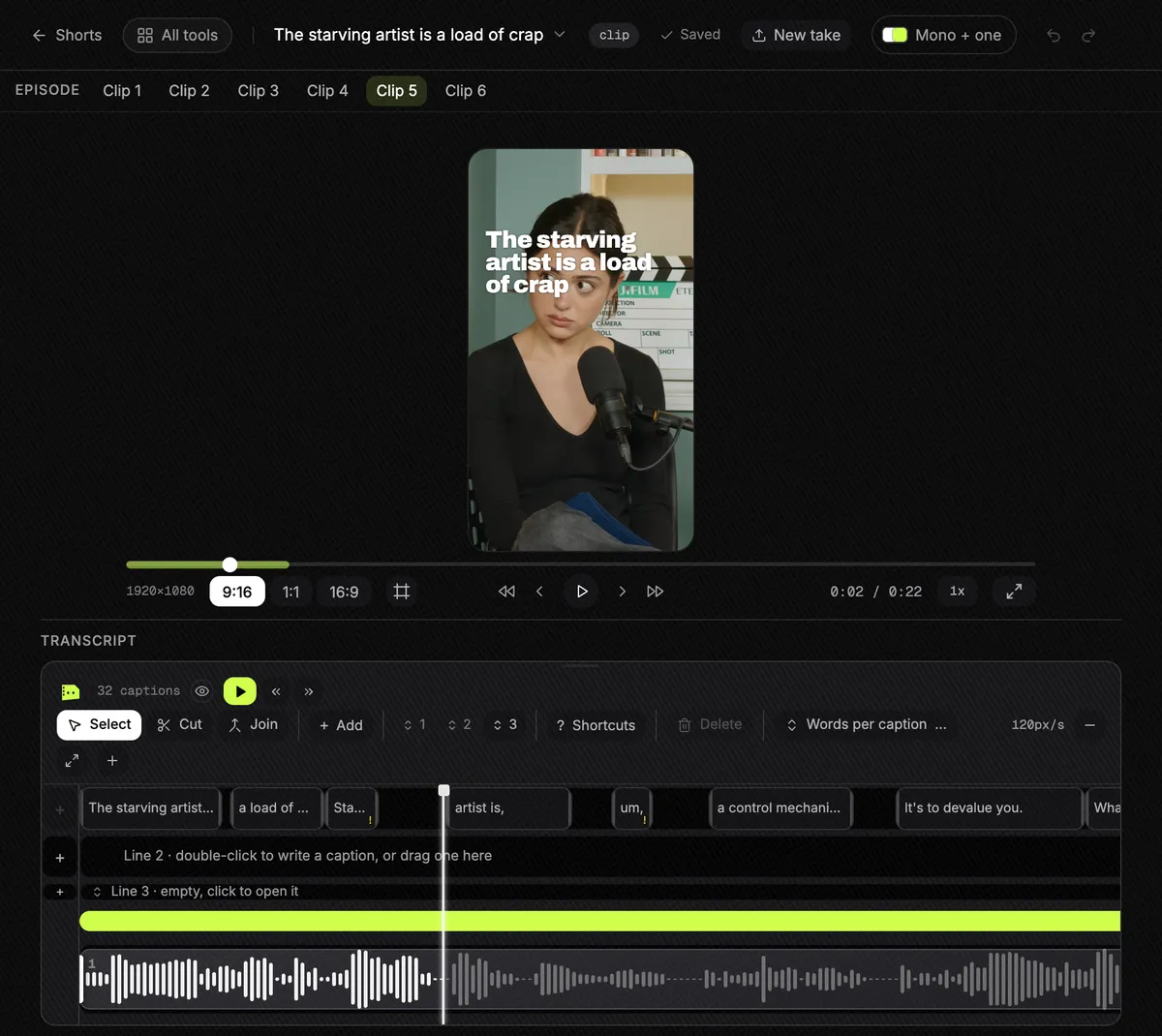
Slice on a real episode, start to finish
We did not run quso.ai, so we will not guess how it does. Here is what Slice did with a real one. The episode is LinuxGameCast Weekly 430, a three-host video podcast, 1:21:55 long, 1280×720, 531MB, published by LinuxGameCast LLP under CC BY-SA 4.0. We ran it through Slice on 2 October 2026 and read the times back from our own database afterwards.
- Upload of the 531MB file: about two minutes.
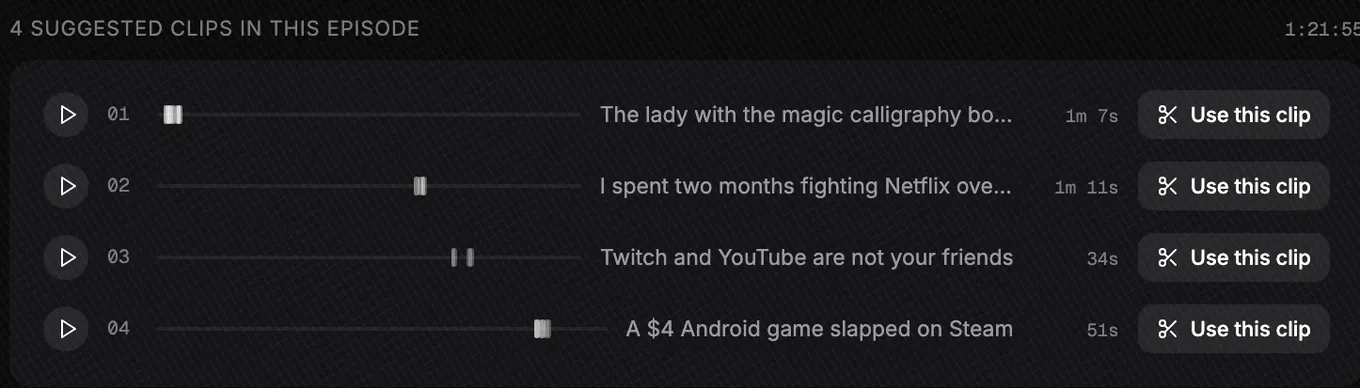
- Three and a half minutes after the upload finished, Slice listed four moments. Most of that was the transcript; the search itself took 39 seconds.
- No moment was one unbroken stretch. “The lady with the magic calligraphy books” runs 1:07, joined from 17 passages between 1:20 and 4:05; “I spent two months fighting Netflix over a copyright claim” runs 1:11, from 6 passages.
- We picked two. Both were finished 4 minutes later: 1080×1920 MP4s at 30 frames a second: 1:08 and 1:11 long, 70MB and 56MB.
What came out wrong
- The framing. The episode is three webcams side by side under the show’s logo. Slice kept the middle camera, cut the logo to “AST 430”, and a line of stream chat shows in the first clip.
- The joins. One join dropped a word; another left a stray “have.” between two sentences.
- The language. The show swears, and the third moment opens on it, so we skipped that one.

Each of those is a fix in the editor before posting. The full run, with both clips frame by frame, is in Can ChatGPT make clips from my video?.
Or do it inside ChatGPT
If you already work in ChatGPT, you don’t have to open another app. Add Slice to ChatGPT once, attach the video in a chat and type “@Slice turn this video into short clips”. Slice lists the moments it found with their lengths and opening lines; reply with the numbers you want and you get download links for vertical clips with captions and a hook title. Clips need a Slice plan or the free trial, the same as on the website.
Can ChatGPT make clips from my video? has a real run from upload to finished files. The full steps are in how to make podcast clips with ChatGPT, and adding Slice takes a couple of minutes with the setup guide.
Get the Slice Weekly
One free email every Friday: tools for creators and the best advice we found from people who make things.
Questions
Is quso.ai the same as vidyo.ai?
Yes. Its pricing page says "Coming from Vidyo.ai? Your plan and pricing are unchanged", and its site footer reads "quso.ai (formerly vidyo.ai)".
Is Slice cheaper than quso.ai?
Month to month, yes: $14.99 against $29 for Lite, and Lite is capped at 100 credits, about 100 minutes of video. Billed yearly, Lite is $19 a month ($228 a year, with 200 credits a month) against Slice's $149 a year with no cap on videos. Checked 3 October 2026.
How long a video can quso.ai take?
Its help centre says "We support videos upto 5 hours in length". Its AI clips page says "Our tool processes videos up to 75 minutes." We could not tell which is current. Slice takes up to 3 hours and 2GB.
What do people say about quso.ai?
Very little, so far. It has 11 reviews on Product Hunt (4.3), all from 2024 when it was vidyo.ai, and one each on Trustpilot and G2. The two low ones on Product Hunt are about bugs that lost edits and being pushed to buy. That is too few to call a pattern.
How was this compared?
Compared from published pricing, limits, features and user reviews, checked 3 October 2026. quso.ai's figures are from its own pricing page, help centre and review pages. We did not test quso.ai hands-on. We make Slice.
More comparisons
- Best AI clipping tools for podcasts and streams (2026)
- Best AI clipping tools for Twitch and Kick streamers (2026)
- The OpusClip alternative
- The Klap alternative
- The Vizard alternative
- The Submagic alternative
- The Descript alternative
- The Riverside alternative
- The Choppity alternative
- The reap alternative
- The Ssemble alternative
- The Headliner alternative
- AI clip tools compared: prices and caps in one table
- AI clipping inside ChatGPT or Claude vs AI clipping apps
- How to make podcast clips with ChatGPT (2026)
All comparisons, in one list.
Try Shorts by Slice on your next episode. If quso.ai fits you better, use it.