Last updated 30 September 2026
Best tools for clipping Twitch and Kick streams (2026)
For clippers and streamers turning Twitch and Kick VODs into Shorts, Reels and TikToks. Seven tools in depth: how each one gets the stream in, whether it puts the facecam over the gameplay, how long a stream it takes, whether it posts for you, what it costs, and what its users say.
Our bias, plainly: we make Shorts by Slice, one of the tools below. Compared from published pricing, limits, features and user reviews, checked 30 September 2026. We did not test the others hands-on. Several of them do things for stream clippers that Slice does not, and this page says which.
Shorts by Slice turns a long podcast or stream into captioned vertical clips. $14.99 a month, 3 days free, no card.
Try it free →The short version
| Tool | Best for | How it gets the stream | Facecam layout | Longest stream | Posting | Entry price |
|---|---|---|---|---|---|---|
| Shorts by Slice | Many clips per stream, flat price, one zip | Upload the VOD file, or paste a YouTube link | Face on top, game below: you place the two boxes | 3 hours, 2GB | No: download, with post text ready | $14.99/month or $149/year |
| StreamLadder | Twitch and Kick VOD links, facecam templates | Paste a Twitch or Kick VOD link (ClipGPT); clip links or files in the editor | Facecam and gameplay templates; detects the facecam | Not stated | Schedules to TikTok, Shorts and Reels (Starter and up) | £13/month; AI clipping from £23 (shown in pounds) |
| Eklipse | Connect your channel; game-aware highlights | Connect Twitch, Kick, YouTube or Facebook; it pulls in your streams | Templates and layouts; a facecam split is not named in its help centre | 6 hours per stream | Publishes to TikTok, Shorts, Reels, Facebook; schedules on Premium | $24.99/month, or $179.99/year |
| OpusClip | Longest streams, gameplay layout, auto-post | YouTube links on every plan; Twitch and more on Pro | "Gameplay" layout: speaker on top 30%, game below 70% | Up to 10 hours | Auto-post (Starter); scheduler (Pro) | $15/month Starter; Twitch links need Pro, $29 |
| Klap | Paste a link, auto-reframe, auto-post | Its pages name YouTube, Twitch and Vimeo links | AI reframe with a "Gaming" layout; detects the webcam | Up to 4 hours | Auto-post to TikTok, YouTube, Instagram, LinkedIn | $29/month, or $14/month billed yearly |
| Vizard | Twitch VOD links, best reviews, scheduling | YouTube, Twitch VOD and other links | Automatic framing; no named facecam-over-game layout | 10 hours on paid plans (60 min free) | Scheduling to 6 or 20 social accounts | $29/month, or $14.50/month billed yearly |
| Choppity | Twitch links, free hour to try | YouTube, Vimeo or Twitch links, or upload | Auto-reframe that keeps the facecam centred | 120 minutes per file | Posts and schedules (1 to 10 accounts) | $20/month, or $14/month billed yearly |
Prices in US dollars except StreamLadder’s, which its page showed us in pounds. Read from each vendor’s own pages on 30 September 2026. Scroll the table sideways on a phone.
Where Slice loses
Since we make it, the weak spots first. Slice takes no Twitch or Kick links and does not connect to your channel: you download the VOD and upload it (StreamLadder, OpusClip, Vizard and Choppity take VOD links; Eklipse connects to your account). It takes streams up to 3 hours, where Eklipse takes 6 and OpusClip 10. It does not watch the game for kills or events (Eklipse does) or give a virality score (StreamLadder and OpusClip do). You place the facecam box yourself, where StreamLadder and Klap detect it. It does not post or schedule. And it has no third-party reviews yet.
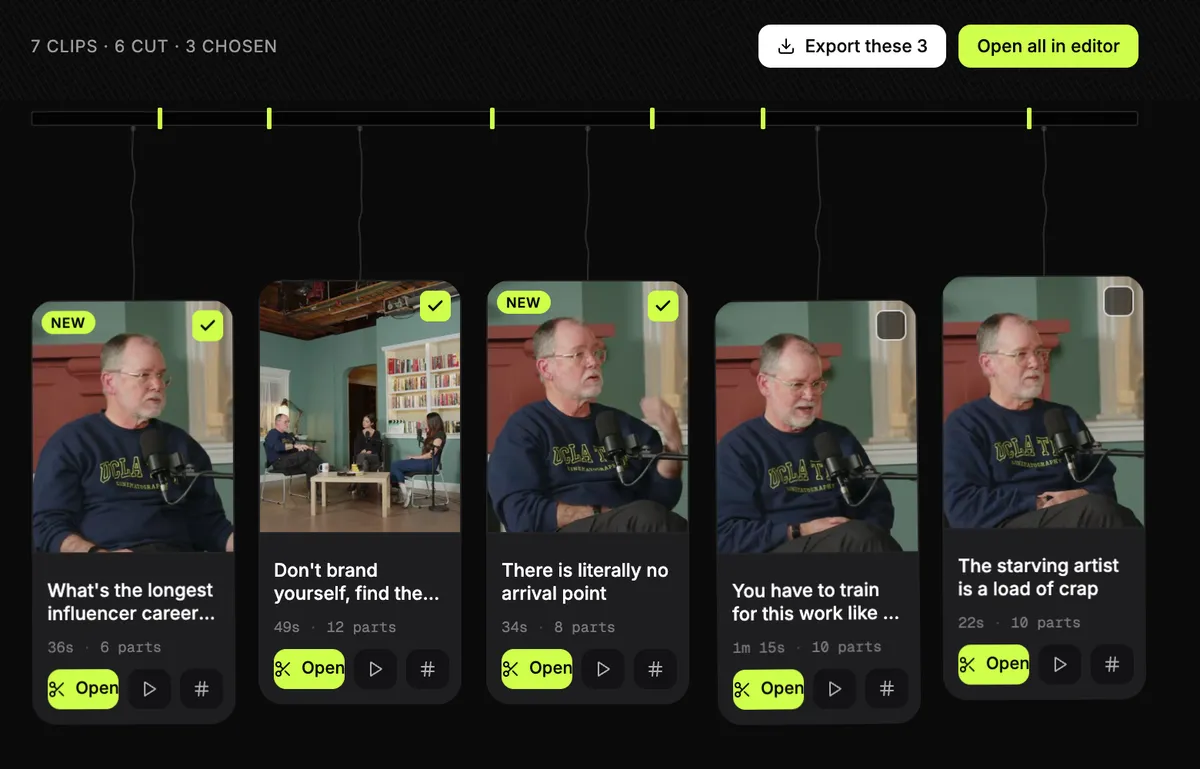
Where it is built for clippers: it finds many clips in one stream and finds new ones when you ask again, puts the camera on top and the game below, starts every clip with a hook title, writes the post text, and exports the whole set at once, with one email and a single “Download all” zip. Vertical clips come out at 1080x1920 as standard, up to 4K when the recording is 4K, for $14.99 a month with no cap on videos.
Shorts by Sliceours
Best for clippers who cut a lot of clips from each stream, want facecam over gameplay, and want them all out in one download.
How the stream gets in: Upload the VOD file, or paste a YouTube link.
Facecam layout: Face on top, game below: you place the two boxes.
Longest stream: 3 hours, 2GB.
What it does well for streams
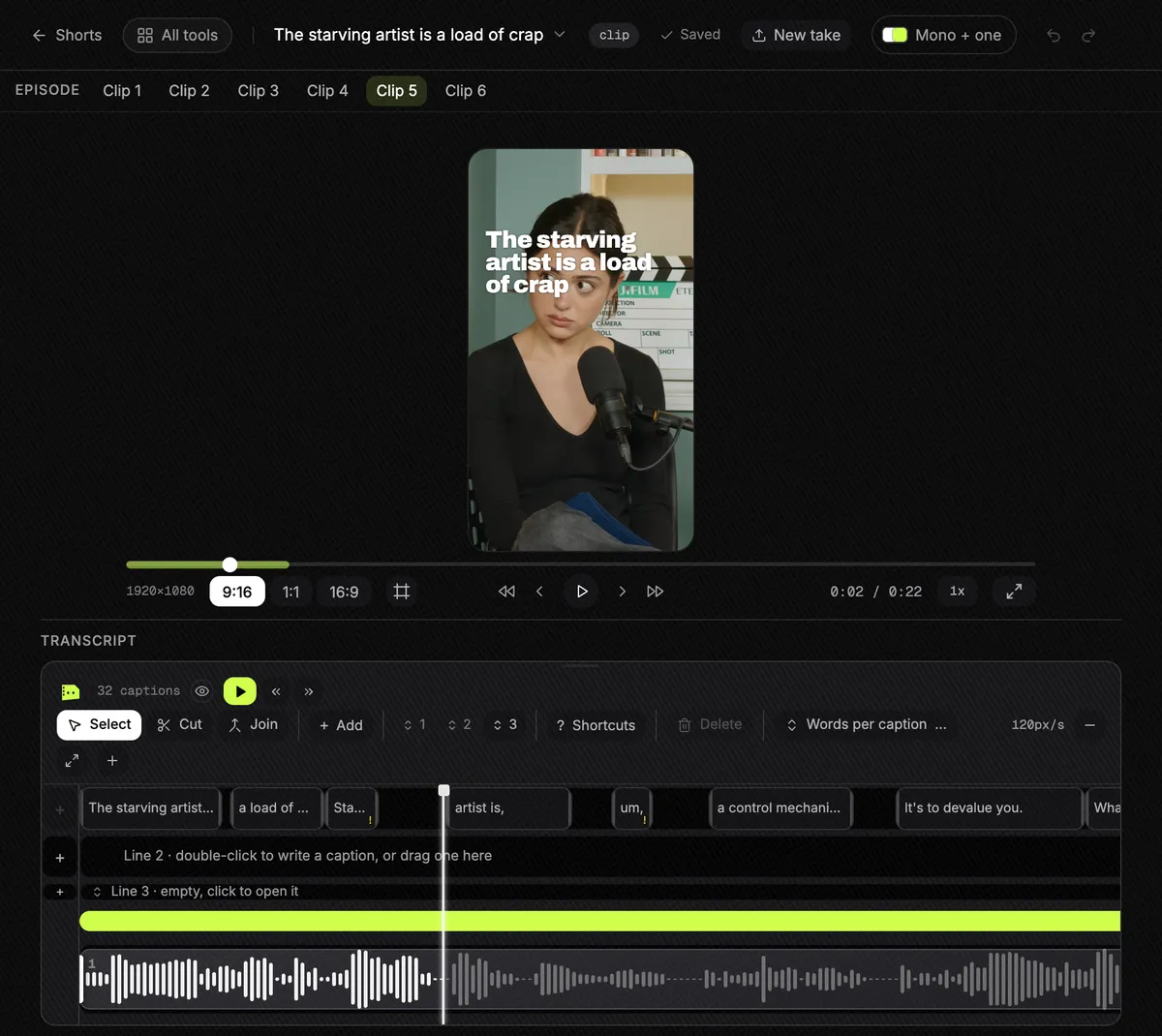
- Finds the clips in a long stream. Ask it to look again and it finds different moments, not the same ones twice.
- A stream layout: your camera across the top and the game underneath. Drag the Camera and Game boxes into place once and it holds for the clip.
- Tick the clips you want and export them together. One email arrives when they are done, with a single "Download all" zip.
- Every clip starts with a hook title on it, and comes with post text and hashtags in the language of the stream.
- Vertical exports are 1080x1920 as standard, and up to 4K when the recording is 4K.
- No cap on videos and up to 1,000 exports a month, on one flat price, with nothing stamped on the video.
Where it falls short
- No Twitch or Kick links and no channel connection: download the VOD and upload it. YouTube links work.
- Streams longer than 3 hours have to be split first. Eklipse takes 6 hours, OpusClip and Vizard 10.
- It does not watch the game for kills or other events, and gives no virality score.
- Nothing finds the facecam for you: you place the camera and game boxes yourself.
- It does not post or schedule.
- No third-party reviews to report yet.
Pricing, in plain words
- One plan: $14.99 a month, or $149 a year.
- A 3-day free trial with everything switched on, and no card needed to start it.
- No per-export charge, no cap on how many videos you put through it, and up to 1,000 exports a month.
- The same subscription also covers Captions, Reframe, Podshare and Moodboard.
Reviews
No third-party ratings to report yet. That is a real gap next to Eklipse and Vizard, so weigh it.
StreamLadder
Best for Twitch and Kick streamers who want facecam-and-gameplay templates and AI that scans a whole VOD from its link.
How the stream gets in: Paste a Twitch or Kick VOD link (ClipGPT); clip links or files in the editor.
Facecam layout: Facecam and gameplay templates; detects the facecam.
Longest stream: Not stated.
What it does well for streams
- Paste a Twitch or Kick VOD link and ClipGPT finds the clips, with a 0-100 virality score on each.
- Facecam and gameplay layout templates, custom layouts, and it detects the facecam.
- 1080p at 60fps on Starter, 4K at 60fps on Pro.
- Schedules posts to TikTok, YouTube Shorts and Instagram Reels, and has phone apps.
- Captions in 90+ languages.
Where it falls short
- The AI clipping is on Creator, £23 a month, not the entry plan.
- A YouTube stream has to be uploaded as a file for ClipGPT.
- Longest VOD not stated on the pages we could read.
- Almost no reviews to go on: 2 on Trustpilot, none on G2 or Product Hunt.
Pricing, in plain words
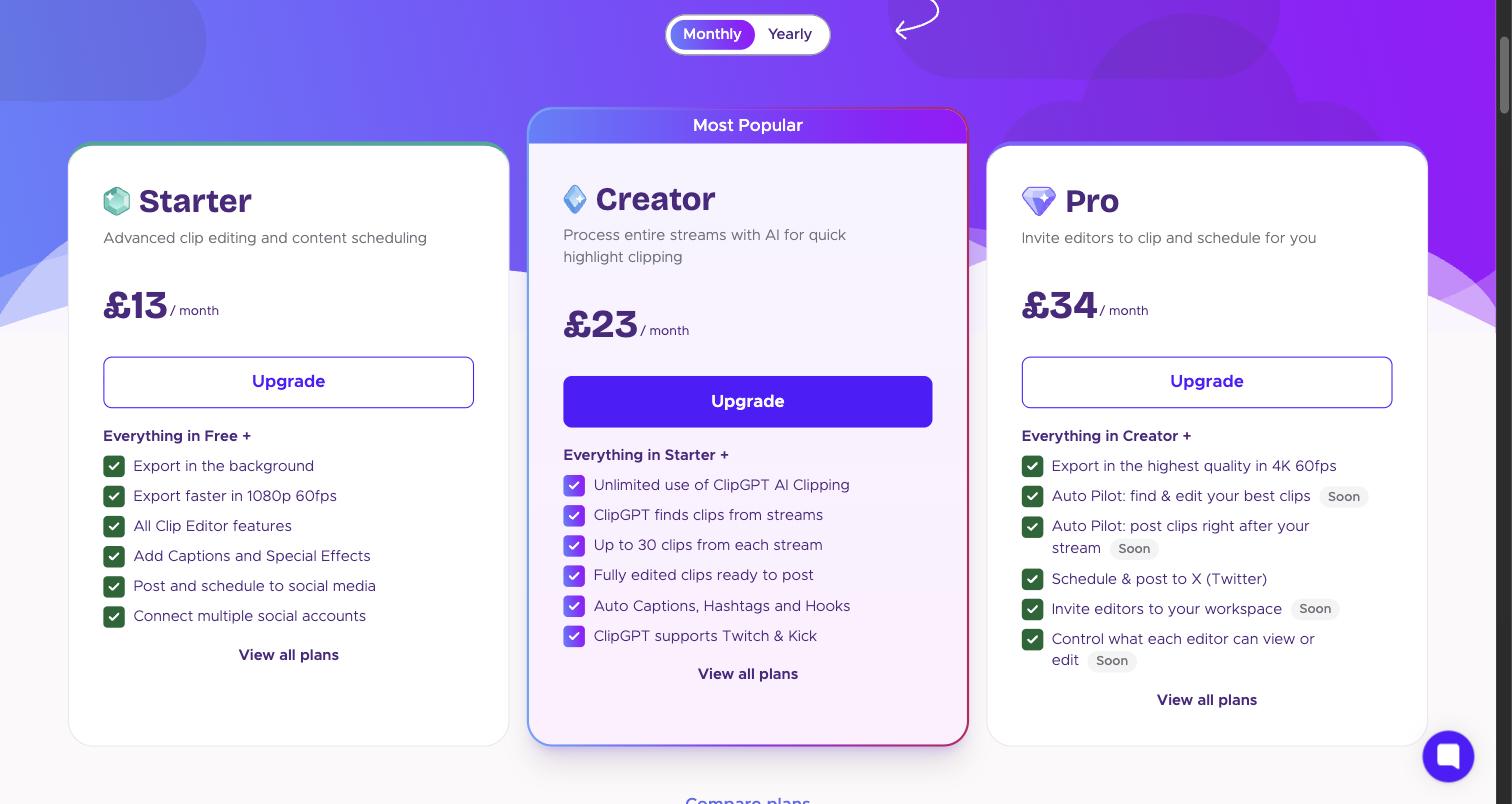
- Free: the clip editor, converter and downloader. Basic editing adds no watermark; using Starter editor features on Free adds one.
- Starter: £13 a month. 1080p at 60fps, captions and effects, posting and scheduling to several social accounts.
- Creator: £23 a month. Unlimited ClipGPT, which scans a whole Twitch or Kick stream and returns up to 30 edited clips with captions, hashtags and hooks.
- Pro: £34 a month. 4K at 60fps and posting to X. Autopilot and editor seats are marked "Soon".
- Yearly plans give 2 months free, and there is a 7-day free trial. Prices are in pounds because we read the page from the UK; its US prices did not load for us.
Source: StreamLadder’s pricing page, read 30 September 2026.
Review ratings
| Site | Rating | Reviews |
|---|---|---|
| Trustpilot | 3.7 / 5 | 2 |
Too few reviews to show a pattern of praise or complaints.
Eklipse
Best for streamers who want their Twitch, Kick or YouTube channel connected once, with every new stream scanned for game moments.
How the stream gets in: Connect Twitch, Kick, YouTube or Facebook; it pulls in your streams.
Facecam layout: Templates and layouts; a facecam split is not named in its help centre.
Longest stream: 6 hours per stream.
What it does well for streams
- Connect Twitch, Kick, YouTube or Facebook and it pulls in your recent and future streams.
- Game-aware highlight finding for supported games; for others it goes by audio and on-screen action.
- Takes streams up to 6 hours.
- Publishes to TikTok, Shorts, Reels, Facebook and Discord, with scheduling on Premium.
- Reviewers say it saves time, is easy, and catches kills and teamfights.
Where it falls short
- The free plan only previews: you pay to export.
- Twitch VODs are counted: 20 a month on monthly Premium.
- Exports up to 1080p at 60fps (its homepage says 1440p; its help centre says 1080p).
- In 20 Trustpilot 1-2 star reviews from March to September 2026, the most common complaints were a site or scheduler that does not work, and a paywall.
Pricing, in plain words
- Free: scan a recent stream and preview the moments it finds. Exporting and downloading need Premium.
- Premium on the web: $24.99 a month, $112.99 for 6 months, or $179.99 a year.
- Premium includes "unlimited AI clipping", up to 1080p at 60fps and no watermark. Twitch VODs come as credits: 3 on sign-up, then 20 a month on monthly Premium.
- There is no public pricing page: these figures are from its help centre.
Source: Eklipse’s help centre, read 30 September 2026.
Review ratings
| Site | Rating | Reviews |
|---|---|---|
| Trustpilot | 4.1 / 5 | 970 |
| Capterra | 4.8 / 5 | 12 |
| Product Hunt | 4.6 / 5 | 58 |
Praise: Saves time; Easy to use; Finds kills and teamfights; The scheduler.
Complaints: Site or scheduler broken (8 of 20); Paywall, or a misleading "free" (6 of 20); Weak moment detection (4 of 20); Slow processing (3 of 20); Refunds refused (3 of 20).
Source: Trustpilot 1-2 star reviews, 20 reviews from March to September 2026. A sample, not every review. Read them yourself on Trustpilot.
“everything is basically behind a pay wall”A reviewer on Trustpilot, March 2026
OpusClip
Best for clippers with very long streams who want a gameplay layout and auto-posting, and whose monthly hours fit a minutes budget.
How the stream gets in: YouTube links on every plan; Twitch and more on Pro.
Facecam layout: "Gameplay" layout: speaker on top 30%, game below 70%.
Longest stream: Up to 10 hours.
What it does well for streams
- A "Gameplay" layout: the speaker in the top 30% of the frame and the game in the bottom 70%, per its help centre.
- Takes up to 10 hours, the longest here.
- Its list of import sources names Twitch, Kick and Medal alongside YouTube.
- Bulk download of clips on Pro, auto-posting on Starter and a scheduler on Pro.
Where it falls short
- Twitch links need Pro ($29 a month, or $14.50 billed yearly); Free takes YouTube links and files. Kick is in its list of sources but not in any plan's list, so check before paying.
- Priced by minutes of video: a 3-hour stream is 180 credits, more than the 150 a month on Starter.
- Its auto-import follows YouTube channels only; there is no Twitch or Kick connection.
Pricing, in plain words
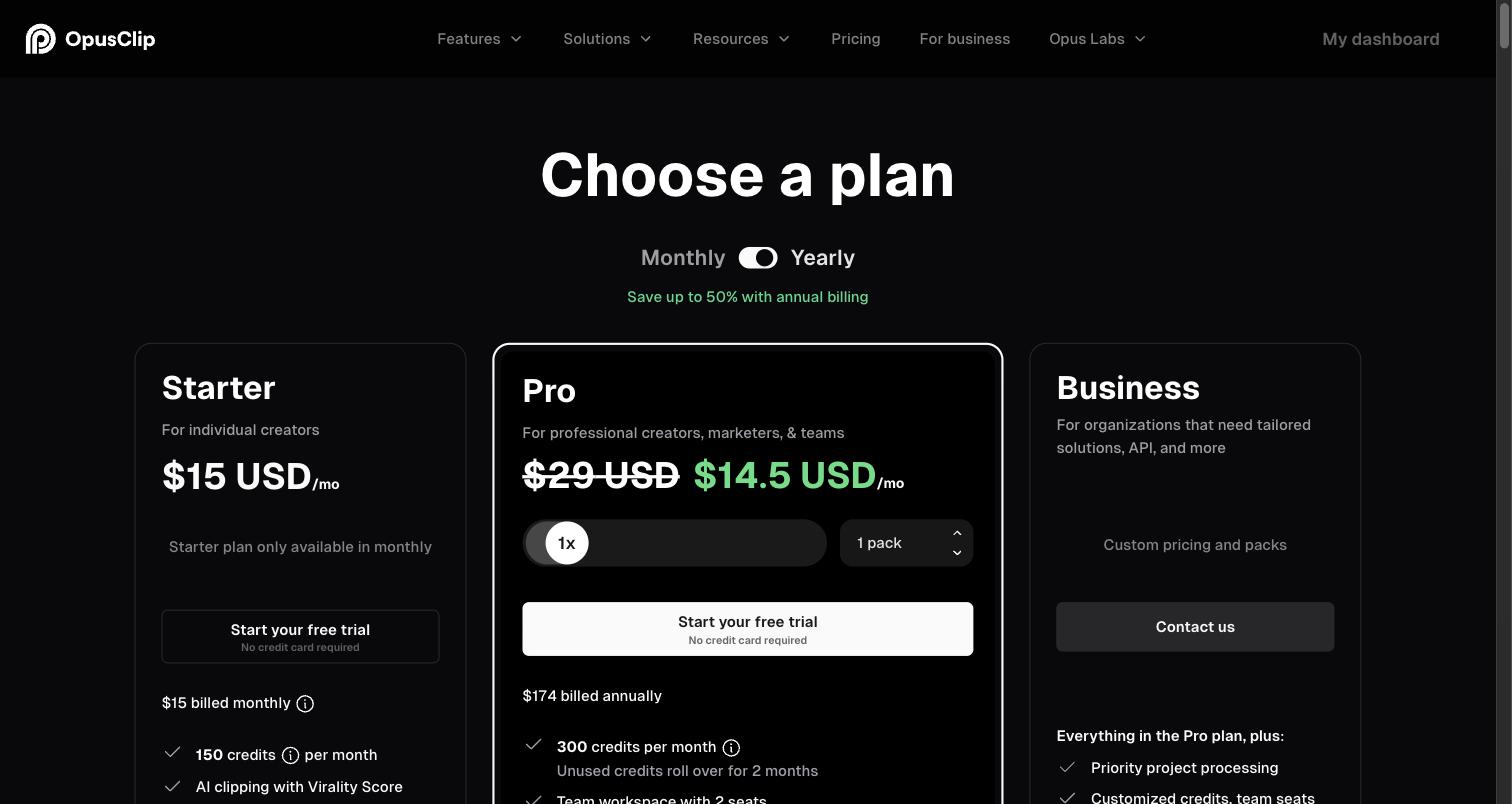
- Free: 60 credits a month (one credit is one minute of source video), watermarked, 1080p, and you have 3 days to export.
- Starter: $15 a month, monthly billing only. 150 credits a month, no watermark, a 30-day export window, and auto-posting to YouTube Shorts, TikTok and Reels.
- Pro: $29 a month, or $14.50 a month billed yearly ($174 a year). 300 credits a month per pack, rolling over for 2 months; up to 4K, a scheduler for 6 accounts, 2 seats per pack, 30GB uploads, public MP4 link import and limited API access.
- Business: custom pricing.
- Credits on monthly plans expire after 60 days.
Source: OpusClip’s pricing page, read 30 September 2026.
Review ratings
| Site | Rating | Reviews |
|---|---|---|
| Trustpilot | 4.0 / 5 | 499 |
| G2 | 4.6 / 5 | 121 |
| Capterra | 3.6 / 5 | 5 |
| Product Hunt | 4.5 / 5 | 78 |
Praise: Easy to use; Saves time; Picks good moments; Captions with emoji and keyword highlights; Active-speaker reframe.
Complaints: Support unresponsive or AI-only (7 of 16); Charged after cancelling, or refund refused (6 of 16); Bugs or failed uploads (5 of 16); Weak clip choice (2 of 16).
Source: Trustpilot 1-2 star reviews, 16 reviews from June to September 2026. A sample, not every review. Read them yourself on Trustpilot.
“a funnel to upsell you at every click”A reviewer on Product Hunt
Weighing OpusClip against Slice? Slice as a OpusClip alternative, side by side.
Klap
Best for clippers who want to paste a link, let it pick a gaming layout on its own, and have the clips posted for them.
How the stream gets in: Its pages name YouTube, Twitch and Vimeo links.
Facecam layout: AI reframe with a "Gaming" layout; detects the webcam.
Longest stream: Up to 4 hours.
What it does well for streams
- Its tool pages name Twitch links alongside YouTube and Vimeo.
- AI Reframe picks a layout, including "Gaming", and detects the webcam overlay.
- Files up to 4 hours, and you can batch-export the whole set.
- Posts to TikTok, YouTube, Instagram and LinkedIn for you.
Where it falls short
- Its API docs say Twitch links are still to come, which disagrees with its tool pages. Kick is not named anywhere we read.
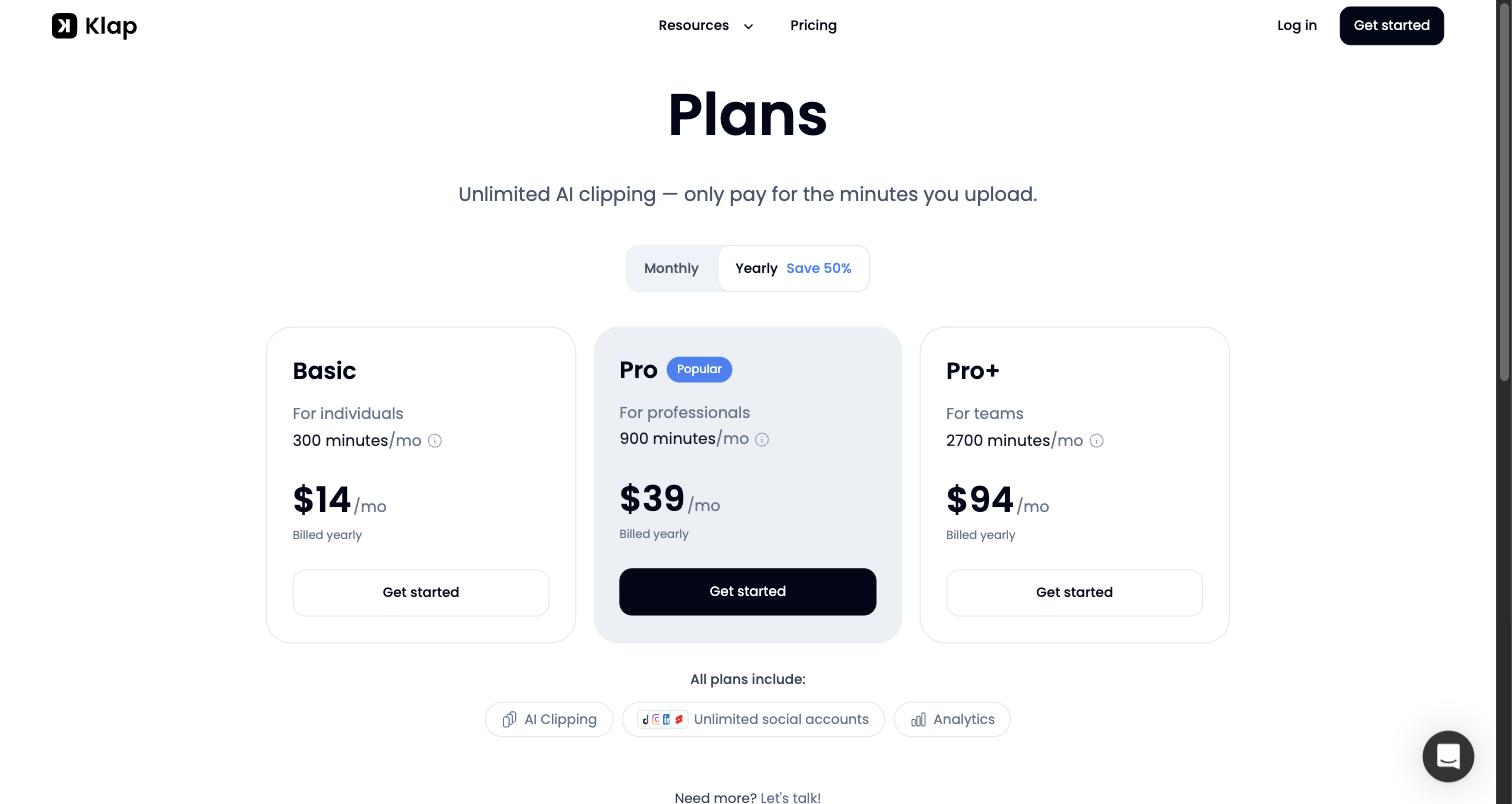
- Priced by clips: 100 a month on Basic.
- In 11 Trustpilot 1-2 star reviews, the most common complaints were billing after cancelling and not finding how to cancel.
Pricing, in plain words
- Free: one video, no card needed. Its tool page says there is no watermark on the free plan.
- Basic: 100 clips a month for $29 a month, or $14 a month billed yearly.
- Pro: 300 clips a month for $79 a month, or $39 a month billed yearly.
- Pro+: 1,000 clips a month for $189 a month, or $94 a month billed yearly.
Source: Klap’s pricing page, read 30 September 2026.
Review ratings
| Site | Rating | Reviews |
|---|---|---|
| Trustpilot | 3.6 / 5 | 47 |
| G2 | 4.8 / 5 | 2 |
| Capterra | 5.0 / 5 | 1 |
| Product Hunt | 3.2 / 5 | 6 |
Praise: Saves time; Simple; Many languages.
Complaints: Billing, or charged after cancelling (6 of 11); Support unresponsive (5 of 11); Hard to find how to cancel (5 of 11); The "free trial" felt misleading (3 of 11).
Source: Trustpilot 1-2 star reviews, 11 reviews. A sample, not every review. Read them yourself on Trustpilot.
“when you try to cancel your subscription there is no where to do it”A reviewer on Trustpilot, June 2026
Weighing Klap against Slice? Slice as a Klap alternative, side by side.
Vizard
Best for clippers who want to paste a Twitch VOD link into the best-reviewed tool here and schedule the results.
How the stream gets in: YouTube, Twitch VOD and other links.
Facecam layout: Automatic framing; no named facecam-over-game layout.
Longest stream: 10 hours on paid plans (60 min free).
What it does well for streams
- Paste a Twitch VOD link; its Twitch page talks about multi-hour VODs.
- Up to 10 hours per upload on paid plans.
- Scheduling to 6 social accounts on Creator, 20 on Business.
- The strongest reviews here: 4.7 on Trustpilot from 2,521.
Where it falls short
- No named facecam-over-gameplay layout: it frames automatically.
- Kick is not in its list of link sources.
- No "download all" in the web app that we could find.
- Its pricing page says 4K exports; one of its help articles says it keeps the original resolution only up to 1080p.
Pricing, in plain words
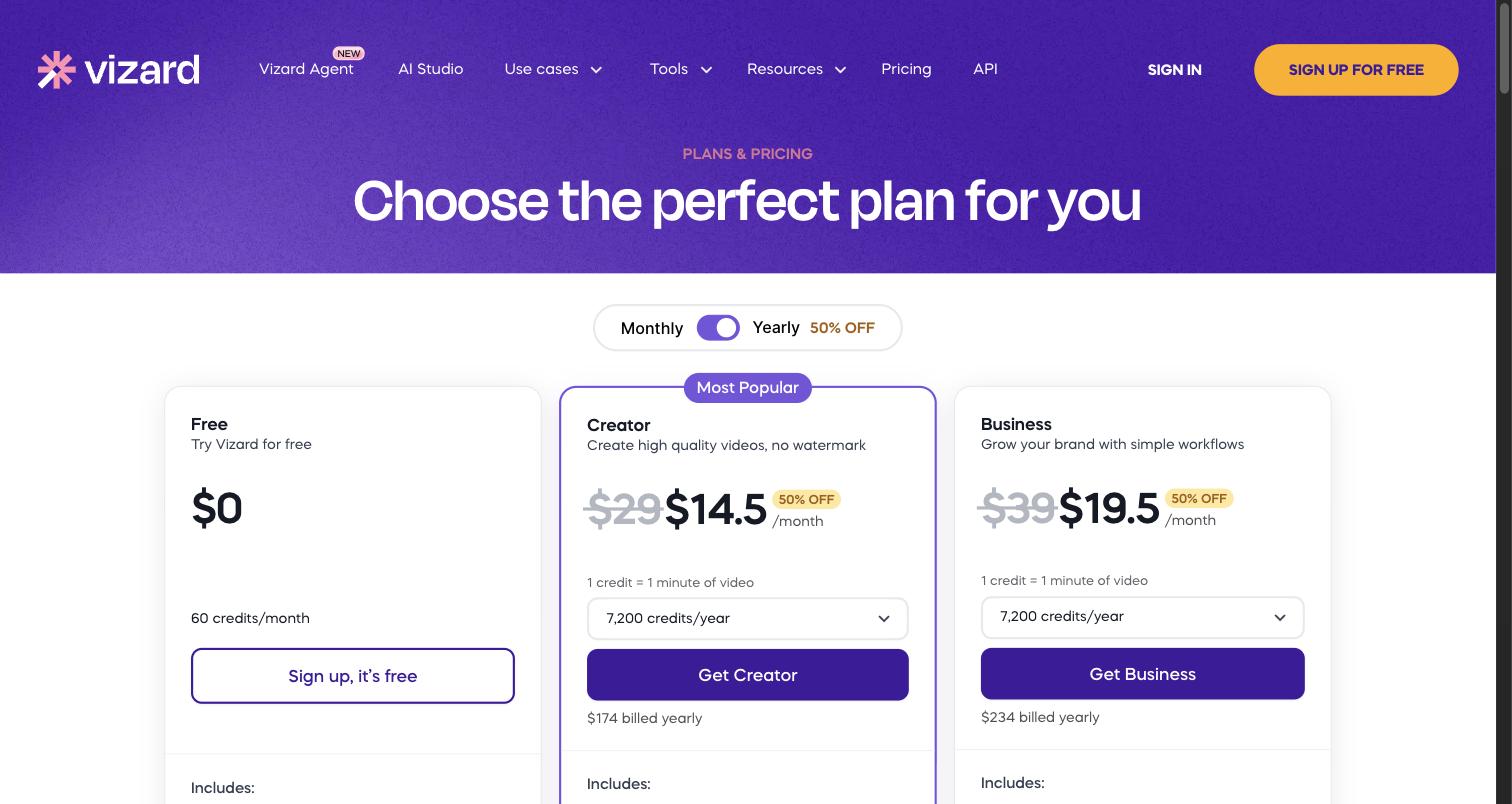
- Free: 60 credits a month, 1GB uploads, 720p exports up to 10 minutes long, watermarked, and files kept for 3 days.
- Creator: $29 a month, or $14.50 a month billed yearly ($174 a year). 600 credits a month, 30GB uploads, 4K, no watermark, 6 social accounts with scheduling, 100GB storage.
- Business: $39 a month, or $19.50 a month billed yearly ($234 a year). 600 credits a month, a brand kit, 20 social accounts, and extra team seats at $5 a month each.
Source: Vizard’s pricing page, read 30 September 2026.
Review ratings
| Site | Rating | Reviews |
|---|---|---|
| Trustpilot | 4.7 / 5 | 2,521 |
| G2 | 4.7 / 5 | 420 |
| Capterra | 4.9 / 5 | 481 |
| Product Hunt | 4.6 / 5 | 18 |
Praise: Finds good moments; Simple; Accurate captions; Many languages.
Complaints: Credits forfeited on cancelling; Limited customisation (subtitle position, zoom); Slow on long videos; Clips or captions sometimes need manual fixes.
Source: Recurring themes on page one of each review site and its 1-2 star filter. A sample, not every review. Read them yourself on Trustpilot.
Weighing Vizard against Slice? Slice as a Vizard alternative, side by side.
Choppity
Best for clipping shorter streams from a Twitch link, after trying it free on an hour of video.
How the stream gets in: YouTube, Vimeo or Twitch links, or upload.
Facecam layout: Auto-reframe that keeps the facecam centred.
Longest stream: 120 minutes per file.
What it does well for streams
- Paste a Twitch VOD link, or a YouTube or Vimeo one.
- Keeps the facecam centred when it reframes to vertical, per its Twitch page.
- Posts and schedules to TikTok, Shorts, Reels and LinkedIn.
- Try it free on an hour of video a month.
Where it falls short
- Files up to 120 minutes, so most full streams need splitting.
- 3 hours of analysis a month on Starter: about one stream.
- No facecam-over-gameplay template that we found, and exports top out at 1080p.
- Kick is not mentioned. Seven of its 8 Trustpilot 1-2 star reviews say support did not reply.
Pricing, in plain words
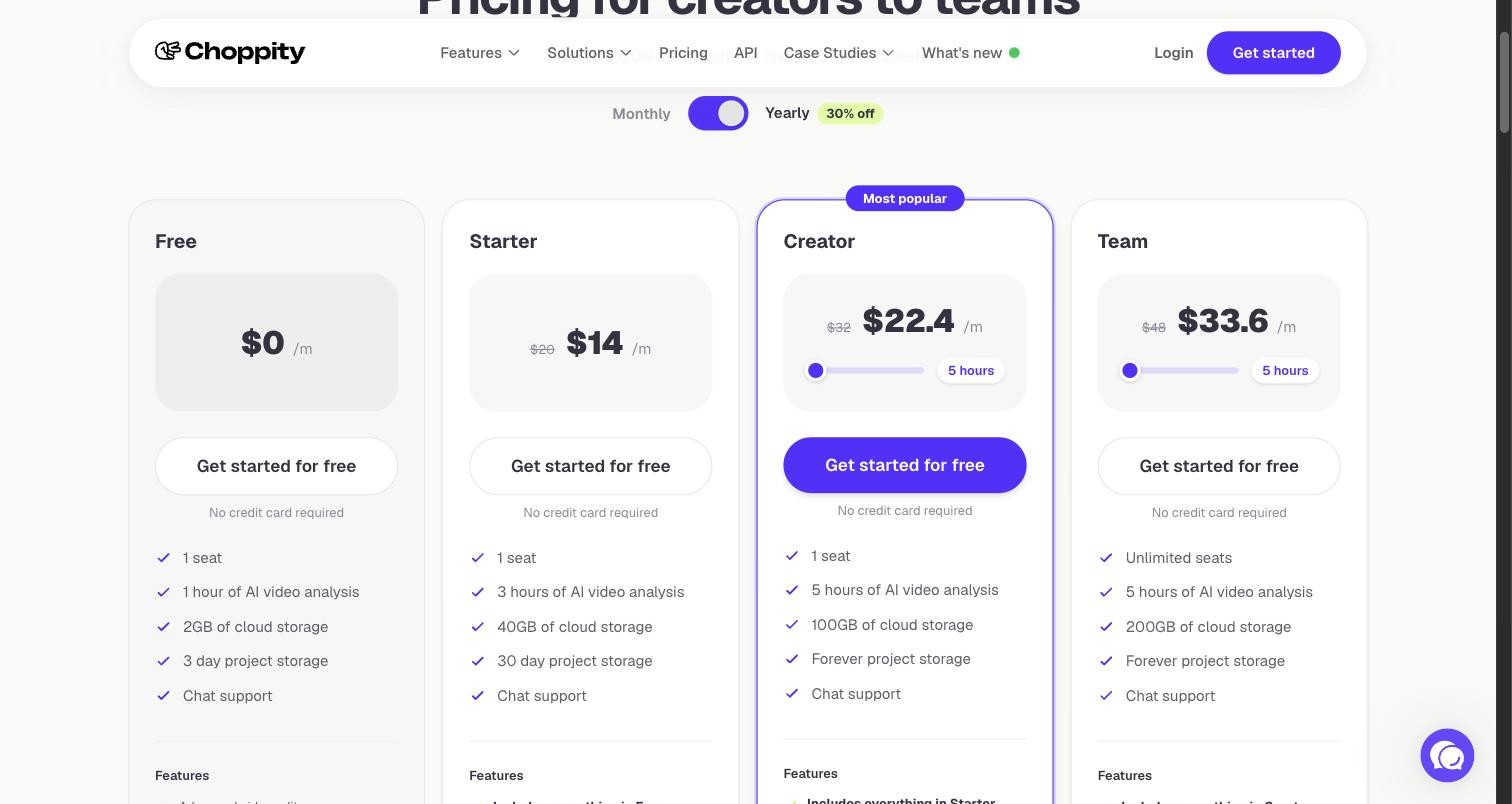
- Free: 1 hour of AI video analysis a month, 2GB storage, projects kept 3 days. The plan table shows no exports on Free.
- Starter: $20 a month, or $14 a month billed yearly. 3 hours of analysis, 1080p exports, scheduling to 1 social account.
- Creator: $32 a month, or $22.40 a month billed yearly. 5 hours of analysis (more on a slider), 3 social accounts, custom fonts, API access.
- Team: $48 a month, or $33.60 a month billed yearly. Unlimited seats, 10 social accounts.
- Exports are 1080p on every plan. Usage resets on the 1st of each month.
Source: Choppity’s pricing page, read 30 September 2026.
Review ratings
| Site | Rating | Reviews |
|---|---|---|
| Trustpilot | 3.3 / 5 | 16 |
| Product Hunt | 5.0 / 5 | 1 |
Praise: Easy for beginners; Quick clips; Auto-captions.
Complaints: Support never replies (7 of 8); Broken, or not as promised (3 of 8); Audio, video or captions out of sync (2 of 8).
Source: Trustpilot 1-2 star reviews, all 8, from February to September 2025. A sample, not every review. Read them yourself on Trustpilot.
“the audio and video don’t sync properly so the clips are unusable”A reviewer on Trustpilot, August 2025
Weighing Choppity against Slice? Slice as a Choppity alternative, side by side.
Also around, for clips you already have
These convert clips that already exist rather than scanning a whole stream, so we have not covered them in depth.
Streamlabs Cross Clip
Turns a Twitch or Kick clip you already have into a vertical video with a camera box and a content box. It does not scan a whole VOD.
Clipbot
Pulls your existing Twitch clips, filters them by views, and posts them to YouTube Shorts and TikTok. It does not scan a whole VOD.
Powder: closed
Powder, the gaming clip app, has shut down. powder.gg now redirects to a letter from its team saying the app will no longer be updated and subscriptions are being cancelled. Trustpilot reviews mention the shutdown from October 2025.
How we compared
Compared from published pricing, limits, features and user reviews, checked 30 September 2026. For each tool we read its own pricing page (in a browser and in the page source) and its help centre, and its pages on Trustpilot, G2, Capterra and Product Hunt. The ratings and review counts are what those pages showed that day. Eklipse has no public pricing page, so its prices are from its help centre. StreamLadder’s page showed us prices in pounds, and its US prices did not load.
The praise and complaints come from the first page of each tool’s Trustpilot 1-2 star reviews and its recent positive ones. The counts, such as “8 of 20”, are from that sample, not from every review a tool has. Quotes are short and credited to the site they are from.
We did not test the other tools hands-on. Slice is described from the product itself: its limits and prices are read from the same code the app runs on, and the screenshots are of the real app. Pricing changes often, so check a vendor’s page before you pay. We re-check this page every month.
Questions
What is the best tool for clipping Twitch streams?
It depends on how you work. StreamLadder takes a Twitch or Kick VOD link and has facecam templates. Eklipse connects to your channel and scans each new stream for game moments. OpusClip takes the longest streams, up to 10 hours, with a gameplay layout. Shorts by Slice (ours) suits clippers who cut many clips per stream and want them in one zip, at a flat price, but you upload the VOD file. Checked 30 September 2026.
Which tools take a Twitch VOD link?
StreamLadder (ClipGPT, on its Creator plan), OpusClip (on Pro), Vizard and Choppity. Klap's tool pages name Twitch links, though its API docs say they are still to come. Eklipse connects to your Twitch account instead. Slice does not take Twitch links: download the VOD and upload it.
Which tools work with Kick?
StreamLadder's ClipGPT takes Kick VOD links, and Eklipse connects to Kick. OpusClip lists Kick among its import sources, but not in any plan's list, so check before paying. Klap, Vizard and Choppity do not name Kick on the pages we read. With Slice, download the Kick VOD and upload the file.
Which tools put the facecam on top and the gameplay below?
Slice has a stream layout with the camera across the top and the game below; you place the two boxes yourself. StreamLadder has facecam and gameplay templates and detects the facecam. OpusClip has a "Gameplay" layout (speaker in the top 30%). Klap's reframe includes a "Gaming" layout. Vizard and Choppity frame automatically.
How long a stream can each tool take?
OpusClip up to 10 hours; Vizard 10 hours on paid plans; Eklipse 6 hours per stream; Klap 4 hours; Slice 3 hours and 2GB; Choppity 120 minutes per file. StreamLadder does not state a limit on the pages we read.
Is Powder still available?
No. powder.gg now redirects to a letter from its team saying the app will no longer be updated and subscriptions are being cancelled.
How did you compare these tools?
Compared from published pricing, limits, features and user reviews, checked 30 September 2026. We read each vendor's pricing page and help centre, and the Trustpilot, G2, Capterra and Product Hunt pages linked here. Complaint counts come from a sample of 1-2 star reviews, not every review. We did not test the other tools hands-on. We make Slice.
More comparisons
- Best AI clipping tools for podcasts and streams (2026)
- Slice vs OpusClip: the OpusClip alternative
- Slice vs Klap: the Klap alternative
- Slice vs Vizard: the Vizard alternative
- Slice vs Submagic: the Submagic alternative
- Slice vs Descript: the Descript alternative
- Slice vs Riverside: the Riverside alternative
- Slice vs Choppity: the Choppity alternative
- AI clip tools compared: prices and caps in one table
- Shorts by Slice for clippers
Shorts by Slice is $14.99 a month with a 3-day trial and never puts anything on your video. If another tool here fits how you clip, use it.