Compare
The EchoWave alternative for podcast clips (2026)
EchoWave is a free online video editor with a lot in it: 93 visualizers, 176 caption styles, AI voices and a multitrack timeline, plus 90+ free tools. Podcasters look at Slice when they would rather not build each clip by hand: Slice reads the whole episode, lists the moments worth sharing and draws each clip in one of 46 templates.
Our bias: we make Shorts by Slice. Compared from EchoWave's own pricing and product pages, checked 8 October 2026. We did not test EchoWave hands-on, and where it is the better choice we say so.
Shorts by Slice turns a long podcast or stream into captioned vertical clips. $14.99 a month. Your first 3 clips are free, no card. Then a 3-day free trial for the rest.
Try it free →Is EchoWave free?
Yes. EchoWave has a "free forever" plan: the full editor, 90+ free tools, captions and visualizers, exports to 720p "with a small badge", and up to 60 minutes per video. Paid plans remove the badge, from Basic at £12 a month (£6 a month billed yearly, in pounds as shown to us). Checked 8 October 2026.
- Its pricing page: "The whole editor, free to use. No account needed to start, no time limit to finish."
- Its FAQ: "Free editor exports go up to 720p with a small EchoWave badge, and most free tools export clean files with no watermark at all."
- Free videos are stored for 24 hours; paid plans keep them for at least 30 days.
- Its FAQ offers a free trial of paid plans only to Business customers with at least 3 users.
Read on from EchoWave pricing and FAQ, not signed in. On Slice, your first 3 clips are free, no card, and nothing is ever watermarked.
Slice vs EchoWave
| Shorts by Slice (Slice Audio) | EchoWave | |
|---|---|---|
| Price | $14.99/month or $149/year | Free; Basic £12, Pro £25, Business £69 a month, or £6 / £10 / £49 billed yearly (in pounds) |
| Free to try | Your first 3 clips free, no card; then a 3-day free trial, which takes a card | Free forever: 720p exports with a small badge, up to 60 minutes per video |
| Audio-only episodes | Yes: upload MP3, M4A, WAV, OGG or FLAC; each clip is drawn with one of 46 templates from the words, your cover and the sound | Yes: cover art with an animated waveform or visualizer, and word-timed captions |
| Finding the moments | Reads the whole episode and lists the moments that stand on their own | You trim to the moment in the editor; its clip maker page also describes an AI shortlist, ranked for hook, clarity and payoff |
| Making the clip | Pick a template; Slice draws it from the words, your cover and your people | Build it on a multitrack timeline: 93 visualizers, 176 caption styles, transitions and keyframes |
| Watermark | Never, trial included | A small badge on free editor exports; none on Basic and up |
| Voices | Your own voices only | AI voiceovers in 63 voices and voice cloning, on Pro |
| Where it runs | In the browser | In the browser, with apps for Mac and Windows |
EchoWave’s figures from its pricing page and its own site, 8 October 2026. Prices in pounds, as the page showed them to us from the UK; it shows each visitor their local currency.
Choose EchoWave if…
- You like designing every frame yourself, with a full timeline, transitions and keyframes.
- You want a free plan for good, and a small badge on free exports is fine.
- You want AI voiceovers or voice cloning, or video editing well beyond podcast clips.
- You want 4K or 8K exports.
Choose Slice if…
- You want the moments found and the clips made for you, many from each episode, rather than built one at a time.
- You want clips that look like your show without designing them: 46 audio templates, with your hosts' and guests' photos and names, the person talking lit up.
- You want your free clips with no badge: your first 3 are free, no card, never watermarked.
Where Slice loses to EchoWave
- EchoWave is free for good; Slice is a paid plan after the first 3 free clips and the trial.
- EchoWave is a full editor, with stock media, transitions and keyframes; Slice's editor is for clips and their captions.
- EchoWave makes AI voiceovers and has desktop apps; Slice has neither.
EchoWave, in short
Pricing, in plain words
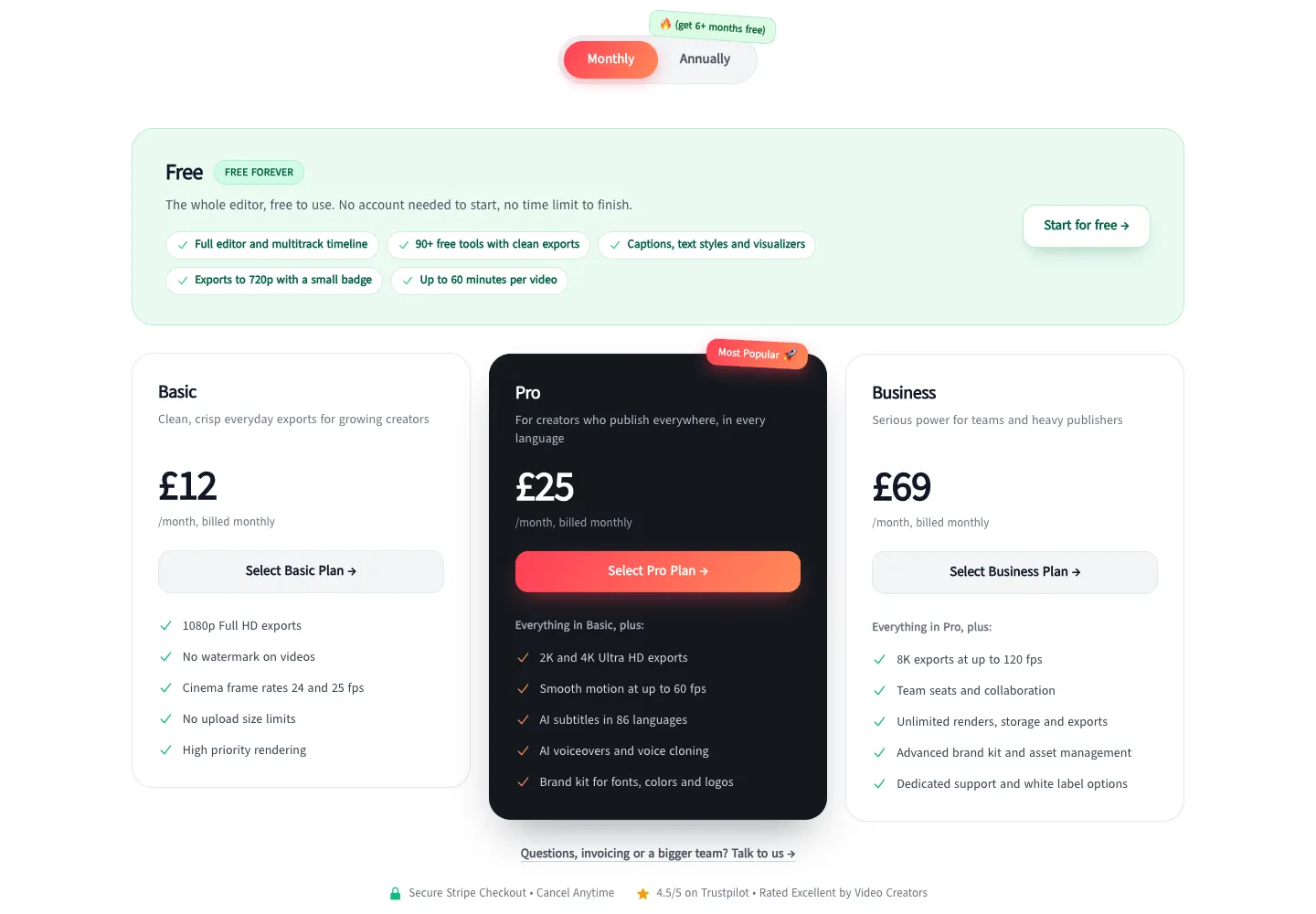
- Free, "free forever": the full editor and multitrack timeline, 90+ free tools, captions, text styles and visualizers, exports to 720p with a small badge, up to 60 minutes per video.
- Basic: £12 a month, or £6 a month billed yearly. 1080p exports, no watermark, no upload size limits, high-priority rendering.
- Pro: £25 a month, or £10 a month billed yearly. 2K and 4K exports, up to 60 fps, AI subtitles in 86 languages, AI voiceovers and voice cloning, a brand kit.
- Business: £69 a month, or £49 a month billed yearly. 8K exports, team seats, unlimited renders, storage and exports, white label options.
- Prices as shown to us from the UK: its page says it shows prices "in your local currency".
Reviews
We did not read EchoWave's reviews for this page, so there are no ratings, praise or complaints here: its own pages, read on 8 October 2026, are the only source.
Slice, in short
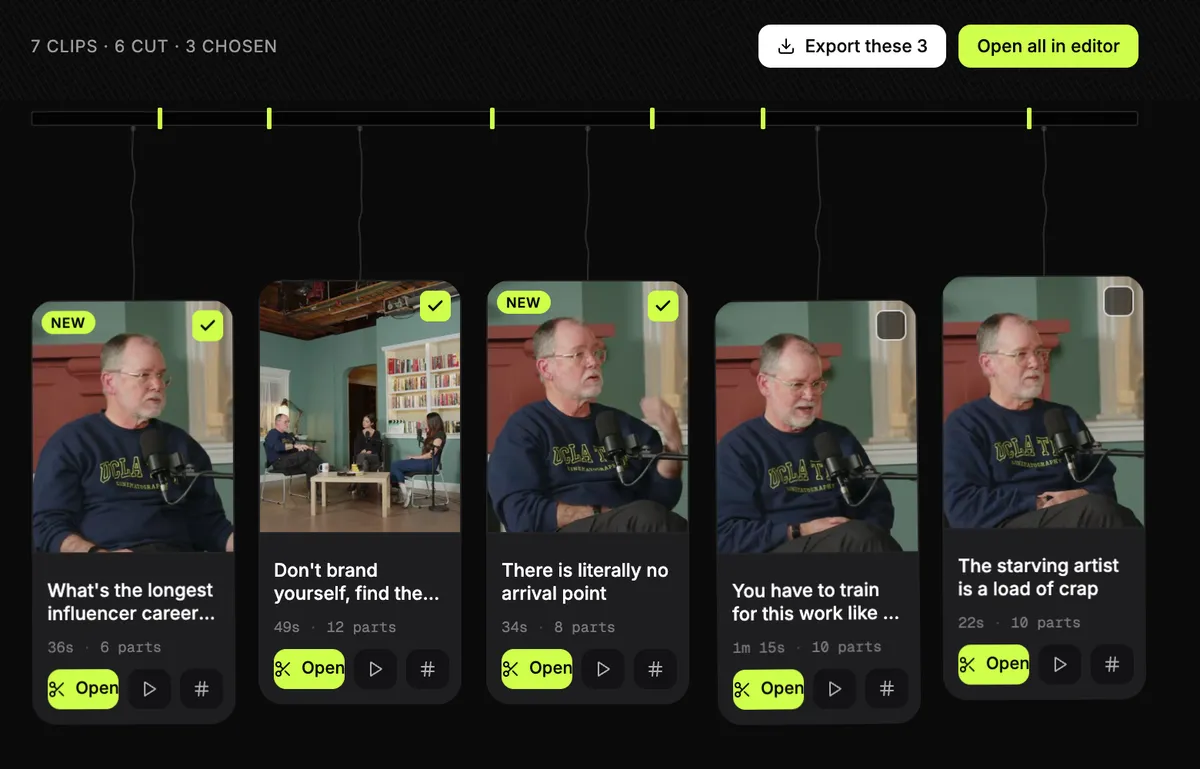
For a show with no video, it is Slice Audio: video clips for audio-only podcasts, part of Shorts by Slice. Upload the audio and each clip is drawn in one of 46 templates, with your cover, your colours and your hosts’ and guests’ photos and names. Same account, same plan.
$14.99 a month or $149 a year. Your first 3 clips are free, no card, then a 3-day free trial for the rest. It does not post, schedule or add b-roll. Upload the file (MP4, MOV or WebM, up to 4GB).
Slice on a real episode, start to finish
We did not run EchoWave, so we will not guess how it does. Here is what Slice did with a real one. The episode is LinuxGameCast Weekly 430, a three-host video podcast, 1:21:55 long, 1280×720, 531MB, published by LinuxGameCast LLP under CC BY-SA 4.0. We ran it through Slice on 2 October 2026 and read the times back from our own database afterwards.
- Upload of the 531MB file: about two minutes.
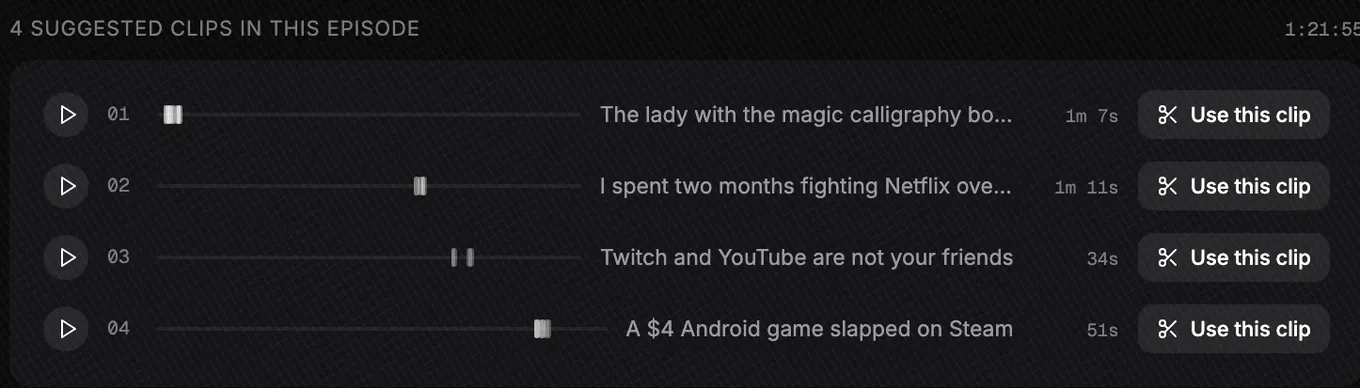
- Three and a half minutes after the upload finished, Slice listed four moments. Most of that was the transcript; the search itself took 39 seconds.
- No moment was one unbroken stretch. “The lady with the magic calligraphy books” runs 1:07, joined from 17 passages between 1:20 and 4:05; “I spent two months fighting Netflix over a copyright claim” runs 1:11, from 6 passages.
- We picked two. Both were finished 4 minutes later: 1080×1920 MP4s at 30 frames a second: 1:08 and 1:11 long, 70MB and 56MB.
What came out wrong
- The framing. The episode is three webcams side by side under the show’s logo. Slice kept the middle camera, cut the logo to “AST 430”, and a line of stream chat shows in the first clip.
- The joins. One join dropped a word; another left a stray “have.” between two sentences.
- The language. The show swears, and the third moment opens on it, so we skipped that one.
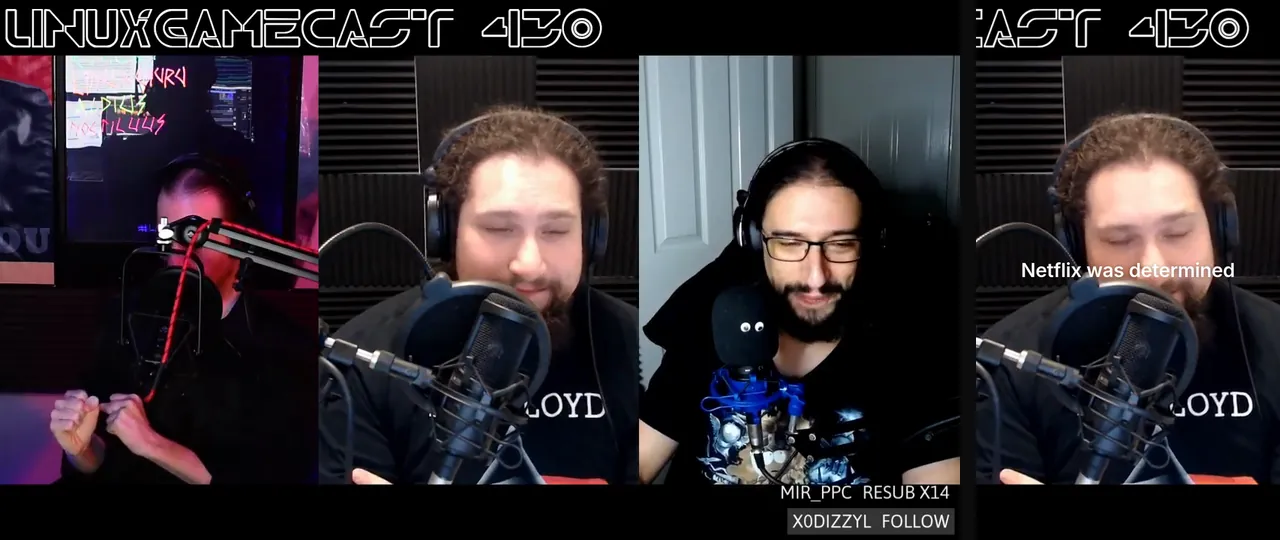
Each of those is a fix in the editor before posting. The full run, with both clips frame by frame, is in Can ChatGPT make clips from my video?.
Or do it inside ChatGPT
If you already work in ChatGPT, you don’t have to open another app. Add Slice to ChatGPT once, attach the video in a chat and type “@Slice turn this video into short clips”. Slice lists the moments it found with their lengths and opening lines; reply with the numbers you want and you get download links for vertical clips with captions and a hook title. Clips need a Slice plan or the free trial, the same as on the website.
Can ChatGPT make clips from my video? has a real run from upload to finished files. The full steps are in how to make podcast clips with ChatGPT, and adding Slice takes a couple of minutes with the setup guide.
Get the Slice Weekly
One free email every Friday: tools for creators and the best advice we found from people who make things.
Questions
Is EchoWave free?
Yes. EchoWave has a "free forever" plan: the full editor, 90+ free tools, captions and visualizers, exports to 720p "with a small badge", and up to 60 minutes per video. Paid plans remove the badge, from Basic at £12 a month (£6 a month billed yearly, in pounds as shown to us). Checked 8 October 2026.
How much does EchoWave cost in dollars?
We could not see dollar prices: its pricing page shows each visitor their local currency, and from the UK on 8 October 2026 it showed Basic at £12, Pro at £25 and Business at £69 a month, or £6, £10 and £49 a month billed yearly.
Can EchoWave make an audiogram from podcast audio?
Yes. Its podcast clip maker page describes pairing episode art with an animated waveform or music visualizer and word-timed captions, for an audio-only show.
Does Slice have an editor like EchoWave?
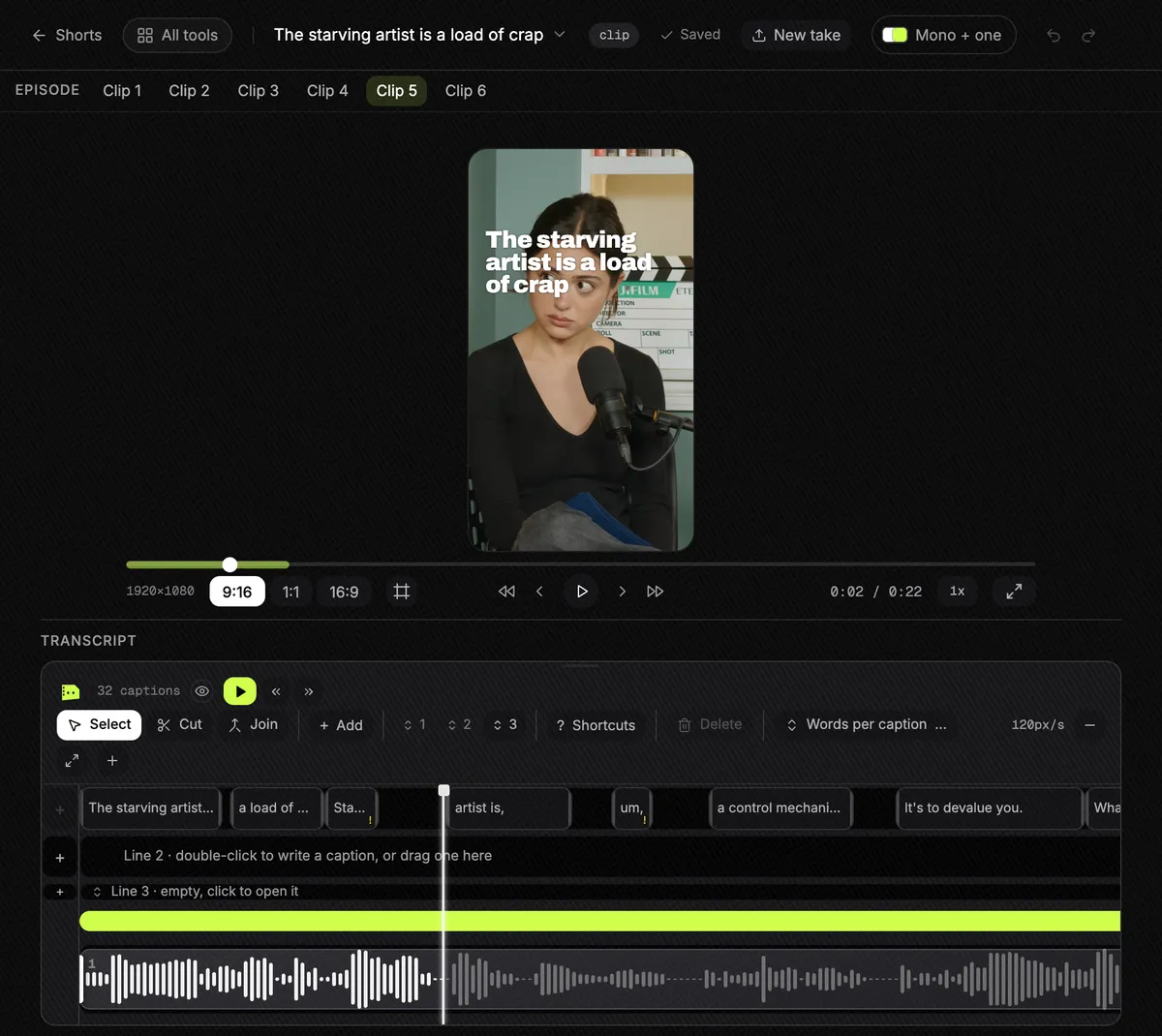
Slice has an editor for clips: fix any word, trim, split, change the template, colours, fonts and who is on screen. It is not a general video editor, so there is no stock library, keyframing or voiceover.
How was this compared?
Compared from EchoWave's own pricing and product pages, read in a browser on 8 October 2026, not signed in. We did not read its reviews and did not test EchoWave hands-on. We make Slice.
More comparisons
- Best podcast audiogram makers (2026)
- Slice Audio: clips for audio-only podcasts
- Podcast clips with your guest’s photo and name
- How long should a podcast clip be?
- Best AI clipping tools for podcasts and streams (2026)
- Best AI clipping tools for Twitch and Kick streamers (2026)
- The OpusClip alternative
- The Klap alternative
- The Vizard alternative
- The Submagic alternative
- The Descript alternative
- The Riverside alternative
- The Choppity alternative
- The quso.ai alternative
- The reap alternative
- The Ssemble alternative
- The Headliner alternative
- The Wavve alternative
- The Castmagic alternative
- The Recast Studio alternative
- AI clip tools compared: prices and caps in one table
- AI clipping inside ChatGPT or Claude vs AI clipping apps
- How to make podcast clips with ChatGPT (2026)
All comparisons, in one list.
Try Shorts by Slice on your next episode. If EchoWave fits you better, use it.