Compare
The Castmagic alternative for podcast clips (2026)
Castmagic turns one episode into a stack of content: a transcript with speaker labels, show notes, summaries, newsletters and posts, and in its Studio, clips and audiograms. Podcasters look at Slice when clips are the main thing they need: the moments found across the whole episode, each one drawn in a look that fits their show, and a free start with no card.
Our bias: we make Shorts by Slice. Compared from Castmagic's own pricing and product pages, checked 8 October 2026. We did not test Castmagic hands-on, and where it is the better choice we say so.
Shorts by Slice turns a long podcast or stream into captioned vertical clips. $14.99 a month. Your first video (we search the first hour) and first 2 clips are free, no card. After that, buy clips one at a time or take the plan, which you can cancel any time.
Try it free →Which is better, Castmagic or Slice?
It depends. Castmagic is best for podcasters and content teams who want each episode turned into written content as well as clips: show notes, newsletters, posts and audiograms from one upload or link. Shorts by Slice (ours) is best for podcasters and clippers who cut long episodes and streams, video or audio-only, into lots of clips and export them in one go. As of October 2026, Slice is $14.99 a month. Castmagic started at Hobby $29 a month, or $19 a month billed yearly when we checked on 4 November 2026.
The short version, with where Slice falls short: Castmagic vs Slice.
Is Castmagic free?
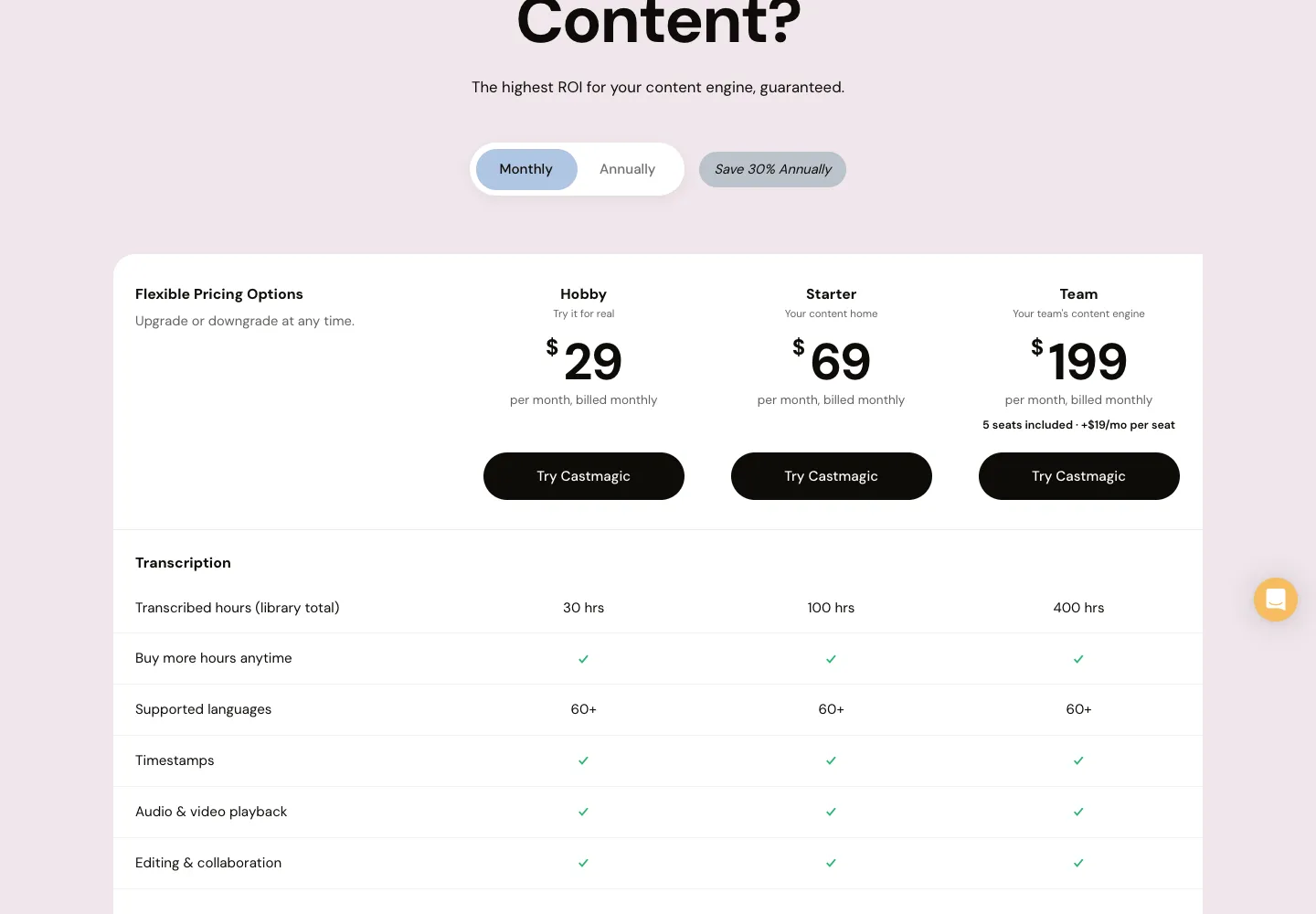
No free plan is listed. Castmagic's pricing page starts at Hobby, $29 a month or $19 a month billed yearly, with 30 transcribed hours, and every plan's button reads "Try Castmagic". Checked 8 October 2026.
- Hobby: $29 a month, or $19 a month billed yearly ($239 a year).
- Clips and audiograms are unlimited on every paid plan; plans differ by transcribed hours (30, 100 or 400, a library total), spaces, storage and seats.
- Its home page links a post on its own blog titled "Why We Killed Our Free Tier".
Read on from Castmagic pricing and Castmagic home page, not signed in. On Slice, your first video (we search the first hour) and first 2 clips are free, no card, and nothing is ever watermarked.
Want to know which moments are worth clipping before you choose a tool? Slice’s free podcast clip finder picks the three best from your podcast feed, with timestamps, no account needed.
Slice vs Castmagic
| Shorts by Slice (Slice Audio) | Castmagic | |
|---|---|---|
| Price | $14.99/month or $149/year | $29 / $69 / $199 a month, or $19 / $48 / $139 a month billed yearly |
| Free to try | Your first video (we search the first hour) and first 2 clips free, no card; then $14.99 a month | No free plan listed on the pricing page |
| Audio-only episodes | Yes: upload MP3, M4A, WAV, OGG or FLAC; each clip is drawn with one of 47 templates from the words, your cover and the sound | Yes: "Audio-only shows get audiograms", per its clip page |
| Finding the moments | Reads the whole episode and lists the moments that stand on their own | Transcribes with speaker labels and "flags the strongest moments" |
| Monthly limits | Up to 6 hours of video and 100 clips a month | 30, 100 or 400 transcribed hours (a library total); clips and audiograms unlimited |
| Longest file | 3 hours and 4.5GB (MP4, MOV or WebM) | Files up to 10GB |
| Getting the episode in | Upload only for now: MP4, MOV or WebM, up to 4.5GB | A Spotify, Apple Podcasts or YouTube link, an RSS feed, Zoom, Google Drive, or an upload |
| Written content | A post caption for each clip | Show notes, timestamps, summaries, articles, newsletters, social posts and more |
| Watermark | Never | "No watermark on exports", per its clip page |
| Team | One person per account | Up to 3 seats on Hobby, 5 on Starter, 5 included on Team |
Castmagic’s figures from its pricing page and its own site, 8 October 2026; prices and limits read again on 4 November 2026. Prices in US dollars.
Choose Castmagic if…
- You want show notes, timestamps, newsletters, articles and social posts written from every episode, not only clips.
- You work as a team, agency or network and want seats and shared spaces.
- You would rather paste a Spotify or Apple Podcasts link or an RSS feed than upload a file.
- You want an API (Starter and up).
Choose Slice if…
- Clips are the main thing you need, and you want the moments listed from the whole episode, including ones joined from different parts of it.
- You want audio clips that look like your show: 47 templates, with your hosts' and guests' photos and names on screen.
- You want to start free: your first video (we search the first hour) and first 2 clips cost nothing and need no card.
- You want clips cut the way an editor would cut them. Slice is built by video editors: every clip starts and ends where the thought does, not halfway through a sentence.
Where Slice loses to Castmagic
- Castmagic writes the show notes, newsletters and posts; Slice writes a post caption for each clip and stops there.
- Castmagic takes podcast links and RSS feeds; Slice takes uploaded files only for now.
- Castmagic has team seats and an API; a Slice account is one person's.
Castmagic, in short
Pricing, in plain words
- Hobby: $29 a month, or $19 a month billed yearly ($239 a year). 30 transcribed hours (a library total), up to 3 spaces, 50GB of storage, up to 3 seats.
- Starter: $69 a month, or $48 a month billed yearly ($579 a year). 100 transcribed hours, up to 10 spaces, 250GB, up to 5 seats, API access and an onboarding call.
- Team: $199 a month, or $139 a month billed yearly ($1,669 a year). 400 transcribed hours, up to 25 spaces, 1TB, 5 seats included (more at $19 a month each), priority support.
- Business & Scale: from $699 a month, with custom volume, more seats and dedicated support.
- On every plan: unlimited media clipping and audiogram generation, unlimited AI content, 60+ transcription languages, files up to 10GB, and Zoom, Google Drive, Zapier, RSS and YouTube, TikTok and Instagram import.
Reviews
We did not read Castmagic's reviews for this page, so there are no ratings, praise or complaints here: its own pages, read on 8 October 2026, are the only source.
Slice, in short
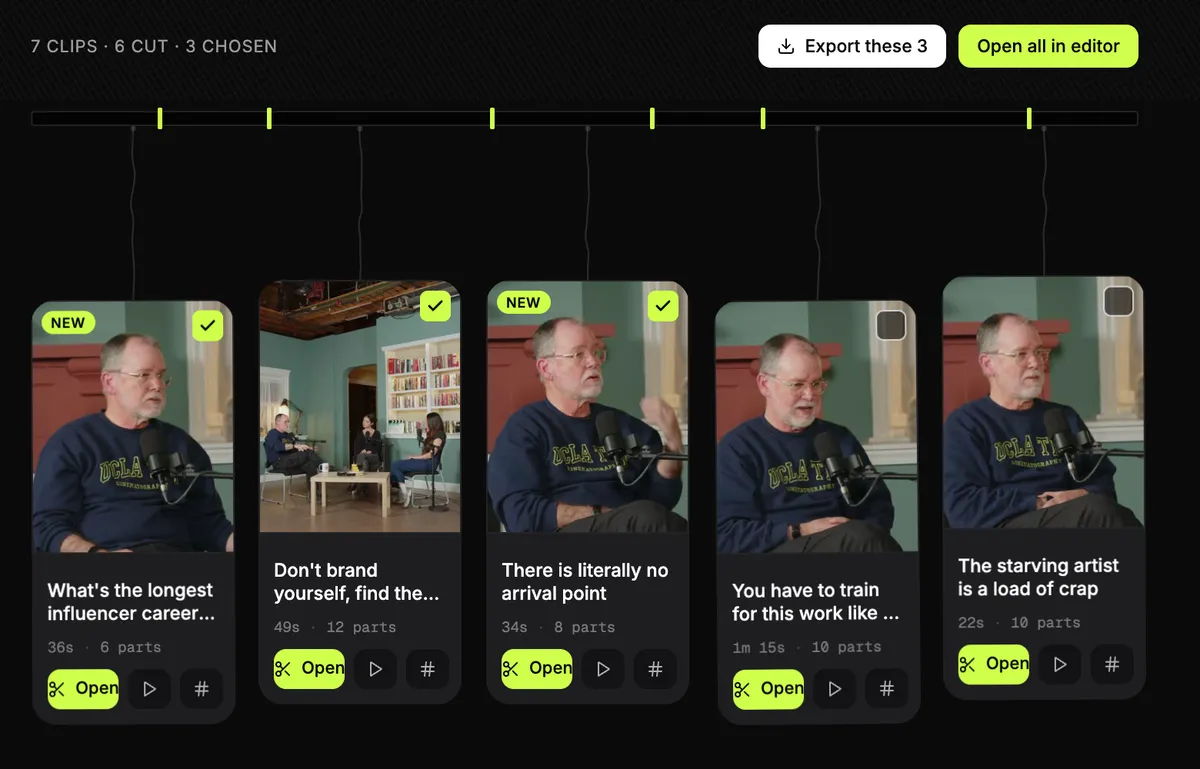
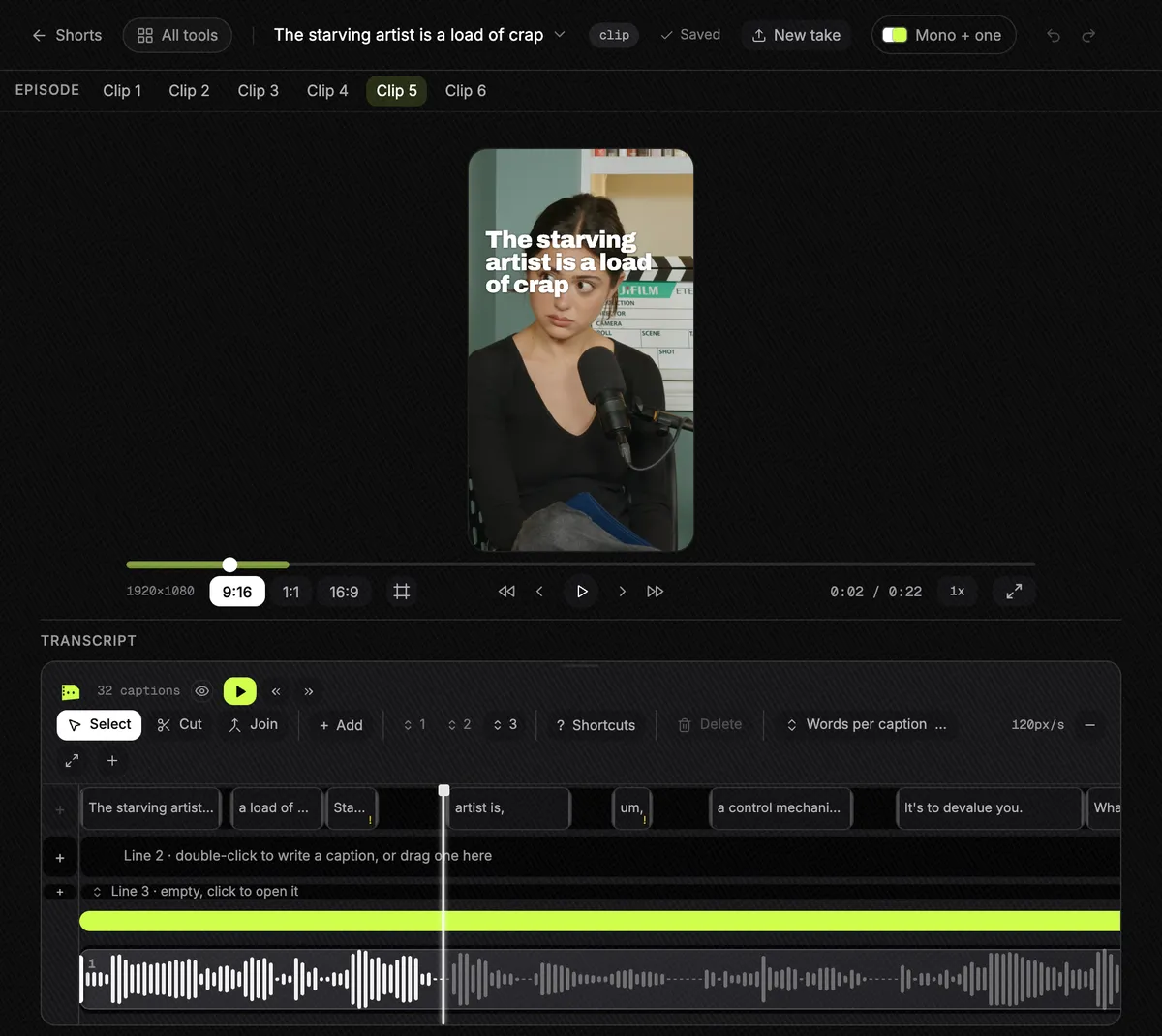
For a show with no video, it is Slice Audio: video clips for audio-only podcasts, part of Shorts by Slice. Upload the audio and each clip is drawn in one of 47 templates, with your cover, your colours and your hosts’ and guests’ photos and names. Same account, same plan.
$14.99 a month or $149 a year. Your first video (we search the first hour) and first 2 clips are free, no card. It does not post, schedule or add b-roll for you. Upload the file (MP4, MOV or WebM, up to 4.5GB).
Slice on a real episode, start to finish
We did not run Castmagic, so we will not guess how it does. Here is what Slice did with a real one. The episode is LinuxGameCast Weekly 430, a three-host video podcast, 1:21:55 long, 1280×720, 531MB, published by LinuxGameCast LLP under CC BY-SA 4.0. We ran it through Slice on 2 October 2026 and read the times back from our own database afterwards.
- Upload of the 531MB file: about two minutes.
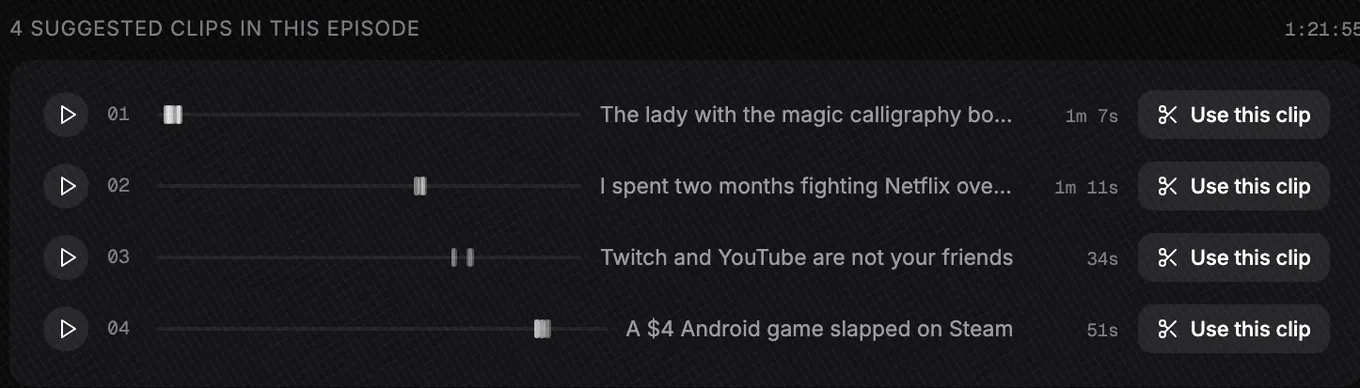
- Three and a half minutes after the upload finished, Slice listed four moments. Most of that was the transcript; the search itself took 39 seconds.
- No moment was one unbroken stretch. “The lady with the magic calligraphy books” runs 1:07, joined from 17 passages between 1:20 and 4:05; “I spent two months fighting Netflix over a copyright claim” runs 1:11, from 6 passages.
- We picked two. Both were finished 4 minutes later: 1080×1920 MP4s at 30 frames a second: 1:08 and 1:11 long, 70MB and 56MB.
What came out wrong
- The framing. The episode is three webcams side by side under the show’s logo. Slice kept the middle camera, cut the logo to “AST 430”, and a line of stream chat shows in the first clip.
- The joins. One join dropped a word; another left a stray “have.” between two sentences.
- The language. The show swears, and the third moment opens on it, so we skipped that one.
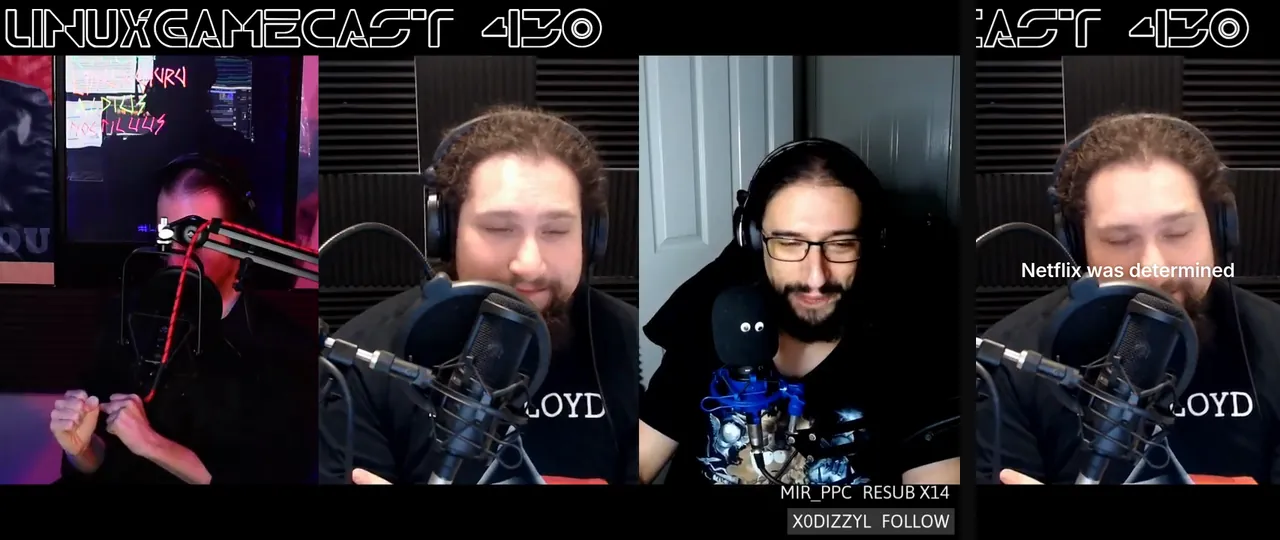
Each of those is a fix in the editor before posting. The full run, with both clips frame by frame, is in Can ChatGPT make clips from my video?.
Or do it inside ChatGPT
If you already work in ChatGPT, you don’t have to open another app. Add Slice to ChatGPT once, attach the video in a chat and type “@Slice turn this video into short clips”. Slice lists the moments it found with their lengths and opening lines; reply with the numbers you want and you get download links for vertical clips with captions and a hook title. Clips need a Slice plan (your first 2 clips on the website are free).
Can ChatGPT make clips from my video? has a real run from upload to finished files. The full steps are in how to make podcast clips with ChatGPT, and adding Slice takes a couple of minutes with the setup guide.
Questions
Is Castmagic free?
No free plan is listed. Castmagic's pricing page starts at Hobby, $29 a month or $19 a month billed yearly, with 30 transcribed hours, and every plan's button reads "Try Castmagic". Checked 8 October 2026.
What does Castmagic make from a podcast episode?
A transcript with speaker labels and timestamps; written content such as show notes, summaries, articles, newsletters and social posts; and, in its Studio, captioned clips and audiograms, unlimited on every plan. Read from its own pages on 8 October 2026.
How much does Castmagic cost?
Its pricing page showed Hobby at $29 a month, Starter at $69 and Team at $199, or $19, $48 and $139 a month billed yearly, on 8 October 2026. Business & Scale starts at $699 a month.
Can Slice make clips from an audio-only podcast?
Yes. Slice Audio, part of Shorts by Slice, takes the audio file (MP3, M4A, WAV, OGG or FLAC), finds the moments and draws each clip with one of 47 templates: your cover, big captions, your hosts' and guests' photos and names. Same account and same plan as video episodes.
How was this compared?
Compared from Castmagic's own pricing and product pages, read in a browser on 8 October 2026, not signed in. We did not read its reviews and did not test Castmagic hands-on. We make Slice.
Get The Cut
More comparisons
- Best podcast audiogram makers (2026)
- Slice Audio: clips for audio-only podcasts
- Podcast clips with your guest’s photo and name
- How long should a podcast clip be?
- Best AI clipping tools for podcasts and streams (2026)
- Best AI clipping tools for Twitch and Kick streamers (2026)
- The OpusClip alternative
- The Klap alternative
- The Vizard alternative
- The Submagic alternative
- The Descript alternative
- The Riverside alternative
- The Choppity alternative
- The quso.ai alternative
- The reap alternative
- The Ssemble alternative
- The Headliner alternative
- The Wavve alternative
- The Recast Studio alternative
- The EchoWave alternative
- The Kapwing alternative
- The Podcastle (now Async) alternative
- The VEED alternative
- AI clip tools compared: prices and caps in one table
- AI clipping inside ChatGPT or Claude vs AI clipping apps
- How to make podcast clips with ChatGPT (2026)
All comparisons, in one list.
Try Shorts by Slice on your next episode. If Castmagic fits you better, use it.