Guide for churches
From SermonAudio to sermon clips
If your church publishes its sermons on SermonAudio, the hard part of sermon clips is already done: the recording is there, with a download button under it. Here is how to get the file, choose the moments and share them well.
The short answer
Open your church’s sermon on SermonAudio, click Download and choose Download HQ Audio (an MP3) or a video size (an MP4). Upload that file to a clip tool, pick moments that make one point each, leave the songs out, and post them with a pointer back to the full sermon. If you broadcast on SermonAudio, its own Smart Clips is included and worth a try first.
How to download your sermon from SermonAudio
Every sermon page has a Download button under the player, beside Bookmark, Promote and Share. Here it is open on SermonAudio’s own tutorial sermon:
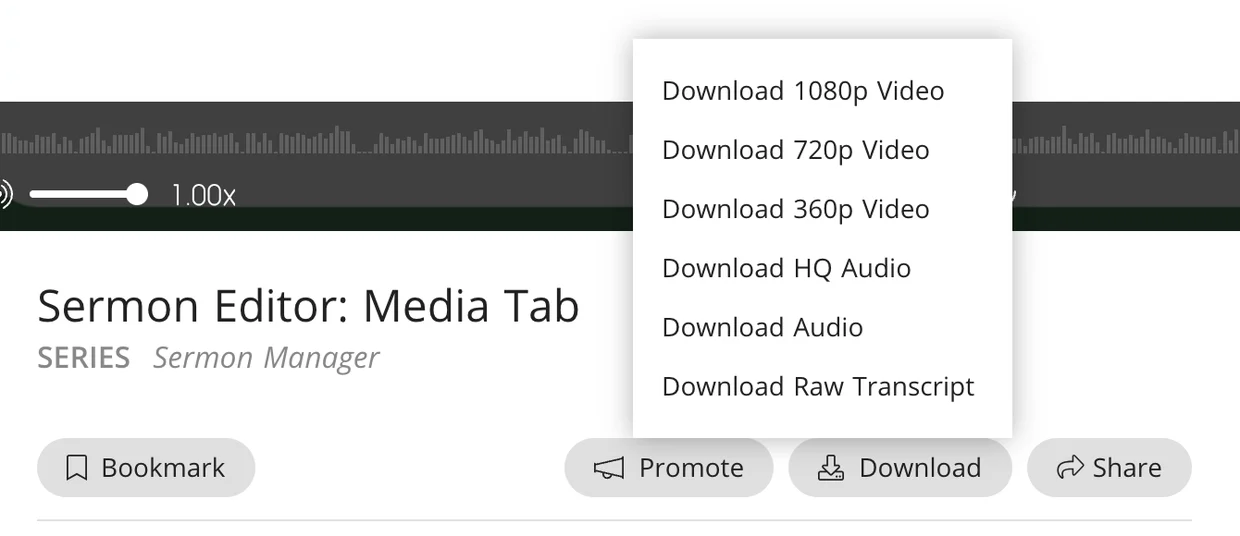
- Download 1080p Video
- Download 720p Video
- Download 360p Video
- Download HQ Audio
- Download Audio
- Download Raw Transcript
The video choices downloaded MP4 files and the audio choices MP3s when we looked on 8 October 2026. Download HQ Audio is the one to use for an audio-only sermon; Download 1080p Video for a filmed one. Download Raw Transcript gives the words as plain text, useful for picking moments.
Even a filmed sermon has an audio download. SermonAudio’s tutorial on uploading explains: When a video file is uploaded, an audio-only version of your sermon will automatically be created using the audio from the video file.
And its apps download too:
“Native apps for iPhone, iPad, Android devices, and Amazon Fire tablets with background playback, video streaming, live webcast support, download ability, and more.”
Clip your own church’s sermons
SermonAudio is a library of sermons from many churches, and each sermon belongs to the church and preacher who published it. Being able to download a sermon is not the same as permission to republish it. So clip your own church’s sermons, and if you would like to share a moment from someone else’s, ask the church or the preacher first, in writing. We could not find a SermonAudio page that gives permission to reuse other churches’ sermons, and this guide does not assume it.
The same care goes for people in the room. If the recording catches a congregant’s prayer, testimony or a child, ask before you clip it. Our church Reels ideas guide has more on consent.
SermonAudio’s own Smart Clips
If your church broadcasts on SermonAudio, look here first: it has a clip tool built in, and it is included with the broadcaster account. SermonAudio describes it this way:
“You can generate clips, review them, and even cross-publish directly to your social platforms”
“This is about using clips as a tool to scatter the seed, sending out sermon "hooks" into the public square and guiding listeners back to the full preaching.”
Its page lists vertical clips found by its AI, your own begin and end points, captions, the speaker centred automatically and a QR code back to the full sermon. See Smart Clips on SermonAudio.
A separate clip tool helps when the sermon is audio only and you want a picture made from the words, when you want your church’s artwork and colours on every clip, or when your church does not broadcast on SermonAudio but you have its sermons there. That is where Slice comes in.
Choosing the moments
One point per clip. A moment works when someone who has never been to your church can follow it from the first sentence. Church media teams who do this every week find them as they go:
“If you note down times in the sermon that could work as a short, you could publish shorts later.”
And keep the music out. Two members of r/churchtech, asked about background music under sermon clips:
“loud background music would make me scroll away though”
“if it's one point then you probably dont need the music”
Worship songs are a licensing question as well as a taste one, and teams report takedowns even with licences:
“We were fully CCLI compliant, and were being taken down on Facebook every 2-3 weeks.”
One sermon moment, made from the audio
Here is a real moment from the sermon our other church guides use, Tim Keller’s “Let the Psalms Teach You to Pray”: Slice titled it “Aristotle said you can’t be friends with God — then look at the cross” (1:07), drawn four ways from the audio alone, the way it would look after uploading a SermonAudio MP3.
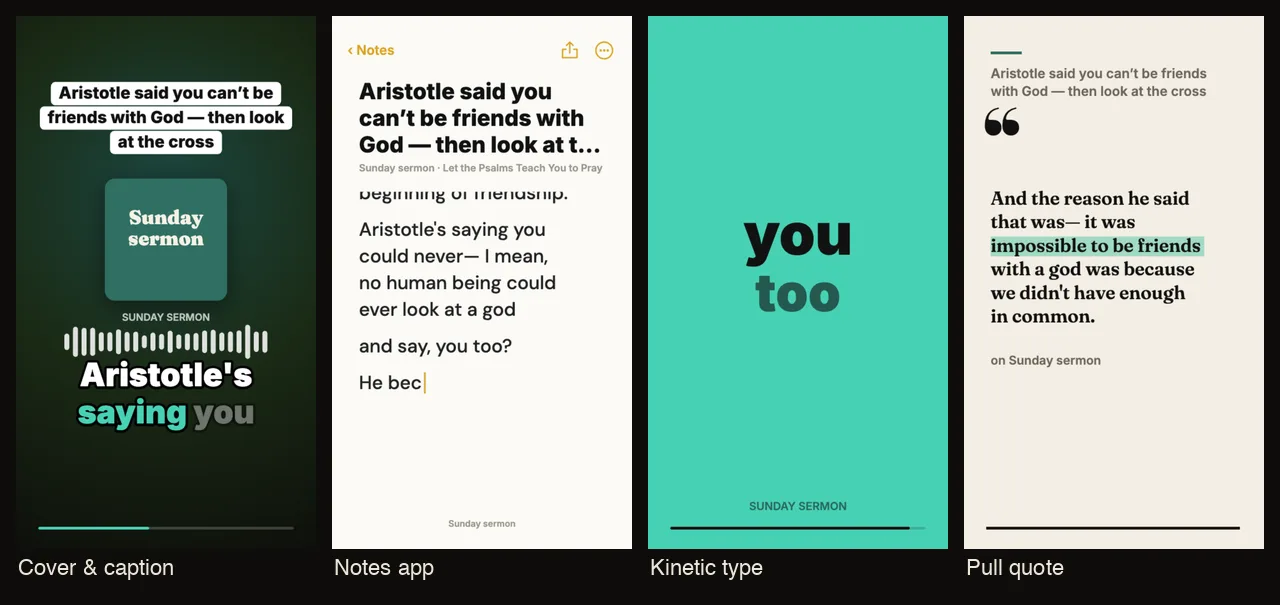
For an MP3 from SermonAudio, that is Slice Audio: video clips for audio-only podcasts, part of Shorts by Slice: upload the sermon audio and it lists the moments and draws each as a captioned vertical clip, with your church’s artwork and colours. For a filmed sermon, upload the MP4 instead and Shorts by Slice crops to the preacher. Same account, same plan.
Posting, and pointing back to the sermon
Each clip is an invitation to the whole sermon, so say where it is. One church media team’s way of doing it:
“Our YouTube channel has the full sermons, which all the clips link back to.”
“I've been posting a clip every day of the week on YouTube shorts, Facebook, Instagram, and TikTok.”
Caption every clip: with an audio sermon the captions are the picture, and they let people who are hard of hearing follow.
“If you were making TikTok’s or reels, regardless of what you do, use captions.”
Where each clip goes, platform by platform: YouTube Shorts (with a link to the full sermon), Instagram and TikTok. For a church channel on YouTube, see church YouTube Shorts.
From SermonAudio to sermon clips, step by step
- Open your church’s sermon on SermonAudio
Find the sermon on your church’s SermonAudio page. Clip sermons your church preached and published, or ones you have written permission to use.
- Download the file
Click Download under the player and choose a file: Download HQ Audio for an MP3, or Download 1080p Video for an MP4 if the sermon was filmed. SermonAudio’s apps can download too.
- Upload it to Slice
Sign in at tryslicemedia.com/shorts and drop the file in (MP3, M4A, WAV, OGG or FLAC for audio, or the MP4). Slice transcribes the sermon and lists the moments that stand on their own.
- Choose one point per clip, and leave the songs out
Pick moments that make one point a stranger can follow. Skip the worship songs and any congregant who has not agreed to be shared. Check the captions for names and Bible references.
- Post, and point back to the full sermon
Download the clips and post them to Reels, Shorts and TikTok through the week, each saying where the full sermon is: your SermonAudio page, your website or your YouTube channel.
Get the Slice Weekly
One free email every Friday: tools for creators and the best advice we found from people who make things.
Questions
How do I download a sermon from SermonAudio?
Open the sermon’s page and click Download under the player. The menu offers Download 1080p, 720p or 360p Video, Download HQ Audio, Download Audio and Download Raw Transcript. The video choices are MP4 files and the audio choices MP3s. SermonAudio’s phone and tablet apps also have downloads.
Can I make clips from any sermon on SermonAudio?
Clip your own church’s sermons. SermonAudio hosts sermons from many churches and preachers, and each one belongs to whoever preached and published it. To clip someone else’s, ask the church or preacher first, in writing.
Does SermonAudio make clips itself?
Yes. SermonAudio’s Smart Clips is included with every broadcaster account: it finds clips in a full sermon, lets you set your own begin and end points, adds captions, and can cross-publish to social media. If your church broadcasts on SermonAudio, it is worth trying first.
Can I make sermon clips from audio only?
Yes. Download HQ Audio gives an MP3, and Slice Audio turns an audio-only sermon into vertical clips with big captions and your church’s artwork, with no video needed. When a video file is uploaded, SermonAudio also makes an audio-only version automatically, so most sermons have an audio download.
Should sermon clips include the worship music?
Leave it out. Church media teams report takedowns of worship songs even with licences in place, and members of r/churchtech say background music under a sermon point makes them scroll away. Clip the preaching.
How long should a sermon clip be?
Long enough for one point: usually 30 seconds to two minutes. Shorts can run to three minutes, Spotify Clips to 90 seconds. Slice’s clips run from 30 seconds to two and a half minutes, and you can trim any of them.
More for churches
- How to turn sermon audio into clips: from the sound desk or a sermon podcast.
- How to turn a sermon into short clips: from the livestream, with real timings.
- Sermon transcription: the words, the passages and quotes for the notes.
- Best sermon clip tools: the church clip tools compared.